
1. Киришүү
Thank you for choosing the JELLICO X7 In-Ear Earphones with Microphone. This manual provides essential information for the proper setup, operation, and maintenance of your earphones. Please read it carefully before use to ensure optimal performance and longevity of your product.
2. Продукт бүтүп калдыview
The JELLICO X7 earphones are designed for clear audio playback and convenient communication. They feature an integrated microphone and an in-line remote for easy control of music and calls.
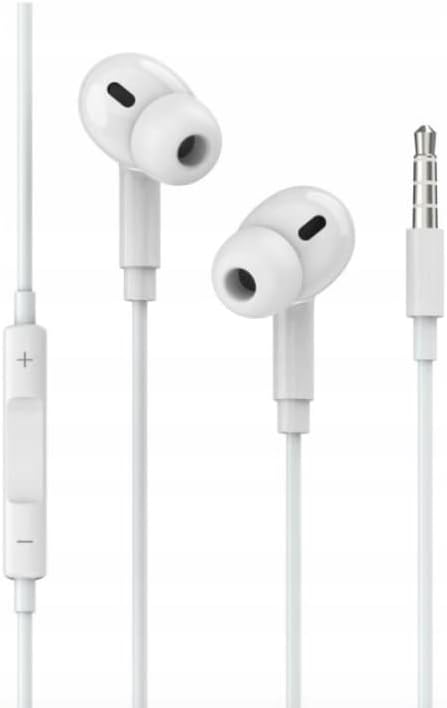
Сүрөт 1: JELLICO X7 In-Ear Earphones. This image displays the white in-ear earphones, connected by a cable, featuring an in-line remote control with volume buttons and a 3.5mm audio jack at the end of the cable.
Негизги компоненттер:
- Кулакчындар: Designed for comfortable in-ear fit, delivering audio.
- Интернеттеги алыстан башкаруу пульту: Located on the cable, this unit houses the microphone and control buttons.
- Интегралдык микрофон: Колсуз чалуулар жана үн буйруктары үчүн.
- 3.5mm Mini Jack: Universal connector for audio devices.
3. Орнотуу
Connecting your JELLICO X7 earphones is straightforward:
- Аудио портту аныктоо: Locate the 3.5mm audio jack on your smartphone, tablet, computer, or other compatible audio device. This port is typically marked with a headphone icon.
- Туташтыргычты салыңыз: Gently insert the 3.5mm mini jack of your JELLICO X7 earphones into the audio port of your device until it is fully seated.
- Үндү тууралоо: Once connected, play audio and adjust the volume using your device's volume controls or the in-line remote control on the earphone cable.
Your earphones are now ready for use.
4. Иштөө нускамалары
The in-line remote control provides convenient access to various functions:
- Музыканы ойнотуу/тындыруу: Press the central button once to play or pause audio playback.
- Кийинки трек: Press the central button twice quickly to skip to the next song.
- Мурунку трек: Press the central button three times quickly to go back to the previous song.
- Чалууга жооп берүү/аяктоо: When a call comes in, press the central button once to answer. Press it again to end the call.
- Чакырууну четке кагуу: Кирүүчү чалууну четке кагуу үчүн борбордук баскычты болжол менен 2 секунд басып туруңуз.
- Көлөмү: Үнүн жогорулатуу үчүн '+' баскычын басыңыз.
- Үнүн азайтуу: Үндү азайтуу үчүн '-' баскычын басыңыз.
Note: Functionality may vary slightly depending on your device's operating system and audio player application.
5. Техникалык тейлөө
To ensure the longevity and optimal performance of your JELLICO X7 earphones, follow these maintenance guidelines:
- Тазалоо: Gently wipe the earbuds and cable with a soft, dry, lint-free cloth. Do not use harsh chemicals, cleaning solvents, or strong detergents.
- Сактагыч: When not in use, store your earphones in a clean, dry place, preferably in a protective pouch, to prevent tangling and damage. Avoid extreme temperatures.
- Нымдуулуктан качыңыз: Наушниктерди сууга же ашыкча нымдуулукка дуушар кылбаңыз. Алар суу өткөрбөйт.
- Этияттык менен мамиле кылуу: Avoid pulling the cable forcefully or bending the 3.5mm jack at sharp angles, as this can damage internal wiring.
6. Кыйынчылыктарды
If you encounter issues with your JELLICO X7 earphones, try the following solutions:
| Көйгөй | Мүмкүн чечим |
|---|---|
| Үн жок: |
|
| Микрофон иштебейт: |
|
| Алыстан башкаруу жооп бербейт: |
|
If the problem persists after trying these steps, please contact JELLICO customer support.
7. Техникалык шарттар
| Өзгөчөлүк | Деталь |
|---|---|
| Бренд: | JELLICO |
| Модел: | X7 |
| Түрү: | Кулак ичиндеги наушник |
| Байланыш: | 3.5mm Mini Jack (wired) |
| Микрофон: | Интеграцияланган |
| Башкаруу каражаттары: | In-line remote with music and call control, volume adjustment |
| Түсү: | Ак |
| ASIN: | B0C5448LB1 |
8. Кепилдик жана колдоо
JELLICO products are designed for reliability and performance. For information regarding warranty coverage, technical support, or service inquiries, please refer to the warranty card included with your purchase or visit the official JELLICO website. Please have your product model (X7) and ASIN (B0C5448LB1) ready when contacting support.
For further assistance, you may contact JELLICO customer service through their official channels.