
1. Киришүү
This manual provides instructions for the installation, configuration, and operation of the TP-Link TL-SG3428X-M2 24-Port Multi-Gigabit L2+ Managed Switch. This device is designed to provide high-performance network connectivity with advanced management features.
Негизги өзгөчөлүктөр төмөнкүлөрдү камтыйт:
- 24x 2.5-Gigabit Ethernet ports for high-speed connections.
- 4x 10 Gbps SFP+ slots for high-bandwidth uplinks.
- Support for Omada Software Defined Networking (SDN) for centralized cloud management.
- Enhanced network security features including 802.1Q VLAN, IP-MAC-Port binding, ACL, and DoS defend.
- L2+ features such as Static Routing for efficient network resource utilization.
2. Продукт бүтүп калдыview
2.1 алдыңкы панели

Сүрөт 2.1: Фронт view of the TP-Link TL-SG3428X-M2 switch, showing 24 2.5G Ethernet ports, 4 10G SFP+ ports, console port, and LED indicators.
2.2 тарап View
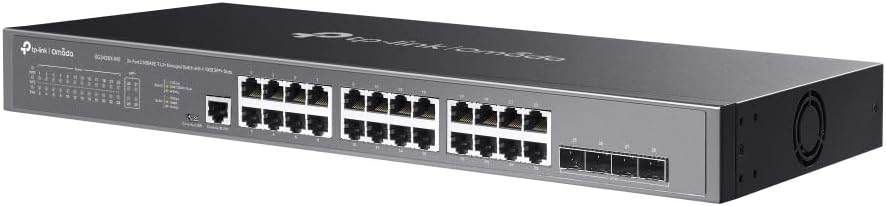
Сүрөт 2.2: Side view of the TP-Link TL-SG3428X-M2 switch, highlighting the ventilation and overall chassis design.
2.3 Арткы панель

Сүрөт 2.3: Арткы view of the TP-Link TL-SG3428X-M2 switch, showing the power input and grounding screw.
2.4 Бурчтуу View

Сүрөт 2.4: Бурчтуу view of the TP-Link TL-SG3428X-M2 switch, providing a comprehensive look at its form factor.
2.5 Port and Dimension Diagram

Сүрөт 2.5: Detailed diagram illustrating the port layout, including 1x RJ45 Console Port, 1x Micro-USB Console Port, 24x 2.5 Gigabit Ethernet Ports, and 4x 10G SFP+ Fiber Ports. Dimensions are also indicated: 440 mm width, 220 mm depth, and 44 mm height, with a switching capacity of 128 Gbps.
3. Орнотуу
3.1 Пакеттин мазмуну
Сиздин пакетиңизде төмөнкү заттар бар экенин текшериңиз:
- TP-Link TL-SG3428X-M2 Switch
- Электр кабели
- Rackmount Kit (эгер бар болсо)
- Резина буттары
- Ыкчам орнотуу колдонмосу
3.2 Физикалык орнотуу
- Монтаждоо: Place the switch on a flat, stable surface or install it in a standard 19-inch equipment rack using the provided rackmount kit. Ensure adequate ventilation around the device.
- Кубат туташуу: Connect the power cord to the switch's power inlet and then to a grounded electrical outlet.
- Негиздөө: For enhanced safety, connect a grounding cable (not included) from the switch's grounding screw to a protective ground.
3.3 Тармактык байланыштар
- Ethernet порттору: Connect your network devices (computers, servers, access points) to the 2.5 Gigabit Ethernet ports using standard RJ45 Ethernet cables.
- SFP+ порттору: For high-speed uplinks or connections to other fiber-optic devices, insert compatible 10G SFP+ modules (not included) into the SFP+ slots and connect fiber optic cables.
- Консол порту: For initial configuration or advanced management, connect a console cable (RJ45 to RS232 or Micro-USB to USB) from your computer to the switch's console port.
4. Операция
4.1 Баштапкы конфигурация
Upon powering on, the switch will perform a self-test. You can access the switch's management interface via a web browser or through the console port.
- Webнегизделген GUI: Connect your computer to an Ethernet port on the switch. Configure your computer's IP address to be in the same subnet as the switch's default IP address (refer to the Quick Installation Guide for default IP). Open a web browser and enter the switch's IP address to access the login page.
- CLI (Console): Use a terminal emulator program (e.g., PuTTY) on your computer to connect to the console port. Configure the serial port settings (e.g., 115200 baud rate, 8 data bits, no parity, 1 stop bit, no flow control).
4.2 Omada SDN интеграциясы
The TL-SG3428X-M2 supports TP-Link's Omada Software Defined Networking (SDN) platform, allowing for centralized management of your network devices.
- Омада контроллери: The switch can be managed by an Omada Hardware Controller, Omada Software Controller, or Omada Cloud-based Controller.
- Cloud Access: Remote cloud access and the Omada app enable management of your entire network from a single interface, anywhere, anytime.
- Өз алдынча режим: The switch can also operate in standalone mode, configured directly via its web GUI же CLI.
4.3 Өркүндөтүлгөн функциялар
Utilize the switch's advanced features for optimized network performance and security:
- VLAN (Virtual Local Area Networks): Segment your network to improve security and performance.
- Статикалык багыттоо: Configure static routes to direct traffic efficiently within your network.
- QoS (Кызматтын сапаты): Маанилүү тиркемелер үчүн тармактык трафикке артыкчылык бериңиз.
- Коопсуздук өзгөчөлүктөрү: Implement IP-MAC-Port Binding, Access Control Lists (ACLs), Port Security, DoS Defend, Storm Control, DHCP Snooping, and 802.1X Radius Authentication.
5. Техникалык тейлөө
Үзгүлтүксүз техникалык тейлөө сиздин өчүргүчүңүздүн оптималдуу иштешин жана узак мөөнөттүү иштешин камсыз кылат.
- Программалык камсыздоонун жаңыртуулары: Мезгил-мезгили менен TP-Linkти текшерип туруңуз webакыркы микропрограммалык камсыздоо версиялары үчүн сайт. Микропрограмманы жаңыртуу жаңы функцияларды, иштин натыйжалуулугун жакшыртууларды жана коопсуздук жаңыртууларын камсыздай алат.
- Тазалоо: Keep the switch and its ventilation openings clean and free of dust. Use a soft, dry cloth for cleaning. Do not use liquid or aerosol cleaners.
- Экологиялык шарттар: Ensure the switch operates within its specified temperature and humidity ranges. Avoid placing it in direct sunlight or near heat sources.
- Конфигурациянын камдык көчүрмөсү: Regularly back up your switch's configuration settings to prevent data loss in case of unexpected issues.
6. Кыйынчылыктарды
Эгерде сиз коммутаторуңуз менен көйгөйлөргө туш болсоңуз, төмөнкү жалпы көйгөйлөрдү чечүү кадамдарын караңыз:
- Кубат жок: Кубат шнуру өчүргүчкө да, розеткага да бекем туташтырылганын текшериңиз. Розетканын иштеп турганын текшериңиз.
- Шилтеме жарыгы жок: Check the Ethernet cable connections. Ensure the connected device is powered on and functioning correctly. Try a different port or cable.
- Тармакка туташуу маселелери: Verify IP address settings on connected devices. Check VLAN configurations if applicable. Ensure there are no IP conflicts.
- Жай аткаруу: Check for network loops, excessive broadcast traffic, or faulty cables. Monitor port utilization.
- Башкаруу интерфейсине кирүү: Confirm your computer's IP address is in the same subnet as the switch. Clear your browser's cache or try a different browser.
- Заводдун баштапкы абалга келтирүү: If configuration issues persist, you may need to perform a factory reset. Refer to the Quick Installation Guide or the full user manual on the TP-Link website for instructions on how to reset the device. Note: A factory reset will erase all custom configurations.
7. Техникалык шарттар
| Өзгөчөлүк | Спецификация |
|---|---|
| Модель номери | TL-SG3428X-M2 |
| Бренд | TP-Link |
| Порттардын саны | 24 (2.5Gbps Ethernet) + 4 (10Gbps SFP+) |
| Interface Type | RJ45, SFP+ |
| Маалыматтарды өткөрүү ылдамдыгы | 2.5 Gigabits Per Second (Ethernet), 10 Gigabits Per Second (SFP+) |
| Продукциянын өлчөмдөрү | 17.32 x 7.09 x 1.73 дюйм (440 x 180 x 44 мм) |
| Элемент Салмагы | 4.95 фунт (2.25 килограмм) |
| Тtage | 100-240 вольт (AC) |
| Иштин материалы | Металл |
| Иштөө температурасы | 0°Cден 40°Cге чейин (32°F—104°F) |
| Сактоо температурасы | -40°Cден 70°Cге чейин (-40°Fтен 158°Fге чейин) |
| Иштөө нымдуулугу | 10%тен 90%ке чейин конденсацияланбайт |
| Сактоочу нымдуулук | 5%тен 90%ке чейин конденсацияланбайт |
8. Кепилдик жана колдоо
TP-Link provides a comprehensive warranty and technical support for this product.
- Кепилдик: This product is backed by a 5-year manufacturer warranty. Please retain your proof of purchase for warranty claims.
- Техникалык колдоо: Акысыз 24/7 техникалык колдоо жеткиликтүү.
Көбүрөөк жардам алуу үчүн TP-Link колдоо кызматына кайрылыңыз:
- Телефон: (866) 225-8139
- Webсайт: myproducts.tp-link.com/us
- Электрондук почта: support.USA@tp-link.com