
1. Киришүү
The MOBI CONNECT Smart DualScan Bluetooth Thermometer (Model 700026) is designed for accurate and versatile temperature measurement. It offers multiple reading methods including ear, forehead, room, and object temperature. This device features a backlit screen, LED fever indicators, and memory recall for up to 20 previous readings. It supports both Fahrenheit and Celsius modes and can connect via Bluetooth to the MOBI Smart App for enhanced tracking and management capabilities.

Image: The MOBI CONNECT Smart DualScan Bluetooth Thermometer, its packaging, and a smartphone displaying the companion app.
2. Пакеттин мазмуну
Пакетте бардык буюмдар бар экенин текшериңиз:
- 1 x MOBI CONNECT Smart DualScan Bluetooth Thermometer
- 1 x Protective Cap (for forehead mode)
- 1 x сактоочу баштык
- 1 x User Manual
- 1 x Quick Start Guide
- 2 x AAA батареялары

Сүрөт: деталдуу view of the thermometer with its components labeled for easy identification.
3. Орнотуу
3.1. Батареяны орнотуу
- Open the battery compartment cover located on the back of the thermometer.
- Туура полярдуулукту (+/-) камсыз кылуу менен эки AAA батарейкасын салыңыз.
- Батарея уясынын капкагын бекем жабыңыз.
3.2. Күйгүзүү / Өчүрүү
- Күйгүзүү үчүн, басыңыз SCAN/Power button. The device will perform a self-test and display the last reading.
- Батареянын иштөө мөөнөтүн үнөмдөө үчүн термометр болжол менен 30 секунд аракетсиз болгондон кийин автоматтык түрдө өчөт.
3.3. Температураны өлчөө бирдиктерин которуу (Фаренгейт/Цельсий)
Түзмөк күйүп турганда, баскычын басып кармап туруңуз РЕЖИМ button for 3 seconds to switch between Fahrenheit (°F) and Celsius (°C).
4. Иштөө режимдери
4.1. Forehead Measurement
- Ensure the protective cap is on the probe.
- басыңыз SCAN/Power термометрди күйгүзүү үчүн баскыч.
- Position the thermometer approximately 0.5 to 1 inch (1-2.5 cm) from the center of the forehead.
- басып, кармап туруңуз SCAN button. A beep will sound, and the temperature will be displayed on the LCD screen.

Image: Demonstrating forehead temperature measurement.
4.2. Ear Measurement
- Gently remove the protective cap from the probe.
- басыңыз SCAN/Power термометрди күйгүзүү үчүн баскыч.
- Зондду кулак каналына этияттык менен киргизиңиз. 1 жашка чейинки балдар үчүн кулакты акырын артка тартыңыз. 1 жаштан жогорку балдар жана чоңдор үчүн кулакты акырын өйдө жана артка тартыңыз.
- басып, кармап туруңуз SCAN button. A beep will sound, and the temperature will be displayed on the LCD screen.

Image: Removing the protective cap for ear measurement.

Image: Demonstrating ear temperature measurement.
4.3. Room and Object Temperature Measurement
The thermometer can also measure ambient room temperature and the temperature of objects (e.g., liquids, surfaces). To switch to these modes, press the РЕЖИМ button repeatedly until the desired icon (room or object) appears on the display. Then, point the thermometer at the object or area and press SCAN.
4.4. Дене табынын көрсөткүчү
The LCD display changes color to indicate temperature status:
- Жашыл арткы жарык: Indicates a normal body temperature.
- Кызыл арткы жарык: Indicates a high body temperature (fever warning).
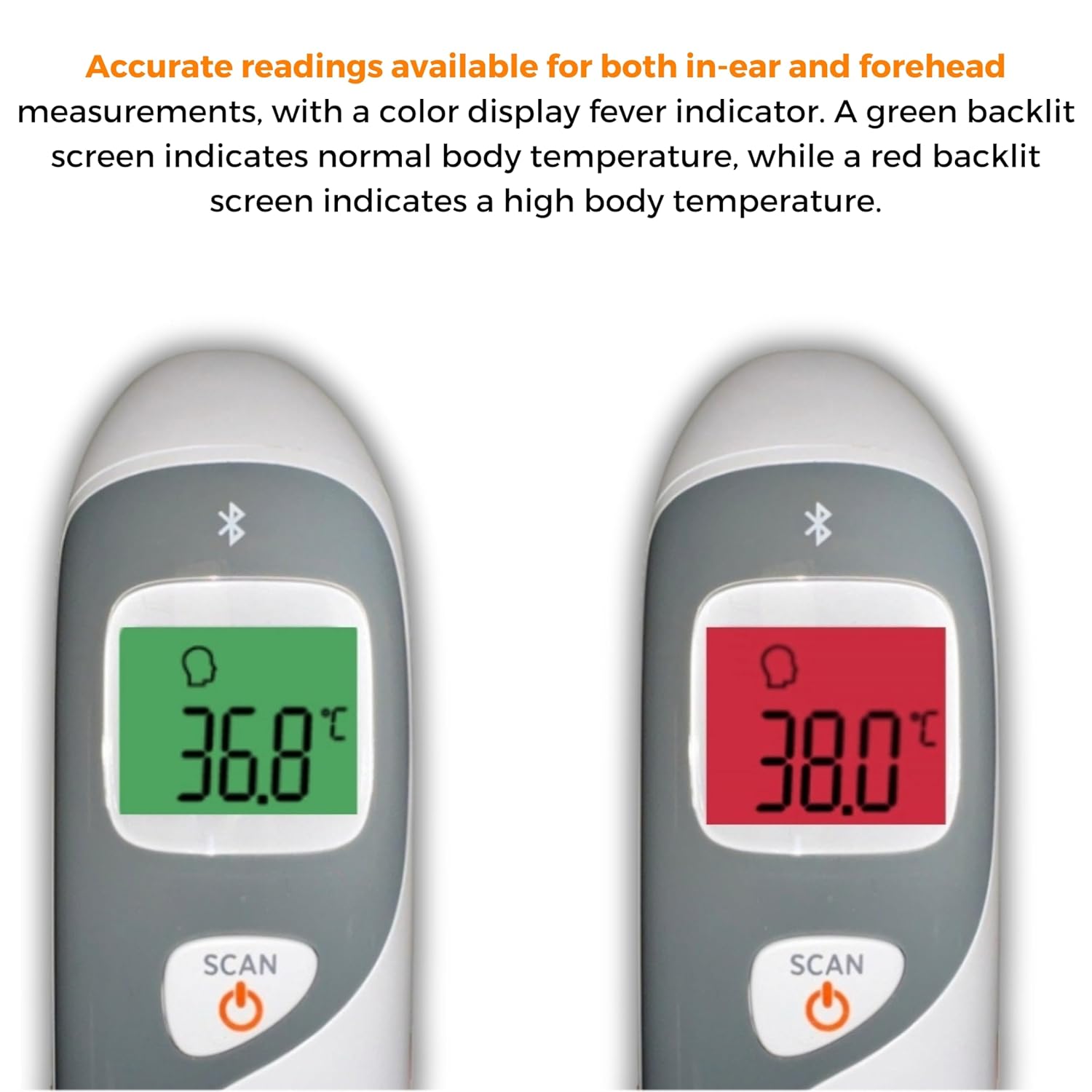
Image: The thermometer's color-changing LCD display indicating normal (green) and high (red) temperatures.
4.5. Эстутумду кайра чакыруу
The thermometer stores the last 20 temperature readings. To access these readings, press the MEM/MUTE button while the device is on. Each press will cycle through the stored readings.
5. Bluetooth Connectivity and MOBI Smart App
The MOBI CONNECT Smart DualScan Thermometer can be used independently or paired with your smartphone via Bluetooth for enhanced tracking and features through the MOBI Smart App.
5.1. Колдонмону жүктөп алуу жана жупташтыруу
- Download the "MOBI Smart" app from your device's app store (available on iOS and Android).
- Смартфонуңузда Bluetooth иштетилгенин текшериңиз.
- Open the MOBI Smart App and follow the on-screen instructions to pair your thermometer.
5.2. Колдонмонун өзгөчөлүктөрү
- Автоматтык түрдө көзөмөлдөө: Automatically records temperature readings from the thermometer.
- Көп колдонуучу Profiles: Pro түзүңүз жана башкарыңызfiles for each family member to track their health data independently.
- Маалыматтарды каттоо: Add comments to each reading for context.
- Reporting & Graphs: View powerful reports and graphs for daily, weekly, monthly, or yearly temperature trends.
- Экспорттоо параметрлери: Export data for sharing with healthcare professionals.
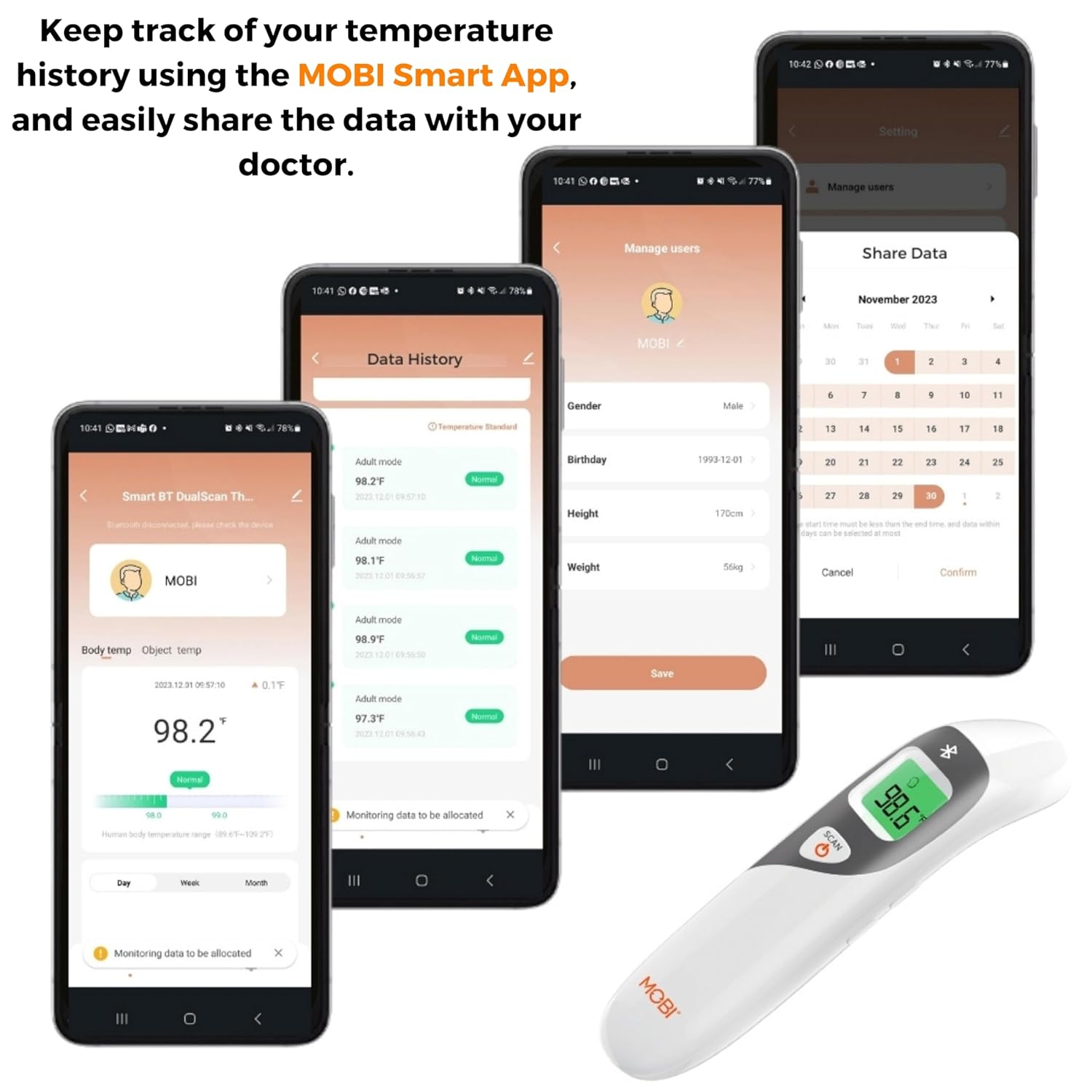
Image: Screenshots of the MOBI Smart App interface, showing data tracking and user management.
5.3. Расмий продукт Video
Видео: Аткаминерview of the MOBI Smart DualScan Bluetooth Ear & Forehead Thermometer, demonstrating its features and usage.
6. Техникалык тейлөө
6.1. Тазалоо
To clean the thermometer, wipe it with a soft, damp cloth. Do not immerse the device in water or use abrasive cleaners. Ensure the probe is clean before each use, especially for ear measurements.
6.2. Сактоо
Store the thermometer in its protective pouch in a cool, dry place, away from direct sunlight and extreme temperatures. Remove batteries if the device will not be used for an extended period.
7. Кыйынчылыктарды
- "Lo" or "Hi" Reading: Indicates a temperature outside the measurable range. Ensure proper placement and try again.
- Туура эмес окуулар:
- Check for proper probe placement (ear or forehead).
- Ensure the probe is clean.
- Verify the correct mode (Adult/Child/Object) is selected if applicable.
- Allow the thermometer to acclimate to room temperature for 30 minutes if it has been in a significantly different environment.
- Bluetooth туташуу маселелери:
- Смартфонуңузда Bluetooth иштетилгенин текшериңиз.
- Restart the thermometer and the MOBI Smart App.
- Ensure the thermometer is within range of your smartphone.
- Дисплей жок: Батареянын орнотулушун текшерип, керек болсо батарейкаларды алмаштырыңыз.
8. Техникалык шарттар
| Модель номери | 700026 |
| Power Source | Батарея менен иштейт (2 x AAA) |
| Дисплей түрү | Арткы жарык менен LCD |
| Байланыш | Bluetooth |
| Өлчөө режимдери | Ear, Forehead, Room, Object |
| Температура бирдиктери | Фаренгейт (°F) / Цельсий (°C) |
| Memory Recall | Акыркы 20 окуу |
| Продукт кам көрүү | Ачуу тазалоо |
| Материал | Пластик |
| Өндүрүүчү | Mobi Technologies Inc. |
9. Кепилдик жана колдоо
For warranty information or technical support, please contact Mobi Technologies Inc. directly. Refer to the product packaging or the official MOBI webакыркы байланыш маалыматы үчүн сайт.