
1. Киришүү
This user manual provides detailed instructions for the Rocketek PC/SC USB Smart Card Reader. This device is designed to facilitate secure digital interactions, including online identification, digital signatures, and access to various smart card applications. Please read this manual thoroughly before using the product to ensure proper functionality and longevity.
2. Продукт бүтүп калдыview
The Rocketek PC/SC USB Smart Card Reader is a versatile device supporting a wide range of smart cards. It features a compact design and a standard USB interface for easy connectivity.
2.1 Пакеттин мазмуну
- Rocketek PC/SC USB Smart Card Reader
- Колдонуучунун Колдонмосу (бул документ)
2.2 Түзмөктүн өзгөчөлүктөрү
The card reader includes dedicated slots for different card types and an indicator light for operational status.
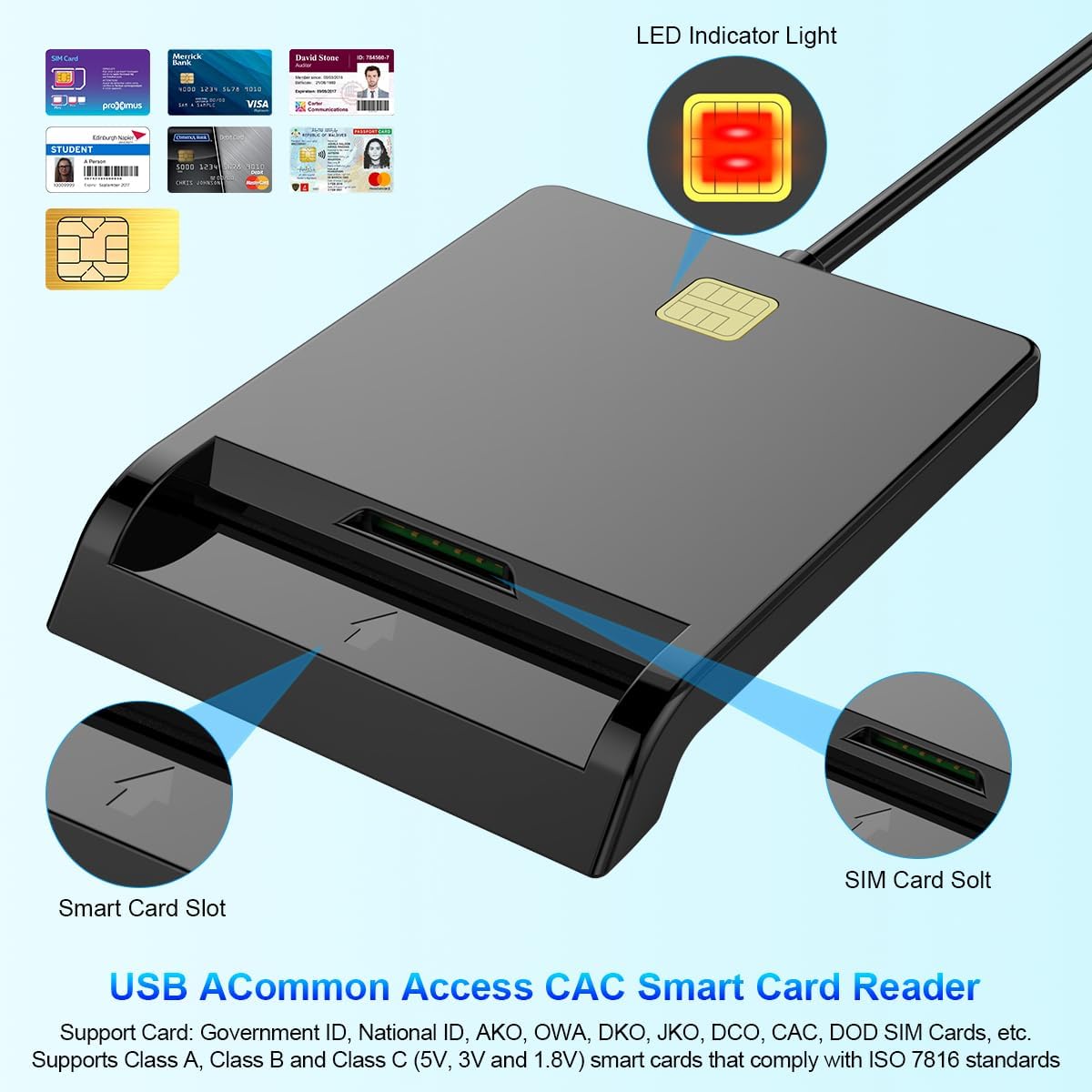
1-сүрөт: Фронт view of the Rocketek Smart Card Reader, highlighting the LED indicator light, the main smart card slot, and the SIM card slot.

2-сүрөт: The Rocketek Smart Card Reader shown with its USB connector, a SIM card, and a standard debit card, illustrating its multi-card compatibility.
3. Орнотуу
Follow these steps to set up your Rocketek PC/SC USB Smart Card Reader.
3.1 Системалык талаптар
- Операция системасы: Windows 98 / Me / 2000 / NT 4.0 / XP / CE / Vista / 7 / 8 / 8.1 / 10 / 11, Chromebook OS, Linux, Ubuntu, Mac OS.
- Интерфейс: Жеткиликтүү USB порту.

3-сүрөт: The card reader is compatible with various operating systems, including different versions of Windows and Linux.
3.2 Аппаратты туташтыруу
- Компьютериңизде же ноутбукуңузда жеткиликтүү USB портун табыңыз.
- Plug the USB connector of the Rocketek Smart Card Reader into the USB port.
- The device is generally Plug & Play for Windows systems, meaning it should be recognized automatically without manual driver installation. For Mac OS and Linux, or for specific smart card applications (e.g., Belgian eID, CAC cards), additional drivers or official software may be required. Refer to the card issuer's website for necessary software.
4. Иштөө нускамалары
Using the Rocketek PC/SC USB Smart Card Reader is straightforward.
4.1 Акылдуу картаны салуу
- Карта окугуч компьютериңизге туташкандыгын текшериңиз.
- For standard smart cards (e.g., ID cards, bank cards), insert the card into the main smart card slot with the chip facing upwards and towards the reader.
- For SIM cards, insert the SIM card into the dedicated SIM card slot.
- The LED indicator light on the reader will illuminate or flash to indicate card detection and activity.
4.2 Картаны окуу куралын колдонуу
- Once the card is inserted and recognized, you can use it with compatible software for tasks such as:
- Online banking
- Санарип кол тамгалар
- Online tax declarations
- Accessing government services (e.g., Belgian eID)
- CAC, AKO, OWA, DKO, JKO, NKO, BOL, GKO, Marinenet, AF-Portal, Pure Edge Viewer колдонмолору
- Маанилүү: The reader is designed to read only one card at a time. Do not attempt to insert multiple cards simultaneously into different slots if they are intended for active use.

4-сүрөт: The card reader supports high-speed data transmission but can only process one smart card or SIM card at any given moment.
5. Техникалык тейлөө
To ensure optimal performance and extend the lifespan of your card reader, follow these maintenance guidelines:
- Аппаратты таза жана чаңдан алыс кармаңыз. Тазалоо үчүн жумшак, кургак чүпүрөктү колдонуңуз.
- Avoid exposing the reader to extreme temperatures, humidity, or direct sunlight.
- Do not insert foreign objects into the card slots.
- USB кабелин зыян келтирбөө үчүн этият кармаңыз.
- Store the reader in a safe place when not in use.
6. Кыйынчылыктарды
If you encounter issues with your Rocketek Smart Card Reader, refer to the following common problems and solutions:
6.1 Түзмөк таанылган жок
- USB туташуусун текшерүү: Ensure the reader is firmly plugged into a working USB port. Try a different USB port or a different computer if possible.
- Компьютерди кайра иштетүү: Кээде жөнөкөй кайра иштетүү таануу маселелерин чечиши мүмкүн.
- Драйверди орнотуу: While the device is generally plug-and-play for Windows, some specific smart cards (e.g., certain government IDs, health cards) or operating systems (Mac OS, Linux) may require dedicated drivers or middleware. Visit the official website of your smart card issuer or the Rocketek support page for driver downloads.
6.2 Card Not Reading
- Туура киргизүү: Ensure the smart card is inserted correctly with the chip facing the right direction and fully seated in the slot.
- Картанын абалы: Check the smart card for any visible damage or dirt on the chip. Clean the chip gently with a soft, dry cloth if necessary.
- Программалык шайкештик: Verify that you have the correct software installed for the specific type of smart card you are trying to read (e.g., eID software for Belgian ID cards).
- Single Card Rule: Ensure only one card is inserted into the reader at a time.
6.3 Жай аткаруу
- USB порт: Ensure you are using a high-speed USB port (e.g., USB 2.0 or 3.0).
- Системалык ресурстар: Close unnecessary applications running in the background that might be consuming system resources.
7. Техникалык шарттар
| Бренд | Rocketek |
| Модел | B0C5LR8DTN |
| Байланыш технологиясы | USB |
| Шайкеш түзмөктөр | Компьютерлер, ноутбуктар |
| Операциялык системалар | Windows 98 / Me / 2000 / NT 4.0 / XP / CE / Vista / 7 / 8 / 8.1 / 10 / 11, Chromebook OS, Linux, Ubuntu, Mac OS |
| Өзгөчө өзгөчөлүк | Plug & Play |
| Колдоого алынган карталардын түрлөрү | Smart, ID, CAC, CRS, CNS, IC, SIM, etc. (ISO 7816 Class A, B, C for 5V, 3V and 1.8V smart cards) |
| Өлчөмдөрү (болжол менен) | 84мм (L) x 65mm (W) x 9.5mm (H) |
| Кабелдин узундугу (болжол менен) | 95cm / 2.5in |

5-сүрөт: Approximate dimensions of the Rocketek Smart Card Reader and its integrated USB cable.
8. Кепилдик жана колдоо
Rocketek stands behind the quality of its products.
8.1 Өндүрүүчүнүн кепилдиги
All Rocketek USB CAC smart card readers come with a worry-free 12 айлык өндүрүүчүнүн кепилдиги сатып алынган күндөн тартып. Бул кепилдик нормалдуу колдонуудагы материалдардагы жана жасалгадагы кемчиликтерди камтыйт.
8.2 Кардарларды колдоо
If you have any questions, require technical assistance, or experience issues with your product, please do not hesitate to contact Rocketek customer support directly. Refer to the product packaging or the Rocketek official webбайланыш маалыматы үчүн сайт.