
1. Киришүү
The Hilitand NLQ3-125/4P Dual Power Automatic Transfer Switch (ATS) is designed to ensure a continuous power supply by automatically switching between a main power source and a standby power source. This device is crucial for emergency power systems in homes, factories, and other applications where uninterrupted power is essential. It features millisecond-level switching for seamless power transition.
This manual provides detailed instructions for the safe installation, operation, and maintenance of your NLQ3-125/4P ATS.
2. Коопсуздук маалыматы
ЭСКЕРТҮҮ: Installation and maintenance should only be performed by qualified personnel. Failure to follow these instructions may result in electric shock, fire, or serious injury.
- АТСти орнотуудан же тейлөөдөн мурун ар дайым бардык кубат булактарын ажыратыңыз.
- Аппаратты туура жерге туташтырууну камсыз кылыңыз.
- Бардык зымдардын туташууларынын бекем жана туура экенин зым схемасына ылайык текшериңиз.
- Эгер өчүргүч бузулуп калса иштетпеңиз.
- Бардык жергиликтүү жана улуттук электр эрежелерин сактаңыз.
3. Продукт бүтүп калдыview
The NLQ3-125/4P ATS is a compact, 4-pole device featuring both automatic and manual operation modes. It is constructed from flame-retardant PC plastic for safety and durability, with silver contacts for improved conductivity and extended service life.

Сүрөт 3.1: Алдыңкы view of the NLQ3-125/4P ATS, showing the main power (Source A) and generator (Source B) inputs, output terminals, and the manual/auto selector switch.

3.2-сүрөт: Бурчтуу view of the ATS, highlighting the robust terminal blocks for secure wiring connections.
Негизги компоненттер:
- Source A (Normal Power) Terminals: For connecting the primary power supply.
- Source B (Generator) Terminals: For connecting the standby power supply.
- Чыгуу терминалдары: For connecting to the load.
- Manual/Auto Selector Switch: Allows selection between automatic and manual operation modes.
- Индикатор жарыктары: To show the active power source (A or B).
- Башкаруу терминалдары: For external control signals (AR, AN, NC, C1, OFF, BR, BN, NC, C1, OFF).
4. Техникалык шарттар
| Өзгөчөлүк | Спецификация |
|---|---|
| Модел | NLQ3-125/4P |
| Материал | PC, Silver Contacts |
| Которуу түрү | Экинчи бөлүштүрүү |
| Номиналдуу ток | 63A |
| Rated Voltage | 110V AC |
| Insulation Voltage | 690V AC |
| Номиналдуу жыштык | 50/60 Гц |
| Электрдик деңгээл | PC Level Isolation Type |
| Rated Impulse Stend Voltage | 8КВ |
| Иштөө режими | Автоматтык, Кол менен |
| Монтаж түрү | DIN темир жол |
| Өлчөмдөрү (болжол менен) | 143 мм x 96 мм x 69 мм (5.63 дюйм x 3.78 дюйм x 2.72 дюйм) |
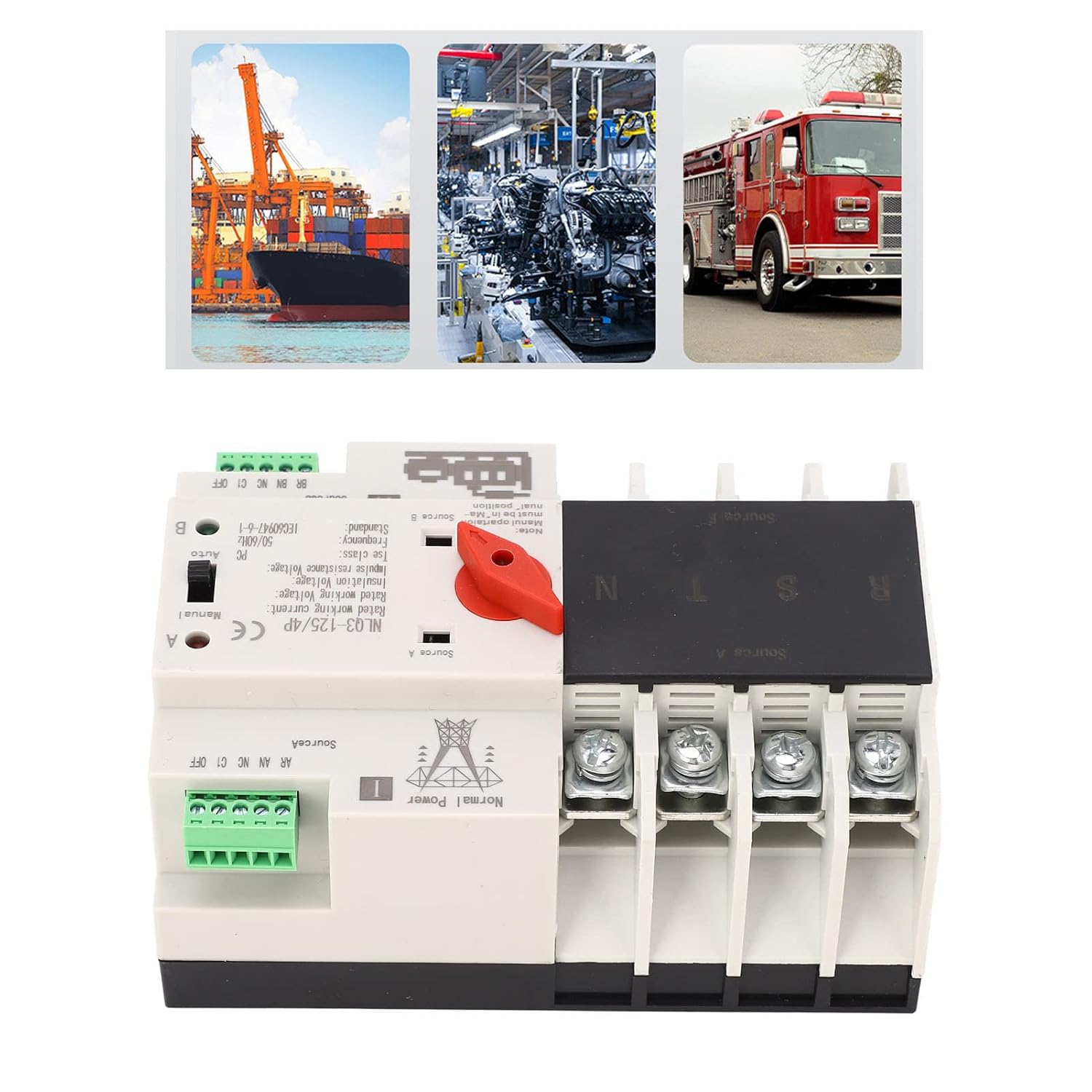
Figure 4.1: Approximate dimensions of the NLQ3-125/4P ATS for installation planning.
5. Орнотуу жана орнотуу
The NLQ3-125/4P ATS is designed for track installation and is compatible with PZ30 power distribution boxes. Before proceeding with installation, ensure all power is disconnected at the main breaker.
Орнотуу кадамдары:
- Текшерүү: Before installation, carefully inspect the ATS for any signs of damage. Use the operating handle to manually switch it on and off to check the flexibility of the transmission mechanism. Verify the generation and disconnection conditions of the load at each stage for both normal and standby power supplies.
- Монтаждоо: Mount the ATS securely onto a DIN rail within your PZ30 power distribution box or suitable enclosure.
- Wiring Main Power (Source A): Connect the main power supply (Normal Power) to the terminals labeled 'Source A'. Ensure correct phase (R, S, T) and neutral (N) connections for 4-pole systems.
- Wiring Standby Power (Source B): Connect the standby power supply (Generator) to the terminals labeled 'Source B'. Ensure correct phase (R, S, T) and neutral (N) connections.
- Wiring Load: Connect the load (your electrical system) to the output terminals of the ATS.
- Башкаруу зымдары: Connect any necessary external control signals to the AR, AN, NC, C1, OFF (for Source A) and BR, BN, NC, C1, OFF (for Source B) terminals as per your system requirements.
- Текшерүү: Double-check all wiring for correctness and tightness. Ensure no loose connections are present.

5.1-сүрөт: Мисample wiring diagram for the NLQ3-125/4P ATS. Consult a qualified electrician for specific installation needs.
Экологиялык шарттар:
- Айлана-чөйрөнүн температурасы: Maximum 40°C, minimum -5°C. The average temperature within 24 hours should not exceed 35°C.
- Бийиктиги: Installation site altitude should not be higher than 2000m.
- Салыштырмалуу нымдуулук: At 40°C, relative humidity should not exceed 50%. At -5°C, higher humidity is permissible (e.g., 90% at 25°C). Special measures may be needed to address occasional condensation due to temperature changes.
6. Иштөө нускамалары
The NLQ3-125/4P ATS offers both automatic and manual operation modes.
Автоматтык режим:
- Set the selector switch to the 'Auto' position.
- In this mode, the ATS will continuously monitor the main power supply (Source A).
- If Source A fails or becomes abnormal, the ATS will automatically switch to the standby power supply (Source B) within milliseconds.
- When Source A is restored and stable, the ATS will automatically switch back to Source A.
- The indicator lights (A or B) will show which power source is currently active.
Кол режими:
- Set the selector switch to the 'Manual' position.
- In manual mode, the user can manually switch between Source A and Source B using the operating handle.
- This mode is typically used for testing, maintenance, or in situations where automatic switching is not desired.
- Эскертүү: Ensure the manual operation is performed carefully and safely, especially when power is connected.
7. Техникалык тейлөө
Regular maintenance ensures the longevity and reliable operation of your ATS.
- Мезгилдүү текшерүү: Annually inspect the ATS for any signs of wear, damage, or loose connections.
- Тазалоо: Түзмөктү таза жана чаң менен таштандылардан таза кармаңыз. Тазалоо үчүн кургак, жумшак чүпүрөк колдонуңуз. Суюк тазалоочу каражаттарды колдонбоңуз.
- Терминал текшерүү: Periodically check all terminal screws to ensure they are tight and secure.
- Функция тести: Regularly test the automatic switching function by simulating a main power failure (if safe to do so) to ensure the standby power engages correctly.
- Кесиптик кызмат: For any complex issues or internal repairs, contact a qualified electrician or service technician.
8. Кыйынчылыктарды
This section addresses common issues you might encounter with your ATS.
Issue: ATS does not switch automatically.
- Текшерүү режими: Ensure the selector switch is set to 'Auto' mode.
- Электр камсыздоо: Verify that both main (Source A) and standby (Source B) power supplies are connected and functional.
- Башкаруу зымдары: Inspect control wiring for any disconnections or faults.
- Ички ката: If all external checks are clear, there might be an internal fault. Contact a qualified technician.
Issue: No power to load.
- Киргизүү күчү: Check if both Source A and Source B have power.
- Которуу орду: Ensure the ATS is switched to an active power source (either A or B, indicated by lights).
- Чыгуу зымдары: Inspect the wiring from the ATS output to the load for any breaks or loose connections.
- Overload/Short Circuit: Check for any overload or short circuit conditions in your electrical system that might have tripped protective devices upstream.
Issue: ATS makes unusual noises.
- Бош компоненттер: Disconnect power and check for any loose internal components or mounting screws.
- Ички зыян: If the noise persists and cannot be identified, it may indicate internal damage. Seek professional assistance.
9. Кепилдик жана колдоо
For warranty information and technical support, please refer to the documentation provided with your purchase or contact Hilitand customer service through their official channels. Keep your purchase receipt as proof of purchase.
Өндүрүүчү: Хилитанд
Модель номери: NLQ3-125/4P