
1. Киришүү
This manual provides essential information for the safe and efficient operation of your Sennheiser EW-D CI1 Wireless Guitar System (Q1-Q6). Please read this manual thoroughly before using the product to ensure proper setup, operation, and maintenance. Keep this manual for future reference.
2. Коопсуздук маалыматы
- Always follow the safety instructions provided in this manual and on the product itself.
- Do not expose the system to extreme temperatures, humidity, or direct sunlight.
- Компоненттерди түшүрүп алуудан же катуу соккуга дуушар кылуудан алыс болуңуз.
- Use only the power adapter and USB cable supplied with the system.
- Do not attempt to open or modify the components. Refer all servicing to qualified personnel.
- Keep the system away from water and other liquids.
3. Пакеттин мазмуну
Пакетиңизде бардык буюмдар бар экенин текшериңиз:
- EW-D CI1 Wireless Receiver
- EW-D CI1 Wireless Transmitter
- Кубаттуу адаптер
- USB кабели
- Көтөрмө куту
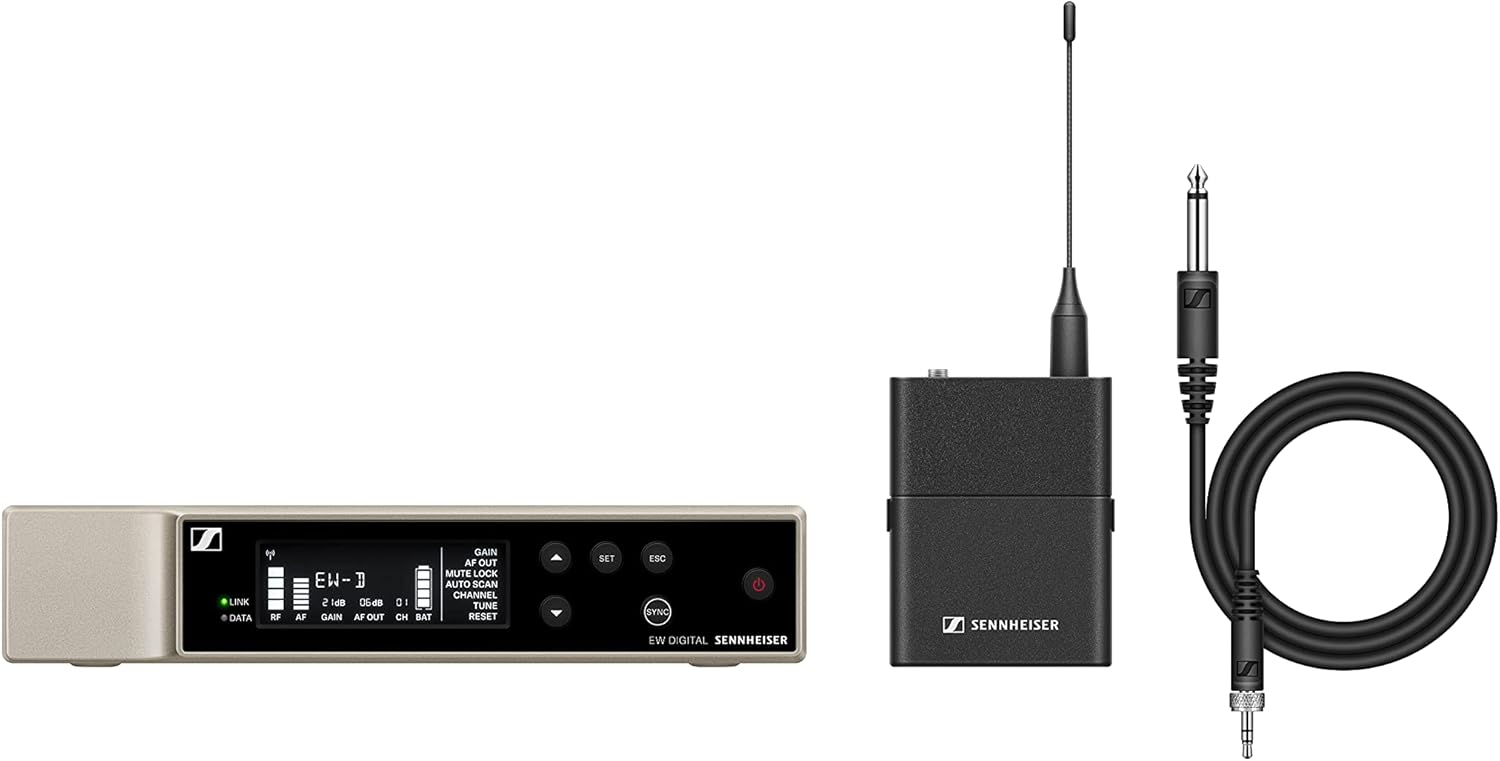
An image showing the main components of the Sennheiser EW-D CI1 Wireless Guitar System, including the receiver, transmitter, and accessories.
4. Орнотуу
4.1 Кабыл алгычты туташтыруу
- Place the EW-D CI1 Wireless Receiver on a stable surface, ensuring good line-of-sight to the transmitter.
- Connect the supplied power adapter to the receiver's power input and then to a power outlet.
- Connect the receiver's audio output to your amplifier, mixer, or audio interface using an appropriate audio cable (not included).
4.2 Connecting the Transmitter
- Ensure the EW-D CI1 Wireless Transmitter is charged. Use the USB cable to charge if necessary.
- Plug the transmitter directly into your guitar's output jack. Ensure it is securely connected.
4.3 Pairing the System
The EW-D CI1 system typically pairs automatically upon power-up. If pairing does not occur:
- Power on both the receiver and the transmitter.
- Refer to the receiver's display or indicator lights for pairing status.
- If a manual pairing option is available (consult the quick guide for specific button presses), initiate pairing on both devices within a short timeframe.
5. Иштөө
5.1 Күйгүзүү/өчүрүү
- To power on: Press and hold the power button on both the receiver and transmitter until the indicators light up.
- To power off: Press and hold the power button on both devices until the indicators turn off.
5.2 Негизги колдонуу
- Ensure both the transmitter and receiver are powered on and successfully paired.
- Үндү тууралаңыз amplifier or mixer as needed.
- Monitor the signal strength and battery indicators on the receiver and transmitter to ensure optimal performance.
5.3 Channel Selection (90 Channels)
The system offers 90 channels for operation. In environments with potential interference, you may need to select a different operating channel:
- Access the channel selection menu on the receiver (refer to the quick guide for navigation).
- Scan for available frequencies or manually select a channel.
- Ensure the transmitter automatically syncs to the new channel, or manually set it if required.
6. Техникалык тейлөө
- Тазалоо: Use a soft, dry cloth to clean the surfaces of the receiver and transmitter. Do not use liquid cleaners or solvents.
- Батареяга кам көрүү: For battery-powered components, ensure regular charging. If storing for extended periods, charge the battery to approximately 50% to prolong its lifespan.
- Сактагыч: Store the system in its carrying case in a cool, dry place when not in use.
7. Кыйынчылыктарды
| Көйгөй | Мүмкүн себеп | Чечим |
|---|---|---|
| Системадан үн жок. | Transmitter or receiver not powered on; not paired; volume too low; incorrect cable connection. | Ensure both devices are on and paired. Check all cable connections. Increase volume on ampкөтөргүч/микшер. |
| Кийлигишүү же окуудан чыгып кетүү. | Other wireless devices nearby; too far from receiver; obstacles blocking signal. | Change operating channel. Reduce distance between transmitter and receiver. Ensure clear line-of-sight. |
| Transmitter not charging. | Faulty USB cable or power source; dirty charging port. | Try a different USB cable or power adapter. Clean the charging port carefully. |
If you encounter issues not listed here, or if the problem persists, please contact Sennheiser customer support.
8. Техникалык шарттар
- Бренд: Sennheiser
- Модел: EW-D CI1
- Байланыш технологиясы: Зымсыз
- Туташтыргыч түрү: USB (for charging/data)
- Шайкеш түзмөктөр: Гитара
- Элемент Салмагы: 6 Pounds (approximate total package weight)
- Коргоо материалы: Металл
- Каналдардын саны: 90
- Кубат булагы: Battery Powered (transmitter), Power adapter (receiver)
- Элементтин өлчөмдөрү (L x W x Y): 15.94 x 13.78 x 2.87 дюйм (пакет өлчөмдөрү)
- Өндүрүүчү бөлүгүнүн номери: 508730-кр
- UPC: 657768463013
9. Кепилдик
This Sennheiser EW-D CI1 Wireless Guitar System (Q1-Q6) comes with a 90 күн чектелген кепилдик. Please retain your proof of purchase for warranty claims. The warranty covers defects in materials and workmanship under normal use. It does not cover damage caused by misuse, accidents, unauthorized modifications, or normal wear and tear.
10. Колдоо
For technical assistance, troubleshooting, or warranty inquiries, please visit the official Sennheiser website or contact their customer support directly. You may need to provide your product model number (EW-D CI1) and serial number (if applicable) when seeking support.