
1. Киришүү
This manual provides detailed instructions for the installation, operation, and maintenance of your Yamiry Smart Door Handle Lock with Keypad. This advanced keyless entry system offers multiple unlocking methods for enhanced convenience and security.
The Yamiry Smart Door Handle Lock is designed for easy DIY installation on most standard American wooden front doors, typically within 10 minutes, without requiring additional drilling. It features a reversible handle for compatibility with both left and right-handed doors.
Manage access conveniently through the mobile app, allowing you to grant permanent or temporary access, generate one-time passcodes remotely, and track unlock records. This smart lock is an ideal solution for homeowners, landlords, and property managers seeking efficient and secure access control.
2. Коопсуздук маалыматы
- Орнотуудан жана колдонуудан мурун бардык нускамаларды кылдат окуп чыгыңыз.
- Кулпуну ажыратууга же өзгөртүүгө аракет кылбаңыз. Бул кепилдикти жокко чыгарып, коопсуздукту бузушу мүмкүн.
- Use only specified battery types (Lithium Ion batteries required, not included).
- Keep mechanical keys in a secure location outside the property to prevent lockout in case of battery failure or electronic malfunction.
- Protect the lock from extreme temperatures and direct water exposure beyond its IP66 rating.
- Ensure all components are securely fastened during installation to prevent accidental dislodgement.
3. Пакеттин мазмуну
Сиздин пакетте бардык компоненттер бар экенин текшериңиз:
- Exterior assembly (1)
- Interior assembly (1)
- Adjustable latch (1)
- Mechanical key (2)
- Key Fob (2)
- Screw set (1)
4. Техникалык шарттар
| Өзгөчөлүк | Деталь |
|---|---|
| Бренд | Ямири |
| Модель аты | YR01 |
| Кулпу түрү | joldar, |
| Материал | Дат баспас болот, цинк |
| Түс | Matte Black |
| Элементтин өлчөмдөрү (L x W x Y) | 5.5 x 2.95 x 0.79 дюйм |
| Элемент Салмагы | 2.59 фунт |
| Power Source | Lithium Ion batteries (not included) |
| Байланыш | Bluetooth, Wi-Fi (кошумча шлюз менен) |
| Башкаруу ыкмасы | Колдонмо, Пульт, Сенсордук, Үн (кошумча шлюз менен) |
| Өзгөчөлүктөр | Fingerprint, Key Fob, Passcode, App Control, Mechanical Key, Auto-Lock |
| Суу өткөрбөйт рейтинги | IP66 |
| Иштөө температурасы | -22°F жана 185°F |

Image: The Yamiry Smart Lock is designed to withstand various weather conditions, featuring an IP66 waterproof rating and operational temperatures ranging from -22°F to 185°F.
5. Орнотуу
5.1 Орнотууга чейинки текшерүүлөр
Орнотууну баштоодон мурун, эшиктин төмөнкү талаптарга жооп берерин текшериңиз:
- Эшик калыңдыгы: 1-3/8" to 2" (35mm-50mm)
- Артка: 2-3/8" (60мм) же 2-3/4" (70мм)
- Эшиктин диаметри: 2-1/8" (54мм)
No additional drilling is required for most standard installations.

Image: This diagram illustrates the necessary door measurements, including thickness, backset, and door hole diameter, to ensure compatibility with the smart lock. No extra drilling is typically needed.
5.2 Орнотуу кадамдары
The Yamiry Smart Door Handle Lock is designed for quick and effortless DIY installation, typically taking about 10 minutes. You will primarily need a screwdriver to replace your existing handle, knob, or deadbolt.
- Remove your existing door hardware.
- Install the new latch into the door edge.
- Mount the exterior assembly, ensuring the spindle aligns correctly with the latch.
- Attach the interior assembly and secure it with the provided screws.
- Insert the required Lithium Ion batteries (not included) into the interior assembly.
- Test the lock's functionality with the mechanical key.

Image: This visual guide demonstrates the straightforward installation process, highlighting that the lock can be installed in approximately 10 minutes without extra drilling. It also shows the reversible handle design, compatible with both left-handed and right-handed doors.

Image: This chart illustrates the compatibility of the Yamiry smart lock with different types of existing door hardware, demonstrating how it can replace standard knobs, handles, and deadbolts.
5.3 App Download and Initial Setup
To unlock the full potential of your smart lock, download the dedicated mobile app. The app allows for convenient access management and monitoring.
- Scan the QR code in the product packaging or search for the Yamiry app in your device's app store (iOS/Android).
- Каттоо эсебин түзүп, кириңиз.
- Follow the in-app instructions to add your new smart lock. Ensure Bluetooth is enabled on your smartphone and you are within range of the lock.
- Once paired, you can begin configuring user access, passcodes, and other settings.

Image: The Yamiry mobile app provides comprehensive control over your smart lock, offering features such as keyless entry, user management, auto-lock settings, access log history, and the ability to generate passcodes remotely.
Video: This video provides an unboxing and initial setup guide for the Yamiry Smart Door Handle Lock with Keypad, demonstrating the components and first steps of installation.
6. Кулпуну иштетүү
6.1 Кулпуну ачуу ыкмалары
Your Yamiry Smart Door Handle Lock offers six versatile ways to unlock:
- Манжа изин таануу: Place your registered finger on the sensor for quick access. The lock identifies your fingerprint in approximately 0.3 seconds.
- Bluetooth Mobile App: Use the Yamiry app on your smartphone to unlock the door when within Bluetooth range.
- Personalized Passcodes: Enter your unique numerical code on the keypad.
- Негизги фобдор: Tap the provided key fob against the lock's sensor.
- Механикалык ачкычтар: Use the traditional mechanical key as a backup.
- Alexa Voice Unlock & Remote Control (Requires WiFi Gateway): With a separately sold WiFi gateway, you can unlock the door using Alexa voice commands or remotely via the app from anywhere.
Image: This illustration highlights the various methods available to unlock the Yamiry smart lock, including fingerprint, mobile app, key fob, and keypad passcode entry.
Сүрөт: жакын план view of the smart lock's fingerprint sensor, emphasizing its rapid 0.3-second unlock time and the presence of an upgraded data encryption chip for enhanced security.

Image: This diagram explains the color-coded light indicators on the smart lock: Green signifies successful verification, Blue indicates active mode, and Red denotes failed verification.
6.2 App Features and Management
The Yamiry app provides comprehensive control over your smart lock:
- Колдонуучуну башкаруу: Add or remove users, and assign specific unlocking methods (fingerprint, passcode, key fob) to each.
- Алыстан сырсөз генерациялоо: Generate one-time or temporary passcodes for visitors or service providers, even when you are away from home.
- Access Log History: View a detailed record of all lock and unlock events, including the method used and the timestamp.
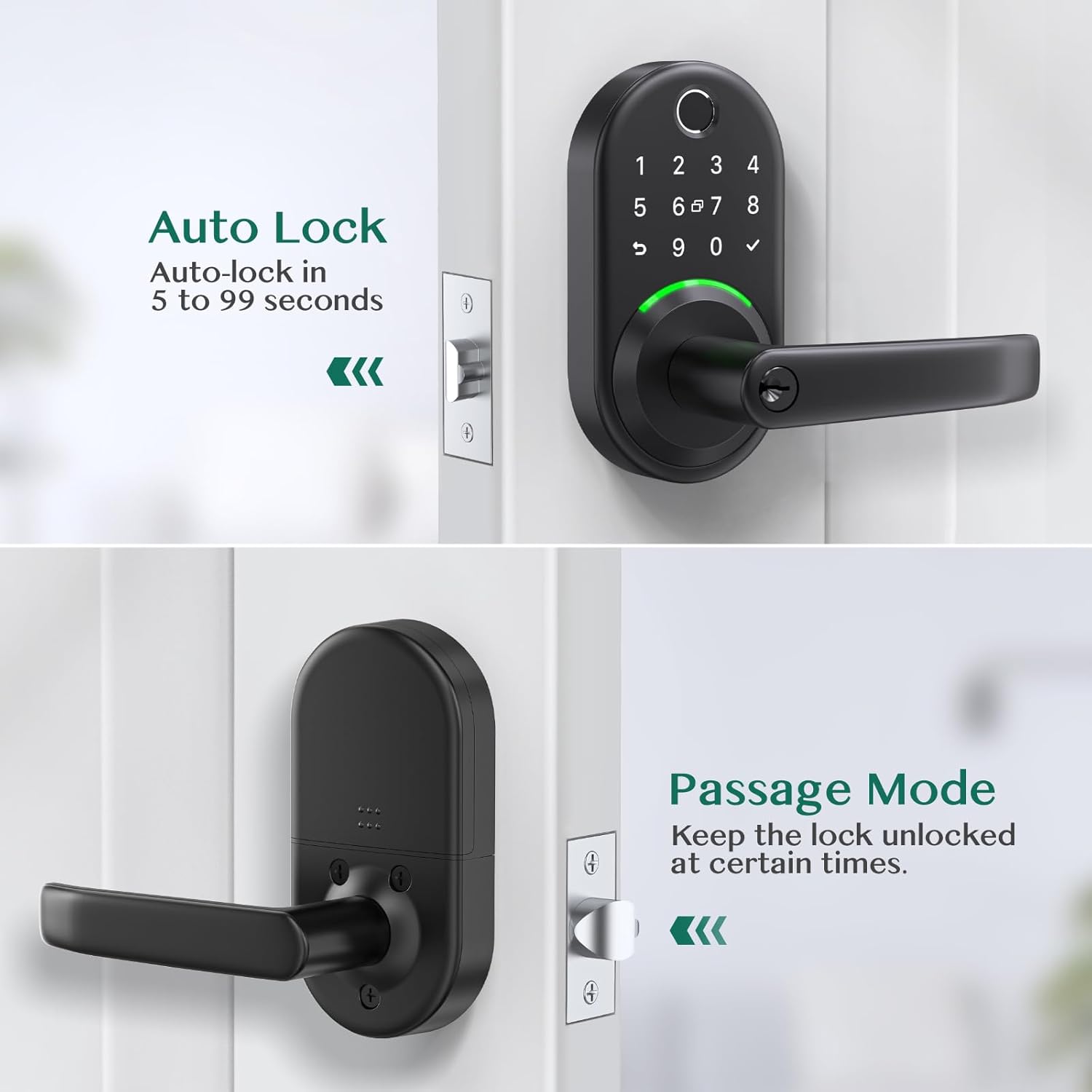
- Автоматтык кулпулоо: Configure the lock to automatically re-lock after a set period (e.g., 5 to 99 seconds) after being unlocked.
- Өтүү режими: Temporarily disable auto-lock to keep the door unlocked for extended periods, useful for gatherings or moving items.

Image: The Yamiry app's user management screen, displaying a list of registered family members and their assigned access permissions for the smart lock.

Image: The app interface for generating temporary passcodes, allowing users to create one-time or custom passcodes for guests or service personnel.

Image: A screenshot of the app's log history, displaying a chronological record of all lock and unlock activities, including the user and method of entry.
Image: This image illustrates the auto-lock function, which can be set to re-lock the door within 5 to 99 seconds, and the passage mode, which keeps the door unlocked for convenience.
7. Техникалык тейлөө
7.1 Батареяны алмаштыруу
The lock requires Lithium Ion batteries (not included). When the battery level is low, the lock will provide an audible or visual alert. To replace batteries:
- Ички түзүлүштөгү батареянын капкагын алып салыңыз.
- Эски батарейкаларды кылдаттык менен чыгарып алыңыз.
- Insert new Lithium Ion batteries, ensuring correct polarity.
- Батареянын капкагын алмаштырыңыз.
Эскертүү: If the batteries are completely dead, you can use a power bank with a USB cable via the USB port on the bottom of the keypad to temporarily power the lock and gain entry.
7.2 Тазалоо
To maintain the appearance and functionality of your smart lock:
- Сырткы беттерин жумшак менен сүртүңүз, гamp кездеме.
- Абразивдүү тазалагычтарды, эриткичтерди же катуу химиялык заттарды колдонуудан алыс болуңуз, анткени алар финишке жана электрондук компоненттерге зыян келтириши мүмкүн.
- Оптималдуу иштеши үчүн манжа изинин сенсору менен клавиатураны таза жана таштандылардан тазалаңыз.
8. Кыйынчылыктарды
| Көйгөй | Мүмкүн болгон себеп / Чечим |
|---|---|
| Кулпу киргизүүгө жооп бербейт. | Check battery level and replace if necessary. Ensure the lock is properly installed and all cables are connected. |
| Fingerprint recognition fails frequently. | Манжаңыздын таза жана кургак экенине ынаныңыз. Колдонмодо манжа изиңизди кайра каттатып көрүңүз. Сенсорго туура жайгаштырууну камсыз кылыңыз. |
| Баскычтоп күйбөйт же жооп бербейт. | Press any key to activate the keypad. Check battery level. |
| Cannot connect to the lock via Bluetooth/App. | Ensure Bluetooth is enabled on your phone. Be within close proximity to the lock. Restart the app and/or your phone. If using a WiFi gateway, ensure it is properly configured and connected to your network. |
| Автоматтык кулпу функциясы күтүлгөндөй иштебей жатат. | Verify auto-lock settings in the app. Ensure the door sensor (if applicable) is clean and unobstructed. |
| Lock is making unusual noises. | Check for any obstructions in the door frame or latch mechanism. Ensure the lock is securely mounted and not loose. |
9. Кепилдик жана колдоо
For warranty information and technical support, please refer to the official Yamiry website or contact Yamiry customer service directly. Keep your purchase receipt as proof of purchase for any warranty claims.
Байланыш маалыматы: Please visit the Yamiry official website or refer to the contact details provided in your product packaging for the most up-to-date support information.


