
1. Киришүү
The TAXNELE STC-3028 is a versatile digital temperature and humidity controller designed for precise environmental management. It features a dual display for simultaneous monitoring of temperature and humidity, and can be configured to control both heating/cooling and humidification/dehumidification equipment. This manual provides essential information for the safe and effective installation, operation, and maintenance of your STC-3028 controller.
2. Продукт бүтүп калдыview
The STC-3028 controller integrates a high-accuracy sensor to measure both temperature and humidity. Its front panel features two digital displays, one for temperature (left) and one for humidity (right), along with control buttons for setting parameters. Output relays allow connection to external heating, cooling, humidifying, or dehumidifying devices.

Сүрөт 2.1: Алдыңкы view of the STC-3028 Temperature and Humidity Controller, showing the dual digital display and control buttons.
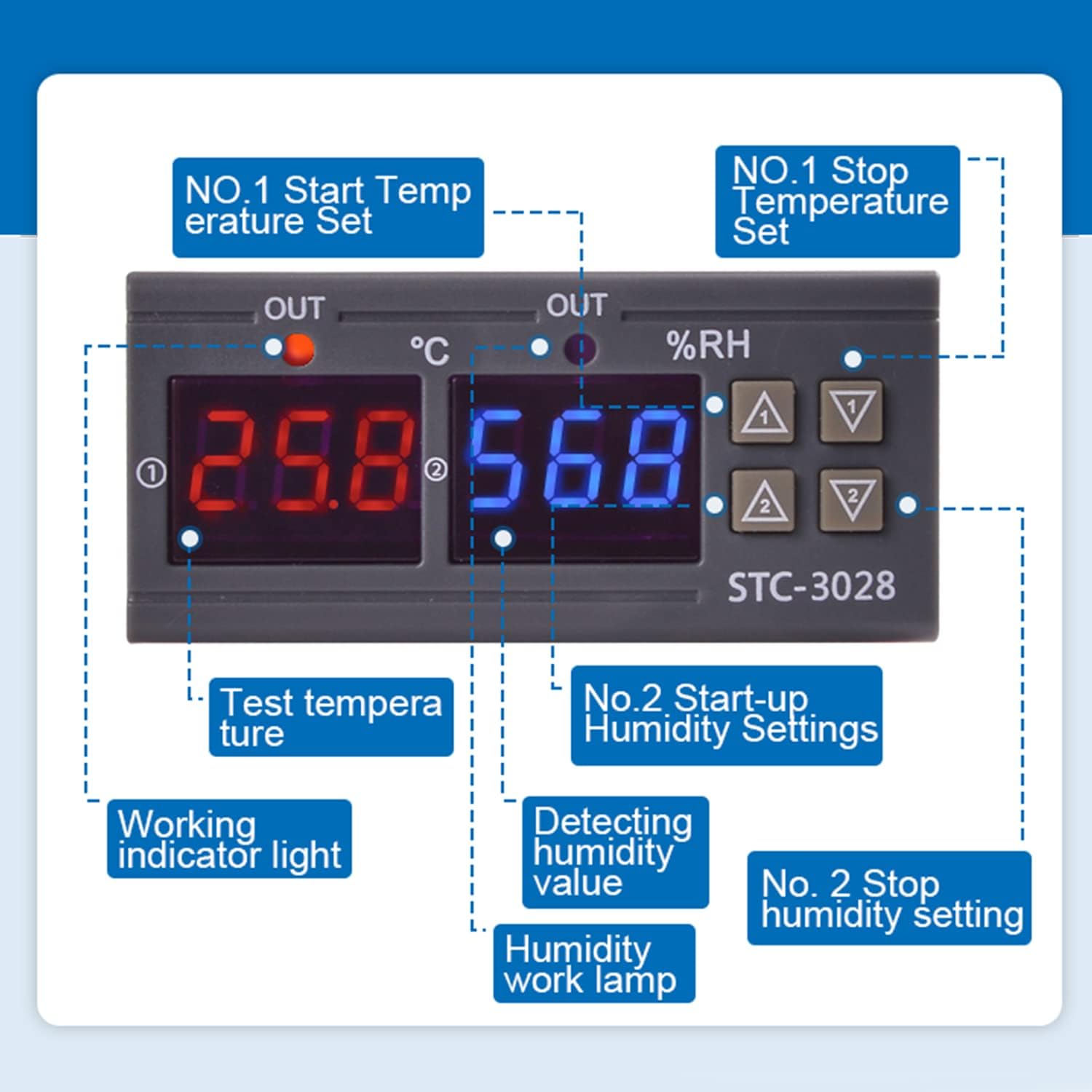
2.2-сүрөт: Детальдуу view of the STC-3028 display and control buttons, indicating the temperature display, humidity display, working indicators, and parameter setting buttons.
3. Техникалык шарттар
| Параметр | Нарк |
|---|---|
| Модел | СТК-3028 |
| Киргизүү көлөмүtage | DC 12V |
| Shell Material | PC and ABS Fireproof |
| Температураны көзөмөлдөө диапазону | -50°Cден 120°Cге чейин |
| Нымдуулукту көзөмөлдөө диапазону | 00% RHден 100% RHге чейин |
| Өлчөө тактыгы | ±0.1°C / ±0.1%RH |
| Тактыгын көзөмөлдөө | ±0.1°C / ±0.1%RH |
| Output Relay Contact Capacity | Макс 10А |
| Sensor Length | 1 метр |
| Controller Dimensions (L*W*D) | 75 мм * 34 мм * 85 мм |
| Sensor Dimensions (L*W) | 2.17 дюйм * 0.98 дюйм |
| Сенсор кабелинин узундугу | 40.35 дюйм |
4. Орнотуу
4.1 Монтаждоо
The STC-3028 is designed for panel mounting. Ensure adequate space for ventilation and access to wiring terminals. Refer to the dimensions below for proper cutout size.

Figure 4.1: Dimensions of the STC-3028 controller and its integrated sensor, including cable length, for installation planning.
4.2 Электр байланыш схемалары
ЭСКЕРТҮҮ: Ensure power is disconnected before performing any wiring to prevent electric shock or damage to the device. All wiring should be performed by a qualified professional.
The STC-3028 offers two primary wiring configurations depending on whether the load uses an independent power supply or shares the controller's power supply.
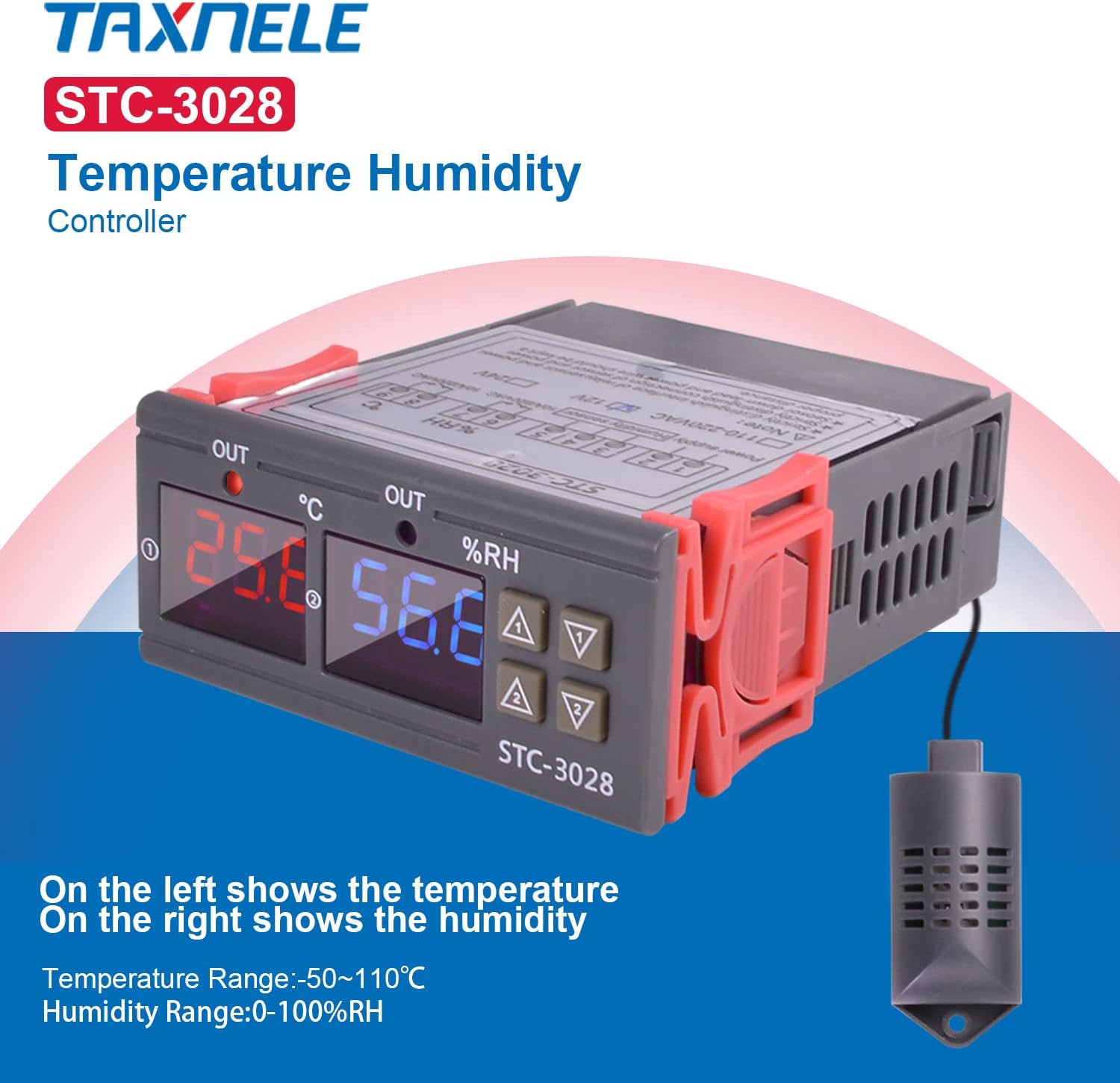
Figure 4.2: Wiring diagram for connecting the STC-3028 where the controlled load (e.g., heater, cooler) has its own independent power supply. The controller's power input (L, N) is separate from the load's power, and the controller's output terminals act as a switch for the load's circuit.

Figure 4.3: Wiring diagram for connecting the STC-3028 where the controlled load shares the same power supply as the controller. The controller's power input (L, N) also supplies power to the load through the controller's output terminals, which switch the live (L) connection to the load.
Ensure all connections are secure and correctly matched to the terminals. Incorrect wiring can damage the device or pose a safety hazard.
5. Операция
5.1 Күйгүзүү/өчүрүү
Once wired correctly, apply power to the controller. The digital displays will illuminate, showing the current temperature and humidity readings.
5.2 Температура параметрлерин орнотуу
- Set Startup Temperature: басыңыз "Жогору" button (labeled ▲1 or ▲ for temperature) once to display the current startup temperature. Long press the "Жогору" button for approximately 3 seconds until the display flashes. Use the "Жогору" жана "Төмөн" buttons to adjust the desired startup temperature. The setting will automatically save after a few seconds of inactivity.
- Токтотуу температурасын коюңуз: басыңыз "Төмөн" button (labeled ▼1 or ▼ for temperature) once to display the current stop temperature. Long press the "Төмөн" button for approximately 3 seconds until the display flashes. Use the "Жогору" жана "Төмөн" buttons to adjust the desired stop temperature. The setting will automatically save after a few seconds of inactivity.
5.3 Setting Humidity Parameters
- Set Startup Humidity: басыңыз "Жогору" button (labeled ▲2 or ▲ for humidity) once to display the current startup humidity. Long press the "Жогору" button for approximately 3 seconds until the display flashes. Use the "Жогору" жана "Төмөн" buttons to adjust the desired startup humidity. The setting will automatically save after a few seconds of inactivity.
- Set Stop Humidity: басыңыз "Төмөн" button (labeled ▼2 or ▼ for humidity) once to display the current stop humidity. Long press the "Төмөн" button for approximately 3 seconds until the display flashes. Use the "Жогору" жана "Төмөн" buttons to adjust the desired stop humidity. The setting will automatically save after a few seconds of inactivity.
5.4 Temperature and Humidity Correction (Calibration)
To correct or calibrate the temperature and humidity readings, press the "Жогору" жана "Төмөн" buttons simultaneously. Follow the on-screen prompts to adjust the offset if necessary. This feature allows for fine-tuning the sensor readings to match a known reference.
6. Техникалык тейлөө
- Тазалоо: Regularly wipe the controller's surface with a soft, dry cloth. Do not use abrasive cleaners or solvents, as they may damage the casing же дисплей.
- Сенсорго кам көрүү: Keep the sensor clean and free from dust or debris. Avoid exposing the sensor to extreme physical shock or corrosive environments, which can affect its accuracy and lifespan.
- Байланыштары: Periodically check all wiring connections to ensure they remain secure. Loose connections can lead to intermittent operation or device malfunction.
7. Кыйынчылыктарды
If you encounter issues with your STC-3028 controller, consider the following common troubleshooting steps:
-
Дисплей/кубат жок:
- Check the power supply connection to the controller. Ensure it matches the specified 12VDC input.
- Кубат булагынын иштеп турганын жана туура көлөмдү камсыз кылып жатканын текшериңизtage.
-
Туура эмес окуулар:
- Ensure the sensor is properly connected to the controller.
- Check if the sensor is clean and unobstructed.
- Perform a temperature and humidity correction (calibration) as described in Section 5.4 if you have a reliable reference instrument.
-
Жүктөө иштетилбей жатат:
- Verify that the wiring to the load is correct and secure, referring to Section 4.2.
- Check the set startup and stop parameters for temperature and humidity to ensure they are configured to activate the load under current conditions.
- Confirm that the load itself (e.g., heater, humidifier) is functional.
Бул кадамдар маселени чечпесе, кошумча жардам алуу үчүн кардарларды тейлөө кызматына кайрылыңыз.
8. Кепилдик жана колдоо
Specific warranty information for the TAXNELE STC-3028 controller is not provided within this manual. For details regarding warranty coverage, technical support, or service, please refer to the product packaging, the point of purchase, or contact TAXNELE customer service directly.