
1. Introduction and Overview
The UGREEN Uno 65W GaN USB-C Charger is a compact and efficient multi-port charging device. Utilizing advanced GaN (Gallium Nitride) technology, it offers high power output in a smaller form factor, reducing energy loss and heat generation during operation. This charger features an interactive LED display that indicates the charging status, providing a clear visual cue.
Equipped with two USB-C ports and one USB-A port, it supports various fast charging protocols, making it compatible with a wide range of devices including laptops, tablets, and smartphones. Integrated multiple safety features protect against short circuits, overcharging, overheating, and overvoltage, ensuring safe and reliable charging.

Image 1.1: UGREEN Uno 65W GaN USB-C Charger, showcasing анын компакттуу дизайны.
2. Коопсуздук маалыматы
- Заряддоочу түзүлүштү суюктуктарга, нымдуулукка же өтө жогорку температурага дуушар кылбаңыз.
- Заряддагычты кулап түшпөңүз же катуу таасирлерге дуушар болбоңуз.
- Do not disassemble, modify, or attempt to repair the charger. This may void the warranty and pose safety risks.
- Ensure proper ventilation when using the charger. Do not cover it with clothing or other materials.
- Кубаттоочу түзүлүш менен шайкеш келген кабелдерди жана түзмөктөрдү гана колдонуңуз.
- Балдар жетпеген жерде сактаңыз.
- Заряддоо түзүлүштү колдонбогондо же электр бороону учурунда электр розеткасынан сууруп алыңыз.
3. Пакеттин мазмуну
Сураныч, пакетте төмөнкү нерселерди текшериңиз:
- UGREEN Uno 65W GaN USB-C Charger (Model CD361)
- User Manual
4. Продукциянын өзгөчөлүктөрү
- 65 Вт максималдуу чыгаруу кубаттуулугу: Delivers up to 65W of power for rapid charging of compatible devices.
- GaNFast Technology: High-efficiency power conversion (95%) for reduced heat and compact size.
- 3-бирде-1 көп порттуу дизайн: Features 2 USB-C ports and 1 USB-A port for simultaneous charging of multiple devices.
- LED дисплей: An interactive LED screen indicates the current charging status.
- Өркүндөтүлгөн коопсуздук системасы: Built-in protections against short circuits, overcharging, overheating, and overvoltage.
- Removable Magnetic Feet: Provides stability and a unique aesthetic.
- Кеңири шайкештик: Supports a wide range of devices including laptops, tablets, and smartphones from various brands.

Сүрөт 4.1: Детальдуу view of the charger's ports, magnetic feet, and LED display.
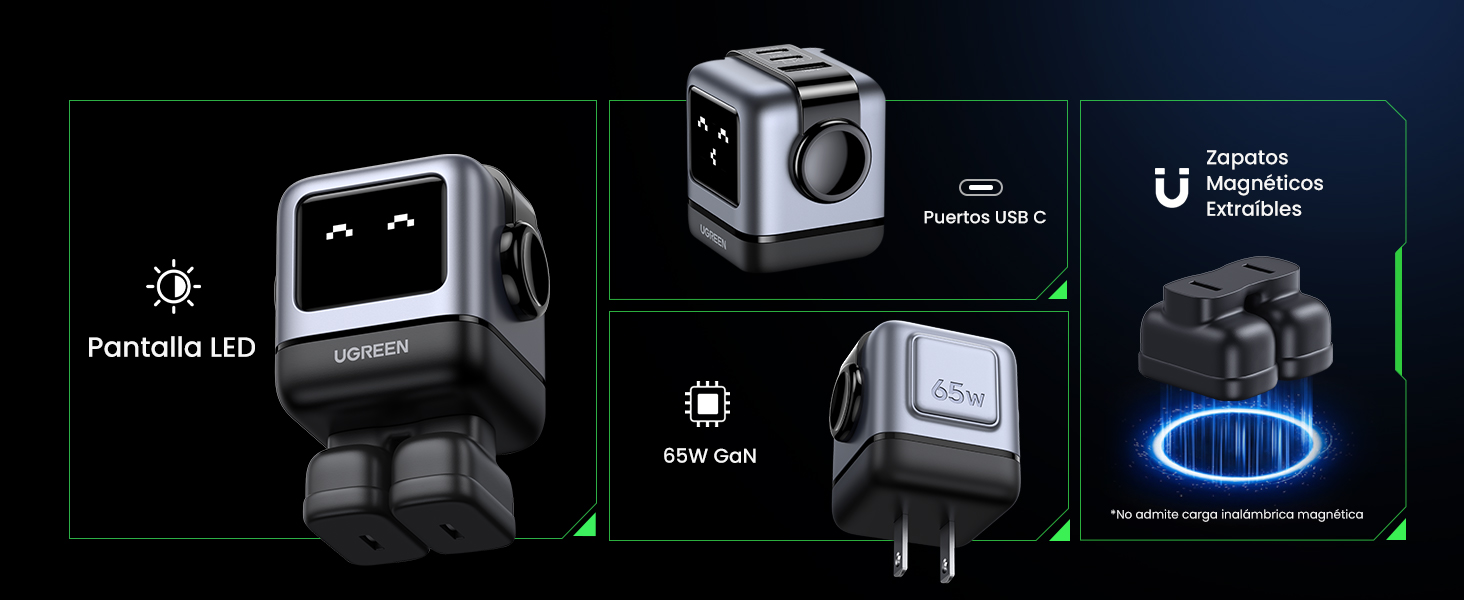
Image 4.2: The charger's LED display showing charging status.
5. Орнотуу
- Заряддагычты таңгактан чыгаруу: Carefully remove the UGREEN Uno 65W GaN USB-C Charger from its packaging.
- Attach Magnetic Feet (Optional): If desired, attach the removable magnetic feet to the bottom of the charger for added stability.
- Розеткага туташуу: Plug the charger into a standard wall power outlet (AC 100-240V, 50/60Hz).
- Колдонууга даяр: Кубаттагыч эми түзмөктөрүңүздү туташтырууга даяр.
6. Иштөө нускамалары
6.1 Түзмөктөрдү туташтыруу
- Use a compatible USB-C to USB-C cable for devices that support USB-C charging.
- Use a compatible USB-A to [device connector] cable for devices that charge via USB-A.
- Connect the appropriate cable to one of the charger's ports (2x USB-C, 1x USB-A).
- Кабелдин экинчи учун шайманга туташтырыңыз.
6.2 Электр энергиясын бөлүштүрүү
The charger intelligently distributes power based on the connected devices and their charging requirements:
- Бир портту колдонуу: When only one USB-C port is used, it can deliver up to 65W (e.g., charging a MacBook Air M2 from 0% to 51% in approximately 30 minutes).
- Бир нече портту колдонуу: When multiple ports are in use, the 65W total power is dynamically distributed. For example, if both USB-C ports are used, one might provide 45W for a laptop and the other 20W for a mobile device.
- USB-A порту: The USB-A port provides standard charging output, typically up to 18W, depending on the device.
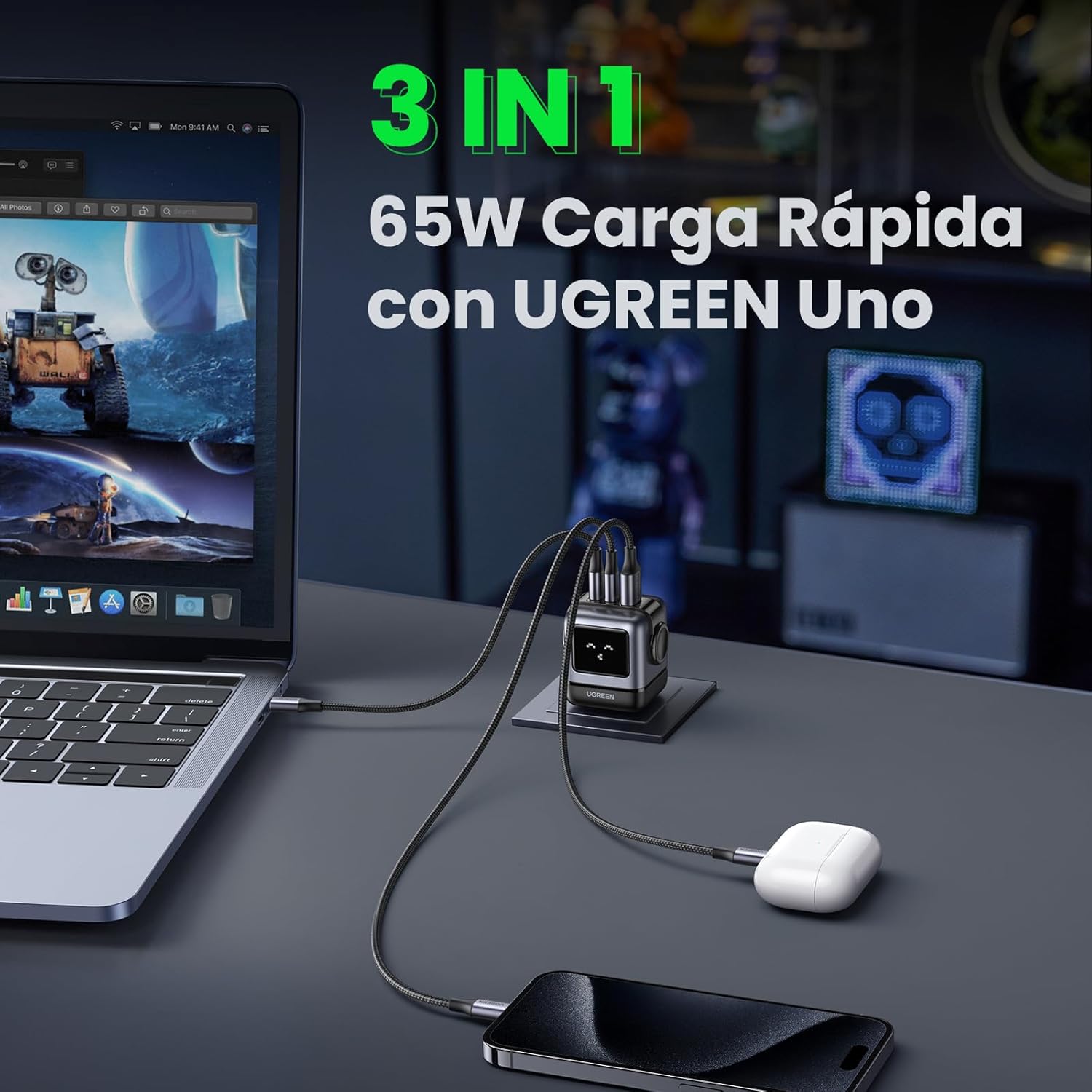
Image 6.1: The charger simultaneously charging a laptop, smartphone, and earbuds.
6.3 LED Display Indications
The LED display on the charger provides visual feedback on its operational status:
- Заряддоо: The LED display will show an animation or specific icon indicating that a device is actively charging.
- Толугу менен заряддалган: Once a connected device reaches full charge, the LED display will change to indicate completion.
- Бекер: When no devices are connected or charging, the display may show a standby indicator.

Image 6.2: Comparison of the LED display during charging and when fully charged.
Эскертүү: The charger is not compatible with 60W fast charging for the Samsung S26 Ultra; it will charge at a maximum of 45W PPS for this device.
7. Техникалык тейлөө
- Тазалоо: Тазалоодон мурун заряддагычты розеткадан ажыратыңыз. Бетти сүртүү үчүн жумшак, кургак чүпүрөктү колдонуңуз. Суюк тазалагычтарды же аэрозолдорду колдонбоңуз.
- Сактагыч: Заряддоо түзүлүштү күн тийбеген жана экстремалдык температурадан алыс, салкын, кургак жерде сактаңыз.
- Кабельге кам көрүү: Avoid bending or twisting charging cables excessively, as this can damage them.
8. Кыйынчылыктарды
| Көйгөй | Мүмкүн себеп | Чечим |
|---|---|---|
| Түзмөк заряддалбай жатат. | 1. Charger not plugged in. 2. Cable is faulty. 3. Device is incompatible or port is damaged. | 1. Ensure the charger is securely plugged into a live power outlet. 2. Try a different charging cable. 3. Test with another device or try a different port on the charger. |
| Жай кубаттоо. | 1. Using a non-fast charging cable. 2. Multiple devices connected, distributing power. 3. Device does not support fast charging. 4. Device requires higher PPS than provided (e.g., S26 Ultra). | 1. Use a high-quality, fast-charging compatible cable. 2. Disconnect other devices to allow maximum power to a single device. 3. Verify your device supports fast charging. 4. Note that some devices may not achieve their absolute maximum charging speed if they require specific PPS profiles not fully supported by the charger. |
| Заряддоочу жылуулукту сезет. | Кадимки иштөө, айрыкча жогорку кубаттуулуктагы заряддоо учурунда. | The charger is designed with thermal protection. If it becomes excessively hot, disconnect it and allow it to cool. Ensure adequate ventilation. |
| LED display not working or showing incorrect status. | Убактылуу программалык камсыздоонун бузулушу же электр кубатынын көйгөйү. | Unplug the charger from the wall outlet, wait a few seconds, and plug it back in. If the issue persists, contact customer support. |
9. Техникалык шарттар
| Өзгөчөлүк | Деталь |
|---|---|
| Бренд | UGREEN |
| Модель номери | CD361 |
| Туташтыргыч түрү | USB Type-C |
| Шайкеш түзмөктөр | Game consoles, Laptops, Smartphones, Tablets (e.g., iPhone 8-17 Series, Galaxy S10-S24 Series, Pixel 8/7/6, MacBook Air/Pro, iPad Pro/Air/mini, Watch 8/7, HomePod, AirPods Pro) |
| Киргизүү көлөмүtage | 240 Вольт (өзгөрмө ток 100-240V) |
| Ampөчүрүү | 3.25 Amperes |
| Жалпы USB порттору | 3 (2x USB-C, 1x USB-A) |
| Максималдуу кубаттуулук | 65 Ватт |
| Output Current | 5 Amperes |
| Output Voltage | 5 вольт |
| Power Source | Зымдуу электр |
| Жыштык диапазону | 50-60 Гц |
| Негизги электр туташтыргычынын түрү | 2-pin (North America Type A) |
| Portable | Ооба |
| Элемент Салмагы | 146 грамм |
| Тышкы материал | GaN |
| Форма фактору | Robot-shaped |
10. Кепилдик жана колдоо
10.1 Кепилдик маалыматы
This UGREEN product is covered by an 18 айлык кепилдик сатып алынган күндөн тартып. Бул кепилдик өндүрүштүк кемчиликтерди жана кадимки колдонуудан келип чыккан көйгөйлөрдү камтыйт. Ал туура эмес колдонуудан, кырсыктардан, уруксатсыз өзгөртүүлөрдөн же табигый кырсыктардан келип чыккан зыянды камтыбайт.
Кепилдик дооматтары үчүн сатып алганыңыздын далилин сактап коюңуз.
10.2 Кардарларды колдоо
For technical support, warranty claims, or any questions regarding your UGREEN Uno 65W GaN USB-C Charger, please contact UGREEN customer service through the following channels:
- UGREEN расмий Webсайт: Visit www.ugreen.com Көп берилүүчү суроолор, колдоо ресурстары жана байланыш маалыматы үчүн.
- Электрондук почта колдоо: Чиновниктин байланыш бөлүмүнө кайрылыңыз webтиешелүү электрондук почта дареги үчүн сайт.
- Online Retailer Support: If purchased from an online retailer, you may also contact their customer service for assistance.