
1. Киришүү
This manual provides detailed instructions for the installation, operation, and maintenance of the SOGTICPS 80A MPPT Solar Charge Controller, model SY8048. This intelligent regulator is designed for 12V, 24V, 36V, and 48V battery systems, featuring an LCD display, dual USB 5V charging ports, and a maximum PV input of 100V. It is compatible with various battery types including Sealed, GEL, Flooded, and LiFePO4.
The controller utilizes advanced Maximum Power Point Tracking (MPPT) technology to optimize energy harvesting from solar panels, ensuring efficient charging of your battery bank. It also incorporates multiple protection features to safeguard your system.
2. Коопсуздук маалыматы
- Ensure all connections are correct and secure before operation. Incorrect wiring can cause damage to the controller, battery, or solar panels.
- Always connect the battery to the controller алгачкы, then the solar panel, and finally the DC load.
- When disconnecting, follow the reverse order: алгачкы disconnect the DC load, then the solar panel, and finally the battery.
- Install the controller in a well-ventilated area, away from flammable materials and moisture.
- Контроллерди өз алдынча бөлүктөргө бөлүүгө же оңдоого аракет кылбаңыз. Тейлөө үчүн квалификациялуу адистерге кайрылыңыз.
- Батареянын көлөмүн текшериңизtage системага дал келетtage setting of the controller.
- Батареялар жана электр системалары менен иштегенде көздү коргоочу каражаттарды кошо алганда, тиешелүү жеке коргонуу каражаттарын кийиңиз.
3. Продукт бүтүп калдыview
The SOGTICPS SY8048 solar charge controller is designed for robust performance and user-friendly operation. Key features include:
- Өркүндөтүлгөн MPPT технологиясы: High tracking efficiency (not less than 99.5%) for maximum power point tracking of the PV array.
- Automatic Voltagэлектрондук таануу: Supports 12V, 24V, 36V, and 48V battery systems.
- Көп функциялуу LCD дисплей: Backlit display shows real-time operating data and status.
- Кош USB порттары: 5V charging ports for external devices.
- Бир нече иштөө режимдери: Includes charging mode, light control mode, light control + time delay, universal control, manual control, and timing control.
- Комплекстүү коргоо: Көлөмүtage, over-current, power failure, overcharge, deep discharge, reverse connection, and overheat temperature protection.
- Батарея шайкештиги: Supports Sealed, GEL, Flooded, and LiFePO4 batteries.

Сүрөт 1: Алдыңкы view of the SY8048 Solar Charge Controller.

2-сүрөт: Детальдуу view of the controller's features including USB ports and heat sink.
4. Орнотуу
4.1 Монтаждоо
Mount the controller vertically on a flat, non-flammable surface in a dry, well-ventilated indoor location. Ensure adequate clearance around the controller for heat dissipation. The dimensions of the controller are approximately 7.67 x 7.24 x 2.59 inches.
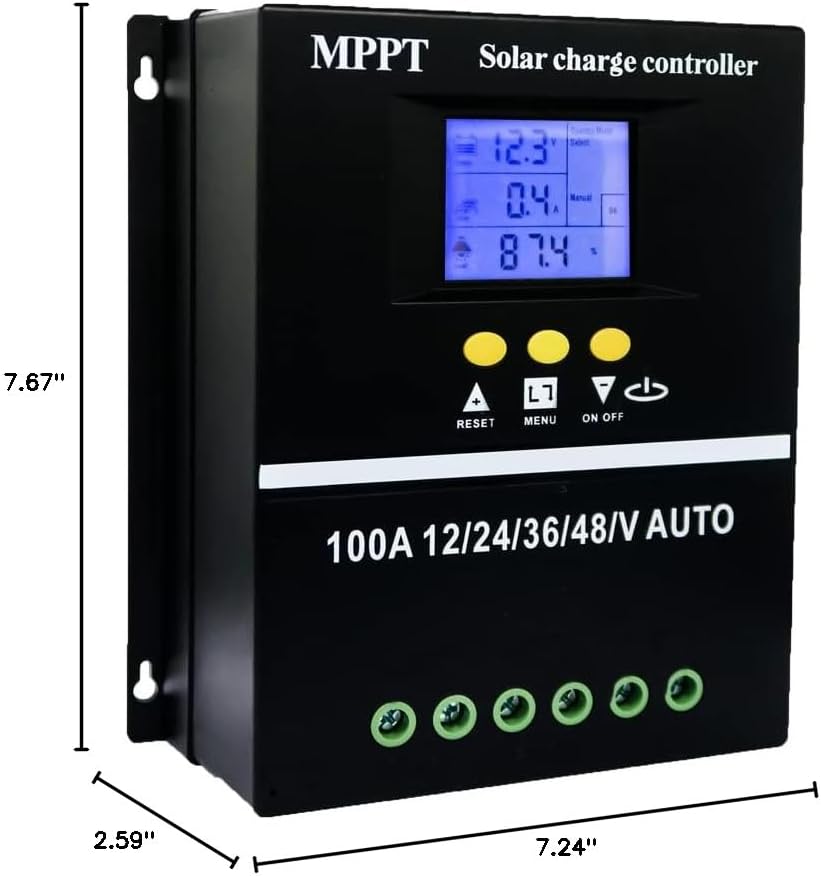
Figure 3: Controller dimensions for mounting.
4.2 Зымдарды туташтыруу ырааттуулугу
Follow the correct wiring sequence to prevent damage to the controller and other components. Use appropriate gauge wiring for your system's current and distance requirements.
- Батареяны туташтыруу: Connect the battery to the controller's battery terminals (positive to positive, negative to negative). The controller will automatically detect the battery voltage.
- Күн панелин туташтыруу: Connect the solar panel array to the controller's PV terminals (positive to positive, negative to negative).
- Туруктуу токтун жүктөмүн туташтырыңыз: Connect the DC load to the controller's load terminals (positive to positive, negative to negative).
Disconnection Sequence: To disconnect the system, reverse the order: first disconnect the DC load, then the solar panel, and finally the battery.

Figure 4: Wiring diagram for the solar charge controller.
5. Иштөө нускамалары
5.1 LCD дисплей интерфейси
The LCD provides dynamic display of operational data and working status. It includes:
- Battery work status display area (voltagд, учурдагы).
- Operating status of the solar panel (charging current).
- Load output status and display areas for all parameters (discharging current, working temperature, delay time).
- Mode control display area.
- Normal and fault status display area.

Figure 5: LCD Display Interface details.
5.2 Иштөө режимдери
The controller offers seven operating modes, selectable via the menu:
- Заряддоо режими: Standard battery charging.
- Жарыкты башкаруу режими: Күн батканда жүктөө күйүп, күн чыкканда өчөт.
- Light Control + Time Delay Control Mode: Load turns on at sunset and stays on for a set duration.
- Universal Control Mode: Load is always on (24H).
- Manual Control Mode: Load can be manually switched on/off.
- Timing Control Mode: Load operates according to a set schedule.

Figure 6: Load Working Modes.
5.3 Батареяны заряддоо Stages
The controller employs a four-stagБатареяны натыйжалуу жана коопсуз кубаттоо үчүн электрондук кубаттоо алгоритми:
- Жапырт акы: Charges the battery at maximum current until voltagе сиңирүү деңгээлине жетет.
- Тездетет акысыз: Maintains absorption voltage for a set period to fully charge the battery.
- Float акысы: Көлөмдү азайтатtage to a lower level to maintain a full battery charge.
- Теңдөө акысы: Periodically overcharges flooded batteries to balance cell voltages (if applicable and configured).

Figure 7: Four Battery Charging Stages.
5.4 Батареянын түрүн тандоо
The controller is compatible with Sealed, GEL, Flooded, and LiFePO4 batteries. Ensure the correct battery type is selected in the controller settings for optimal charging and protection. Refer to the controller's menu for specific battery type configuration.

8-сүрөт: Шайкеш келген батарея түрлөрү.
6. Техникалык тейлөө
- Бардык зымдарды туташтыргычтын бекемдигин жана коррозиясын дайыма текшерип туруңуз.
- Контроллерди чаңдан жана таштандыдан таза жана таза кармаңыз. Тазалоо үчүн кургак чүпүрөктү колдонуңуз.
- Ensure the ventilation openings are not blocked to allow for proper heat dissipation.
- Periodically check battery terminals for corrosion and clean if necessary.
- LCD дисплейди ката коддору же адаттан тыш көрсөткүчтөр үчүн көзөмөлдөңүз.
7. Кыйынчылыктарды
If you encounter issues with your SOGTICPS SY8048 controller, refer to the following common troubleshooting steps:
| Көйгөй | Мүмкүн себеп | Чечим |
|---|---|---|
| Контроллер күйбөй жатат | Батарея туташкан эмес же кубаты азtagд; тескери полярдуулук. | Батарея байланыштарын жана тtagд. Туура полярдуулукту камсыз кылыңыз. Батареяны заряддаңыз, эгерде томtage өтө төмөн. |
| Батарея заряддалбай жатат | Solar panel not connected; insufficient sunlight; faulty panel; incorrect battery type setting. | Verify solar panel connections. Check for adequate sunlight. Test solar panel output. Confirm correct battery type is selected in settings. |
| Жүк иштебейт | Load not connected; battery low voltage protection; load overcurrent protection; incorrect load mode. | Check load connections. Ensure battery voltage is above low voltage disconnect. Reduce load if overcurrent. Verify selected load operating mode. |
| LCD display error | Internal fault; temporary glitch. | Restart the controller by disconnecting all power sources (load, solar, battery) and reconnecting in the correct sequence. If error persists, contact support. |
For issues not covered here, please refer to the Warranty and Support section.
8. Техникалык шарттар
| Параметр | Нарк |
|---|---|
| Модел | SY8048 |
| Номиналдуу заряд ток | 80A |
| System Voltage | 12V/24V/36V/48V Auto таануу |
| Максималдуу PV киргизүү көлөмүtage | 100V |
| USB чыгышы | Dual 5V |
| Иштөө температурасы | 60°Сге чейин |
| Продукциянын өлчөмдөрү | 7.67 x 7.24 x 2.59 дюйм |
| Элемент Салмагы | 1.87 фунт |
| Дисплей түрү | LCD |
| Материал | Пластик |
9. Кепилдик жана колдоо
The SOGTICPS 80A MPPT Solar Charge Controller SY8048 comes with a 1 жылдык кепилдик from the date of purchase. SOGTICPS also provides өмүр бою техникалык колдоо бул продукт үчүн.
If you require technical assistance, have questions about installation, operation, or encounter any issues with your controller, please do not hesitate to contact our support team. Our engineers are available to provide advice and solutions to any problems you may experience.
For support, please visit the SOGTICPS store on Amazon or refer to the contact information provided with your product packaging.