1. Киришүү
Welcome to the user manual for your AULA F3030 Gaming Keyboard. This mechanical wired keyboard is designed for an enhanced gaming and typing experience, featuring a durable metal panel, responsive Blue mechanical switches, and vibrant green backlighting. This manual will guide you through the setup, operation, and maintenance of your new keyboard.
2. Негизги өзгөчөлүктөрү
- Мультимедиа баскычы: Easily adjust volume or mute audio with a simple turn or press.
- Узак металл панели: Provides a robust and stable base for intense gaming sessions.
- Көк механикалык өчүргүчтөр: Offer tactile feedback and an audible click for precise keystrokes.
- Жашыл арткы жарык: Illuminates keys for visibility in low-light conditions and adds aesthetic appeal.
- EN 104 Key Layout: Standard full-size keyboard layout for comprehensive functionality.
- Full N-Key Rollover & Anti-Ghosting: Ensures every keystroke is registered accurately, even during rapid, simultaneous presses.

Сүрөт: бүттүview of key features including the metal panel, blue light, and mechanical switches.
3. Пакеттин мазмуну
Сураныч, пакеттин мазмунун текшерип, бардык буюмдар бар экенин текшериңиз:
- AULA F3030 Gaming Keyboard
- Колдонуучунун Колдонмосу (бул документ)
4. Орнотуу колдонмосу
Setting up your AULA F3030 Gaming Keyboard is straightforward:
- Баскычтопту таңгагынан чыгарыңыз.
- Компьютериңизден жеткиликтүү USB портун табыңыз.
- Plug the USB cable of the keyboard into the USB port.
- Your operating system should automatically detect and install the necessary drivers. No additional driver installation is typically required for basic functionality.

Image: The AULA F3030 Gaming Keyboard ready for connection.
5. Иштөө нускамалары
5.1 Multimedia Knob and Buttons
The AULA F3030 keyboard features a versatile multimedia knob and dedicated multimedia buttons for quick control over your audio and media playback:
- Мультимедиа баскычы: Rotate the knob clockwise to increase volume, counter-clockwise to decrease volume. Press the knob to mute or unmute audio.
- M1 Button: Typically functions as 'Previous Track'.
- M2 Button: Typically functions as 'Play/Pause'.
- M3 Button: Typically functions as 'Next Track'.
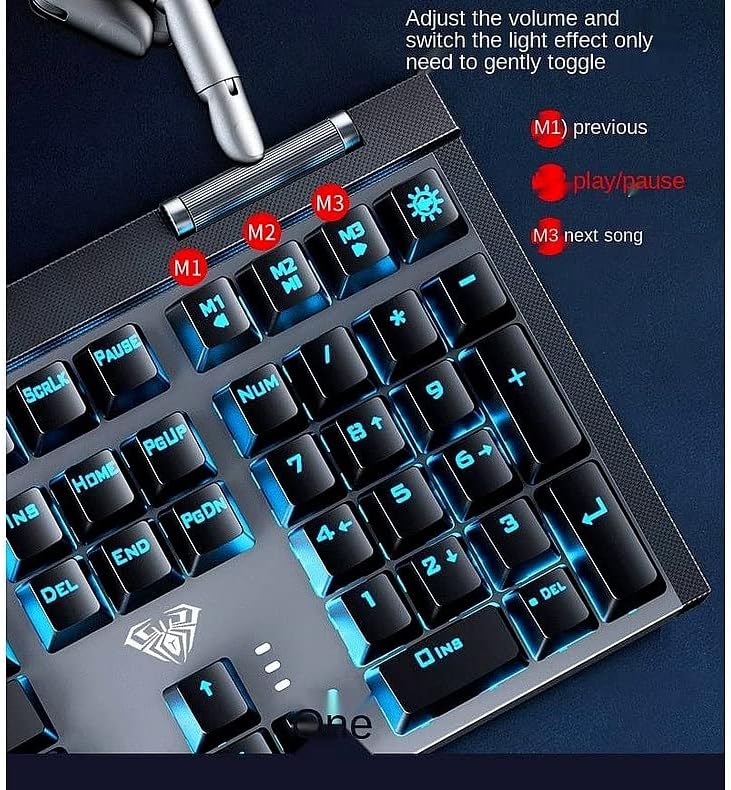
Сүрөт: деталдуу view of the multimedia knob and dedicated media control buttons.
5.2 Жарыкты башкаруу
The keyboard features a green backlight. Specific controls for changing backlight modes or brightness may be available through function key combinations (e.g., Fn + specific keys). Refer to the keyboard's keycap legends or try common combinations like Fn + directional arrows or Fn + Ins/Home/PgUp/Del/End/PgDn for backlight adjustments.

Image: The AULA F3030 keyboard showcasing its green backlight.
5.3 Механикалык өчүргүчтөр
The AULA F3030 uses Blue mechanical switches, known for their distinct tactile bump and audible click. This provides clear feedback with each keystroke, which is preferred by many typists and gamers for its responsiveness and accuracy.

Image: A close-up of the Blue mechanical switch, highlighting its design.
6. Техникалык тейлөө жана кам көрүү
To ensure the longevity and optimal performance of your AULA F3030 Gaming Keyboard, follow these maintenance tips:
- Тазалоо: Use a soft, dry cloth to wipe down the keyboard surface. For dust and debris between keys, use compressed air. For stubborn grime, a slightly damp cloth (not wet) can be used, ensuring no liquid enters the keyboard.
- Суюктуктардан алыс болуңуз: Ички компоненттерге зыян келтирбөө үчүн клавиатурадан суюктуктарды алыс кармаңыз.
- Сактагыч: When not in use, store the keyboard in a clean, dry environment away from direct sunlight or extreme temperatures.
7. Кыйынчылыктарды
If you encounter any issues with your AULA F3030 Gaming Keyboard, please refer to the following common solutions:
- Баскычтоп жооп бербейт:
- USB кабели клавиатурага жана компьютерге бекем сайылганын текшериңиз.
- Баскычтопту компьютериңиздин башка USB портуна сайып көрүңүз.
- Компьютериңизди өчүрүп күйгүзүңүз.
- Арткы жарык иштебейт:
- Check if the backlight has been turned off via a function key combination (e.g., Fn + light icon key).
- Баскычтоп туура туташып жана кубат алып жатканын текшериңиз.
- Катталбаган ачкычтар:
- Clean around the affected key to ensure no debris is obstructing the switch.
- Эгер белгилүү бир ачкычтар гана таасир этсе, бул аппараттык камсыздоо маселесин көрсөтүшү мүмкүн.
Бул кадамдарды жасагандан кийин көйгөй чечилбесе, кардарларды колдоо менен байланышыңыз.
8. Продукттун спецификациялары
| Спецификация | Деталь |
|---|---|
| Продукциянын өлчөмдөрү | 27 x 22 x 5 см |
| Салмагы | 1.55 кг |
| Өндүрүүчү | Aula |
| Байланыш технологиясы | USB Wired |
| Keyboard Description | Мультимедиа |
| Өзгөчөлүктөр | Backlit, Anti-Ghosting, N-Key Rollover |
| Ачкычтардын саны | 104 |
| Стиль | Заманбап |
| Материал | Металл |
| Тема | Оюндар |
| Шайкеш түзмөктөр | Laptop (and other devices with USB port) |
9. Кепилдик жана колдоо
For information regarding warranty coverage and technical support for your AULA F3030 Gaming Keyboard, please refer to the warranty card included with your purchase or contact the retailer/manufacturer directly. Keep your proof of purchase for warranty claims.

