
1. Киришүү
This manual provides detailed instructions for the Voktta DC 5V-30V Programmable Delay Relay Module, model ZK-KTD2. This versatile module is designed for various timing control applications, offering adjustable delay settings and multiple operating modes. Please read this manual thoroughly before operation to ensure correct usage and optimal performance.
1.1. Негизги өзгөчөлүктөрү
- Wide Voltage Range: DC 5V - 30V, with Micro USB 5.0V power support.
- Adjustable Timing: Continuously adjustable from 0.1 seconds to 999 minutes.
- High Load Capacity: Controls devices up to DC 30V/5A or AC 220V/5A.
- Memory Function: Automatically saves all set parameters (OP, CL, LOP, CLL, CLH) after power off.
- Multi-functionality: Includes emergency stop and reverse polarity protection.
- Sleep Mode: Display turns off after 3 minutes of inactivity, wakes with any button press.
- Passive Relay Output: The relay output is a passive contact, controlling the on/off state of a line without providing current output.
1.2. Тиркемелер
The ZK-KTD2 module is suitable for a wide range of applications requiring precise timing control, such as:
- Кирүүнү башкаруу системалары
- Water heater control
- Automatic pet feeders (e.g., cat food dispensers)
- Жарыкты башкаруу
- Өнөр жайды автоматташтыруу
- DIY projects requiring timed switching
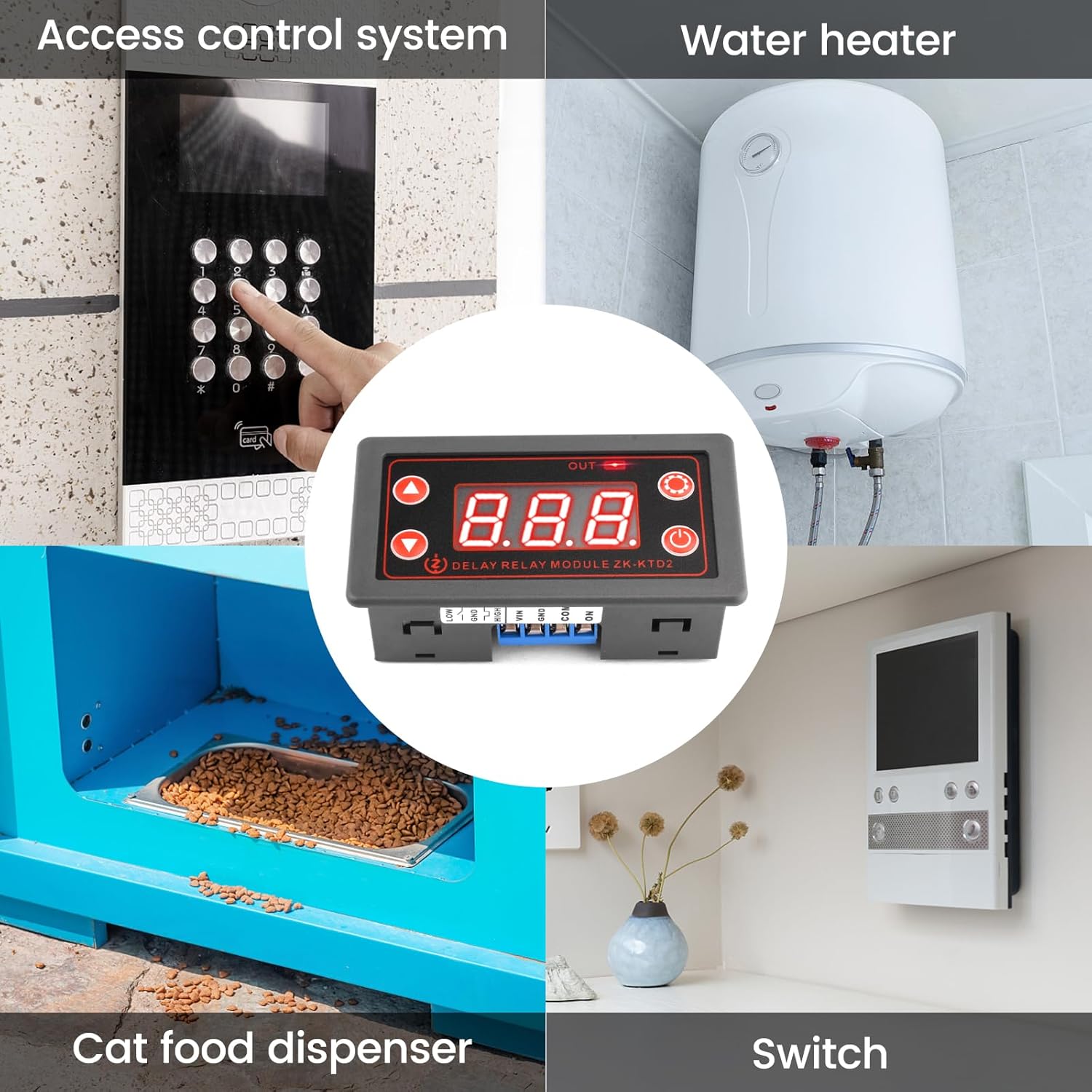
1-сүрөт: Мисample applications of the ZK-KTD2 module.
2. Продукт бүтүп калдыview
2.1. Module Components
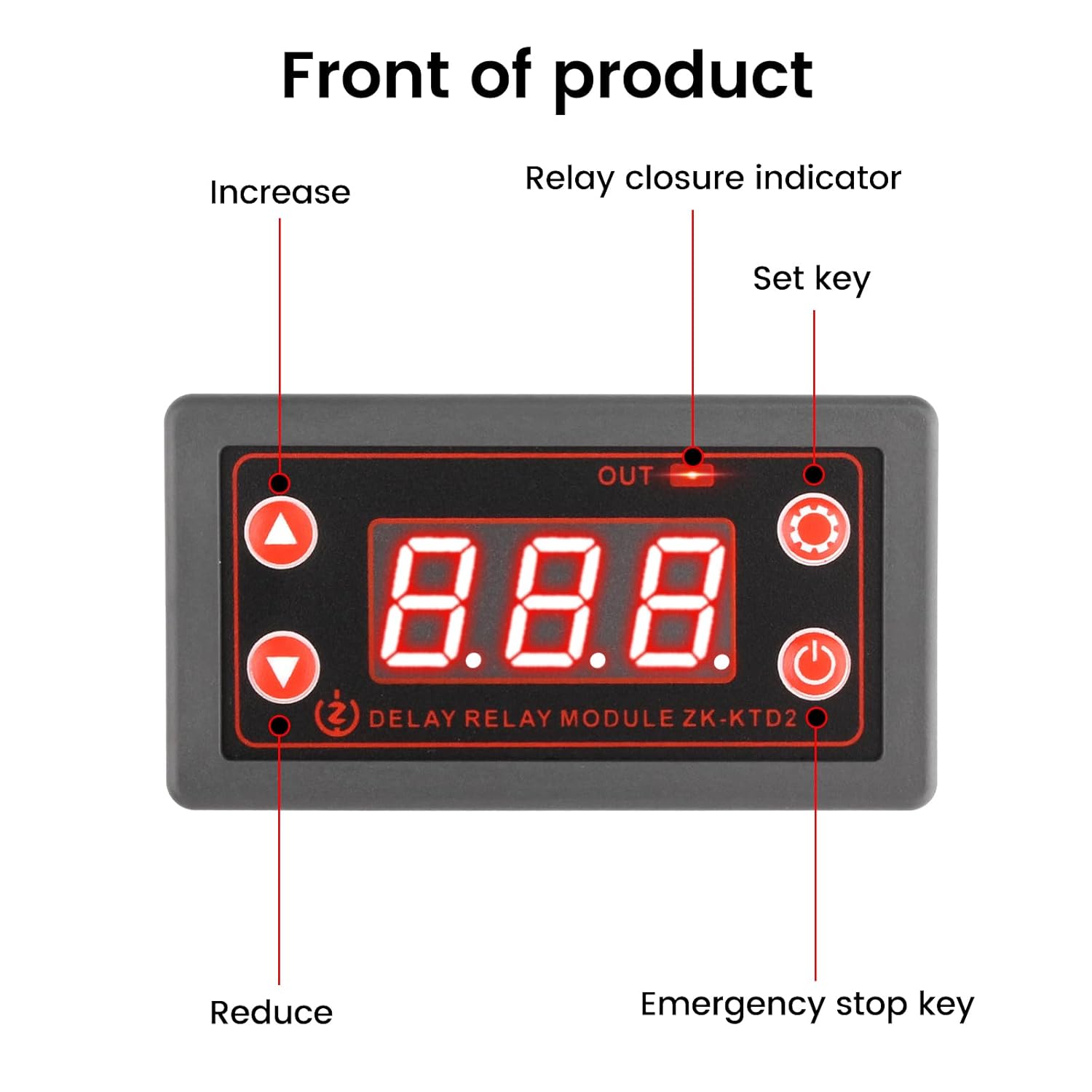
Сүрөт 2: Алдыңкы view of the ZK-KTD2 module with labeled controls.
- LED дисплей: Shows current time, mode, and parameter settings.
- OUT көрсөткүчү: Illuminates when the relay is active (closed).
- Increase Button (Up Arrow): Маанилерди көбөйтүү же менюларда багыт алуу үчүн колдонулат.
- Reduce Button (Down Arrow): Маанилерди азайтуу же менюларда багыт алуу үчүн колдонулат.
- Set Key (Gear Icon): Программалоо режимине кирип, жөндөөлөрдү ырастайт.
- Emergency Stop Key (Power Icon): Toggles the relay output on/off immediately.
2.2. Connection Terminals
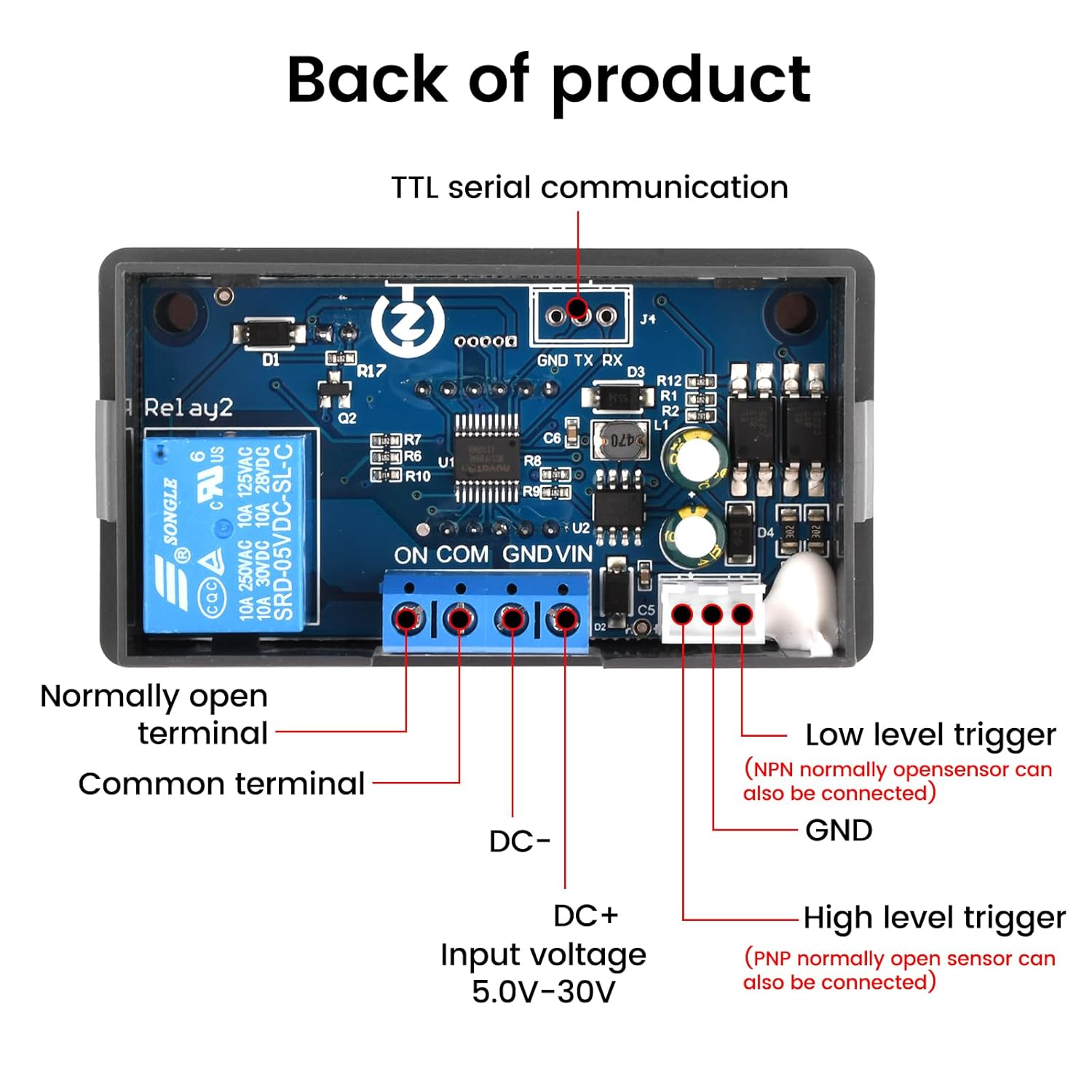
3-сүрөт: Артка view of the ZK-KTD2 module with labeled connection terminals.
- VIN / GND: DC 5.0V-30V power input. Micro USB 5.0V can also be used for power.
- DC+ / DC-: Киргизүү тtage terminals (5.0V-30V).
- КҮЙҮК: Normally Open terminal of the relay.
- COM: Common terminal of the relay.
- ТӨМӨН: Low-level trigger input (NPN normally open sensor can be connected).
- ЖОГОРКУ: High-level trigger input (PNP normally open sensor can be connected).
- GND (Trigger): Ground for trigger inputs.
- TTL Serial Communication (GND TX RX): For advanced control and data communication.
3. Орнотуу жана зымдар
3.1. Электр кубатын кошуу
The module can be powered by a DC 5V-30V source connected to the VIN/GND terminals or via a 5.0V Micro USB cable. Ensure the correct polarity when connecting the DC power supply to prevent damage.
3.2. Load Wiring
The relay output is a passive contact (ON, COM). This means it acts as a switch and does not provide power to the load. You must connect your load and its power source through these contacts.
- Identify the power source for your load (e.g., DC 12V, AC 220V).
- Connect one side of your load to the power source.
- Connect the other side of your load to the ON (Normally Open) terminal of the relay.
- туташтыруу COM (Common) terminal of the relay to the other side of your load's power source (e.g., ground for DC, neutral for AC).
- Бардык байланыштар коопсуз жана изоляцияланганын текшериңиз.
Warning: Always disconnect power before making any wiring changes. Incorrect wiring can damage the module or connected devices.
3.3. Trigger Input (Optional)
If using an external trigger, connect it to the LOW or HIGH trigger input terminals and the corresponding GND. The type of sensor (NPN for LOW, PNP for HIGH) determines the appropriate connection.
4. Иштөө нускамалары
4.1. Дисплей режимдери
The module has several display modes, indicated by the LED display. The default display shows the current operating mode or time value.
4.2. Parameter Settings (OP, CL, LOP)
The module supports various operating modes, each with specific parameters:
- OP: On-time (relay closes for this duration).
- CL: Off-time (relay opens for this duration).
- LOP: Loop count (number of cycles for cycle mode).
These parameters are independent and automatically saved.
4.3. Программалоо режимине кирүү
- басып, кармап туруңуз Ачкычты коюу (gear icon) for 3 seconds to enter programming mode. The display will show the current operating mode (e.g., P1.1).
- колдонуу Көбөйтүү жана Кыскартуу buttons to select the desired operating mode (P1.1 to P5.x).
- басыңыз Ачкычты коюу briefly to enter parameter setting for the selected mode. The first parameter (e.g., OP) will flash.
- колдонуу Көбөйтүү жана Кыскартуу маанисин тууралоо үчүн баскычтар.
- басыңыз Ачкычты коюу briefly to move to the next parameter (e.g., CL, LOP). Repeat adjustment.
- After setting all parameters for the mode, press and hold the Ачкычты коюу for 3 seconds to save settings and exit programming mode. The module will return to its normal operating state.
4.4. Time Unit Selection
While in parameter setting mode (e.g., OP flashing), briefly press the Шашылыш токтотуу ачкычы (power icon) to cycle through time units:
- xxx. (decimal point in the hundreds place): 0.1 seconds to 99.9 seconds
- xx.x (decimal point in the tens place): 1 second to 999 seconds
- x.x.x. (no decimal points): 1 minute to 999 minutes
4.5. Шашылыш токтотуу функциясы
баскычын кыскача басыңыз Шашылыш токтотуу ачкычы (power icon) during operation to immediately stop or start the relay output. The display will show "OFF" when stopped and "ON" when active.
4.6. Уйку режими
If no operation is performed for 3 minutes after startup, the display will automatically turn off to save power. Press any button to wake up the display and resume operation.
5. Техникалык тейлөө
- Модулду чаңдан жана нымдан таза жана таза кармаңыз.
- Модулга экстремалдык температурага же тике күн нурунун таасирин тийгизбеңиз.
- Regularly check wiring connections for looseness or corrosion.
- Do not attempt to disassemble or repair the module yourself. Refer to qualified personnel for service.
6. Кыйынчылыктарды
| Көйгөй | Мүмкүн себеп | Чечим |
|---|---|---|
| Модуль күйбөйт. | Электр энергиясы жок же туура эмес томtage/polarity. | Check power connections (5V-30V DC or Micro USB 5V). Ensure correct polarity. |
| Реле которулбайт. | Incorrect wiring of the load, incorrect mode settings, or emergency stop active. | Verify load wiring (ON/COM terminals). Check operating mode and parameter settings. Press Emergency Stop Key to ensure it's not in "OFF" state. |
| Дисплей өчүк. | Module is in sleep mode. | Дисплейди ойготуу үчүн каалаган баскычты басыңыз. |
| Parameters not saving. | Did not exit programming mode correctly. | Ensure you press and hold the Set Key for 3 seconds to save and exit after setting parameters. |
For further assistance, please refer to the product manual available on the product page or contact Voktta customer support.
7. Техникалык шарттар

Figure 4: Physical dimensions of the ZK-KTD2 module.
| Өзгөчөлүк | Деталь |
|---|---|
| Бренд | Voktta |
| Модель номери | ZK-KTD2 (GXMA0027-001) |
| Киргизүү көлөмүtage | DC 5V - 30V (supports Micro USB 5.0V) |
| Убакыт диапазону | 0.1 seconds to 999 minutes (continuously adjustable) |
| Жүктөө жөндөмдүүлүгү | DC 30V / 5A or AC 220V / 5A |
| Байланыш түрү | Normally Open (Passive Contact) |
| Байланыш материалы | Жез |
| Иштөө режими | Автоматтык |
| Монтаж түрү | DIN темир жол |
| Продукциянын өлчөмдөрү (L x W x Y) | 7.9 x 4.3 x 2.7 см (3.11 x 1.69 x 1.06 дюйм) |
| Салмагы | 60 грамм |
| Келип чыккан өлкө | Кытай |
8. Кепилдик жана колдоо
Voktta products are designed for reliability and performance. For any questions, technical support, or warranty claims, please contact Voktta customer service. Refer to your purchase documentation for specific warranty terms and contact information.
You may also find additional resources and product information on the official Voktta product page or webсайт.