
Introduction
This manual provides detailed instructions for the setup, operation, and maintenance of your TONOR TW630 UHF Dual Wireless Microphone System. Please read this manual thoroughly before using the product to ensure proper function and longevity.
Кутуда эмне бар
Төмөндө тизмеленген нерселердин баары пакетиңизге камтылганын текшериңиз:
- 2 x Колго кармалуучу микрофондор
- 1 x Receiver with 6.35mm Plug
- 2 x Тайгаланбай турган шакекчелер
- 2 x Mic Covers (Foam Windscreens)
- 1 x USB заряддоо кабели
- 1 x User Manual

Image: All components included in the TONOR TW630 package.
Продукт бүттүview
The TONOR TW630 system features two durable metal handheld microphones and a compact plug-in receiver, designed for clear audio transmission over a UHF frequency band.

Сүрөт: деталдуу view of the microphone, showing its display, power button, and channel switch button.
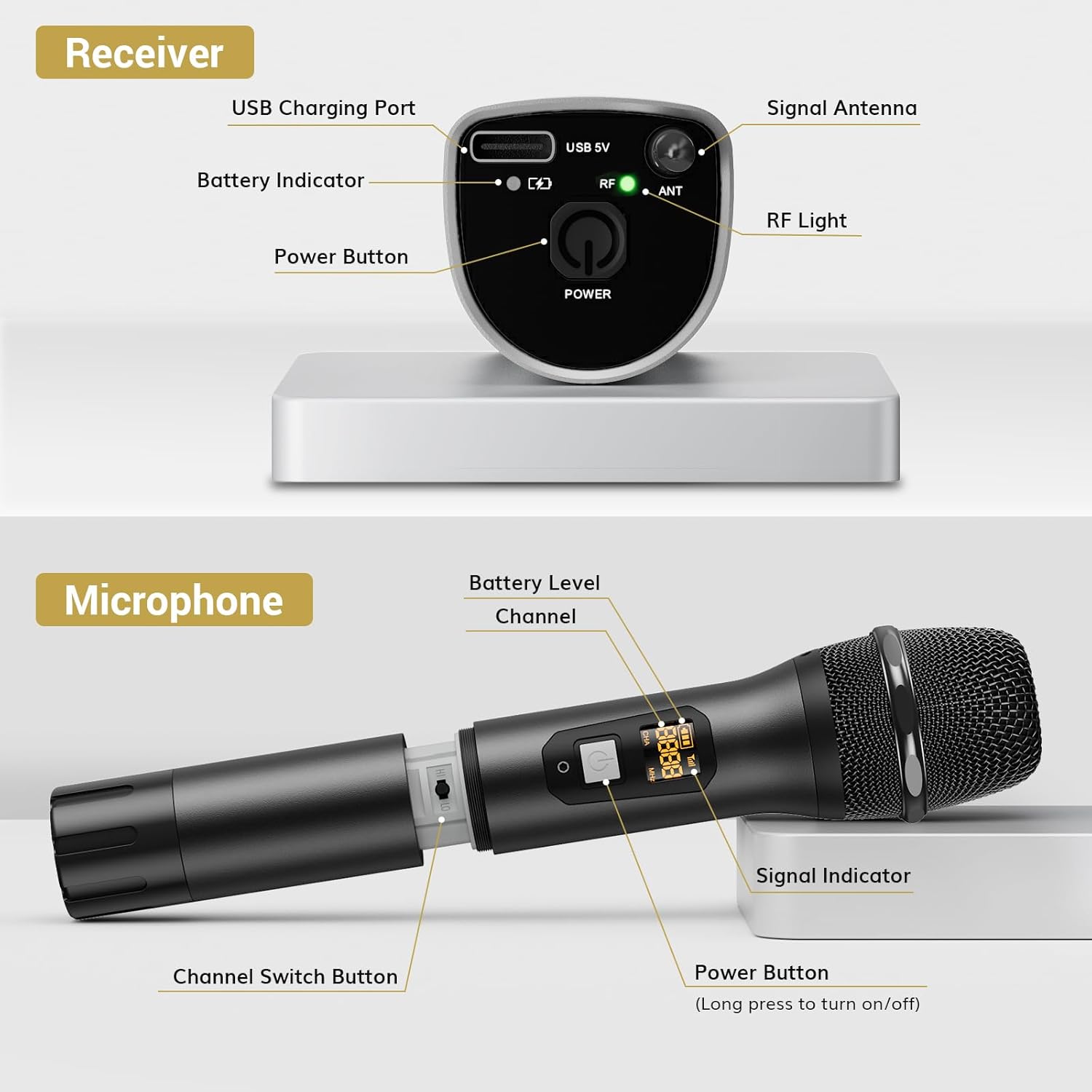
Сүрөт: деталдуу view of the receiver, highlighting its charging port, antenna, and indicator lights.
Негизги өзгөчөлүктөрү:
- Зымсыз эркиндик: Up to 200ft (60m) operating range (line of sight).
- Туруктуу сигнал: 15 adjustable channels to minimize interference.
- Туруктуу курулуш: Microphones and receiver are made of rugged metal.
- Узартылган батареянын иштөө мөөнөтү: Receiver provides up to 6 hours of use on a 2-3 hour charge.
Орнотуу колдонмосу
1. Электр камсыздоо
- Микрофондор: Each microphone requires 2 x AA batteries (not included). Open the battery compartment at the bottom of the microphone and insert the batteries, observing polarity.
- Алуучу: The receiver has a built-in rechargeable battery. Charge it using the provided USB cable and a 5V adapter (not included). A full charge takes approximately 2-3 hours and provides up to 6 hours of operation.

Image: Instructions for powering the microphone with AA batteries and charging the receiver via USB.
2. Pairing the Microphones and Receiver
The system is designed for automatic pairing:
- Turn on both the microphone(s) and the receiver.
- The receiver will automatically sync its frequency with the microphone(s). The RF light on the receiver will illuminate when a stable connection is established.
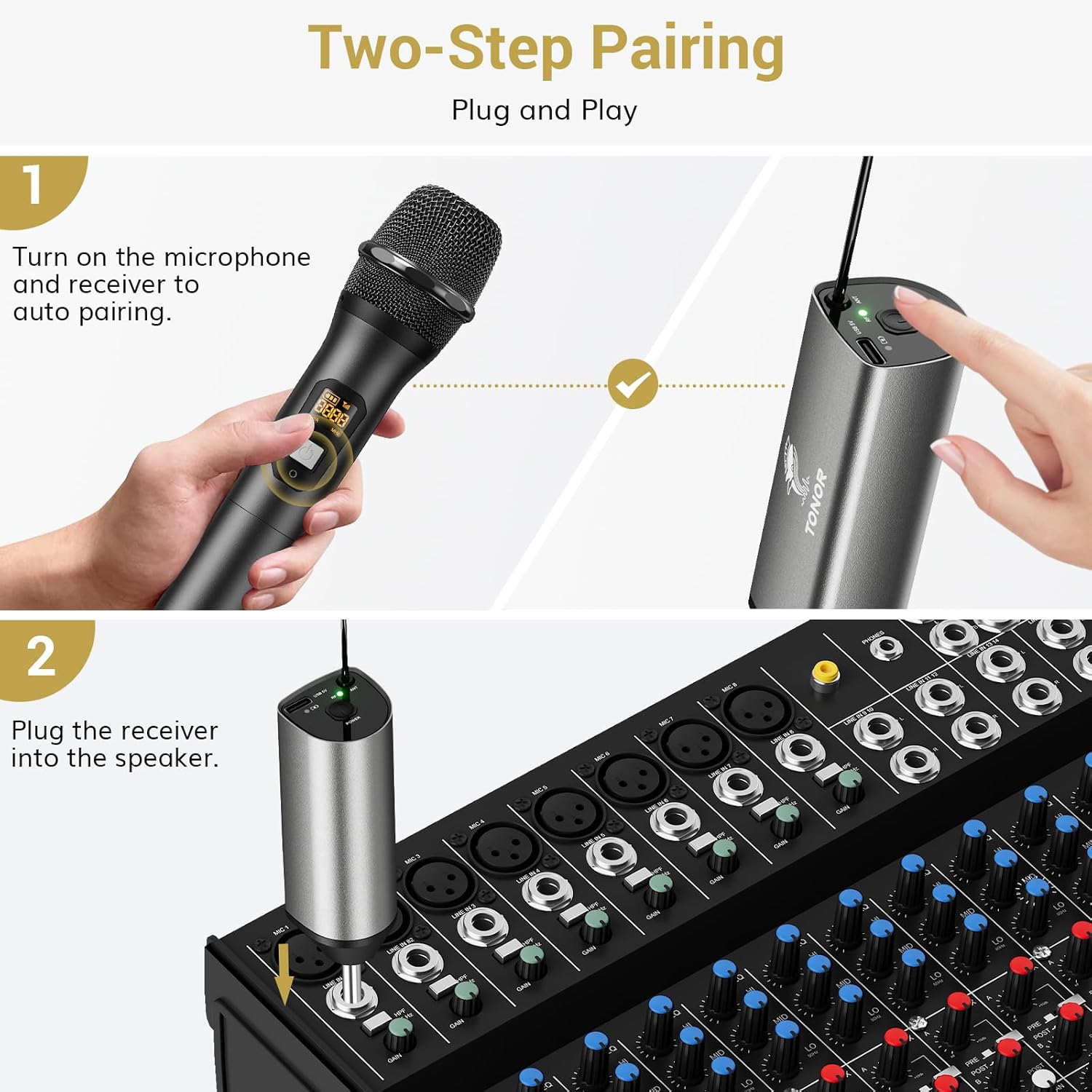
Image: Visual guide for the two-step pairing process and connecting the receiver.
3. Аудио түзмөктөргө туташуу
Plug the 6.35mm receiver directly into the "MIC IN" input of compatible audio equipment.
- Шайкеш түзмөктөр: Powered speakers, karaoke machines, amplifiers, mixers, and audio interfaces.
- Шайкеш келбеген түзмөктөр: This system is not compatible with phones, computers, or tablets directly. An additional 3.5mm (1/8") adapter is required for these devices (not included).

Сүрөт: Мисamples of compatible audio devices and correct input connection.
Иштөө нускамалары
Каналды алмаштыруу
The TW630 system offers 15 adjustable channels to avoid interference. If you experience signal issues or are using multiple sets simultaneously, you can change the microphone's channel:
- To switch channels, briefly press the "Channel Switch Button" located inside the microphone's battery compartment (after unscrewing the bottom part).
- The display on the microphone will show the current channel (CHA) and frequency (MHz).
- The receiver will automatically adjust to the new channel.

Image: Guide to changing microphone channels.
Using Multiple Microphone Sets
Up to 15 sets of TONOR TW630 systems can be used simultaneously without interference. Ensure each set operates on a different channel to prevent signal conflicts.
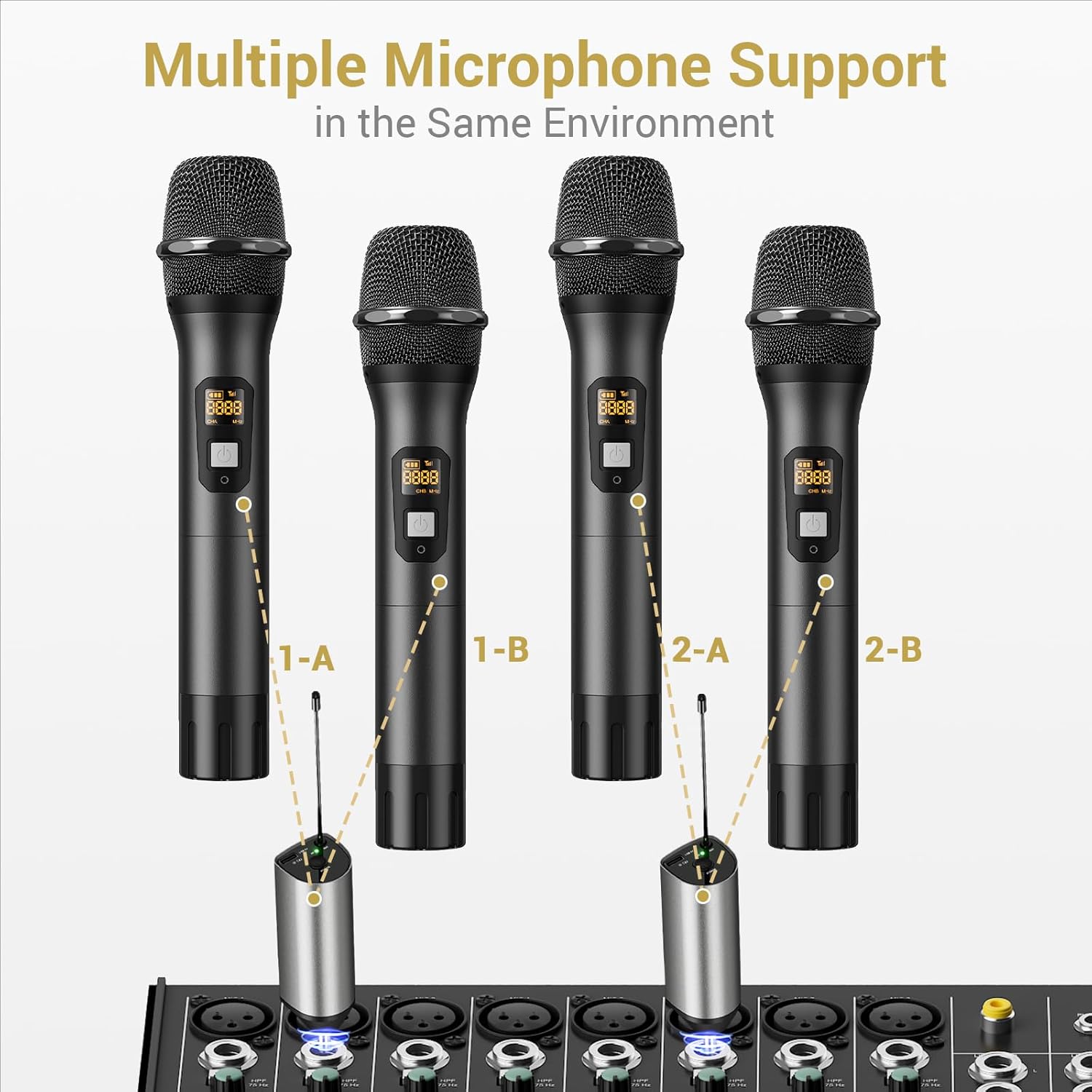
Image: Setup for using multiple microphone systems in the same environment.
Техникалык тейлөө
- Тазалоо: Микрофондорду жана ресиверди жумшак, кургак чүпүрөк менен сүртүңүз. Суюк тазалагычтарды же эриткичтерди колдонбоңуз.
- Батареяга кам көрүү: Remove AA batteries from microphones if not in use for extended periods to prevent leakage. Recharge the receiver regularly to maintain battery health.
- Сактагыч: Системаны күн нурунан жана экстремалдык температурадан алыс салкын, кургак жерде сактаңыз.
- Microphone Covers: Use the provided foam mic covers to protect against wind noise and moisture.
Проблемаларды чечүү
| Көйгөй | Мүмкүн себеп | Чечим |
|---|---|---|
| Микрофондон үн чыкпайт |
|
|
| Интерференция же начар үн сапаты |
|
|
| Receiver not charging |
|
|
Техникалык шарттар
| Өзгөчөлүк | Деталь |
|---|---|
| Бренд | ТОНОР |
| Модель аты | TW630 |
| Элемент моделинин номери | TN120106 |
| Байланыш технологиясы | UHF |
| Туташтыргыч түрү | 6.35 мм Джек |
| Микрофон форма фактору | Колдук |
| Материал | Металл |
| Каналдардын саны | 15 |
| Аудио сезгичтиги | 52 децибел |
| Ызы-чуунун катышы | 70 дБ |
| Полярдык үлгү | Бир багыттуу |
| Power Source | Battery Powered (Microphones: 2x AA each; Receiver: Rechargeable Lithium Ion) |
| Кабылдагычтын заряддоо убактысы | 2-3 саат |
| Ресивердин иштөө убактысы | 6 саатка чейин |
| Иштөө диапазону | 200ft / 60m (line of sight) |
| Элемент Салмагы | 1.32 фунт (600 грамм) |
| Пакеттин өлчөмдөрү | 11.18 x 6.42 x 2.99 дюйм |
Коопсуздук маалыматы
- Do not expose the product to water or excessive moisture.
- Өнүмдү түшүрүүдөн же катуу таасирлерге дуушар кылуудан качыңыз.
- Use only a 5V adapter for charging the receiver to prevent damage.
- Балдар жетпеген жерде сактаңыз.
- Агрегатты өз алдынча бөлүүгө же оңдоого аракет кылбаңыз. Квалификациялуу тейлөө кызматкерлерине кайрылыңыз.
Кепилдик жана колдоо
For warranty information and technical support, please refer to the official TONOR website or contact TONOR customer service directly. Keep your purchase receipt for warranty claims.
You can visit the TONOR store on Amazon for more information: TONOR Store