
iKF iKF Solo
iKF Solo Wireless Over Ear Headphones User Manual
Model: iKF Solo | Brand: iKF
1. Продукт бүтүп калдыview
The iKF Solo Wireless Over Ear Headphones are designed to provide an immersive audio experience with advanced features such as Active Noise Cancelling (ANC), HiFi stereo sound, and an extended battery life. These headphones are suitable for various activities including travel, work, and gaming, offering both wireless Bluetooth and wired connectivity options.

Image: iKF Solo Wireless Over Ear Headphones, showcasing their sleek offwhite design.
2. Кутуда эмне бар
Upon unboxing your iKF Solo headphones, you will find the following components:
- iKF Solo Headphones
- USB заряддоо кабели
- Detachable External Microphone
- Колдонуучунун Колдонмосу (бул документ)
- Сактоочу баштык

Image: A visual representation of the iKF Solo headphone package contents, including the headphones, charging cable, external microphone, and storage bag.
3. Негизги өзгөчөлүктөрү
3.1 Активдүү ызы-чууну жокко чыгаруу (ANC)
The iKF Solo headphones feature hybrid active noise cancelling technology, effectively reducing background noise by up to 52dB. This is ideal for environments such as flights, commutes, or busy offices. ANC levels can be adjusted via the iKF app.

Image: A graphic demonstrating the principle of active noise cancellation, showing how ambient sound is filtered out.
3.2 HiFi Sound Quality
Equipped with 40mm silk diaphragm speakers, these headphones deliver powerful bass and clear treble, providing a high-fidelity audio experience. An immersive 3D surround sound movie mode is also available for enhanced entertainment.

Сүрөт: жарылган view highlighting the 40mm speaker driver, emphasizing the Hi-Res Audio capability.
3.3 Extended Playback Time
Enjoy up to 130 hours of playtime with ANC off, or 95 hours with ANC on, ensuring prolonged use without frequent recharging. The headphones charge fully in approximately 2 hours.
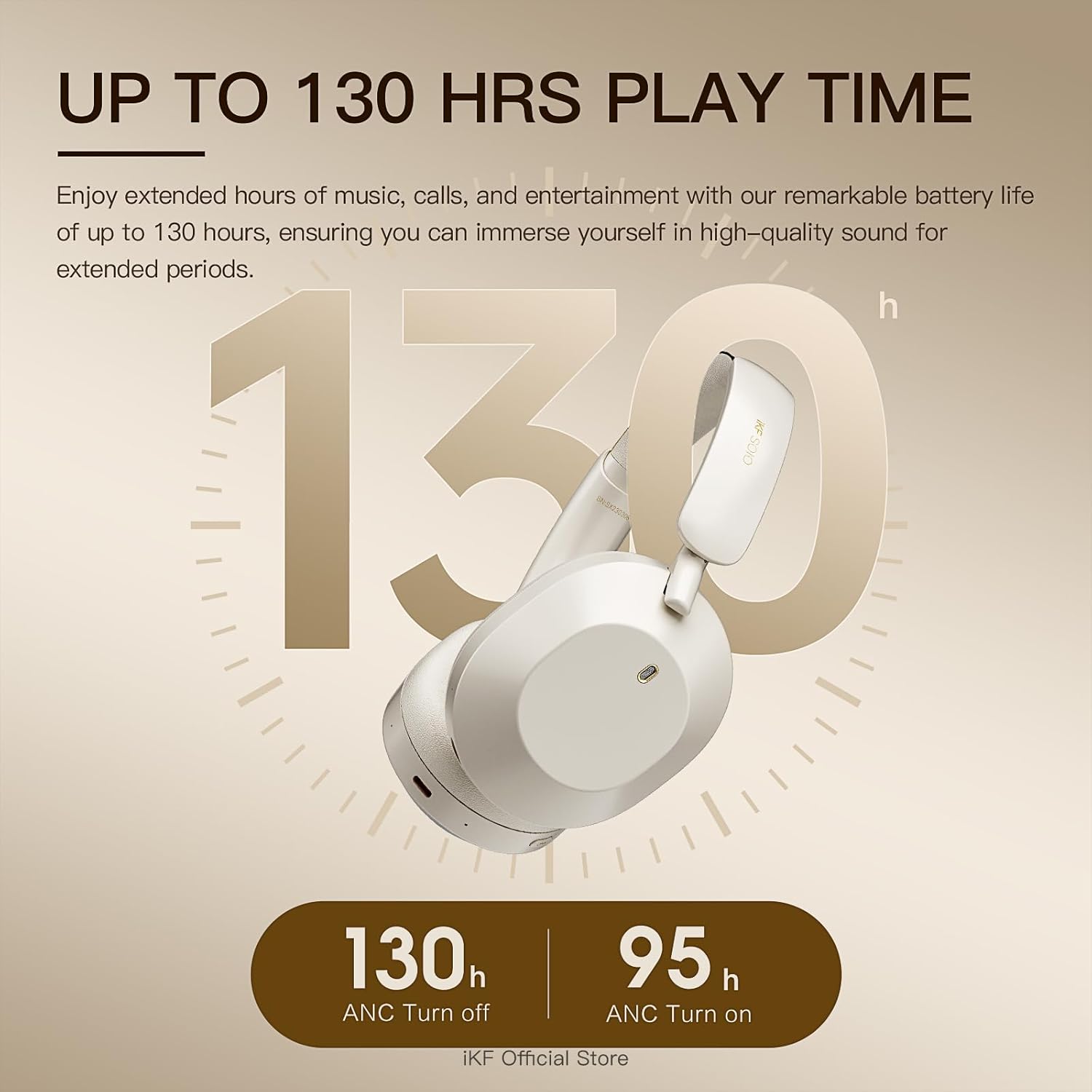
Image: A visual representation of the impressive battery life, indicating 130 hours with ANC off and 95 hours with ANC on.
3.4 Comfortable and Foldable Design
Soft protein leather ear cushions and memory foam padding provide a comfortable, pressure-free fit for extended wear. The lightweight and foldable design enhances portability and storage convenience.

Image: The iKF Solo headphones in their folded configuration, demonstrating their compact design for travel and storage, along with a detail of the soft, skin-friendly earcups.
3.5 Ар тараптуу байланыш
Supports dual wireless (Bluetooth 5.3) and wired connections (AUX input, USB audio output). The detachable microphone ensures clear communication for calls and gaming.
4. Орнотуу колдонмосу
4.1 Наушниктерди заряддоо
- Connect the USB charging cable to the Type-C port on the headphones.
- Plug the other end of the cable into a compatible USB power source (e.g., computer USB port, wall adapter).
- LED индикатору кубаттоо абалын көрсөтөт. Толук кубаттоо болжол менен 2 саатты талап кылат.
4.2 Bluetooth жупташтыруу
- Наушниктердин өчүрүлгөнүн текшериңиз.
- Жупташуу режимин көрсөткөн LED индикатору өчүп калганга чейин Кубат баскычын басып, кармап туруңуз.
- Түзмөгүңүздө (смартфон, планшет, компьютер) Bluetooth иштетип, жеткиликтүү түзмөктөрдү издеңиз.
- Select "iKF Solo" from the list of found devices to connect.
- Туташтырылгандан кийин, LED индикатору моделине жараша туруктуу жарыкка өзгөрөт же өчөт.
5. Иштөө нускамалары
5.1 Гарнитураны башкаруу
The iKF Solo headphones feature intuitive button controls for various functions:
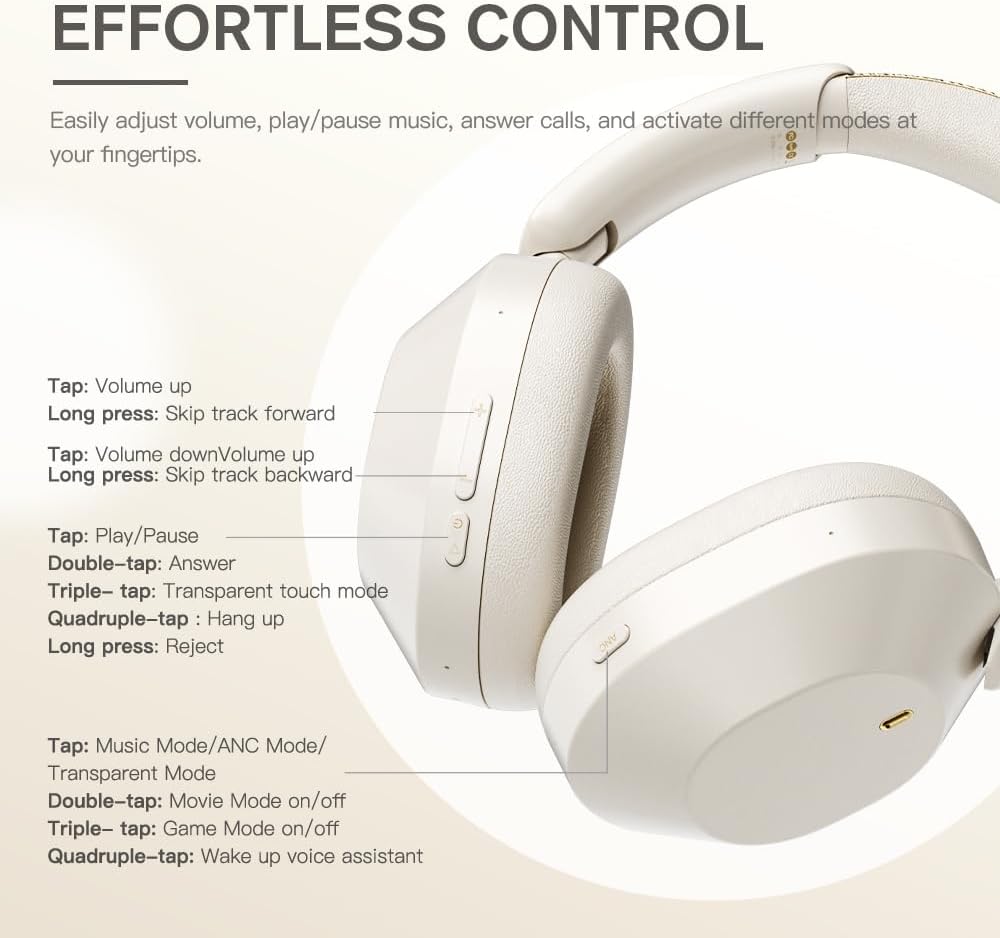
Image: A detailed diagram showing the location and function of each control button on the iKF Solo headphones.
| Акция | Функция |
|---|---|
| (+) таптаңыз | Үндү көтөрүү |
| Long press (+) | Алдыга көз жиберүү |
| (-) таптаңыз | Үндү төмөндөтүү |
| Long press (-) | Жолду артка өткөрүп жиберүү |
| Tap (Play/Pause) | Музыканы ойнотуу/тындыруу |
| Double-tap (Play/Pause) | Чакырууга жооп бер |
| Triple-tap (Play/Pause) | Transparent Touch Mode |
| Quadruple-tap (Play/Pause) | Чакырууну токтотуу |
| Long press (Play/Pause) | Чакырууну четке кагуу |
| Tap (Mode Button) | Cycle Music Mode/ANC Mode/Transparent Mode |
| Double-tap (Mode Button) | Movie Mode On/Off |
| Triple-tap (Mode Button) | Оюн режими күйгүзүү/өчүрүү |
| Quadruple-tap (Mode Button) | Үн жардамчысы ойгот |
5.2 Transparent Mode
The transparent mode allows you to hear your surroundings without removing your headphones, enhancing situational awareness. This can be activated via a triple-tap on the Play/Pause button or by cycling through modes with the Mode button.
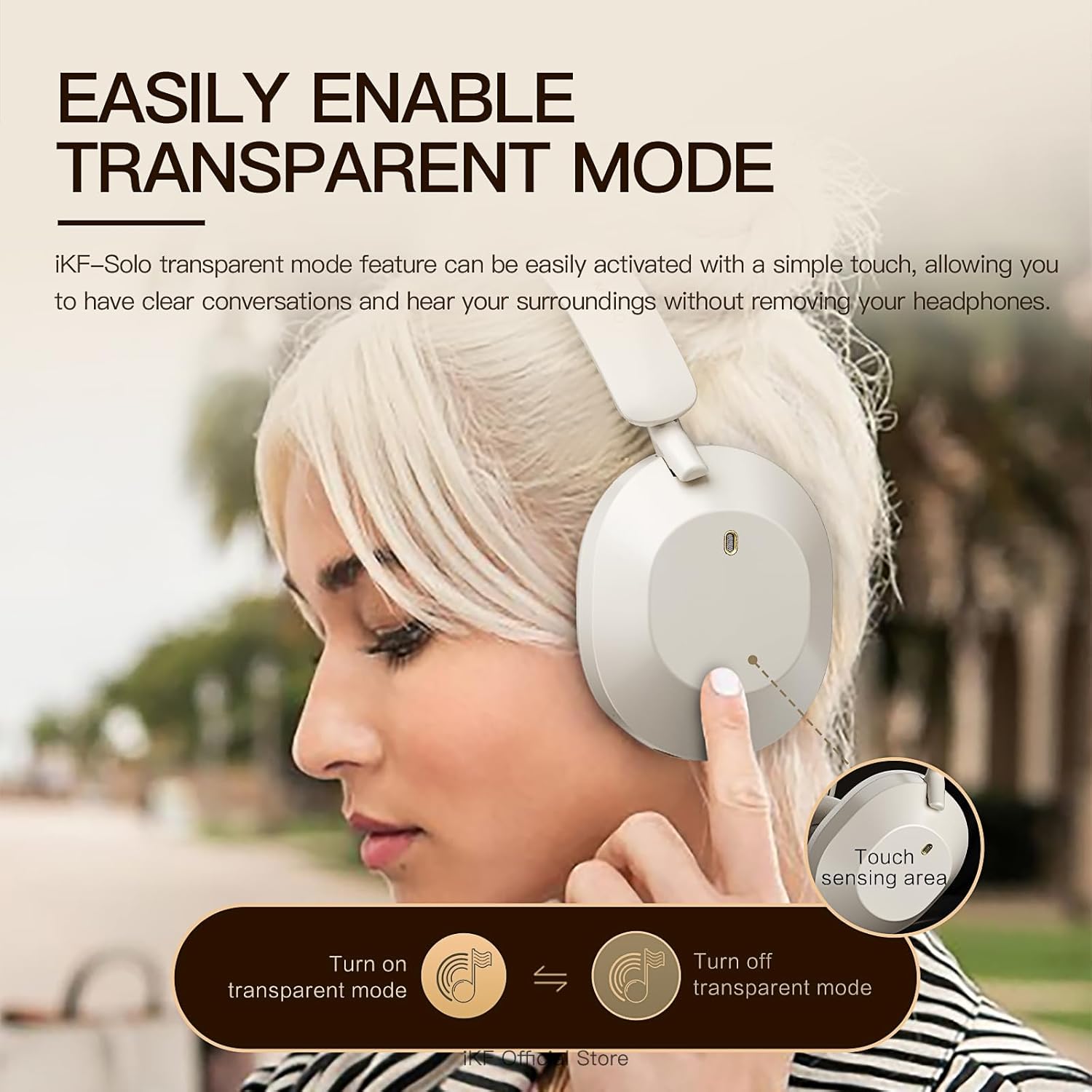
Image: A person demonstrating the activation of transparent mode by touching the ear cup, allowing them to hear their surroundings.
5.3 iKF App Customization
Personalize your listening experience by downloading the iKF app. The app allows you to:
- Adjust ANC strength.
- Switch between various listening modes (e.g., Noise Reduction, Transparent, Movie, Game).
- Control EQ settings for customized audio profiles.
- Enable dual device pairing for seamless switching between devices.
5.4 Продукциянын демонстрациялык видеосу
Watch this official video for a visual guide on the iKF Solo headphones' features and operation:
Видео: Продукциянын расмий көргөзмөсүasing the iKF Solo Hybrid Active Noise Cancelling Headphones, demonstrating features like ANC, transparent mode, Hi-Fi sound, and gaming latency.
6. Техникалык тейлөө
To ensure the longevity and optimal performance of your iKF Solo headphones, follow these maintenance guidelines:
- Тазалоо: Use a soft, dry cloth to clean the exterior of the headphones. For ear cushions, gently wipe with a slightly damp колдонуудан мурун чүпүрөккө сүртүп, толугу менен кургатыңыз. Катуу химиялык заттарды же абразивдүү материалдарды колдонуудан алыс болуңуз.
- Сактагыч: When not in use, store the headphones in the provided storage bag to protect them from dust and scratches. Store in a cool, dry place away from direct sunlight and extreme temperatures.
- Заряддоо: Use only the provided USB charging cable or a certified equivalent. Avoid using chargers with power exceeding 24 watts or unverified fast chargers, as this may damage the battery.
- Суу каршылык: These headphones are not water resistant. Avoid exposure to liquids, moisture, or high humidity.
- Колдонуу: Кулакчындарды этияттык менен кармаңыз. Аларды түшүрүп албаңыз же катуу соккуга кабылтпаңыз.
7. Кыйынчылыктарды
If you encounter issues with your iKF Solo headphones, refer to the table below for common problems and their solutions:
| Көйгөй | Мүмкүн себеп | Чечим |
|---|---|---|
| Кулакчындар күйбөйт | Батарея аз | Наушниктерди толук заряддаңыз. |
| Bluetooth аркылуу жупташтыруу мүмкүн эмес | Кулакчындар жупташтыруу режиминде эмес; Түзмөктүн Bluetooth өчүк; Интерференция | Ensure headphones are in pairing mode (flashing LED). Turn device Bluetooth off/on. Move closer to the device. Forget previous pairings on your device. |
| Үн жок же үнү төмөн | Volume too low; Incorrect audio source; Unpaired | Increase headphone and device volume. Ensure headphones are correctly paired/connected. Check audio output settings on your device. |
| Sound is choppy or cuts out | Distance from device; Interference; Low battery | Reduce distance between headphones and device. Avoid strong Wi-Fi signals or other Bluetooth devices. Charge the headphones. |
| АНК эффективдүү иштебей жатат | ANC not activated; Improper fit | Ensure ANC is turned on. Adjust headphone fit for a proper seal around your ears. |
| Микрофон иштебей жатат | Microphone not attached; Incorrect input device selected | Ensure the detachable microphone is securely plugged in. Check your device's audio input settings to select the headphone microphone. |
8. Продукттун спецификациялары
| Өзгөчөлүк | Спецификация |
|---|---|
| Модель аты | iKF Solo |
| Noise Control | Активдүү ызы-чууну жокко чыгаруу, үн изоляциясы |
| Байланыш технологиясы | Bluetooth, Wired (AUX, USB Type-C) |
| Зымсыз байланыш технологиясы | Bluetooth 5.3 |
| Bluetooth диапазону | 10 метр |
| Аудио драйвер түрү | Динамикалык драйвер |
| Аудио драйверинин өлчөмү | 40 миллиметр |
| Жыштык диапазону | 20 Гц - 20 000 Гц |
| Импеданс | 64 Ом |
| Батареянын иштөө мөөнөтү (ANC өчүк) | 130 саатка чейин |
| Батареянын иштөө мөөнөтү (ANC күйүк) | 95 саатка чейин |
| Заряддоо убактысы | Болжол менен 2 саат |
| Наушник уясы | Type-C |
| Материал | Пластик |
| Салмагы | 1.57 фунт |
| Кулак жайгаштыруу | Кулак үстүндө |
| Башкаруу түрү | Button Control, App, Voice |
| Сууга туруктуулук деңгээли | Сууга чыдамдуу эмес |
9. Кепилдик жана колдоо
For detailed warranty information and customer support, please refer to the official iKF website or the comprehensive User Manual PDF provided with your product. You can typically find the PDF manual at the following link: iKF Solo User Manual (PDF).
For further assistance, please contact iKF customer service through their official channels.
Ask a question about this manual
Ask about setup, troubleshooting, compatibility, parts, safety, or missing instructions. Manuals+ will review the question and use this page’s manual context to help answer it.