
Introduction
Сатып алганыңыз үчүн рахматasing the Kisonli SC-21 Wireless Solar Bluetooth Speaker. This portable speaker offers versatile audio playback options including Bluetooth, USB, TF card, and FM radio, along with the convenience of solar charging. Please read this manual carefully before use to ensure proper operation and to maximize your listening experience.

Image: The Kisonli SC-21 Wireless Solar Bluetooth Speaker, showcasing its design with solar panels and the Kisonli brand logo.
Коопсуздук нускамалары
- Do not expose the speaker to extreme temperatures or direct sunlight for prolonged periods, especially when not charging.
- Спикерди түшүрүүдөн же катуу таасирлерге дуушар кылуудан качыңыз.
- Keep the speaker away from water and liquids. Although it is water-resistant, it is not fully waterproof.
- Динамикти өз алдынча бөлүктөргө бөлүүгө же оңдоого аракет кылбаңыз. Жардам алуу үчүн квалификациялуу тейлөө кызматкерлерине кайрылыңыз.
- Use only the specified charging cables and adapters.
- Балдар жетпеген жерде сактаңыз.
Пакеттин мазмуну
Сураныч, пакетте төмөнкү нерселерди текшериңиз:
- Kisonli SC-21 Wireless Solar Bluetooth Speaker
- USB заряддоо кабели
- Portable Shoulder Strap
- Колдонуучунун Колдонмосу (бул документ)
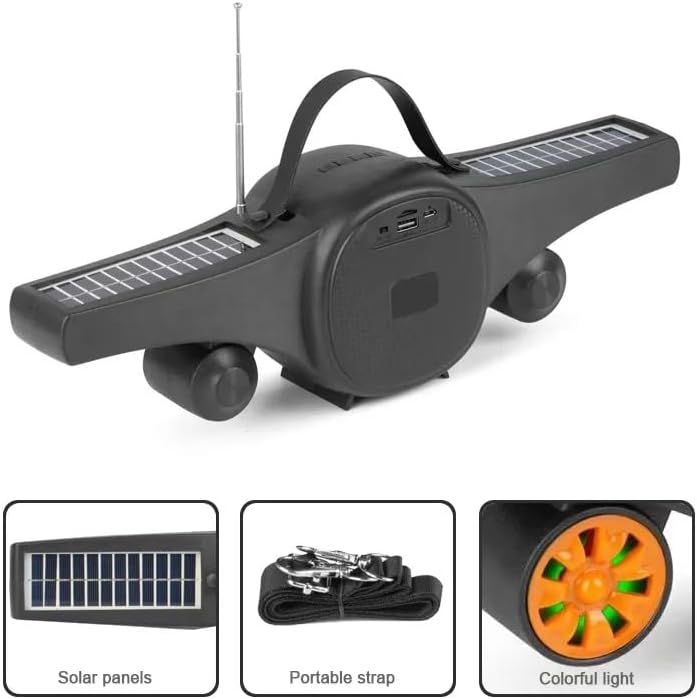
Image: The Kisonli SC-21 speaker showing its solar panels, antenna, USB port, and the included portable strap.
Продукт бүттүview
Familiarize yourself with the various parts and controls of your Kisonli SC-21 speaker.
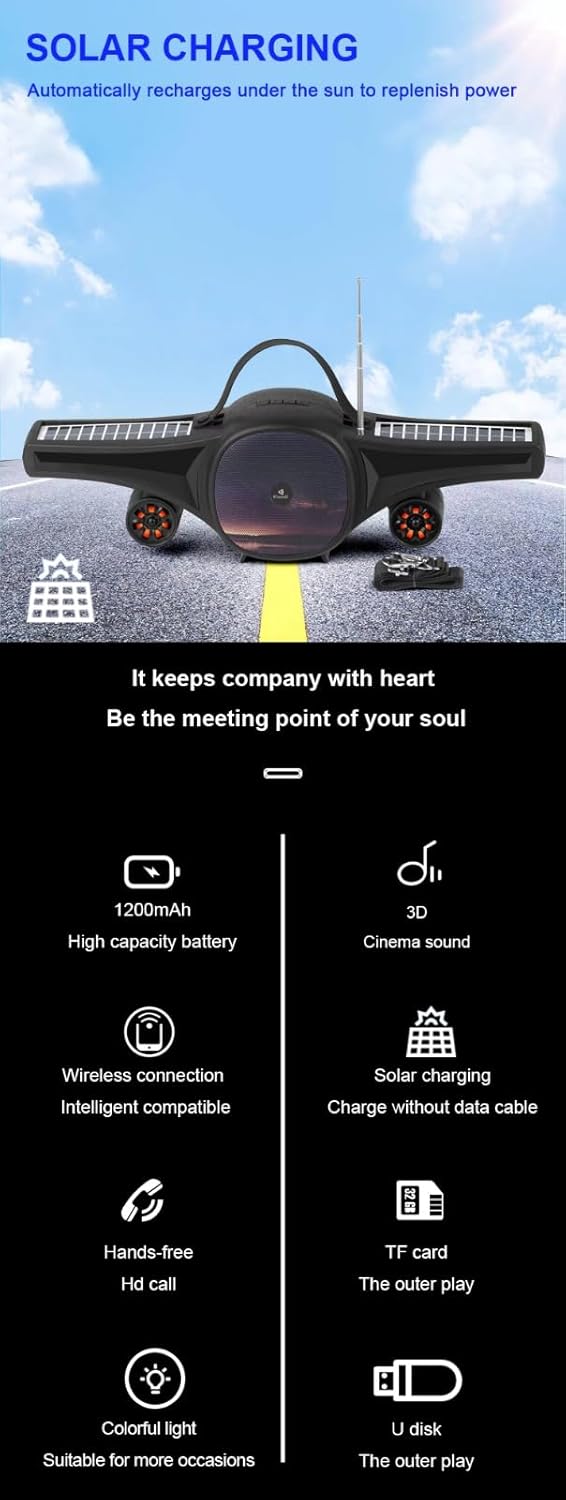
Image: A detailed display of the speaker's features, including the carrying handle, portable strap, control buttons, multiple playback ports (USB, TF card), colorful LED lights, and solar panels.
Башкаруу каражаттары жана порттор:
- Кубат которгучу: ON/OFF баскычы.
- Режим баскычы (M): Switches between Bluetooth, FM Radio, USB, and TF card modes.
- Ойнотуу/тындыруу баскычы (►/−): Plays or pauses audio. In FM mode, long press to auto-scan stations.
- Мурунку трек/үндү азайтуу (-): Short press for previous track/station, long press to decrease volume.
- Кийинки трек/үндү катуулатуу (+): Short press for next track/station, long press to increase volume.
- LED Light Button (☀): Toggles the colorful LED lights.
- USB порт: USB флэш-дискти ойнотуу үчүн.
- TF карта уячасы: TF (MicroSD) картасын ойнотуу үчүн.
- DC 5V заряддоо порту: Берилген USB кабелин колдонуп, динамикти кубаттоо үчүн.
- Күн панелдери: Located on the wings for solar charging.
- Антенна: FM радиосун жакшыраак кабыл алуу үчүн кеңейтилүүчү антенна.
Жайгашуу
1. Динамикти кубаттоо
Before first use, fully charge the speaker. The speaker can be charged via USB or solar power.
- USB заряддоо: Connect the provided USB charging cable to the DC 5V port on the speaker and to a USB power adapter (not included) or a computer's USB port. The charging indicator light will illuminate. Charging time is approximately 2-3 hours.
- Күн кубаты: Place the speaker in direct sunlight. Ensure the solar panels are facing upwards and are not obstructed. The speaker will automatically recharge. Solar charging is slower than USB charging and is ideal for maintaining charge or for use in outdoor environments.

Image: The Kisonli SC-21 speaker positioned to demonstrate its solar charging capability under sunlight.
2. Күйгүзүү / Өчүрүү
To power on the speaker, slide the Power Switch to the "ON" position. To power off, slide it to the "OFF" position.
Иштөө нускамалары
1. Bluetooth режими
- Динамикти күйгүзүңүз. Ал автоматтык түрдө Bluetooth жупташтыруу режимине кирет, жаркыраган LED жарыгы менен көрсөтүлөт.
- Түзмөгүңүздө (смартфон, планшет, ноутбук) Bluetooth иштетиңиз жана жеткиликтүү түзмөктөрдү издеңиз.
- Select "SC-21" from the list of devices.
- Once paired, the speaker will emit a confirmation sound, and the LED light will stop flashing. You can now play audio from your device through the speaker.
2. USB/TF картасын ойнотуу
- Insert a USB flash drive or a TF (MicroSD) card containing MP3/MAV audio files тиешелүү портко.
- The speaker will automatically switch to USB or TF card mode and begin playing audio. If it doesn't, press the "M" (Mode) button to cycle through modes until you reach the correct playback mode.
- Use the Previous/Next Track buttons to navigate through your music.
3. FM радио режими
- Жакшыраак кабыл алуу үчүн антеннаны узартыңыз.
- Press the "M" (Mode) button until you hear the FM radio.
- Long press the Play/Pause button (►/−) to initiate an automatic scan for available radio stations. The speaker will save the stations it finds.
- Short press the Previous/Next Track buttons to switch between saved radio stations.
4. Үндү башкаруу
Long press the "+" button to increase the volume. Long press the "-" button to decrease the volume.
5. LED жарыгын башкаруу
Press the LED Light button (☀) to turn the colorful LED lights on or off.
Техникалык тейлөө
- Тазалоо: Динамиктин бетин тазалоо үчүн жумшак, кургак чүпүрөктү колдонуңуз. Абразивдүү тазалагычтарды же эриткичтерди колдонбоңуз.
- Сактагыч: Динамикти узак убакыт бою колдонбогондо, түз күн тийбеген, кургак, салкын жерде сактаңыз.
- Батареяга кам көрүү: Батареянын иштөө мөөнөтүн узартуу үчүн, бат-баттан батарейканы толук зарядсыздандырбаңыз. Колдонулбаса дагы, динамикти дайыма заряддап туруңуз.
Проблемаларды чечүү
| Көйгөй | Мүмкүн себеп | Чечим |
|---|---|---|
| Динамик күйбөйт. | Батарея аз же түгөнүп калган. | Charge the speaker using the USB cable or place it in direct sunlight. |
| Динамиктен үн чыкпайт. | Volume is too low; device not paired; incorrect mode selected. | Increase volume; ensure Bluetooth device is paired; press "M" button to select correct mode (Bluetooth, USB, TF, FM). |
| Bluetooth жупташуусу болбой жатат. | Динамик жупташтыруу режиминде эмес; аппарат өтө алыс; кийлигишүү. | Ensure speaker is in Bluetooth mode (flashing LED); move device closer; turn off other Bluetooth devices. |
| FM радиосун кабыл алуу начар. | Антенна узартылган эмес; сигнал начар. | Extend the antenna fully; try moving the speaker to a different location. |
| USB/TF картасы ойнотулбай жатат. | Туура эмес file format; card/drive not inserted correctly; speaker not in correct mode. | камсыз кылуу files are MP3/MAV format; reinsert card/drive; press "M" button to select USB/TF mode. |
Техникалык шарттар
Detailed technical specifications for the Kisonli SC-21 speaker.

Image: A table displaying the product parameters for the Kisonli SC-21 speaker.
| Өзгөчөлүк | Деталь |
|---|---|
| Модел | SC-21 |
| Bluetooth версиясы | BT 5.0 |
| Чыгуу күчү | 5W х 1 |
| Заряддоо убактысы | 2-3 саат |
| Ойнотуу убактысы | 3-5 саат |
| Батарея сыйымдуулугу | 1200mAh |
| Продукциянын өлчөмдөрү (L x W x Y) | 400 x 92 x 116 мм |
| Продукт Салмагы | 100 grams (device only) / 800 grams (package weight) |
| Ойнотуу режимдери | Bluetooth, TF Card, USB Disk, FM Radio |
| Колдоого алынган музыка форматтары | MP3, MAV |
| Power Source | Solar Powered, DC 5V USB |
| Өзгөчөлүктөр | LED Light, Portable, Water Resistant |
| Шайкеш түзмөктөр | Смартфондор, планшеттер, ноутбуктар |
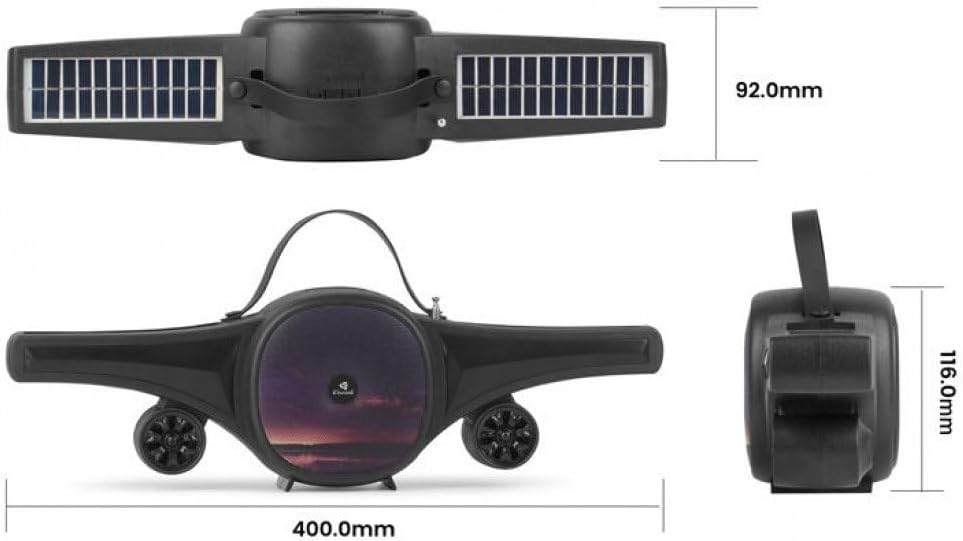
Image: Technical drawing of the Kisonli SC-21 speaker showing its dimensions (400mm length, 92mm width, 116mm height).
Кепилдик жана колдоо
Kisonli products are designed for reliability and performance. For warranty information or technical support, please refer to the retailer where you purchased the product or visit the official Kisonli webсайт. Кепилдик дооматтары үчүн сатып алганыңыздын далилин сактап коюңуз.