
1. Киришүү
Welcome to your WOOXGEHM 4-in-1 Wired Arcade Fight Stick Joystick. This manual provides essential information for setting up, operating, and maintaining your new arcade controller. Designed for compatibility with Nintendo Switch, PC, PlayStation 3, and Android devices, this joystick enhances your gaming experience with precise control and turbo functions.
2. Коопсуздук маалыматы
Коопсуздук эрежелери
- Аппаратты суудан жана нымдан алыс кармаңыз.
- Аппаратты экстремалдык температурага тийгизүүдөн сактаңыз.
- Аппаратты өз алдынча бөлүүгө же оңдоого аракет кылбаңыз.
- Берилген кабелдерди жана аксессуарларды гана колдонуңуз.
- Кичинекей балдар жетпеген жерде сактаңыз.
3. Пакеттин мазмуну
Эмне камтылган
- 1 x Universal Arcade Fight Stick
- 1 x Remote Lever Handle (Joystick)
- 1 x Fixed Small Parts (e.g., suction cups)
- 1 x Instruction Manual
4. Продукт бүтүп калдыview
The WOOXGEHM Arcade Fight Stick is designed for comfort and precision, featuring a spherical metal joystick and six round control buttons. It also includes additional buttons for various functions and platform compatibility.

1-сүрөт: WOOXGEHM 4-in-1 Wired Arcade Fight Stick Joystick, top view. A black arcade fight stick with a red spherical joystick on the left and six red circular action buttons on the right. Smaller function buttons are located above the main action buttons. The surface features a racing car graphic.
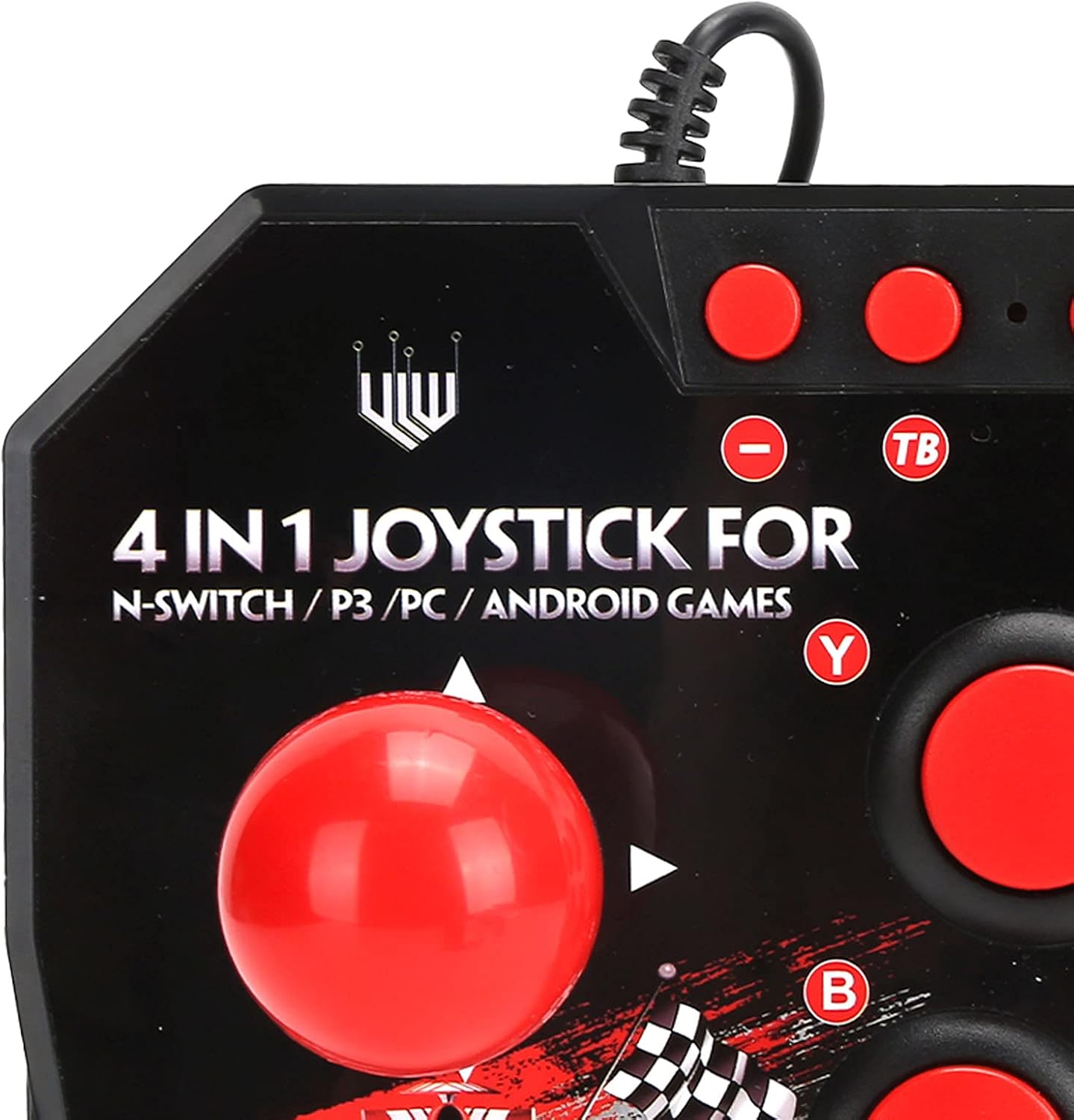
2-сүрөт: Close-up of WOOXGEHM 4-in-1 Wired Arcade Fight Stick Joystick buttons. A detailed view of the joystick's top panel, showing the "4 IN 1 JOYSTICK FOR N-SWITCH / P3 / PC / ANDROID GAMES" text, along with the red spherical joystick and several red action buttons labeled Y, B, X, A, L, R, and smaller buttons for Turbo functions.

3-сүрөт: Төмөнкү view of WOOXGEHM 4-in-1 Wired Arcade Fight Stick Joystick with suction cups. The underside of the arcade fight stick, showing four clear suction cups designed to secure the device to a flat surface during use. The label indicates "Input: DC5V / 500mA", "Working current: 20mA", and "MADE IN CHINA".
5. Орнотуу жана туташуу
The arcade fight stick connects via a wired USB cable. Ensure your console or device is powered on before connecting.
5.1 Nintendo Switch туташуусу
- Connect the USB cable from the arcade fight stick to an available USB port on your Nintendo Switch dock.
- Ensure "Pro Controller Wired Communication" is enabled in your Switch System Settings.
- Контроллер автоматтык түрдө таанылышы керек.
5.2 Компьютерге туташуу
- Connect the USB cable from the arcade fight stick to an available USB port on your PC.
- The system should automatically install the necessary drivers. If not, manual driver installation may be required (refer to your PC's operating system documentation).
- The controller will be recognized as a standard USB gamepad.
5.3 PlayStation 3 (PS3) Connection
- Connect the USB cable from the arcade fight stick to an available USB port on your PS3 console.
- The controller should be automatically recognized and ready for use.
5.4 Android Device Connection
- Connect the USB cable from the arcade fight stick to your Android device using an OTG (On-The-Go) adapter (not included).
- Android түзмөгүңүз OTG функциясын колдой турганын текшериңиз.
- The controller should be recognized as an external gamepad.

4-сүрөт: Multi-platform compatibility. This image illustrates the multi-platform compatibility of the arcade fight stick, showing it connected to a Nintendo Switch console, a PlayStation 3, a PC monitor, and an Android device, highlighting its versatility.

5-сүрөт: Plug-and-Play functionality. This image highlights the plug-and-play nature of the arcade fight stick, showing it connected to a PlayStation console, a Nintendo Switch, and a monitor displaying game content, emphasizing ease of use across platforms.
6. Иштөө нускамалары
6.1 Негизги башкаруу каражаттары
- Джойстик: Use the spherical metal joystick for directional movement.
- Аракет баскычтары: The six large round buttons (A, B, X, Y, L, R) are for primary game actions.
- Функция баскычтары: Smaller buttons above the main action buttons provide additional controls (e.g., Home, Select, Start).
6.2 Turbo Functions
The controller features turbo functions for rapid button presses.
- To activate Turbo for a button, press and hold the desired action button, then press the "TB" (Turbo) button. The button will now rapidly repeat its input when held down.
- To deactivate Turbo, press and hold the same action button, then press the "TB" button again.
6.3 Режимди алмаштыруу
The joystick may have a mode switch to toggle between different input modes (e.g., D-Pad, Left Analog Stick, Right Analog Stick) for specific games or platforms. Refer to the small buttons near the top left of the controller for these options.
7. Техникалык тейлөө жана кам көрүү
Продукт кам көрүү
- Тазалоо: Wipe the surface of the joystick with a soft, dry cloth. Do not use abrasive cleaners or solvents.
- Сактагыч: Аппаратты колдонбогондо күн тийбеген, салкын, кургак жерде сактаңыз.
- Кабелдик башкаруу: Зыяндын алдын алуу үчүн USB кабелин курч ийилүүдөн же ашыкча тартуудан алыс болуңуз.
8. Кыйынчылыктарды
Жалпы маселелер жана чечимдер
- Контроллер таанылган жок:
Чечим: Ensure the USB cable is securely connected to both the joystick and the device/console.
Чечим: For Nintendo Switch, verify "Pro Controller Wired Communication" is enabled in system settings.
Чечим: Башка USB портуна туташып көрүңүз.
Чечим: Restart your console/PC/Android device. - Баскычтар же джойстик жооп бербей жатат:
Чечим: Disconnect and reconnect the joystick.
Чечим: Test the joystick on another compatible device to determine if the issue is with the controller or the device. - Турбо функциясы иштебей жатат:
Чечим: Ensure you are correctly activating/deactivating the turbo mode as described in the Operating Instructions.
9. Техникалык шарттар
Техникалык мүнөздөмөлөр
| Өзгөчөлүк | Деталь |
|---|---|
| Модел | B0C7GYXMLZ |
| Бренд | WOOXGEHM |
| Controller Type | Баскыч менен башкаруу, Джойстик |
| Аппараттык интерфейс | USB |
| Материал | Акрилонитрил бутадиен стирол (ABS) |
| Элемент Салмагы | 0.52 килограмм (1.14 фунт) |
| Өлчөмү (болжол менен) | 21 x 15 x 6 см (8.3 x 5.9 x 2.4 дюйм) |
| Working Voltage/Current | DC5V/20mA |
| USB кабелинин узундугу | 3 м / 9.8 фут |
| Шайкештик | Nintendo Switch, PC, PS3, Android Games |

6-сүрөт: Technical specifications overview. An image displaying the technical specifications of the arcade fight stick, including item type, material (ABS), size (21 x 15 x 6 cm), working voltage/current (DC5V/20mA), and USB cable length (3m/9.8ft), along with a list of package contents.
10. Кепилдик жана колдоо
Кепилдик маалымат
This WOOXGEHM product comes with a standard manufacturer's warranty. For specific warranty terms and conditions, please refer to the warranty card included in your package or contact WOOXGEHM customer support.
Кардарларды колдоо
If you encounter any issues or have questions regarding your Arcade Fight Stick, please visit the official WOOXGEHM webсайтка же жардам үчүн кардарларды тейлөөгө кайрылыңыз.