
Introduction
Сатып алганыңыз үчүн рахматasing the ELECOM Wireless Mouse EX-G Bluetooth Silent S-size 5-button Multi-pairing, model M-XGS30BBSKBK. This ergonomic mouse is designed to provide a comfortable and strain-free experience, developed in collaboration with orthopedic surgeons. It features silent clicks, multi-pairing capabilities, and an antimicrobial surface for enhanced hygiene. This manual will guide you through the setup, operation, and maintenance of your new mouse.

Image: The ELECOM EX-G Bluetooth Silent Mouse, model M-XGS30BBSKBK.
Негизги өзгөчөлүктөрү
- Эргономикалык дизайн: Co-developed with orthopedic surgeons, the EX-G series mouse is shaped to fit the natural curve of your hand, minimizing strain on wrist and finger muscles. This design has been certified by the AskDoctors evaluation service, with 99% of 100 doctors recommending it.
- Silent Click Switches: Equipped with Panasonic silent switches for left and right clicks, as well as the scroll wheel, allowing for quiet operation in any environment, such as during web conferences or in shared workspaces.
- Multi-pairing Functionality: Connects to up to two Bluetooth-compatible devices simultaneously. Easily switch between paired devices with a dedicated button.
- Antimicrobial Surface: The mouse body and printed parts are treated with an antimicrobial coating to inhibit bacterial growth, keeping the mouse clean.
- 5 баскычтуу дизайн: Includes left click, right click, scroll wheel, and two side buttons (forward/back) for enhanced navigation and productivity.

Image: Comparison of the ergonomic EX-G mouse design (right) with a traditional mouse (left), illustrating the natural hand position.
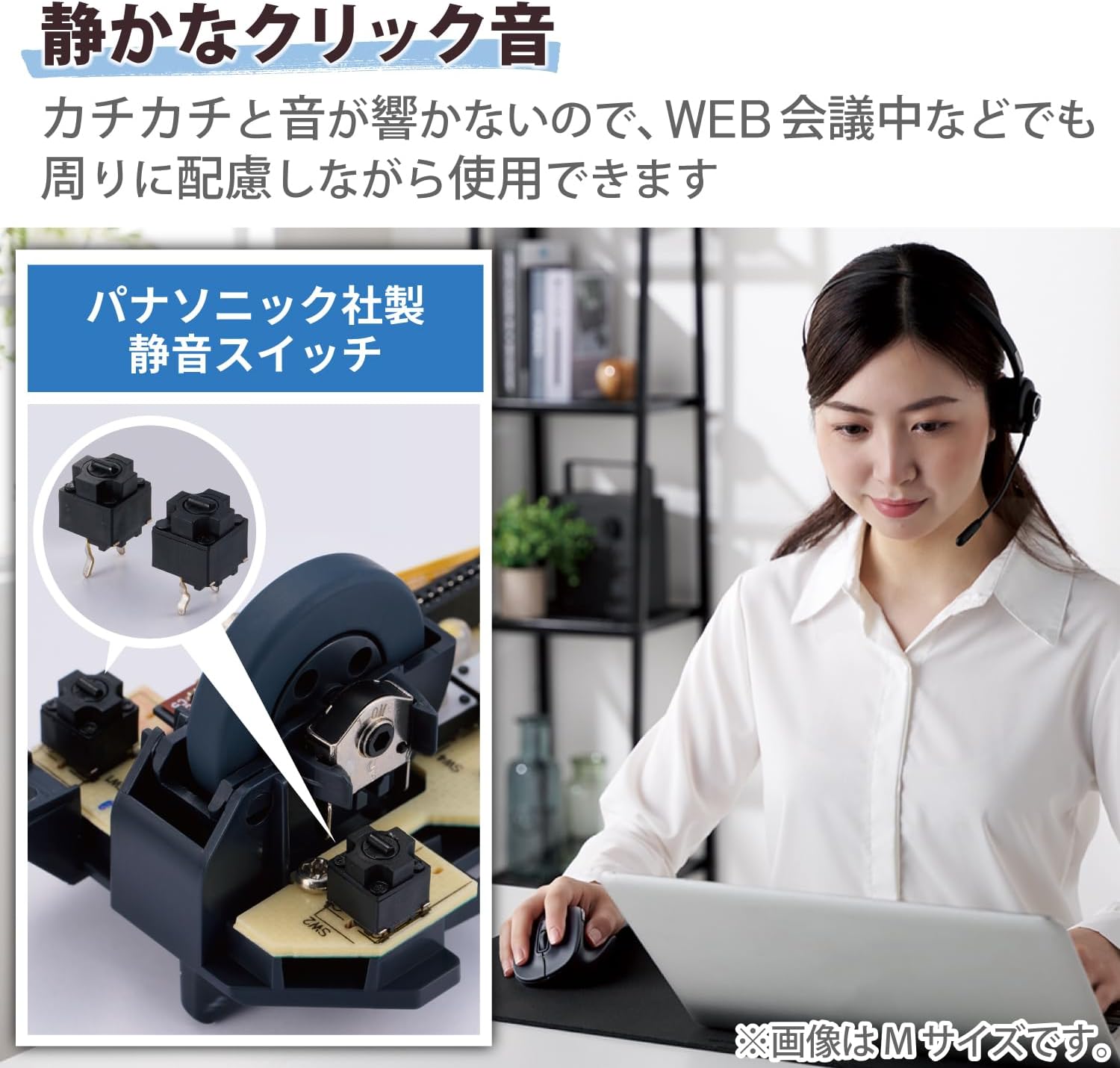
Image: A close-up of the internal Panasonic silent click switches and a user operating the mouse quietly.

Image: Illustration of the multi-pairing feature, showing indicator lights (white for device 1, green for device 2) for switching connections.

Image: Various color models of the EX-G mouse, highlighting the antimicrobial surface treatment.

Image: Diagram illustrating the functions of the 5 buttons: Left Click, Right Click, Double Click, Forward, and Back.
Жайгашуу
1. Батареяны орнотуу
- Open the battery cover located on the underside of the mouse.
- Insert one AAA alkaline battery (included) into the battery compartment, ensuring correct polarity (+/-).
- Батареянын капкагын бекем жабыңыз.
2. Bluetooth Жупташтыруу
- Төмөндөгү кубат которгучу менен чычканды күйгүзүңүз.
- Press and hold the pairing button on the bottom of the mouse until the LED indicator starts flashing (e.g., white for device 1, green for device 2).
- On your computer or device (Windows, macOS, Android, iOS, iPadOS, ChromeOS), navigate to the Bluetooth settings.
- Издөө available Bluetooth devices and select "ELECOM EX-G" or a similar name.
- Follow any on-screen prompts to complete the pairing process. The LED indicator on the mouse will stop flashing and remain solid when successfully paired.
- To pair a second device, repeat steps 2-5, ensuring the mouse is in the correct pairing mode (e.g., green LED for device 2).
Иштөө нускамалары
Чычкандын негизги функциялары
- Сол чыкылдатуу: Негизги тандоо жана активдештирүү.
- Оң чыкылдатуу: Контексттик менюларды ачат.
- Жылдыруу дөңгөлөгү: Scrolls content vertically. Pressing the scroll wheel often acts as a middle click.
- Алга/Артка баскычтары: Located on the side, these buttons allow for quick navigation in web браузерлер жана file изилдөөчүлөр.
Жупташтырылган түзмөктөрдүн ортосунда которулуу
If you have paired the mouse with two devices, press the device switching button (usually located near the pairing button on the bottom or a dedicated button on top) to toggle between Device 1 (white LED) and Device 2 (green LED).
DPI тууралоо
The mouse has a maximum sensitivity of 2000 dpi. While there isn't a dedicated DPI switch mentioned, sensitivity can typically be adjusted through your operating system's mouse settings for personalized control.
Техникалык тейлөө
Тазалоо
- Wipe the mouse surface with a soft, dry cloth.
- өжөр кир үчүн, жеңил гampкездемени суу же жумшак, абразивдүү эмес тазалоочу каражат менен сүртүңүз. Күчтүү химиялык заттардан алыс болуңуз.
- Do not allow liquids to enter the mouse body.
Батареяны алмаштыруу
When the mouse performance degrades or the indicator light suggests low battery, replace the AAA battery following the installation steps in the Setup section.
Проблемаларды чечүү
- Чычкан жооп бербей жатат:
- Check if the power switch on the bottom of the mouse is ON.
- Батарея туура орнотулганын жана түгөнүп калбагандыгын текшериңиз. Керек болсо алмаштырыңыз.
- Verify that the mouse is paired with the correct device (check the LED indicator for Device 1 or 2).
- Чычканды түзмөгүңүз менен кайра жупташтырып көрүңүз.
- Курсордун туура эмес кыймылы:
- Чычкандын түбүндөгү оптикалык сенсорду тазалаңыз.
- Чычканды ылайыктуу бетте колдонуп жатканыңызды текшериңиз. Өтө жарык чагылдыруучу же тунук беттерден алыс болуңуз.
- Башка зымсыз аппараттардын кийлигишүүсүн текшериңиз.
- Scroll wheel issues (e.g., scrolling in the wrong direction, jumping):
- This can sometimes indicate a hardware issue. Ensure the scroll wheel is clean and free of debris.
- Эгер көйгөй чечилбесе, кардарларды колдоо менен байланышыңыз.
- Cannot connect to a second device:
- Ensure the mouse is in the correct pairing mode for the second device (green LED).
- Confirm your device's Bluetooth is enabled and discoverable.
Техникалык шарттар
| Бренд | ELECOM |
| Модель номери | M-XGS30BBSKBK |
| Түс | Кара |
| Байланыш технологиясы | Bluetooth |
| Өзгөчөлүктөр | Ergonomic Design, Silent, Multi-pairing, Wireless |
| Кыймылды аныктоо технологиясы | Оптикалык |
| баскычтардын саны | 5 |
| Колдун багыты | Оң колу |
| Шайкеш түзмөктөр | Bluetooth(R) HOGP compatible Windows OS, Android, macOS, iOS, iPadOS, ChromeOS devices |
| Операциялык системалар | Android 12, Chrome OS, Windows 11/10, iPadOS 16, macOS Ventura 13 |
| Батареялардын саны | 1 AAA батарейка (кошулган) |
| Аппараттык платформа | Mac, PC, Tablet |
| Power Source | Батарея менен иштейт |
| Mouse Max Sensitivity | 2000 dpi |
| Продукт Салмагы | 82 грамм |
| Продукциянын өлчөмдөрү (L x W) | 10.8 см х 7.1 см |
| Бирдик саны | 1 бирдик |
| Сунушталган Колдонуулар | Офис, оюн |
Size Guide (S-size)
The S-size mouse is designed to fit hands where the length from the tip of the middle finger to the base of the palm is approximately 165mm.

Image: Diagram showing the S-size mouse dimensions (Length 108mm, Width 71mm, Height 52mm) and a hand measurement guide for optimal fit.
Кепилдик жана колдоо
This ELECOM product comes with a 2 жылдык кепилдик сатып алынган күндөн тартып. Кепилдик дооматтары үчүн сатып алганыңыздын далилин сактап коюңуз.
For technical support, troubleshooting assistance, or warranty service, please visit the official ELECOM website or contact their customer service department. You can find more information and support resources on the ELECOM Brand Store on Amazon.