
1. Киришүү
This manual provides comprehensive instructions for the installation, operation, and maintenance of your Segotep Memphis M-ATX Mini Tower PC Case. Please read this manual thoroughly before beginning assembly to ensure proper setup and optimal performance.
2. Негизги өзгөчөлүктөрү
- 40 Series GPU Support: Designed to accommodate high-performance 40 series GPUs, ideal for gaming and creative applications.
- Vertical Air Duct: Optimizes internal airflow for efficient cooling and heat dissipation, preventing component overheating.
- Tool-less Disassembly: Facilitates quick and easy installation or upgrades of components without the need for tools.
- 460cm² Side Panel Cooling Holes: Allows for flexible installation of additional fans or radiators to enhance cooling capabilities.
- Excellent Cable Management: Features dedicated routing and concealment options for cables, ensuring a clean build, maximized airflow, and minimized interference.
- Температуралуу айнек панелдери: ачык-айкын камсыз кылат view of internal components and adds to the aesthetic appeal.
3. Орнотуу жана орнотуу
Follow these steps for assembling your PC components within the Segotep Memphis case. Refer to the accompanying images and video for visual guidance.
3.1 Case Disassembly
Before installing components, carefully remove the side panels and top cover. The tempered glass side panels are designed for easy removal.

3.1-сүрөт: жарылган view of the Segotep Memphis case showing the removal of the 4mm tempered glass side panel, power cover, and removable dust filter.
Video 3.1: A detailed guide on disassembling the Segotep Slath Mini Case, which shares similar design principles for panel removal and internal access.
3.2 Motherboard and Storage Installation
The case supports M-ATX and ITX motherboards. Install your motherboard and then proceed with installing up to three SSDs and one HDD.

Figure 3.2: Layout indicating motherboard compatibility (M-ATX, ITX) and storage drive locations (3x SSD, 1x HDD).
3.3 GPU орнотуу
The Segotep Memphis case is designed to support 40 Series GPUs with a maximum length of 350mm. Ensure proper seating in the PCIe slot.
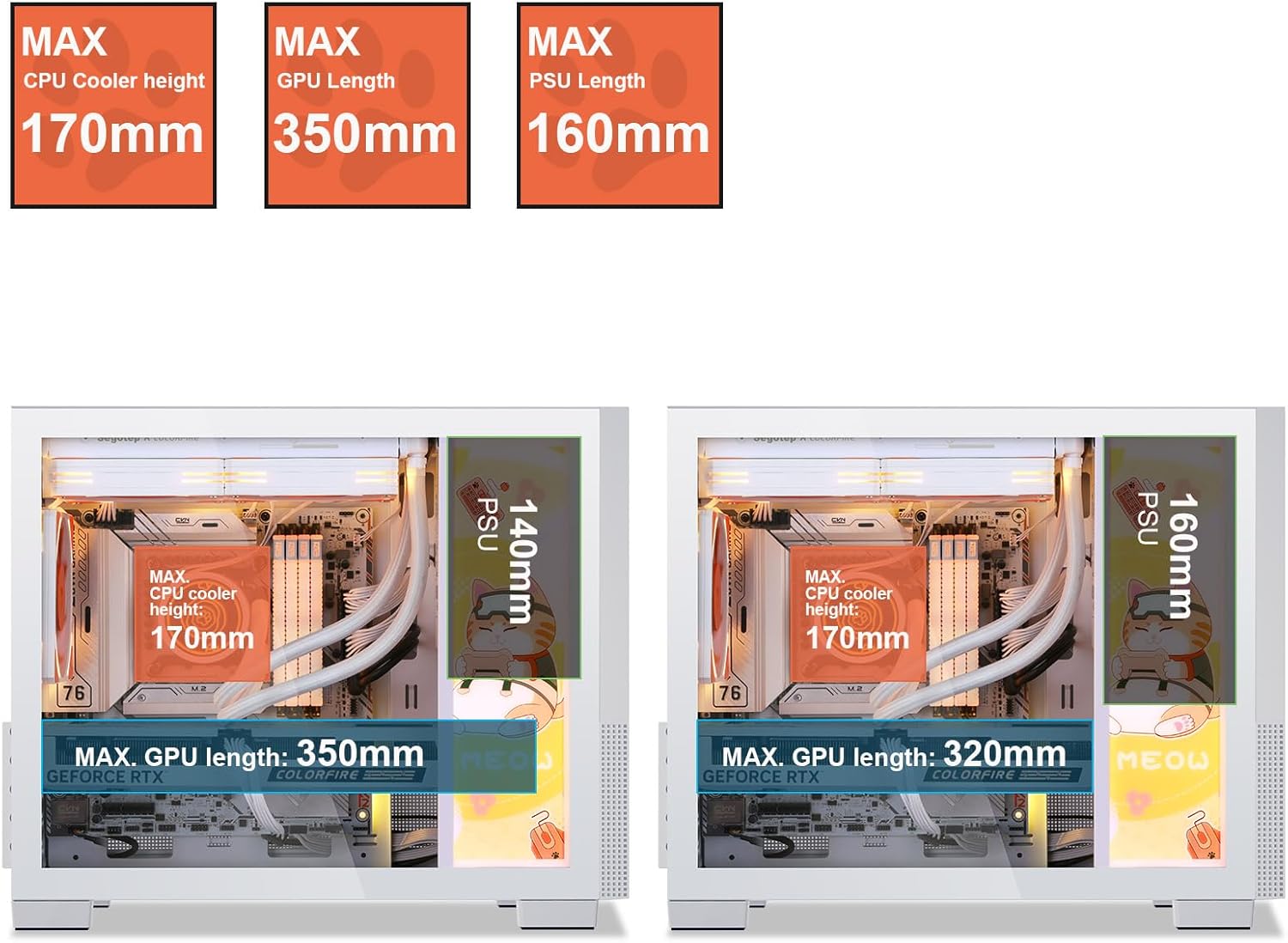
Figure 3.3: Component clearance specifications, including maximum GPU length.
3.4 Муздатуу системасын орнотуу
The case supports up to 6 case fans and a 240mm liquid radiator. Install fans in designated areas for optimal airflow.

Figure 3.4: Fan and radiator support, showing locations for 120mm/140mm fans and a 240mm liquid radiator.

Figure 3.5: Vertical air duct design for efficient cooling.
3.5 Электр менен камсыздоо блогун (PSU) орнотуу
Install the PSU in its designated rear-mount location. The case supports PSUs with a maximum length of 160mm.
3.6 Кабелди башкаруу
колдонуу ample space and routing options behind the motherboard tray to manage cables effectively. This ensures a clean build and improved airflow.

Figure 3.6: Top panel and cable management features.
3.7 Кайра чогултуу
Once all components are installed and cables are managed, carefully reattach the side panels and top cover. Ensure all screws are tightened securely.
4. Иштөө нускамалары
After successful assembly, connect all necessary peripherals and power cables. The front I/O panel provides convenient access to power, audio, and USB 3.0 ports.

4.1-сүрөт: Алдыңкы киргизүү/чыгаруу панелинин жайгашуусу.
- Мониторуңузду, клавиатураңызды, чычканыңызды жана башка перифериялык түзүлүштөрдү энелик платаңыздагы жана графикалык картаңыздагы тиешелүү портторго туташтырыңыз.
- Электр кабелин PSUга жана розеткага туташтырыңыз.
- Press the Power button on the front I/O panel to turn on your system.
5. Техникалык тейлөө
Regular maintenance helps ensure the longevity and optimal performance of your PC case and components.
- Чаң чыпкалары: The Segotep Memphis case includes removable dust filters. Regularly clean these filters to maintain optimal airflow and prevent dust buildup inside the case.
- Тышкы тазалоо: жумшак колдонуу, damp cloth to wipe down the exterior surfaces. Avoid abrasive cleaners that may damage the finish or tempered glass.
- Ички тазалоо: Periodically use compressed air to remove dust from internal components, paying attention to fan blades and heatsinks. Ensure the system is powered off and unplugged before cleaning.
6. Кыйынчылыктарды
Эгерде сиз компьютериңизди түзүүдө көйгөйлөргө туш болсоңуз, төмөнкү жалпы көйгөйлөрдү чечүү кадамдарын карап көрүңүз:
- Кубат жок:
- Ensure the PSU is switched on and properly connected to the wall outlet and motherboard.
- Verify all power cables (24-pin ATX, CPU, GPU) are securely seated.
- Алдыңкы панелдин кубат которгучунун энелик платага туташуусун текшериңиз.
- Дисплей жок:
- Confirm the monitor cable is connected to the graphics card (not the motherboard, if a dedicated GPU is installed).
- Графикалык картаны PCIe слотуна кайра орнотуңуз.
- RAM модулдары өз уячаларына туура жайгаштырылышын текшериңиз.
- Ашыкча ысып кетүү:
- Check if all case fans are spinning and properly oriented for airflow.
- Чаң чыпкаларын жана ички компоненттерин тазалаңыз.
- Verify CPU cooler installation and thermal paste application.
For further assistance, please refer to the support section or contact Segotep customer service.
7. Техникалык шарттар
| Өзгөчөлүк | Спецификация |
|---|---|
| Бренд | Сеготеп |
| Модель аты | Мемфис |
| Иштин түрү | Мини-Мунара |
| Motherboard шайкештиги | Micro ATX, ITX |
| Максималдуу GPU узундугу | 350мм |
| CPU муздаткычтын максималдуу бийиктиги | 170мм |
| Максималдуу PSU узундугу | 160мм |
| Liquid Radiator Support | 240 мм чейин |
| Күйөрмандардын колдоосу | 6 күйөрманга чейин |
| Сактагыч Drive Bays | 3x SSD, 1x HDD |
| Алдыңкы I / O порттору | 2x USB 3.0, Audio (Headphone/Microphone) |
| Материал | Металл, чыңдалган айнек |
| Түс | Memphis-White |
| Элемент Салмагы | 9.55 фунт |
| Пакеттин өлчөмдөрү | 19.25 x 15.5 x 11.5 дюйм |
8. Кепилдик жана колдоо
Segotep products are designed for reliability and performance. For warranty information and technical support, please refer to the official Segotep webсайтка же түздөн-түз кардарларды тейлөөгө кайрылыңыз. Кепилдик дооматтар үчүн сатып алганыңыздын далилин сактаңыз.
Байланыш маалыматы: Please visit the official Segotep webакыркы колдоо байланыш маалыматы үчүн сайт.