
1. Киришүү
This manual provides detailed instructions for the safe and efficient operation of your CREWORKS 130 PPD Crawl Space Dehumidifier. Designed to effectively combat excess moisture and musty odors, this commercial-grade dehumidifier is ideal for large areas such as crawl spaces, basements, and warehouses, covering up to 1440 sq. ft. Please read this manual thoroughly before installation and use to ensure optimal performance and longevity of your unit.
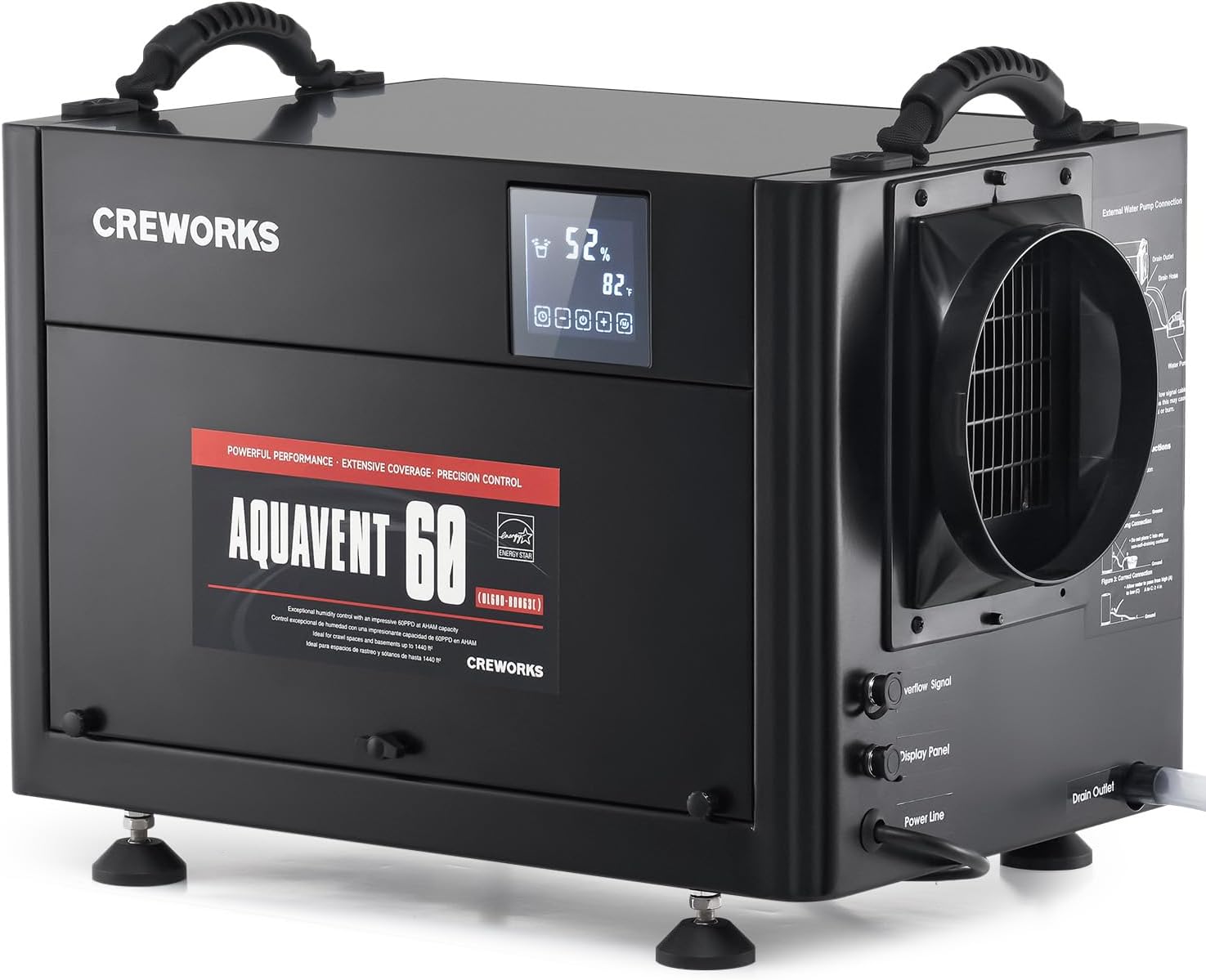
Figure 1: The CREWORKS 130 PPD Crawl Space Dehumidifier, a compact black unit with a digital display and handles, designed for effective moisture removal in large areas.
2. Коопсуздук маалыматы
Always follow basic safety precautions when using electrical appliances to reduce the risk of fire, electric shock, and injury. Ensure the unit is placed on a stable, level surface or securely mounted. Do not operate the unit with a damaged power cord or plug. Keep children and pets away from the appliance during operation. Refer to local electrical codes for installation requirements.
3. Пакеттин мазмуну
Пакетте бардык буюмдар бар экенин текшериңиз:
- CREWORKS 130 PPD Dehumidifier Unit
- Built-in Drain Hose
- Detachable Display Panel
- Adjustable Foot Pads (for freestanding placement)
- Mounting Brackets (for suspended placement)
- External Water Pump Connection Cable (for optional external pump)
- User Manual
4. Продукт бүтүп калдыview & Негизги өзгөчөлүктөрү
The CREWORKS 130 PPD Dehumidifier is engineered for high-performance moisture removal in demanding environments. Key features include:
- Күчтүү нымсыздандыруу: Removes 60 PPD at AHAM and up to 130 PPD at saturation, effectively drying spaces from 500 to 1440 sq. ft.
- Detachable Display Panel: Allows remote control and monitoring of humidity and timer settings from up to 32.8 ft. away.
- Бир нече иштөө режимдери: Choose from Manual, Continuous, and Night modes to suit specific dehumidification needs.
- Авто эритүү: Prevents ice buildup on coils, ensuring continuous operation in low-temperature environments.
- Overflow Alarm: Alerts users to potential water overflow issues.
- Reusable Air Filter: Easy to remove and clean, promoting efficient operation and air quality.
- Энергияны үнөмдөөчү дизайн: Equipped with upgraded condenser and evaporator coils for enhanced efficiency.

Figure 2: A close-up of the dehumidifier's digital display highlighting key features such as 1-24 hour timer range, memory function, fault display, overflow alarm, and automatic defrost.
5. Орнотуу
Нымдандыргычты орнотуу үчүн төмөнкү кадамдарды аткарыңыз:
- Пакеттен чыгаруу: Carefully remove the unit from its packaging. Open the front panel to retrieve the accessories, including the adjustable foot pads and mounting brackets.
- Орнотуу параметрлери:
- Өз алдынча: Screw the adjustable foot pads into the designated corners on the bottom of the unit. Adjust the height as needed to ensure stability and proper drainage.
- Suspended: Attach the provided mounting brackets to the unit using the included screws. Securely hang the unit in your desired location, ensuring it is level and has adequate clearance for airflow.
- Дренаждык туташуу:
- Locate the "Drain Outlet" on the side of the unit.
- Connect the provided drain hose to the drain outlet. Ensure a secure fit.
- Route the drain hose to a suitable drainage point (e.g., floor drain, bucket, or external pump). Ensure the hose has a continuous downward slope to prevent water backup. Avoid kinks in the hose.
- If using an external water pump (purchased separately), connect the provided external water pump connection cable to the "Overflow Signal" port and wire it to your pump according to the pump's instructions.
- Detachable Display Panel (Optional):
- To detach the display panel, carefully remove the two screws holding it in place on the unit.
- Unplug the short cable connecting the panel to the unit.
- Connect the longer extension cable (provided) to both the detached display panel and the unit's display panel port.
- Mount the detached display panel in a convenient location up to 32.8 ft. away.
- Кубат туташуу: Электр шнурын жерге туташтырылган электр розеткасына сайыңыз.
Video 1: An official product video demonstrating the setup and operational features of the CREWORKS 130 PPD Commercial Dehumidifier, including installation of accessories, control panel usage, and mode selection.
Video 2: A brief official product video showcasing the key features and benefits of the CREWORKS 130 PPD Commercial Dehumidifier, highlighting its suitability for basement and crawl space applications.
6. Иштөө режимдери
The dehumidifier offers three distinct operating modes:
- Кол режими: Allows you to set a specific target humidity level (20-90%). The unit will operate until the target humidity is reached, then cycle on and off to maintain it. You can also set a timer (1-24 hours) for operation in this mode.
- Үзгүлтүксүз режим: The compressor and blower operate continuously for consistent humidity removal, regardless of the ambient humidity level. This mode is suitable for rapid dehumidification or extremely damp шарттар.
- Түнкү режим: Similar to Manual Mode, but the display panel's illumination will dim to reduce light disturbance, making it suitable for use in areas where light is a concern. Touch the screen to temporarily re-illuminate the display.
To switch between modes, press the 'M' (Mode) button on the display panel. Use the '+' and '-' buttons to adjust humidity levels or timer settings in Manual Mode.

Figure 3: The intuitive control panel displaying current humidity and temperature, with touch-sensitive buttons for selecting Continuous, Night, or Manual operating modes.
7. Техникалык тейлөө
Regular maintenance ensures the efficient and long-lasting operation of your dehumidifier.
7.1. Аба чыпкасын тазалоо
The dehumidifier is equipped with a reusable air filter that should be cleaned periodically (e.g., every 2-4 weeks, depending on usage and air quality).
- Нымдандыргычты өчүрүп, сууруп алыңыз.
- Чыпкалоочу панелди түзмөктүн арткы бетинен табыңыз.
- Open the panel and carefully slide out the air filter.
- Clean the filter using a vacuum cleaner or wash it with warm, soapy water. Rinse thoroughly.
- Фильтрди бөлүккө кайра салуудан мурун аны толугу менен кургатуу үчүн күтүңүз.
- Close the filter access panel and secure it.

4-сүрөт: Детальдуу views of the dehumidifier's user-friendly design elements, including robust widened handles for portability, non-slip foot pads for stability, and an easily accessible reusable air filter for simple maintenance.
7.2. Жалпы тазалоо
Агрегаттын сыртын жумшак менен сүртүңүз, гamp кездеме. Катуу химиялык заттарды же абразивдүү тазалагычтарды колдонбоңуз.
8. Кыйынчылыктарды
Эгерде сизде нымдандыргычта көйгөйлөр пайда болсо, төмөнкү жалпы көйгөйлөрдү жана чечимдерди караңыз:
- Түзмөк күйбөйт: Check if the power cord is securely plugged into a grounded outlet. Ensure the power button on the display panel is pressed.
- Нымдандыргыч сууну чогултпайт: Verify that the humidity setting is lower than the ambient humidity. Check if the drain hose is properly connected and not kinked or blocked. Ensure the air filter is clean.
- Бирдик ызы-чуу: Ensure the unit is placed on a stable, level surface. Check for any loose parts or obstructions in the fan area.
- Дисплейдеги ката коддору: Refer to the detailed troubleshooting section in the full user manual for specific error code interpretations and solutions.
For further assistance, please contact CREWORKS customer support.
9. Техникалык шарттар
| Өзгөчөлүк | Спецификация |
|---|---|
| Бренд | ЭКИПАЖДАР |
| Модель аты | 130 PPD (OL60D-BD063C) |
| Түс | Кара |
| Capacity (at saturation) | Күнүнө 130 Пинт |
| Capacity (at AHAM) | Күнүнө 60 Пинт |
| Сунушталган камтуу аймагы | 500-1440 кв. |
| Продукциянын өлчөмдөрү | 24.61"D x 17.87"W x 17.48"H |
| Элемент Салмагы | 61.73 фунт |
| Материал | Пластик, металл |
| Иштөө режими | Continuous, Manual, Night |
| Аба агымынын кубаттуулугу | Мүнөтүнө 265 куб сантиметр |
| Жогорку температура рейтинги | 100 градус Фаренгейт |
| Өзгөчөлүктөр | Basement Dehumidifier, Commercial Dehumidifier, Crawl Space Dehumidifier, Auto Defrost, Detachable Display Panel |
10. Кепилдик жана колдоо
CREWORKS products are designed for quality and durability. For any questions, technical support, or warranty claims, please contact CREWORKS customer support. Information regarding returns and protection plans may be available through your retailer.
Кепилдикке байланыштуу суроолор үчүн сатып алганыңыздын далилин сактап коюңуз.