
1. Киришүү
Thank you for choosing the LeadJoy M1 iPhone Mobile Game Controller. This manual provides essential information for setting up, operating, and maintaining your controller to ensure an optimal gaming experience. The LeadJoy M1 is designed for iPhone users running iOS 13, 14, 15, or 16, offering ultra-low latency and precise control for a wide range of mobile games and cloud gaming services.
2. Продукт бүтүп калдыview
The LeadJoy M1 controller enhances your mobile gaming with advanced features and ergonomic design.
Негизги өзгөчөлүктөрү:
- Холл эффектисинин джойстиктери: Utilizes non-contact magnetic sensors for precise positioning and movement, preventing stick drift and ensuring durability up to 5 million cycles.
- Холл эффектинин аналогдук триггерлери: Provides smooth and consistent trigger feedback with 0.1mm accuracy.
- Cooling Conduction Plate Compatibility: Features a movable cooling conduction plate on the back, allowing for attachment of compatible smartphone coolers (sold separately) to maintain optimal phone temperature during extended gaming sessions.
- Өткөөл кубаттоо: Supports charging your iPhone while playing, ensuring uninterrupted gaming.
- Тайгаланбас кармагыч: Laser-textured surface on the grips provides enhanced comfort and prevents slippage due to sweat.
- Direct Lightning Connection: Ensures ultra-low latency and eliminates wireless signal delays.

Image: LeadJoy M1 controller with an attached cooling fan, illustrating the cooling mechanism. This feature helps maintain your iPhone's temperature during intense gaming.

Image: Diagram illustrating the internal mechanism of the Hall Effect analog joystick, highlighting its non-contact magnetic sensing for precise control and zero dead zones.

Сүрөт: Жакын план view of the laser-textured non-slip grip on the controller, designed for comfortable and secure handling during gameplay.
3. Орнотуу нускамалары
- Телефон корпусун алып салуу: Before attaching your iPhone to the LeadJoy M1, ensure that any phone case is removed. This ensures a secure and proper connection to the Lightning port.
- iPhone'ду туташтыруу: Gently slide your iPhone into the controller, aligning the iPhone's Lightning port with the controller's Lightning connector. Ensure a firm connection.
- Күйгүзүү: The controller draws power directly from your iPhone. No separate charging or pairing is required for initial use.
Important Note: The LeadJoy M1 connects via a Lightning port. It is not compatible with iPhone 15 models or newer iPhones that use USB-C ports.
4. Иштөө нускамалары
Оюндун шайкештиги:
The LeadJoy M1 supports a wide array of MFi (Made for iPhone) games, cloud gaming services, and remote play options. This includes:
- Popular iOS games such as Genshin Impact, Diablo Immortal, and Call of Duty Mobile.
- Cloud gaming platforms like Xbox Cloud Gaming (Beta) and Amazon Luna.
- Remote play services including Xbox Remote Play and Steam Link.
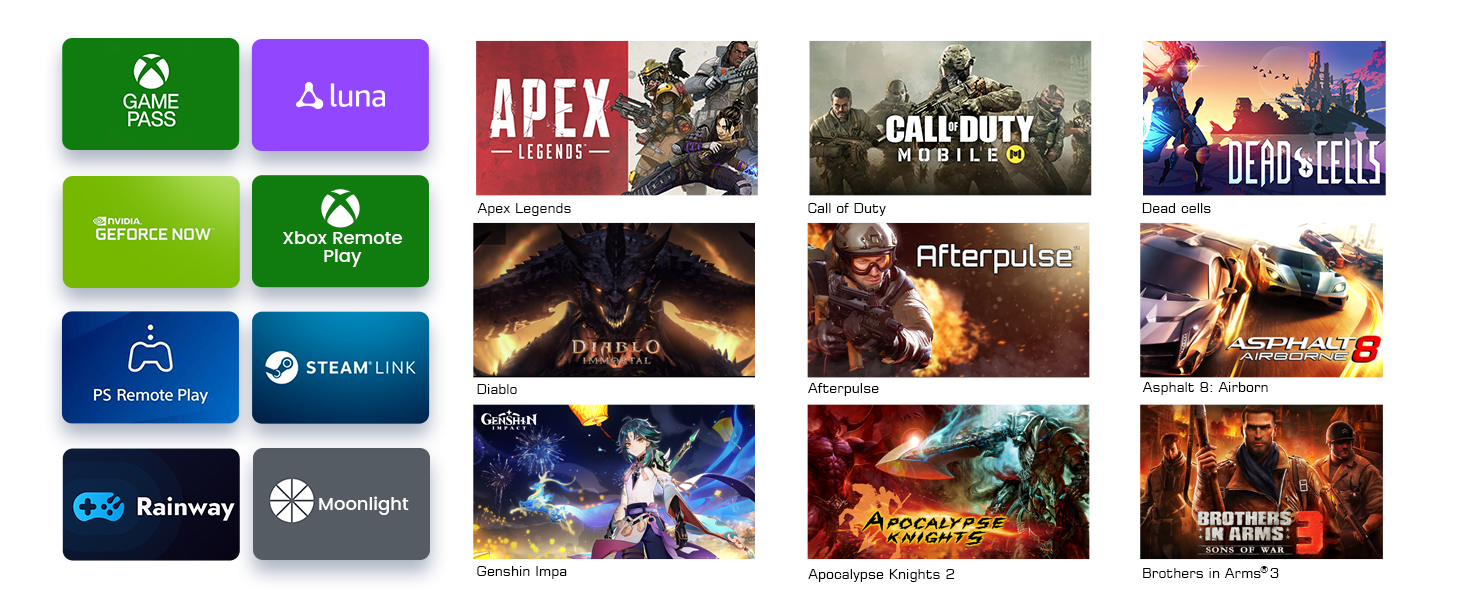
Image: A collage of logos representing various games and streaming services compatible with the LeadJoy M1 controller, including Xbox Game Pass, Luna, Apex Legends, Call of Duty, Genshin Impact, and Steam Link.
Өткөөл кубаттоо:
To charge your iPhone while using the controller, connect a Lightning charging cable to the pass-through port on the LeadJoy M1. This allows for extended gaming sessions without draining your phone's battery.
5. Шайкештик
The LeadJoy M1 is specifically designed for iPhones with a Lightning port, supporting iOS versions 13, 14, 15, and 16. Compatible iPhone models include, but are not limited to, iPhone 12, iPhone 13, and iPhone 14 series.
The controller is not compatible with iPhones featuring a USB-C port, such as the iPhone 15 series and later models.
6. Техникалык тейлөө
- Тазалоо: Use a soft, dry cloth to clean the controller. Avoid using abrasive cleaners or solvents.
- Сактагыч: Контроллерди түз күн нурунан жана экстремалдык температурадан алыс салкын, кургак жерде сактаңыз.
- Cooling Plate (if applicable): If using a separate cooling fan with the conduction plate, ensure the fan is kept clean and free of dust for optimal performance.
7. Кыйынчылыктарды
| Маселе | Мүмкүн себеп | Чечим |
|---|---|---|
| Controller not recognized by iPhone | Phone case obstructing connection; Loose Lightning connection; Incompatible iOS version. | Remove phone case. Ensure the Lightning connector is firmly seated. Verify your iPhone is running iOS 13, 14, 15, or 16. (Note: iOS 17.5.1 and later may not be supported). |
| Киргизүүнүн кечигиши же жооп бербөө | Rare, but could be due to phone performance or specific game optimization. | Close background apps on your iPhone. Restart your iPhone and the game. Ensure your game is updated. |
| iPhone not charging via pass-through port | Faulty charging cable; Insufficient power source. | Try a different Lightning charging cable. Ensure your power adapter provides sufficient wattage. |
| Buttons or joysticks not responding correctly | Software glitch; Physical obstruction. | Restart your iPhone. Ensure no debris is obstructing the buttons or joysticks. If issues persist, contact customer support. |
8. Техникалык шарттар
| Өзгөчөлүк | Деталь |
|---|---|
| Бренд | LeadJoy |
| Модел | M1 |
| Controller Type | Оюн аянтчасы |
| Аппараттык платформа | iOS (Lightning Port) |
| Supported iOS Versions | iOS 13, 14, 15, 16 |
| Өзгөчөлүктөр | Hall Effect Joysticks, Hall Effect Triggers, Motion Sensor, Cooling Conduction Plate Compatibility, Pass-Through Charging |
| баскычтардын саны | 13 |
| Элемент Салмагы | 12.8 унция (болжол менен 363 грамм) |
| Продукциянын өлчөмдөрү | 19.4 x 9.5 x 3.5 см (болжол менен 7.6 x 3.7 x 1.4 дюйм) |
9. Кепилдик жана колдоо
The LeadJoy M1 iPhone Mobile Game Controller comes with a 1 жылдык өндүрүүчү кепилдик сатып алынган күндөн тартып. Бул кепилдик нормалдуу колдонуудагы материалдардагы жана жасалгадагы кемчиликтерди камтыйт.
For technical support, warranty claims, or any questions not addressed in this manual, please contact LeadJoy customer service through their official website or the retailer where the product was purchased. Please have your proof of purchase and product model number (M1) ready when contacting support.