
Gixxted H1
Gixxted Bluetooth Headset H1 User Manual
Your comprehensive guide to setting up, operating, and maintaining your Gixxted Bluetooth Headset.
1. Киришүү
Welcome to the Gixxted Bluetooth Headset H1 user manual. This guide provides detailed instructions to help you get the most out of your new headset, from initial setup to advanced features and troubleshooting. Please read this manual carefully before using the product to ensure optimal performance and longevity.
2. Продукт бүтүп калдыview
The Gixxted Bluetooth Headset H1 is designed for comfort and clear communication, ideal for truckers, home office work, and general computer/cell phone use. It features advanced ENC noise-canceling technology and a long-lasting battery.
- Ыңгайлуу ылайыктуу: Breathable foam wrapped in ultra-soft leather for extended wear.
- Simplified Control Panel: Intuitive three-button design for ease of use.
- Үнсүз функция: Integrated mute function accessible via the volume down button during calls.
- Туруктуу байланыш: Latest Bluetooth version with a wireless range of up to 33 feet (10 meters).
- Advanced Noise Canceling: ENC technology eliminates 95% of unwanted background noise.
- Батареянын узак иштөө мөөнөтү: Up to 2100 hours standby, 30 hours talk time, and 40 hours music time.
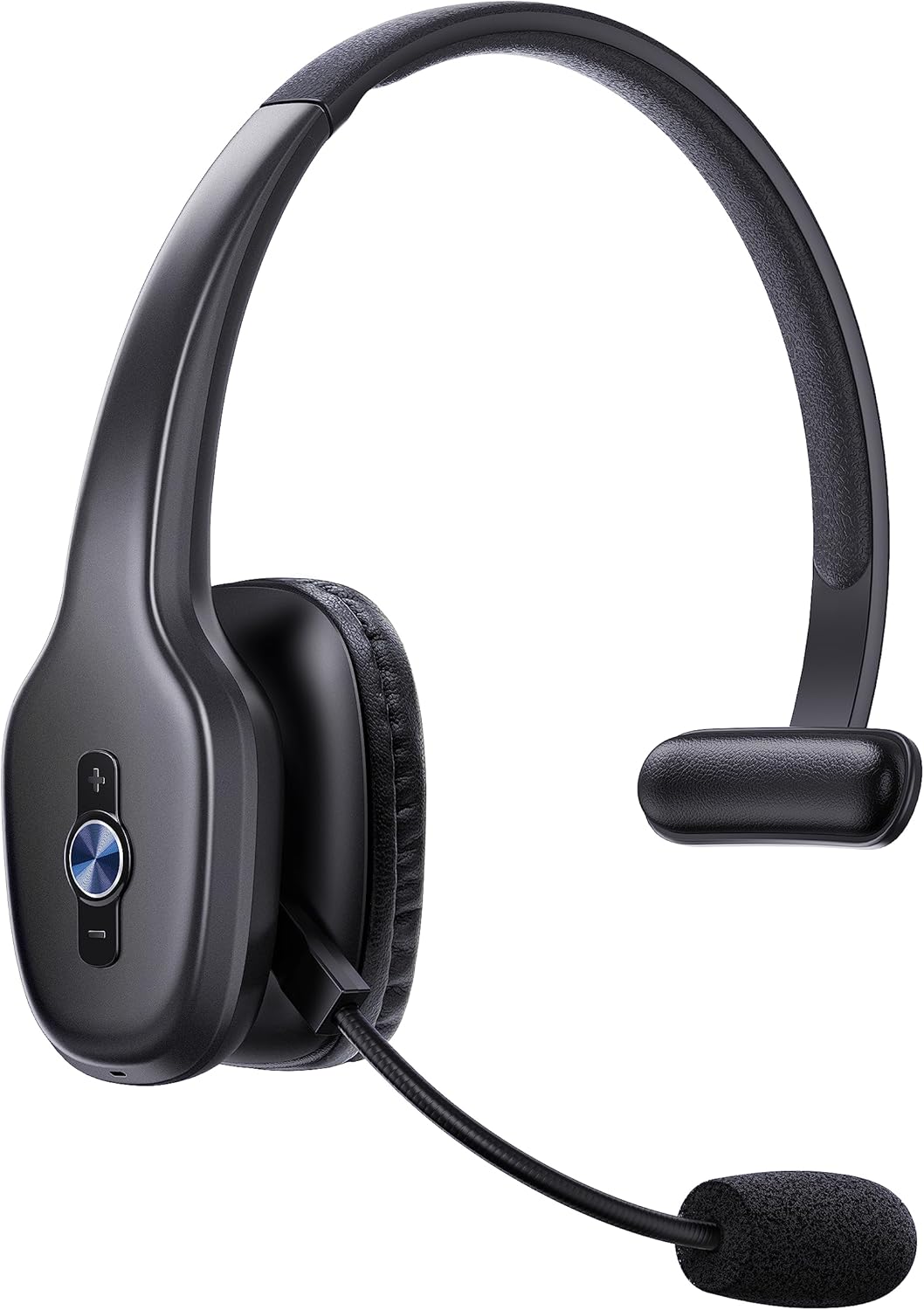
Figure 2.1: Gixxted Bluetooth Headset H1. This image displays the overall design of the headset, highlighting its sleek black finish and the integrated microphone arm.
3. Орнотуу
3.1 Кутуда эмне бар
Upon unboxing your Gixxted Bluetooth Headset H1, you should find the following items:
- Gixxted Bluetooth Headset
- User Manual
- USB-C заряддоо кабели
3.2 Гарнитураны заряддоо
Before first use, fully charge your headset. The headset features a 300mAh battery providing significant usage time.
- Locate the Type-C Charge Port on the headset (refer to Figure 4.1 for location).
- Connect the provided USB-C charging cable to the headset and a compatible USB power source.
- Адатта, толук заряддоо үчүн 2-3 саат талап кылынат.
- Маанилүү: Do not charge the headset with a fast charger to prevent damage.

Figure 3.1: Headset Battery Life and Charging. This image illustrates the impressive battery life, including 2100 hours of standby time, 40 hours of music time, and 30 hours of talk time, along with the 2-3 hour charging duration.
3.3 Bluetooth жупташтыруу
The Gixxted Bluetooth Headset H1 utilizes the latest Bluetooth version for stable and quick connections.
- Гарнитура заряддалганын жана күйгүзүлгөнүн текшериңиз.
- Activate Bluetooth on your device (computer, cell phone, tablet).
- Издөө "H1" or "Gixxted H1" in your device's Bluetooth settings.
- Select the headset to pair. You will hear an audio confirmation when successfully connected.
- The headset can connect to two devices simultaneously, offering seamless switching between them.

Figure 3.2: Simultaneous Device Connection. This image demonstrates the headset's ability to connect stably and simultaneously to two devices, such as a laptop and a smartphone.
4. Иштөө нускамалары
4.1 Гарнитураны башкаруу элементтери
The Gixxted H1 features a simplified control panel for easy operation:
- MFB (көп функциялуу баскыч): The central circular button. Press to answer/reject calls or play/pause music.
- Volume + / Previous Track: The top button. Press to increase volume. Hold to go to the previous track.
- Volume - / Next Track / Mute: The bottom button. Press to decrease volume. Hold to go to the next track.
- Үнсүз функция: During a phone call, press and hold the "Volume -" button for approximately 2 seconds until you hear "mute on". This function is only available during phone calls.

Figure 4.1: Headset Control Buttons. This diagram clearly labels the Multi-Function Button (MFB), Volume +/- buttons, and the Type-C charging port, along with their primary functions.

Figure 4.2: Mute Function in Use. This image demonstrates how to activate the mute function by pressing and holding the Volume - button during a phone call.
4.2 Гарнитураны тагынуу
The Gixxted H1 is designed for superior comfort during long periods of use.
- Жөнгө салынуучу баш боосу: Баш боосун ар кандай баш өлчөмдөрүнө тууралоого болот.
- 270° айлануучу микрофон: The microphone arm can be rotated 270 degrees, allowing you to wear the headset on either your left or right ear. Adjust the microphone position for optimal voice pickup.
- Anti-Slip Pad: Features an anti-slip pad for secure and comfortable placement.
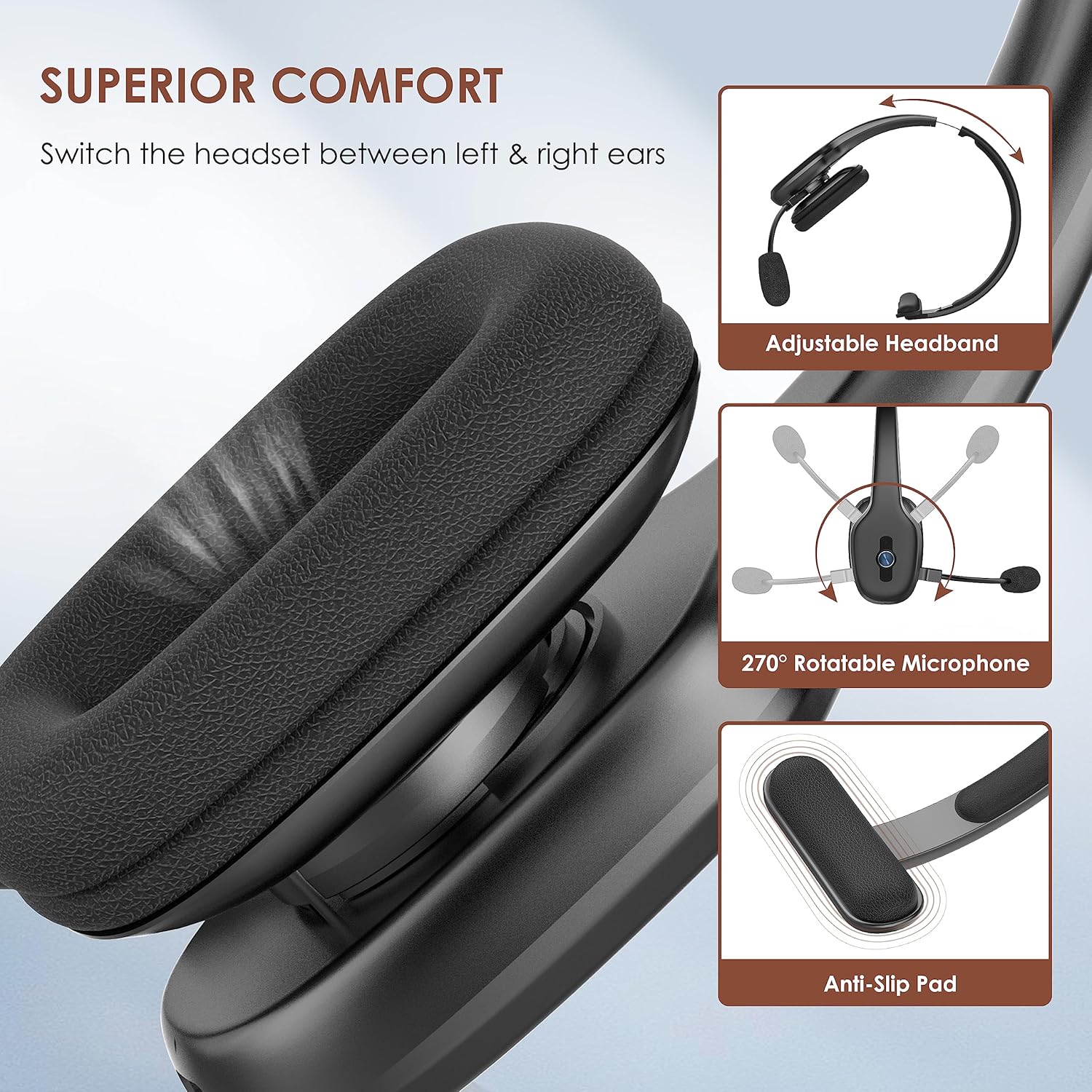
Figure 4.3: Headset Comfort Features. This image highlights the adjustable headband, 270° rotatable microphone, and anti-slip pad designed for superior comfort and adaptability.
4.3 Environmental Noise Canceling (ENC)
The headset incorporates powerful ENC noise-canceling technology, designed to eliminate up to 95% of unwanted interfering noises. This makes it particularly suitable for use in noisy environments such as trucks or busy offices, ensuring your voice is clear to the listener.
Figure 4.4: ENC Noise Cancellation in Action. This image visually represents the headset's ability to block out 95% of background noise, ensuring clear communication.
4.4 Расмий продукт Video
Video 4.1: The Function of the H1 Bluetooth Headset. This official seller video demonstrates various functions and features of the Gixxted H1 Bluetooth Headset, including its controls and how it operates.
5. Техникалык тейлөө
Proper maintenance ensures the longevity and optimal performance of your Gixxted Bluetooth Headset H1.
- Тазалоо: Use a soft, dry cloth to clean the headset. Avoid using harsh chemicals or abrasive materials. For the ear cushions, gently wipe with a damp кездемеге ороп, колдонуудан мурун толугу менен кургатыңыз.
- Сактагыч: Гарнитураны күн нурунан жана экстремалдык температурадан алыс салкын, кургак жерде сактаңыз.
- Заряддоо: Always use the provided USB-C cable for charging. Avoid overcharging or completely draining the battery for extended periods.
6. Кыйынчылыктарды
If you encounter any issues with your Gixxted Bluetooth Headset H1, please refer to the following common troubleshooting steps:
| Көйгөй | Мүмкүн себеп | Чечим |
|---|---|---|
| Гарнитура күйбөй жатат. | Батарея аз. | Charge the headset fully using the provided USB-C cable. |
| Түзмөк менен жупташтыруу мүмкүн эмес. | Bluetooth not enabled on device; headset not in pairing mode; too far from device. | Ensure Bluetooth is on. Make sure headset is powered on and within 10 meters (33 feet) of your device. Restart both devices and try pairing again. |
| Poor audio quality / Background noise during calls. | Interference; microphone not positioned correctly; environmental factors. | Move closer to your device. Ensure the microphone is properly aligned near your mouth. While the headset features ENC, performance can be affected by extremely loud or complex background noises. Test in a quieter environment if possible. |
| Audio stopped working. | Туташуу көйгөйү; программалык камсыздоонун иштебей калышы. | Disconnect and reconnect the headset. Restart your device. If the issue persists, try pairing with a different device to isolate the problem. |
| Үнсүз функция иштебей жатат. | Not during a call; incorrect button press. | Ensure you are actively on a phone call. Press and hold the "Volume -" button for 2 seconds. |
If these steps do not resolve your issue, please contact Gixxted customer support for further assistance.
7. Техникалык шарттар
| Өзгөчөлүк | Деталь |
|---|---|
| Модель аты | H1 |
| Бренд | Gixxted |
| Байланыш технологиясы | Зымсыз (Bluetooth) |
| Зымсыз байланыш технологиясы | Bluetooth |
| Bluetooth версиясы | 5.3 |
| Bluetooth диапазону | 10 метр (33 фут) |
| Батареянын иштөө мөөнөтү (Музыка) | 40 саат |
| Батареянын иштөө мөөнөтү (баяндашуу) | 30 саат |
| Күтүү убактысы | 2100 саат |
| Заряддоо убактысы | 2-3 саат (болжол менен) |
| Noise Control | Активдүү ызы-чууну жокко чыгаруу (ENC) |
| Кулак жайгаштыруу | On Ear |
| Микрофон | 270° Айлануучу |
| Башкаруу ыкмасы | баскыч |
| Элемент Салмагы | 0.23 килограмм (8.1 унция) |
| Сууга туруктуулук деңгээли | Сууга чыдамдуу эмес |
| Шайкеш түзмөктөр | Bluetooth иштетилген түзмөктөр |
| Продукт үчүн атайын колдонуу | Trucker headset, Business |
8. Кепилдик жана колдоо
Gixxted is committed to providing high-quality products and excellent customer service. For any warranty claims, technical support, or inquiries not covered in this manual, please contact Gixxted customer support through the retailer's platform or the official Gixxted webсайт.
Сураныч, кепилдик максаттары үчүн сатып алганыңыздын далилин сактап коюңуз.
Ask a question about this manual
Ask about setup, troubleshooting, compatibility, parts, safety, or missing instructions. Manuals+ will review the question and use this page’s manual context to help answer it.