
1. Киришүү
This manual provides essential information for the proper installation, operation, and maintenance of your ENDORFY Arx 500 ARGB ATX Computer Case. Please read this manual thoroughly before beginning installation to ensure optimal performance and safety.
The ENDORFY Arx 500 ARGB is a high-performance ATX computer case designed for efficient cooling and spacious component compatibility. Key features include:
- Tempered glass side panel for showcasing ички компоненттер.
- Spacious interior for easy component installation and cable management.
- Compatibility with various radiator sizes for advanced cooling solutions.
- Airy and easily accessible front panel for optimal airflow.
- Efficient cooling design to maintain low component temperatures.
- Convenient cable management features for a clean build.
2. Коопсуздук маалыматы
Продукцияга зыян келтирбөө же өзүңүзгө жаракат келтирбөө үчүн төмөнкү коопсуздук чараларын сактаңыз.
- Электр энергиясын өчүрүү: Always disconnect the power supply from the wall outlet before installing or removing any components inside the computer case.
- Статикалык электр: Ички компоненттерди кармоодон мурун статикалык электр тогун разряддоо үчүн антистатикалык билек боону тагыныңыз же жерге туташкан металл нерсеге тез-тез тийип туруңуз.
- Курч жээктер: Орнотуу учурунда корпустун ичиндеги курч бурчтардан сак болуңуз.
- Жылууланган айнек: Handle the tempered glass side panel with care. It is fragile and can break if dropped or subjected to impact. Place it on a soft, flat surface when removed.
- Вентиляция: Ensure adequate ventilation around the case to prevent overheating. Do not block air vents.
- Суюктук менен байланыш: Keep the computer case away from liquids and moisture.
3. Пакеттин мазмуну
Таңгагыңызда бардык буюмдар бар экенин текшериңиз. Эгерде кандайдыр бир буюмдар жок болсо же бузулуп калса, сатуучуга кайрылыңыз.
- ENDORFY Arx 500 ARGB ATX Computer Case
- 4 x 140 mm ARGB Fans (pre-installed)
- Accessory Box (containing screws, cable ties, and other mounting hardware)
- Колдонуучунун Колдонмосу (бул документ)

3.1-сүрөт: жарылган view showing the computer case, fans, and various panels.
4. Орнотуу жана орнотуу
Follow these steps to install your components into the ENDORFY Arx 500 ARGB case.
4.1 Ишти даярдоо
- Каптал панелдерин алып салуу: Carefully remove the tempered glass side panel and the solid metal side panel. Place them on a soft, non-abrasive surface to prevent scratches.
- Аксессуар кутусу: Кошумча жабдуулар кутучасын кутучанын ичинен табыңыз, анда бардык керектүү бурамалар жана бекитүүчү жабдыктар бар.
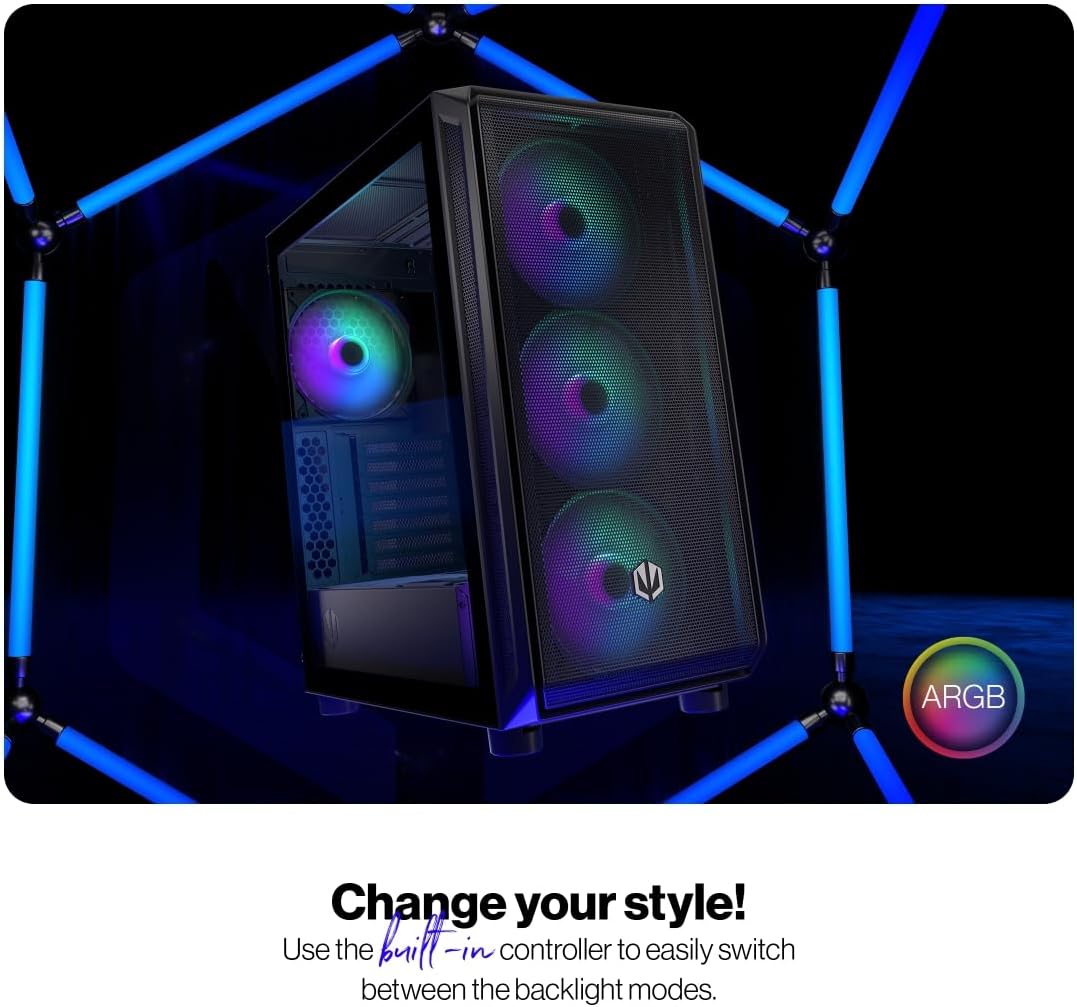
Figure 4.1: The tempered glass side panel allows for a clear view ички компоненттеринин.
4.2 Motherboard орнотуу
- Standoffs орнотуу: Ensure the correct standoffs are installed for your ATX motherboard. The case supports ATX motherboards.
- Mount Motherboard: Carefully place your motherboard onto the standoffs and secure it with the provided screws.

Сүрөт 4.2: кенен ички камсыз кылат ample room for motherboard and other component installation.
4.3 Электр менен камсыздоо жана сактоочу жайды орнотуу
- Электр камсыздоо: Install your power supply unit (PSU) into the dedicated bottom mount area. Secure it with screws from the rear of the case.
- Сактоочу дисктер: Install your 2.5" SSDs or 3.5" HDDs into the designated drive bays. Refer to the case's internal structure for specific mounting points.
4.4 Графикалык карта жана кеңейтүү карталары
- Slot капкактарын алып салуу: Корпустун арткы жагынан керектүү PCI-E уячасынын капкактарын алып салыңыз.
- Карталарды орнотуу: Insert your graphics card and other expansion cards into the motherboard's PCI-E slots and secure them with screws.
4.5 Cooling System (Fans and Radiators)
The case comes with 4 pre-installed 140mm ARGB fans. Additional fans or radiators can be installed for enhanced cooling.
- Fan Capacity: The case accommodates up to 7 fans.
- Радиатор шайкештиги: The design supports various radiator sizes for liquid cooling solutions.

Figure 4.3: The case features pre-installed 140mm ARGB fans for optimal airflow.

Figure 4.4: Perforated front and top panels ensure maximum airflow and dust protection.
4.6 Кабелди башкаруу
Utilize the dedicated cable management space and tie-down points behind the motherboard tray to route and secure cables for a clean build and improved airflow.
4.7 Алдыңкы I/O панелинин туташуулары
Connect the front panel cables (USB, audio, power, reset, LEDs) to the corresponding headers on your motherboard. Refer to your motherboard manual for header locations.

Figure 4.5: Front I/O panel with USB-C, USB-A, headphone, microphone, reset, and power buttons/LEDs.
- USB-C порту: Connects to a USB 3.x Type-C header on your motherboard.
- USB-A порттору: Connects to USB 3.x and USB 2.0 headers on your motherboard.
- Headphones Port: Connects to the audio header on your motherboard.
- Микрофон порту: Connects to the audio header on your motherboard.
- Калыбына келтирүү баскычы: Connects to the reset header on your motherboard.
- Power LED: Connects to the power LED header on your motherboard.
- Storage Activity LED: Connects to the HDD LED header on your motherboard.
- Кубат баскычы: Connects to the power switch header on your motherboard.
5. Иштөө нускамалары
Бардык компоненттер орнотулуп, туташтырылгандан кийин, сиз тутумуңузду иштете аласыз.
- Күйгүзүү: Press the Power Button on the front I/O panel to turn on your computer. The Power LED will illuminate.
- ARGB желдеткич башкаруусу: The pre-installed ARGB fans can be controlled via a built-in controller or synchronized with compatible motherboard software. Use the built-in controller to switch between various backlight modes.

Figure 5.1: The ARGB fans offer customizable lighting effects, controlled via the built-in controller.
6. Техникалык тейлөө
Үзгүлтүксүз тейлөө сиздин компьютериңиздин корпусунун жана компоненттеринин оптималдуу иштешин жана узак иштөөсүн камсыз кылууга жардам берет.
- Чаң чыпкалары: Periodically remove and clean the dust filters located on the front, top, and bottom of the case. Use compressed air or a soft brush to remove accumulated dust.
- Тышкы тазалоо: Корпустун сырткы беттерин жумшак менен сүртүңүз, гamp кездеме. Абразивдүү тазалагычтардан же эриткичтерден качыңыз.
- Ички тазалоо: Тутум өчүк жана электр розеткасынан ажыратылганда, кысылган абаны колдонуп, ички тетиктерден жана желдеткич бычактарынан чаңды акырын тазалаңыз.
- Жылууланган айнек: Чыңалган айнек панелди микрофибра чүпүрөк жана электроника үчүн иштелип чыккан айнек тазалагыч менен тазалаңыз.
7. Кыйынчылыктарды
If you encounter issues with your computer case, refer to the following common troubleshooting steps.
- Система күйбөй жатат:
- Ensure the power supply is properly connected to the wall outlet and switched on.
- Бардык кубат кабелдери энелик платага жана анын компоненттерине туура туташкандыгын текшериңиз.
- Check that the front panel power button cable is correctly connected to the motherboard's power header.
- Вентиляторлор айланбай жатат/ARGB күйбөй жатат:
- Ensure fan power cables are securely connected to the fan hub or motherboard headers.
- Verify ARGB cables are connected to the built-in controller or motherboard ARGB header.
- Check the built-in controller or motherboard software for fan speed and lighting settings.
- Front USB/Audio Ports Not Working:
- Confirm that the front panel USB and audio cables are correctly connected to the corresponding headers on your motherboard.
- Ensure motherboard drivers for USB and audio are installed.
If problems persist, consult your motherboard manual or contact ENDORFY customer support.
8. Техникалык шарттар
| Өзгөчөлүк | Деталь |
|---|---|
| Бренд | ENDORFY |
| Сериялар | Arx 500 ARGB |
| Модель номери | EY2A011 |
| Иштин түрү | Миди мунарасы |
| Motherboard шайкештиги | ATX |
| Өлчөмдөрү (LxWxH) | 16.89 x 8.98 x 19.13 дюйм (429 x 228 x 486 мм) |
| Элемент Салмагы | 16.5 фунт |
| Материал | Tempered Glass (side panel) |
| Муздатуу ыкмасы | Аба |
| Камтылган күйөрмандар | 4 x 140 mm ARGB fans |
| Fan Size | 140 миллиметр |
| Кубат менен камсыздоону орнотуу түрү | Төмөнкү тоо |
| Алдыңкы I / O порттору | 2x USB 2.0, 1x USB-C, 1x Headphone, 1x Microphone, Reset Button, Power Button |

Figure 8.1: Front dimensions (228 mm width).

Figure 8.2: Side dimensions (429 mm depth, 486 mm height).
9. Кепилдик жана колдоо
For warranty information, technical support, or further assistance, please visit the official ENDORFY webсайтына кириңиз же жергиликтүү сатуучуңузга кайрылыңыз.


