
Introduction
This manual provides comprehensive instructions for the Veho Kuzo Sports Smart Watch F1S. Please read this manual carefully before using your device to ensure proper operation and to maximize its features. Keep this manual for future reference.

Сүрөт: алдыңкы view of the Veho Kuzo Sports Smart Watch F1S, showcasing its round display and rugged design.
Коопсуздук маалыматы
Always follow basic safety precautions when using this device to reduce the risk of injury, electric shock, fire, or damage to the product.
- Аппаратты ажыратууга же өзгөртүүгө аракет кылбаңыз.
- Аппаратты экстремалдык температурадан жана тике күн нурунан алыс кармаңыз.
- Түзмөктү катуу соккуларга же кулап түшүүлөргө дуушар кылбаңыз.
- Кандайдыр бир жаңы көнүгүү режимин баштоодон мурун, айрыкча, ден-соолукка байланыштуу шарттарыңыз бар болсо, дарыгер менен кеңешиңиз.
- The device is water-resistant (IP68) but not waterproof for diving or high-pressure water activities.
Пакеттин мазмуну
Бардык буюмдар кутуда бар экенин текшериңиз:
- Veho Kuzo Sports Smart Watch F1S (Black)
- Magnetic Charging Cradle (USB-A)
- Көп тилдүү Колдонуучунун колдонмосу
Жайгашуу
1. Акылдуу саатты кубаттоо
Before first use, fully charge your Veho Kuzo F1S Smart Watch.
- Connect the magnetic charging cradle to a USB-A power source (e.g., computer USB port, wall adapter).
- Align the magnetic pins of the cradle with the charging contacts on the back of the watch. The watch will snap into place and display a charging indicator.
- Charge for approximately 2 hours for a full charge. A full charge provides up to 15 days of typical use.

Image: Graphic illustrating the 15-day battery life of the Veho Kuzo F1S Smart Watch.
2. Companion колдонмосун орнотуу
To unlock all features and synchronize data, download the official companion app on your smartphone.
- The app is compatible with Apple iOS and Android devices.
- Издөө "Kuzo" or "Veho Kuzo" in your device's app store.
- Install the app and follow the on-screen instructions to create an account.
3. Смартфонуңуз менен жупташуу
After installing the app, pair your watch with your phone via Bluetooth.
- Смартфонуңузда Bluetooth иштетилгенин текшериңиз.
- Open the companion app and navigate to the device pairing section.
- Turn on your Veho Kuzo F1S Smart Watch.
- Select your watch from the list of available devices in the app.
- Жупташуу өтүнүчүн саатыңызда жана смартфонуңузда ырастаңыз.

Image: A smartphone displaying the Veho Kuzo companion app, showing health and activity data.
Иштөө нускамалары
Негизги навигация
The Veho Kuzo F1S features a 1.3-inch AMOLED touchscreen and physical buttons for navigation.
- Сенсордук экран: Менюлар жана виджеттер арасында өтүү үчүн өйдө, ылдый, солго же оңго сүрүңүз. Элементтерди тандоо үчүн таптаңыз.
- Каптал баскычтары: Use the physical buttons on the side of the watch to return to the home screen, access sports modes, or other quick functions.
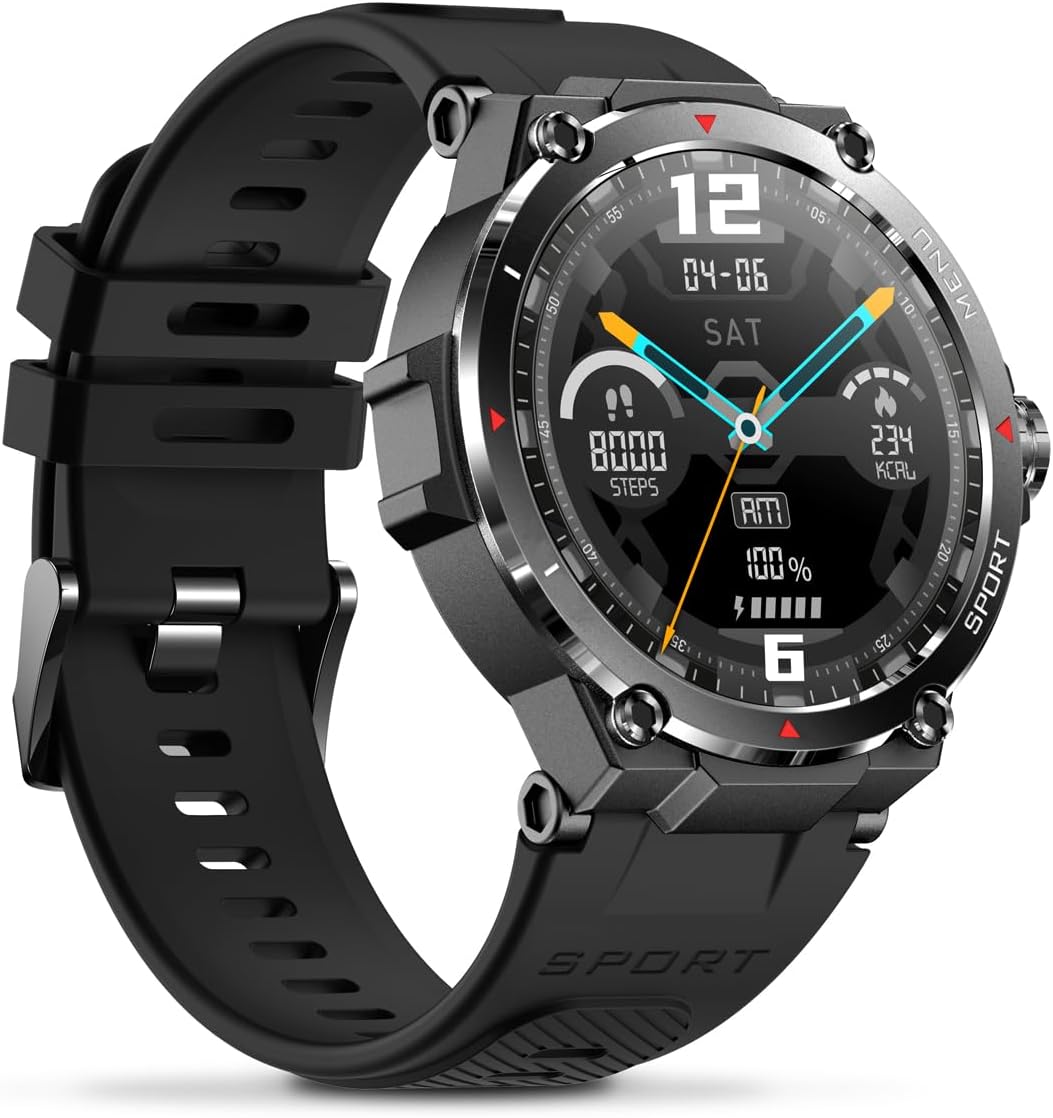
Сүрөт: каптал view of the Veho Kuzo F1S Smart Watch, highlighting the control buttons and rugged casing.
Ден соолук жана фитнеске көз салуу
The watch continuously monitors various health and fitness metrics.
- Жүрөктүн кагышы: 24/7 heart rate monitoring. View саат боюнча реалдуу убакыт дайындары же колдонмодогу деталдуу тренддер.
- Кандагы кычкылтек: Каныңыздын кычкылтек деңгээлин өлчөңүз.
- Активдүүлүккө көз салгыч: Tracks steps, calories burned, and distance covered. Supports walking, running, and cycling.
- Уйку монитору: Monitors daily, weekly, and monthly sleep patterns, detailing deep sleep, light sleep, and awake times.
- GPS: Built-in 3-mode GPS (GPS+Beidou+Glonass) and Assisted GPS (AGPS) for accurate outdoor performance tracking and live map positioning. Compatible with STRAVA.

Image: The Veho Kuzo F1S Smart Watch displaying heart rate monitoring data.
Smart Features
- Эскертмелер: Receive push notifications from apps like WhatsApp, Twitter, Facebook, LinkedIn, Skype, YouTube, Messenger, and Instagram directly on your watch.
- Музыкалык башкаруу: Control music playback (volume, skip tracks, play/pause) on your paired smartphone directly from the watch.
- Убакыт функциялары: Access alarm, timer, intermittent timer, stopwatch, and countdown functions.
- Телефонду табуу: Жупташкан смартфонуңузду табуу үчүн саатыңызды колдонуңуз.
- News/Weather App: Integrated news and weather application functionality.
- Ыңгайлаштырылган саат жүздөрү: Choose from hundreds of different watch face designs through the companion app.
Техникалык тейлөө
Тазалоо
Сааттын көрүнүшүн жана функционалдуулугун сактоо үчүн:
- Саатты жана боону жумшак менен дайыма сүртүп туруңуз, damp кездеме.
- Катуу химиялык заттарды же абразивдүү тазалагычтарды колдонуудан алыс болуңуз.
- Заряддоодон мурун заряддоо контакттары таза жана кургак экенин текшериңиз.
Сууга туруктуулук (IP68)
The Veho Kuzo F1S Smart Watch has an IP68 rating, meaning it is water-resistant in fresh water up to a maximum depth of 1.5 meters for up to 30 minutes, and is protected from dust.
- Do not use the watch for diving, snorkeling, or high-speed water sports.
- Саатты ысык сууга, бууга же жуугучтарга тийгизүүдөн сактаңыз.
- Сууга тийгенден кийин саатты жакшылап кургатып алыңыз.
Батареяга кам көрүү
- Батареянын иштөө мөөнөтүн сактоо үчүн саатты үзгүлтүксүз кубаттап туруңуз.
- Батареяны бат-баттан толук түгөтүп коюудан алыс болуңуз.
- Саатты узак убакытка колдонбосо, салкын, кургак жерде сактаңыз.
Проблемаларды чечүү
If you encounter issues with your Veho Kuzo F1S Smart Watch, refer to the following common solutions:
- Күйгүзүлбөй жаткан саат: Ensure the watch is fully charged. Connect it to the charging cradle and check for the charging indicator.
- Телефон менен жупташтыруу мүмкүн эмес:
- Телефонуңузда жана саатыңызда Bluetooth иштетилгенин текшериңиз.
- Саат телефонуңуздун диапазонунда экенин текшериңиз.
- Саатты да, телефонуңузду да өчүрүп күйгүзүңүз.
- Түзмөктү колдонмо аркылуу жупташып, кайра жупташып көрүңүз.
- Туура эмес ден соолук маалыматтары:
- Саат билегиңизге бекем тагылганын, бирок өтө катуу эмес экенин текшериңиз.
- Сааттын артындагы сенсорду тазалаңыз.
- Айлана-чөйрөнүн факторлору жана теринин абалы тактыкка таасир этиши мүмкүн.
- Эскертмелер көрүнбөй жатат:
- Телефонуңуздагы жана коштоочу колдонмодогу колдонмонун эскертме жөндөөлөрүн текшериңиз.
- Саат телефонуңузга Bluetooth аркылуу туташып турганын текшериңиз.
Көбүрөөк жардам алуу үчүн, колдоо бөлүмүнө кайрылыңыз же кардарларды тейлөө кызматына кайрылыңыз.
Техникалык шарттар
| Модель аты | F1S |
| Модель номери | VSW-001-F1S-B (164426) |
| Дисплей | 1.3 дюймдук AMOLED сенсордук экраны |
| Резолюция | 360 x 360 пиксель |
| Чипсет | Dialogue14695, PPGHX3690 |
| Эс | ROM 128MB + RAM 2MB |
| Bluetooth | v5.1 |
| Батарея сыйымдуулугу | 300 мАч литий-полимер |
| Жумуш убактысы | 15 күнгө чейин |
| Күтүү убактысы | 21 күнгө чейин |
| Заряддоо убактысы | Болжол менен 2 саат |
| Заряддоо түрү | USB-A to Magnetic Charging Cradle |
| Суу каршылык | IP68 (up to 1.5 meters for 30 minutes in fresh water) |
| GPS тутуму | 3-mode (GPS+Beidou+Glonass) |
| Өлчөмдөр | 46 мм x 12.9 мм |
| Салмагы | 51г |
| Боо туурасы | 22мм |
| Боонун узундугу | 260мм |
| OS шайкештиги | Android, iOS |
| Колдоого алынган тилдер | All major languages (replicates paired smartphone language) |
Кепилдик жана колдоо
The Veho Kuzo Sports Smart Watch F1S comes with a limited warranty. Please refer to the warranty card included in your package or visit the official Veho webдеталдуу кепилдик шарттары жана шарттары үчүн сайт.
Кардарларды колдоо
For technical support, troubleshooting, or warranty claims, please contact Veho customer service through their official webсайт же продукт документациясында көрсөтүлгөн байланыш маалыматы.
- Онлайн колдоо: www.veho-world.com/support (Чыгampшилтеме, чыныгы шилтеме ар кандай болушу мүмкүн)
- Электрондук почта: support@veho-world.com (Example email, actual email may vary)