
1. Киришүү
This manual provides detailed instructions for the Binken Wireless HDMI Transmitter and 2 Receivers, Model 810. This system allows for wireless transmission of HDMI audio and video signals, offering a convenient solution for extending your display without the need for long cables. Please read this manual thoroughly before use to ensure proper setup and operation.
2. Пакеттин мазмуну
Пакетиңизде бардык буюмдар бар экенин текшериңиз:
- 1x Binken Wireless HDMI Transmitter (TX)
- 2x Binken Wireless HDMI Receiver (RX)
- 3x USB Power кабелдери
- 2x HDMI Adapters (e.g., Mini HDMI to HDMI, Micro HDMI to HDMI)
- 1x Колдонуучунун колдонмосу (бул документ)

Image: The Binken Wireless HDMI Transmitter and two Receivers, along with included USB power cables and HDMI adapters.
3. Продукт бүтүп калдыview
The Binken Wireless HDMI system consists of a transmitter (TX) and two receivers (RX). The transmitter connects to your source device (e.g., laptop, game console), and the receivers connect to your display devices (e.g., TV, projector). The system supports 1080p@60Hz resolution and operates on 2.4G/5GHz frequencies for stable transmission up to 30 meters (98 feet).

Сүрөт: жакын план view of one Binken Wireless HDMI unit, highlighting its compact design and connection ports (HDMI, USB power).
3.1 Негизги өзгөчөлүктөрү
- Зымсыз HDMI берүү: Transmits audio and video signals wirelessly.
- Plug and Play: No software or Wi-Fi required for setup.
- Жогорку чечим: 60 Гц аралыгында 1080p жыштыкта колдойт.
- Кеңейтилген диапазон: Up to 30 meters (98 feet) transmission distance.
- Көп кабыл алгычты колдоо: One transmitter can connect to up to four receivers (additional receivers sold separately).
- Кеңири шайкештик: Compatible with various HDMI source and display devices.
- Төмөн күтүү: Approximately 0.1 seconds for near real-time experience.
4. Орнотуу нускамалары
Follow these steps to set up your Binken Wireless HDMI system:
- Connect the Transmitter (TX):
- Plug the HDMI connector of the Transmitter into the HDMI output port of your source device (e.g., laptop, PC, game console, DVD player).
- Connect a USB power cable to the Transmitter's power port and then to a USB power source (e.g., a USB wall adapter, TV USB port, or power bank). Ensure the Transmitter powers on (indicated by an LED light).
- Connect the Receiver (RX):
- Plug the HDMI connector of a Receiver into an available HDMI input port on your display device (e.g., TV, monitor, projector).
- Connect a USB power cable to the Receiver's power port and then to a USB power source. Ensure the Receiver powers on.
- Repeat for Additional Receivers: If using a second receiver, repeat step 2 for your second display device.
- Түзмөктөрдү күйгүзүү: Ensure both your source device and display devices are powered on.
- Туура киргизүүнү тандаңыз: On your display device, select the correct HDMI input source to which the Receiver is connected.
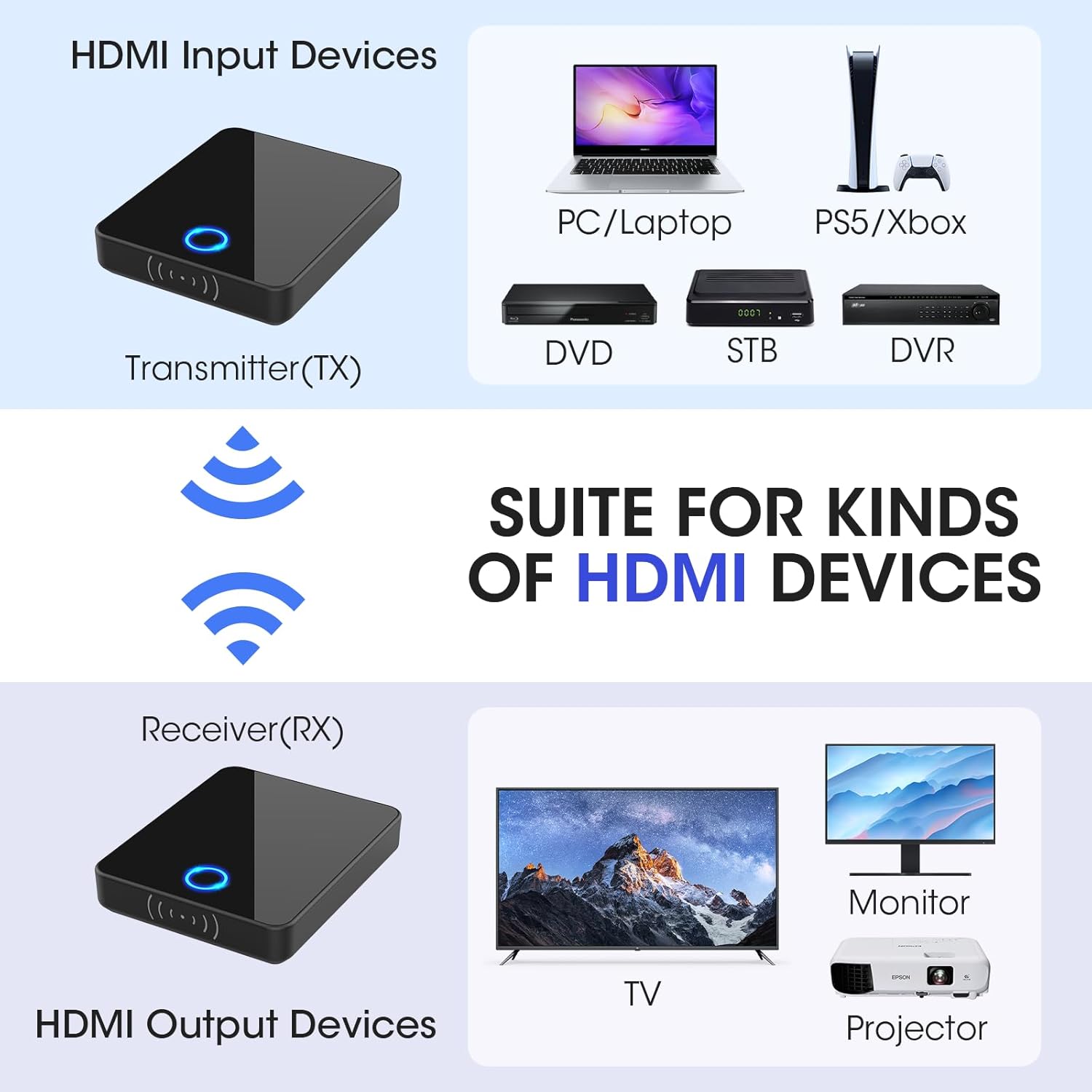
Image: A visual guide illustrating how to connect the Transmitter (TX) to HDMI input devices like laptops or game consoles, and the Receiver (RX) to HDMI output devices such as TVs, monitors, or projectors.
The system is designed for plug-and-play operation. Once all connections are made and devices are powered on, the transmitter and receiver(s) should automatically pair and begin transmitting the signal.
5. Операция
5.1 Негизги операция
After successful setup, the Binken Wireless HDMI system operates automatically. The video and audio from your source device will be mirrored to the connected display(s).
- LED көрсөткүчү: The LED light on both the Transmitter and Receiver indicates connection status. A solid light typically means a stable connection.
- Сигнал диапазону: Maintain the transmitter and receiver within the specified range of 30 meters (98 feet) for optimal performance. Obstructions like walls and furniture can reduce this range.

Сүрөт: мурункуample of the wireless HDMI system in use, showing a presentation being wirelessly projected in a meeting room, demonstrating its application for shared viewing.
5.2 Multi-Receiver Functionality
This system supports one transmitter broadcasting to up to four receivers simultaneously. To use multiple receivers:
- Connect each receiver to a separate display device as described in the Setup section.
- Ensure all receivers are powered on and within range of the transmitter.
- The transmitter will automatically broadcast the signal to all paired receivers.

Image: A floor plan diagram illustrating how one Binken Wireless HDMI Transmitter can send signals to multiple Receivers located in different rooms, enabling multi-room viewing.
6. Техникалык шарттар
| Өзгөчөлүк | Деталь |
|---|---|
| Модель номери | 810 |
| Бренд | Бинкен |
| Байланыш технологиясы | Зымсыз HDMI |
| Туташтыргыч түрү | HDMI |
| Резолюцияны колдоо | 1080p@60Hz чейин |
| Берүү жыштыгы | 2.4 ГГц / 5 ГГц |
| Өткөрмө аралык | 30 метрге чейин (98 фут) көрүү сызыгы |
| Кечигип калуу | Болжол менен 0.1 секунд |
| Көп кабыл алгычты колдоо | 1 өткөргүчтөн 4 кабыл алгычка чейин |
| Compatible Input Devices | Laptops, PCs, Blu-ray players, HD digital video cameras, DVDs, DSLRs, set-top boxes, cable/satellite boxes, PS4, PS5 |
| Compatible Output Devices | HDTVs, Projectors, Monitors |
7. Кыйынчылыктарды
Эгер көйгөйлөргө туш болсоңуз, төмөнкү жалпы көйгөйлөрдү жана чечимдерди караңыз:
- Дисплейде сигнал жок:
- Ensure both the Transmitter and Receiver are properly powered and their LED indicators are on.
- Verify that the HDMI cables are securely connected to both the source and display devices.
- Дисплей түзмөгүңүз туура HDMI киргизүү булагына коюлганын текшериңиз.
- Try connecting the source device directly to the display with an HDMI cable to confirm the source and display are functioning correctly.
- Өткөргүч менен кабыл алгычтын ортосундагы аралыкты азайтыңыз жана кандайдыр бир чоң тоскоолдуктарды алып салыңыз.
- Poor Video Quality or Flickering:
- Ensure the Transmitter and Receiver are within optimal range and have a clear line of sight.
- Башка зымсыз аппараттардын (мисалы, Wi-Fi роутерлери, зымсыз телефондор) кийлигишүүсүн азайтыңыз.
- Check if the power supply to both units is stable.
- Аудио жок:
- Булак түзмөгүңүздөгү аудио чыгаруу орнотуулары туура конфигурацияланганын текшериңиз.
- Дисплей түзмөгүнүн үнү өчүрүлбөгөнүн же өтө төмөн коюлбаганын текшериңиз.
- Check all HDMI connections.
- Үзгүлтүксүз туташуу:
- Relocate the Transmitter and Receiver to avoid physical obstructions or sources of interference.
- Ensure the power supply is consistent and adequate for both units.
8. Техникалык тейлөө
To ensure the longevity and optimal performance of your Binken Wireless HDMI system, follow these maintenance guidelines:
- Тазалоо: Use a soft, dry cloth to clean the devices. Do not use liquid cleaners or aerosols.
- Сактагыч: Узак мөөнөткө колдонулбаганда, аппараттарды күн тийбеген жана өтө температурадан алыс салкын, кургак жерде сактаңыз.
- Колдонуу: Түзмөктөрдү этияттык менен колдонуңуз. Аларды түшүрүп албоодон же катуу соккуга кабылбоодон алыс болуңуз.
- Күч: Always use the provided USB power cables and ensure a stable power source.
- Вентиляция: Ensure the devices have adequate ventilation and are not covered during operation to prevent overheating.
9. Кепилдик жана колдоо
Binken products are designed for reliability and performance. For warranty information and technical support, please refer to the official Binken webсайтка же кардарларды тейлөөгө кайрылыңыз. Сатып алуу квитанциясын кепилдик дооматтары үчүн сатып алуунун далили катары сактаңыз.
Байланыш маалыматы:
- Webсайт: Visit the Binken Store on Amazon
- For further assistance, please consult the product listing page or contact Binken customer support directly.