
Introduction
This manual provides detailed instructions for the installation, operation, and maintenance of your EBTOOLS 4.3-inch 1080P Mirror Dash Cam. This device is designed to record video footage from both the front and rear of your vehicle, offering features such as parking monitoring and loop recording for enhanced driving safety and evidence collection. Please read this manual thoroughly before using the product to ensure proper functionality and to avoid any damage.
Продукт өзгөчөлүктөрү
- Туруктуу курулуш: Manufactured from high-quality ABS material for robustness and extended durability.
- Кең бурчтуу линзалар: Equipped with wide-angle lenses to minimize blind spots and capture comprehensive road details.
- Цикл жаздыруу: Ensures continuous recording by automatically overwriting the oldest video fileэс тутум картасы сыйымдуулугуна жеткенде.
- Бардык аба ырайынын көрсөткүчү: Capable of recording clear video footage even in adverse weather conditions such as rain or fog.
- Колдонуучуга ыңгайлуу дизайн: Features a straightforward installation process and intuitive controls for ease of use.
Пакеттин мазмуну
Сиздин пакетиңизде төмөнкү нерселердин бардыгы камтылганын текшериңиз:
- EBTOOLS 4.3-inch Mirror Dash Cam Unit
- Арткыview Камера
- Унаа заряддагыч
- Арткы камераны туташтыруу кабели
- Mounting Straps/Adhesive
- Колдонуучунун колдонмосу (бул документ)

Жайгашуу
1. Камераны орнотуу
Secure the mirror dash cam over your vehicle's existing rearview mirror using the provided mounting straps. Ensure it is firmly attached and does not obstruct your view.
2. Арткы камераны туташтыруу
Route the rear camera cable from the dash cam to the desired mounting location at the rear of your vehicle. Connect the rear camera to the AV IN port on the main dash cam unit. For optimal performance, ensure the cable is neatly tucked away and secured.


3. Power Connection
Connect the provided car charger to the dash cam's power input port and then plug the other end into your vehicle's 12V power outlet (cigarette lighter socket). The device will typically power on automatically with the vehicle's ignition.
4. Эстутум картасын салыңыз
Insert a compatible Micro SD card (not included) into the TF CARD slot on the dash cam. Ensure the card is inserted correctly until it clicks into place. A high-speed Class 10 or higher card is recommended for reliable recording.

Иштөө нускамалары
Күйгүзүү/өчүрүү
- Автоматтык: The dash cam will power on and begin recording automatically when your vehicle's ignition is turned on.
- Кол менен: Press and hold the Power button (usually marked with a power symbol) to manually turn the device on or off.
Меню Багыттоо
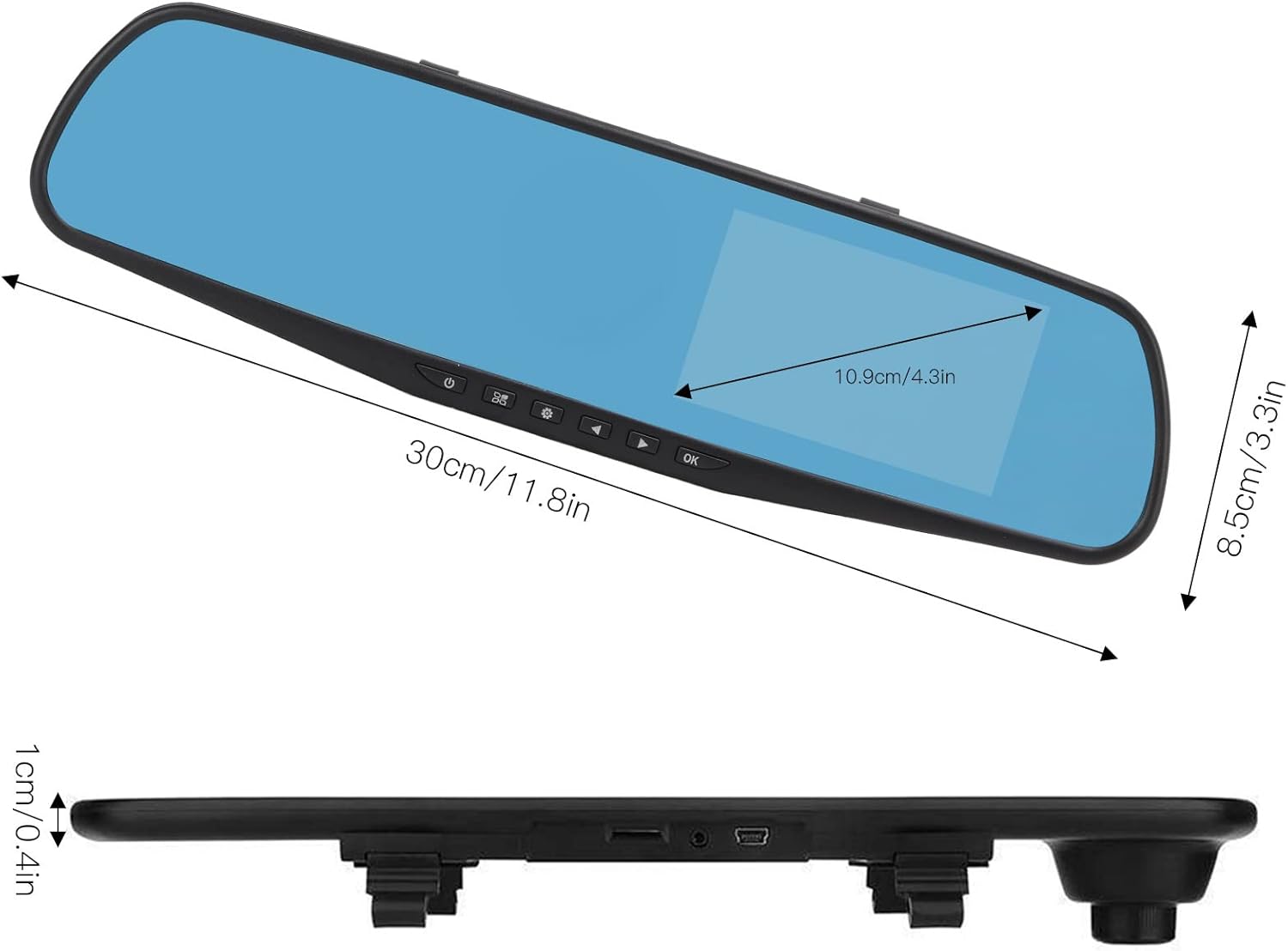
Use the physical buttons located on the bottom of the mirror unit to navigate through the menu options:
- Меню баскычы: Орнотуулар менюсуна кирүү үчүн басыңыз.
- Өйдө/ылдый баскычтары: Use to scroll through menu options.
- OK баскычы: Press to confirm a selection or setting.
Жазуу режимдери
- Цикл жаздыруу: This feature records video in continuous segments (e.g., 1, 2, 3, or 5 minutes). When the memory card is full, the oldest files жаңы жаздыруулар үчүн орун бошотуу үчүн автоматтык түрдө үстүнө жазылат.
- Кыймылды аныктоо: When enabled, the dash cam will automatically start recording if it detects movement in front of the vehicle while parked. This feature is useful for parking surveillance.
Video Resolution Settings
You can adjust the video resolution for both front and rear cameras in the settings menu:
- Алдыңкы камера: Select between 1080P (FHD 1400x1080) or 720P (HD 1280x720).
- Арткы камера: Records at 720P resolution.
Тил орнотуулары
The device supports multiple languages. Navigate to the language settings in the menu to select your preferred language, including English, German, French, Italian, Japanese, Korean, and Simplified Chinese.

Техникалык тейлөө
- Тазалоо: Видеорегистратордун экранын жана линзаларын тазалоо үчүн жумшак, кургак чүпүрөктү колдонуңуз. Абразивдүү тазалоочу каражаттарды же эриткичтерди колдонуудан алыс болуңуз.
- Эстутум картасы: Regularly format your Micro SD card (at least once a month) to ensure optimal performance and prevent data corruption. Back up any important footage форматтоодон мурун.
- Температура: Avoid exposing the device to extreme temperatures, both hot and cold, as this can affect battery life and component integrity.
Проблемаларды чечүү
- Түзмөк күйбөй жатат:
- Ensure the car charger is properly connected to both the dash cam and the vehicle's 12V power outlet. Check if the vehicle's ignition is on. Test the charger in another port or with another device if possible.
- Жаздыруу маселелери (мисалы, жазууну токтотуп, бузулган fileс):
- Verify that a compatible, high-speed Micro SD card (Class 10 or higher) is inserted correctly. Format the memory card through the dash cam's settings menu. If issues persist, try a different memory card.
- Screen display problems (e.g., black screen, distorted image):
- Check all cable connections, especially for the rear camera. Try resetting the device to factory settings via the menu. If the problem continues, contact customer support.
- Арткы камера көрсөтпөй жатат:
- Ensure the rear camera cable is securely connected to both the rear camera and the AV IN port on the main unit. Check for any damage to the cable or connectors.
Техникалык шарттар
| Элемент түрү | 4.3 дюймдук күзгүлүү видеорегистратор |
| Материал | ABS |
| Screen Size | 4.3 дюйм |
| Дисплей түрү | TFT LCD |
| Алдыңкы камеранын бурчу | 110 градус |
| Арткы камеранын бурчу | 90-110 degrees (Adjustable) |
| Алдыңкы видеонун чечилиши | 1080P (FHD 1400x1080), 720P (HD 1280x720) |
| Арткы видеонун чечилиши | 720P |
| Loop Recording Intervals | 1 мүнөт, 2 мүнөт, 3 мүнөт, 5 мүнөт |
| Motion Detection | Колдоого алынган |
| Сүрөттүн чечилиши | 12 МП, 10 МП, 5 МП, 3 МП, 2 МП, 1.3 МП |
| Video Format | AVI |
| Сүрөт форматы | JPEG |
| Линзанын түрү | F2.78 glass resolution multi-layer filter wide-angle lens |
| Колдоого алынган тилдер | English, German, French, Italian, Japanese, Korean, Simplified Chinese |
| Video Output | USB карта окугуч |
| Монтаждоо ыкмасы | Желим түрү |
| Продукциянын өлчөмдөрү | Approx. 30cm (11.8in) L x 8.5cm (3.3in) W x 1cm (0.4in) T |
| Пакеттин өлчөмдөрү | 34 x 12 x 6 см; 512 г |
Кепилдик жана колдоо
For warranty information or technical assistance, please refer to the warranty card included with your product or contact EBTOOLS customer support through the retailer's platform where the product was purchased. Our support team is available to help with any questions or issues you may encounter.