
1. Коопсуздук боюнча маанилүү маалымат
Please read this instruction manual carefully before using the Lefant M210 Robot Vacuum Cleaner. Keep this manual for future reference.
- Бул шайманды 8 жаштан жогорку балдар жана физикалык, сезүү же акыл-эс жөндөмү начар же тажрыйбасы жана билими жок адамдар колдонсо болот, эгерде алар көзөмөлгө алынган же шайманды коопсуз колдонуу боюнча нускама алган болсо жана келтирилген коркунучтарды түшүнсө. .
- Балдар шайман менен ойнобошу керек. Тазалоо жана колдонуучу тейлөөнү балдар көзөмөлсүз жасабашы керек.
- Өндүрүүчү тарабынан берилген оригиналдуу кубат адаптерин гана колдонуңуз.
- Роботту ачык жалын же морт буюмдар бар чөйрөдө колдонбоңуз.
- Ensure the charging base is placed on a flat surface against a wall, with adequate clear space around it.
- Before cleaning, remove loose cables, small objects, or anything that could entangle the robot.
2. Пакеттин мазмуну
Пакетте бардык компоненттер бар экенин текшериңиз:
- Lefant M210 робот чаң соргуч
- Заряддоо базасы
- Кубаттуу адаптер
- Каптал щеткалары (2 жуп)
- Жогорку өндүрүмдүү чыпка
- Тазалоо куралы
- Алыстан башкаруу (батареялар менен)
- User Manual

Image: The Lefant M210 Robot Vacuum Cleaner shown with its included accessories, such as the charging base, power adapter, side brushes, and remote control.
3. Продукт бүтүп калдыview
3.1 Роботтун вакуумдук компоненттери
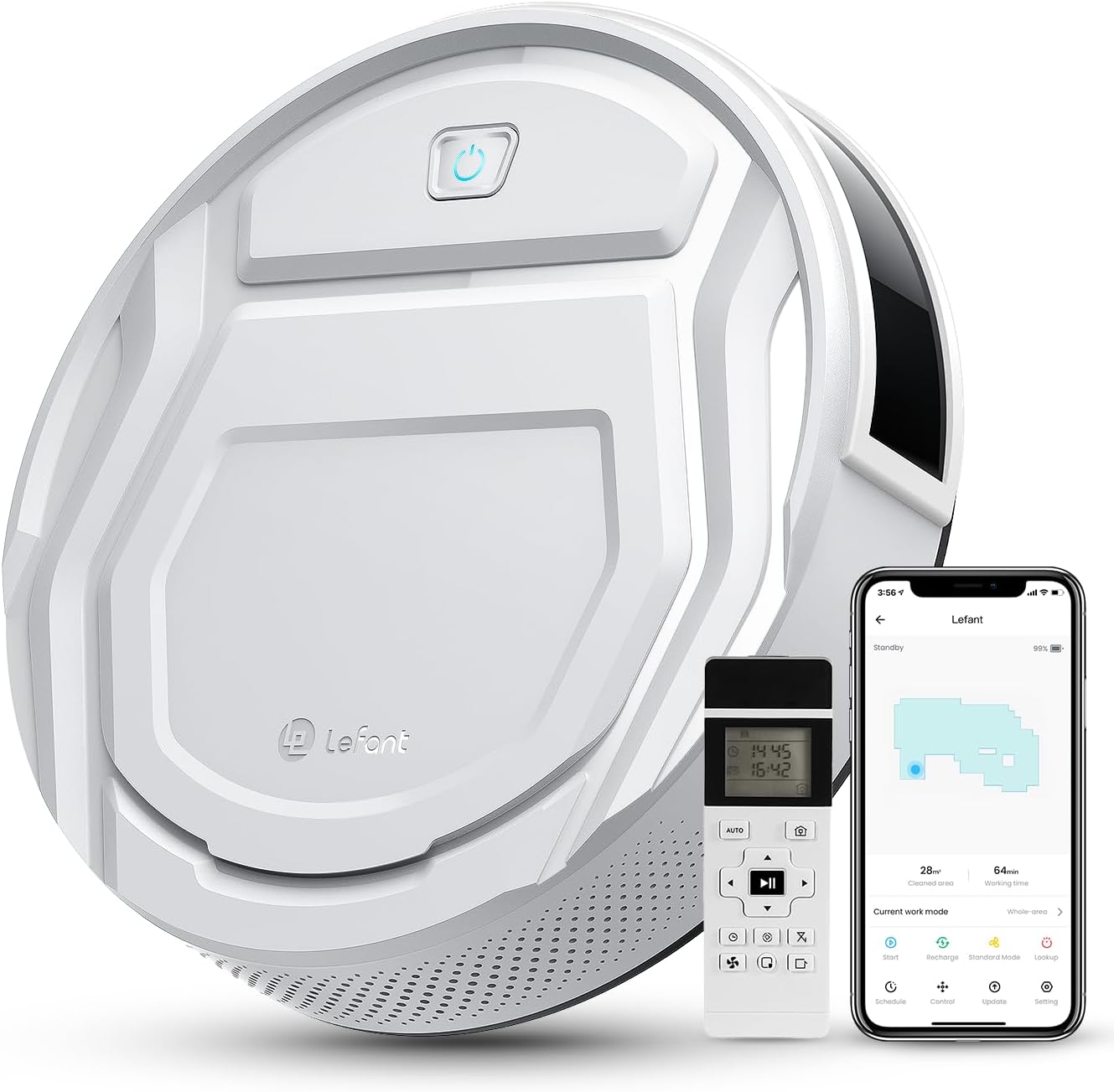
Сүрөт: Жогорку view of the Lefant M210 Robot Vacuum Cleaner, highlighting its compact design and main controls.
The Lefant M210 is an autonomous robot vacuum cleaner designed for efficient cleaning of various floor types. It features a powerful suction and advanced navigation capabilities.
3.2 Кубаттоочу база
The charging base serves as the robot's home station, where it automatically returns to recharge its battery.
4. Орнотуу
4.1 Заряддоо базасын жайгаштыруу
- Заряддоочу негизди дубалга такап, ачык, иретсиз жерге коюңуз.
- Ensure there is at least 0.5 meters (1.6 feet) of clear space on both sides of the charging base and 1.5 meters (4.9 feet) in front of it.
- Кубат адаптерин кубаттоочу базага туташтырып, аны розеткага сайыңыз.
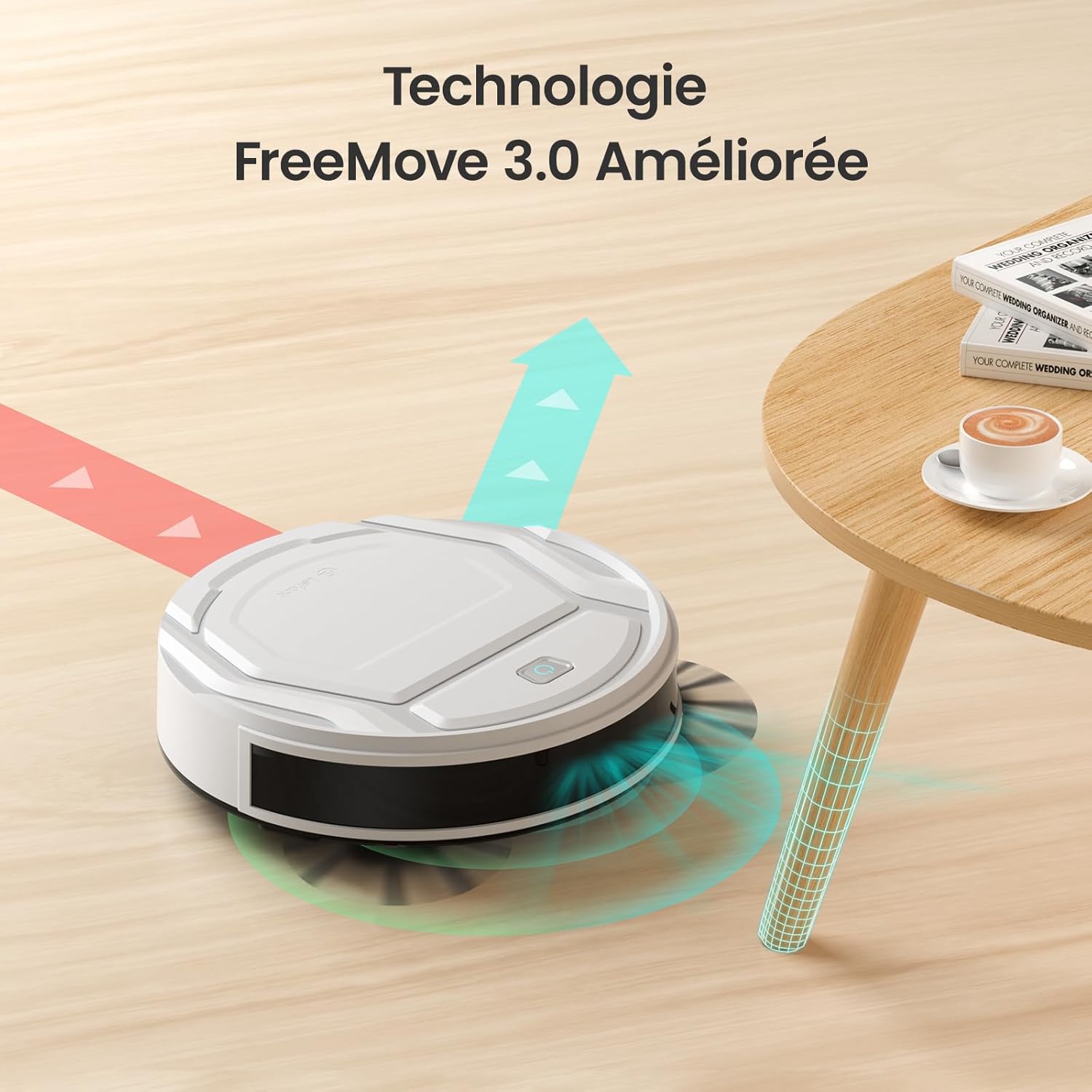
Image: The robot vacuum approaching its charging base, illustrating proper placement for automatic return.
4.2 Алгачкы заряддоо
- Place the robot vacuum onto the charging base, ensuring the charging contacts align.
- The indicator light on the robot will show charging status. Allow the robot to fully charge before its first use (approximately 4-5 hours).
4.3 App Connection (WiFi/Alexa)
- Download the "Lefant Life" app from your smartphone's app store.
- Open the app and follow the on-screen instructions to create an account and add your M210 robot vacuum.
- Ийгиликтүү туташуу үчүн Wi-Fi тармагыңыз 2.4 ГГц экенин текшериңиз.
- For Alexa integration, enable the "Lefant Life" skill in the Alexa app and link your accounts.

Image: A smartphone displaying the Lefant app, illustrating options for scheduling, control, and monitoring the robot vacuum.
5. Робот вакуумду иштетүү
5.1 Тазалоону баштоо жана токтотуу
- Кол менен баштоо: Press the power button on the robot once to start cleaning. Press again to pause.
- App/Remote Start: Use the "Start" button in the Lefant Life app or on the remote control to begin a cleaning cycle.
- To send the robot back to its charging base, press the "Recharge" button on the robot, app, or remote control.
5.2 Suction Power and Quiet Operation
The M210 provides 2200Pa of suction power to effectively clean dust, debris, and pet hair. Its design ensures quiet operation, typically around 55 decibels, allowing for cleaning without significant disturbance.

Image: The Lefant M210 robot vacuum illustrating its 2200Pa suction power, effectively collecting debris from the floor.

Image: The slim Lefant M210 robot vacuum (7.8cm height) cleaning quietly under a sofa, with a noise level of 55dB, indicating minimal disturbance.
5.3 Тазалоо режимдери
The M210 offers multiple cleaning modes to suit different needs:
- Автоматтык режим: The robot cleans in a systematic pattern, adapting to the environment.
- Зигзаг режими: Ideal for large, open areas, the robot cleans in a back-and-forth pattern.
- Edge режими: Робот дубалдарды жана эмеректердин четтерин тазалайт.
- Spot режими: For concentrated cleaning of a specific dirty area, the robot cleans in a spiral pattern.
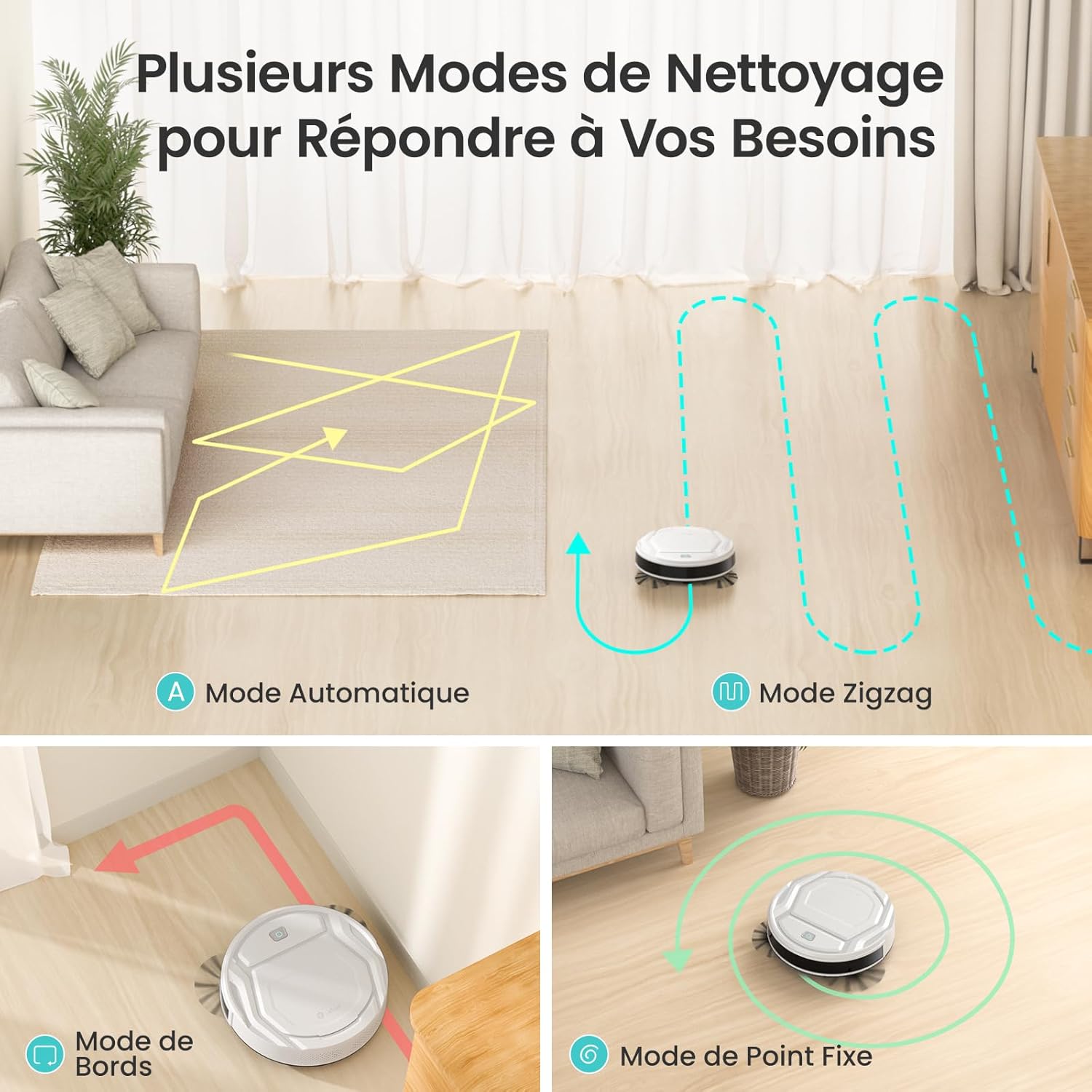
Image: Visual representation of the robot vacuum's various cleaning modes, including automatic, zigzag, edge, and spot cleaning patterns.
5.4 App and Remote Control
Control your M210 robot vacuum using the Lefant Life app or the included remote control. Both allow you to start/stop cleaning, change modes, schedule cleaning, and direct the robot manually.
Image: A smartphone displaying the Lefant app, illustrating options for scheduling, control, and monitoring the robot vacuum.

Image: A user comfortably controlling the robot vacuum via a smartphone app, demonstrating ease of use.
5.5 Навигация жана тоскоолдуктардан качуу
Equipped with FreeMove 3.0 technology, the M210 navigates efficiently around furniture and obstacles, preventing collisions and getting stuck.

Image: The robot vacuum demonstrating its FreeMove 3.0 navigation by smoothly moving around a table leg, avoiding collision.
5.6 Үй жаныбарларынын чачын тазалоо
The M210 is designed to effectively pick up pet hair from various surfaces. Regular cleaning of the dustbin and brushes is recommended when cleaning pet hair frequently.

Image: The Lefant M210 robot vacuum positioned on a floor with visible pet hair, demonstrating its suitability for homes with pets.
6. Техникалык тейлөө
Үзгүлтүксүз техникалык тейлөө оптималдуу иштешин камсыздайт жана робот чаң соргучуңуздун иштөө мөөнөтүн узартат.
6.1 Таштанды кутусун бошотуу
- Таштанды урнасын чыгаруу баскычын басып, таштанды челектерин чыгарыңыз.
- Таштанды челектин капкагын ачып, анын ичиндегисин таштанды челекке төгүңүз.
- Зарыл болсо, кайра салаардан мурун, таштанды челектин толугу менен кургаганын текшерип, суу менен чайкаңыз.
6.2 Фильтрди тазалоо
- Чыпканы таштанды челекинен алып салыңыз.
- Tap the filter gently to remove dust and debris. Do not wash the high-performance filter with water.
- Replace the filter every 2-3 months, or as needed, depending on usage.
6.3 Каптал щеткаларды тазалоо
- Каптал щеткаларды алып салуу үчүн акырын өйдө тартыңыз.
- Remove any hair or debris tangled around the brushes. Use the provided cleaning tool if necessary.
- Snap the brushes back into place, ensuring they are securely attached.
6.4 Сенсорлорду жана заряддоо контакттарын тазалоо
- Wipe the anti-drop sensors, infrared sensors, and charging contacts on both the robot and the charging base with a clean, dry cloth.
- Ensure no dust or debris obstructs these components for proper operation.
7. Кыйынчылыктарды
| Көйгөй | Мүмкүн себеп | Чечим |
|---|---|---|
| Робот күйбөйт. | Батареянын аздыгы; Кубат өчүрүү. | Роботту кубаттаңыз; Негизги кубат которгучу күйүк экенин текшериңиз. |
| Робот заряддай албайт. | Charging contacts are dirty; Charging base not powered. | Clean charging contacts on robot and base; Ensure power adapter is plugged in. |
| Робот бат-баттан тыгылып калат. | Өтө көп тоскоолдуктар; Сенсорлор кир. | Clear the cleaning area; Clean all sensors. |
| Начар тазалоо көрсөткүчү. | Dustbin full; Filter clogged; Brushes tangled. | Empty dustbin; Clean/replace filter; Clean side brushes. |
| Wi-Fi/Колдонмого туташуу мүмкүн эмес. | Incorrect Wi-Fi password; Router is 5GHz; Robot too far from router. | Verify password; Ensure 2.4GHz Wi-Fi; Move robot closer to router. |
8. Техникалык шарттар
| Өзгөчөлүк | Деталь |
|---|---|
| Бренд | Лефант |
| Модель аты | M210 |
| Surface Recommendation | Wood, Carpets, Hard Floors |
| Өзгөчө өзгөчөлүк | Акылдуу |
| Түс | Пил сөөгү |
| Controller Type | Колдонмо башкаруу, алыстан башкаруу |
| Чыпка түрү | Картридж |
| Батареянын иштөө мөөнөтү | 120 мүнөт |
| Батарея түрү | Литий ион |
| Тtage | 19 вольт |
| Таштанды кутусунун сыйымдуулугу | 500 миллилитр |
| Power Source | Батарея менен иштейт |
| Элементтин өлчөмдөрү (L x W x Y) | 11"L x 11"W x 2.99"H |
| Элемент Салмагы | 3.1 килограмм |
| Ызы-чуу деңгээли | 55 децибел |
| Ички сыртта колдонуу | Indoor |
| Камтылган компоненттер | Lefant M210 Robot Vacuum |
| UPC | 769577079450 |

Image: The robot vacuum with an overlay indicating its 120-minute battery life and coverage area of 120 square meters.
9. Кепилдик жана колдоо
Lefant provides a standard warranty for the M210 Robot Vacuum Cleaner. For detailed warranty information, please refer to the warranty card included in your package or visit the official Lefant webсайт.
For technical support, troubleshooting assistance, or to purchase replacement parts, please contact Lefant customer service through the following channels:
- Электрондук почта: Refer to your warranty card or product packaging.
- Webсайт: www.lefant.com
- Lefant Life App: Access support features directly within the application.