
Introduction
Thank you for choosing the Lecoo MCS30 Wireless Portable Speaker. This device is designed to provide high-quality audio and voice amplification with versatile connectivity options. Please read this manual carefully before using the product to ensure proper operation and to maximize its lifespan.
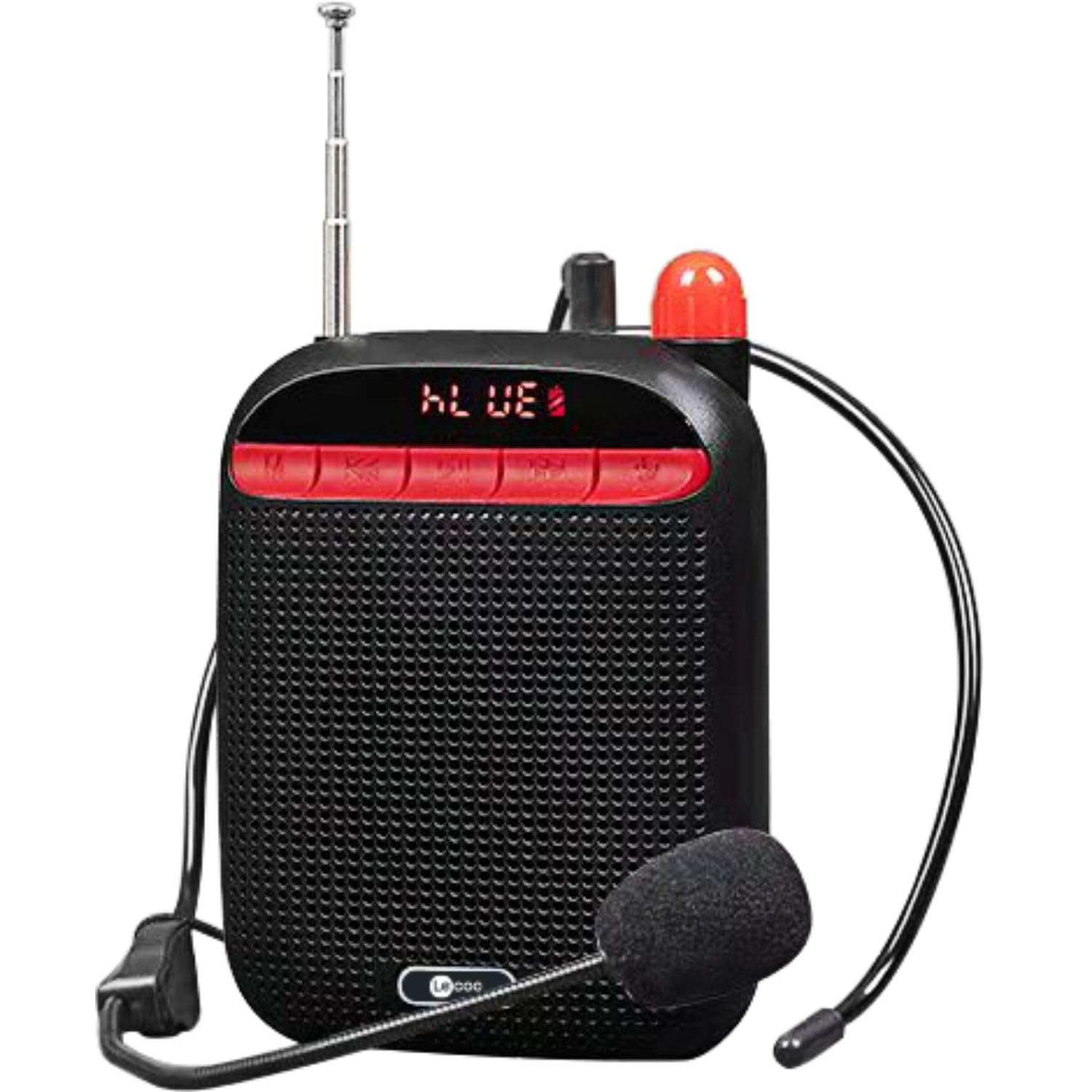
Image: Two Lecoo MCS30 portable speakers, one white and one black, shown with their respective wired headset microphones. Both speakers feature an extendable antenna and front-facing controls.
Продукт бүттүview
The Lecoo MCS30 is a compact and powerful portable speaker featuring multiple input options and dual microphone support for amplification and recording. Familiarize yourself with the device's components and controls.
Алдыңкы панелдин башкаруу элементтери жана дисплей

Сүрөт: алдыңкы пландан view of the black Lecoo MCS30 speaker, highlighting the digital display and the red control buttons for mode selection, track navigation, and microphone functions.
- Дисплей экраны: Учурдагы режимди, трек маалыматын жана батареянын абалын көрсөтөт.
- Режим (M) баскычы: Switches between Bluetooth, USB, AUX, and SD card modes.
- Мурунку/Үндү азайтуу баскычы: Мурунку трек үчүн кыска басыңыз, үндү азайтуу үчүн көпкө басыңыз.
- Ойнотуу/тындыруу баскычы: Аудиону ойнотот же тындырат.
- Кийинки/Үндү катуулатуу баскычы: Кийинки трек үчүн кыска басыңыз, үнүн катуулатуу үчүн көпкө басыңыз.
- Микрофон баскычы: Activates/deactivates microphone functions.
Side and Rear Connections

Сүрөт: жогорудан төмөнгө view of the Lecoo MCS30 speaker, revealing the USB port, TF (SD card) slot, AUX input, and microphone input ports.
- MIC киргизүү: For connecting external microphones (headset or lapel).
- USB порт: USB флэш-дискти ойнотуу үчүн.
- TF карта уячасы: SD карта ойнотуу үчүн.
- AUX киргизүү: 3.5 мм кабель аркылуу тышкы аудио түзмөктөрдү туташтыруу үчүн.
- DC 5V заряддоо порту: Аппаратты заряддоо үчүн.
- Кубат которгучу: On/Off toggle.
- Антенна: Extendable antenna for improved signal reception (if applicable for radio functions).
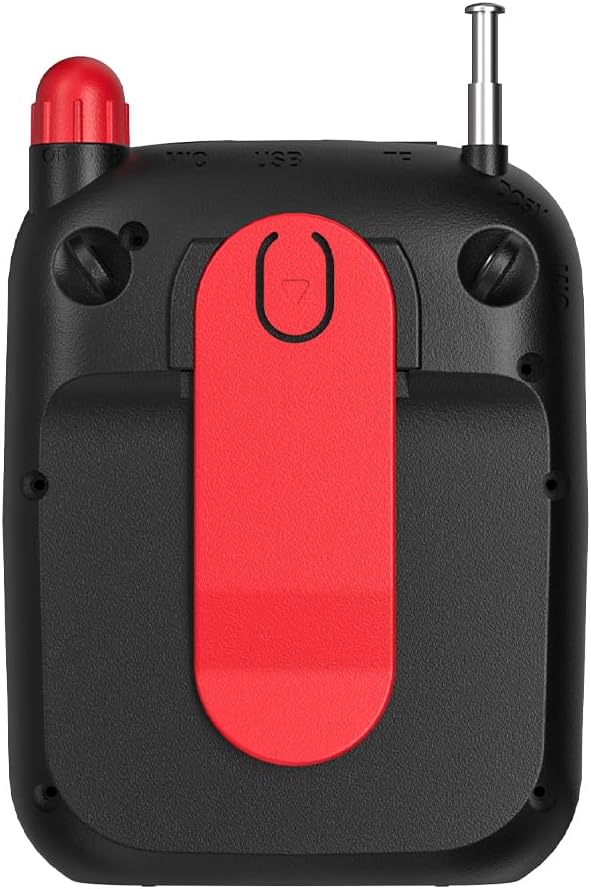
Сүрөт: Арткы view of the Lecoo MCS30 speaker, clearly showing the integrated red belt clip for portable use.
- Кур клип: For attaching the speaker to clothing or a belt for hands-free use.
Жайгашуу
1. Динамикти кубаттоо
- Connect the charging cable to the DC 5V port on the speaker.
- Кабелдин экинчи учун USB кубат адаптерине (кошумча эмес) же компьютердин USB портуна туташтырыңыз.
- Дисплейде кубаттоо абалы көрсөтүлөт. Толук кубаттоо үчүн, адатта, 3-4 саат талап кылынат.
- Батареянын иштөө мөөнөтүн сактоо үчүн толук заряддалгандан кийин заряддагычты ажыратыңыз.
2. Күйгүзүү / Өчүрүү
- To power on, slide the power switch to the 'ON' position. The display will light up.
- Өчүрүү үчүн, кубат которгучун "OFF" абалына жылдырыңыз.
3. Баштапкы Bluetooth жупташуусу
- Ensure the speaker is powered on and in Bluetooth mode (the display will show 'BLUE' or a Bluetooth icon). If not, press the 'M' (Mode) button to switch.
- Мобилдик түзмөгүңүздө (смартфон, планшет, ноутбук) Bluetooth иштетиңиз жана жеткиликтүү түзмөктөрдү издеңиз.
- Select 'Lecoo MCS30' from the list of found devices.
- Жупташтырылгандан кийин, динамик ырастоо үнүн чыгарат жана дисплей ийгиликтүү туташууну көрсөтөт.
Иштөө нускамалары
1. Bluetooth ойнотуу
- After successful pairing, open your music player on your connected device and start playback.
- Use the speaker's 'Previous/Volume Down' and 'Next/Volume Up' buttons for track navigation (short press) and volume adjustment (long press).
- Use the 'Play/Pause' button to control playback.
2. USB/SD картаны ойнотуу
- Insert a USB flash drive into the USB port or an SD card into the TF card slot.
- The speaker will automatically switch to USB or SD card mode and begin playing MP3 files. If not, press the 'M' (Mode) button to select the correct mode.
- Use the speaker's control buttons for track navigation and volume adjustment.
3. AUX киргизүүсүн ойнотуу
- 3.5 мм аудио кабелинин бир учун (киргизилген эмес) динамиктеги AUX киргизүү портуна туташтырыңыз.
- Экинчи жагын аудио шайманыңыздын гарнитура уячасына туташтырыңыз.
- Press the 'M' (Mode) button until the speaker enters AUX mode.
- Start playback from your audio device. Volume can be controlled via both the speaker and the connected device.
4. Microphone Usage and Voice Recording
- Connect the headset microphone or a lapel microphone to the MIC input port.
- Press the 'Microphone' button to activate the amplification function. Your voice will be ampбаяндамачы аркылуу айтылган.
- To record your voice, ensure a USB flash drive or SD card is inserted. Press and hold the 'Microphone' button (or follow specific instructions if a dedicated record button exists, otherwise assume long press). The speaker will indicate recording has started.
- Press the 'Microphone' button again to stop recording. Recorded files are saved to the USB drive or SD card.
5. Үндү башкаруу
- Long press the 'Next/Volume Up' button to increase the volume.
- Long press the 'Previous/Volume Down' button to decrease the volume.
Техникалык тейлөө
Тазалоо
- Wipe the speaker's surface with a soft, dry cloth.
- Do not use abrasive cleaners, alcohol, or chemical solvents, as these may damage the finish.
- Avoid getting moisture into any ports or openings.
Сактагыч
- Динамикти түз күн нурунан жана өтө температурадан алыс салкын, кургак жерде сактаңыз.
- Эгер батарейканы узак убакытка сактасаңыз, анын иштөө мөөнөтүн сактоо үчүн аны мезгил-мезгили менен (мисалы, ар бир 3 ай сайын) кубаттап туруңуз.
Проблемаларды чечүү
- Кубат жок:
Ensure the speaker is fully charged. Check the power switch is in the 'ON' position. - Үн жок:
Check the volume level on both the speaker and the connected device. Ensure the correct input mode (Bluetooth, USB, AUX, SD) is selected. Verify cables are securely connected for AUX input. - Bluetooth туташпай жатат:
Ensure the speaker is in Bluetooth pairing mode. Turn off and on Bluetooth on your device. Move the speaker closer to your device. Clear previous Bluetooth connections on your device and try pairing again. - Микрофон иштебейт:
Ensure the microphone is securely plugged into the MIC input. Press the 'Microphone' button to activate it. Check the microphone's own power source if it has one. - Жаздыруу иштебей жатат:
Ensure a compatible USB flash drive or SD card is inserted and has sufficient free space. Check if the recording function is properly activated (refer to 'Microphone Usage and Voice Recording' section).
Техникалык шарттар
| Өзгөчөлүк | Description |
|---|---|
| Бренд | Lecoo |
| Модел | MCS30 |
| Байланыш технологиясы | Bluetooth 5.3, USB, AUX, SD Card |
| Чыгуу күчү | 5W |
| Жыштык диапазону | 100Гц-20КГц |
| Шайкеш түзмөктөр | Smartphone, Laptop, Karaoke Machine, MP3 Player, Tablet |
| Микрофонду колдоо | Dual Microphone (Headset/Lapel) with Amplification and Recording |
| Аудио форматты колдоо | MP3 |
| Түс | Кара |
Кепилдик жана колдоо
The Lecoo MCS30 Portable Speaker comes with a Lecoo Turkey Warranty. For warranty claims or technical support, please refer to the warranty card included with your product or visit the official Lecoo webсайт.
Көбүрөөк маалымат жана колдоо алуу үчүн төмөнкү дарекке кириңиз: Lecoo Store on Amazon.