
Introduction
This manual provides essential information for the safe and effective operation, maintenance, and troubleshooting of your DEWALT DCD794 20V Cordless 1/2" Drill Driver. The DCD794 is a compact and lightweight tool designed for drilling and fastening applications, delivering up to 1,650 RPMs with a 1/2" ratcheting chuck and an integrated LED work light.

Сүрөт: алдыңкы view of the DEWALT DCD794 20V Cordless 1/2" Drill Driver.
Жалпы коопсуздук маалыматы
Always observe basic safety precautions to reduce the risk of fire, electric shock, and personal injury. Keep your work area clean and well-lit. Do not operate power tools in explosive atmospheres, such as in the presence of flammable liquids, gases, or dust. Keep children and bystanders away while operating a power tool. Wear appropriate personal protective equipment, including eye protection, hearing protection, and gloves. Ensure the tool is switched off before making any adjustments, changing accessories, or storing it.
Продукт бүттүview
The DEWALT DCD794 Drill Driver is engineered for performance and durability. Key features include:
- 1/2" Ratcheting Chuck: Provides high bit retention for secure accessory gripping.
- 2-тез трансмиссия: Allows for versatile drilling and fastening applications.
- 15 Муфта орнотуулары: Offers precise control for various torque requirements.
- LED иш жарык: Көрүнүштү жакшыртуу үчүн жумуш аймагын жарыктандырат.
- Компакт жана жеңил дизайн: Enhances user comfort and maneuverability.
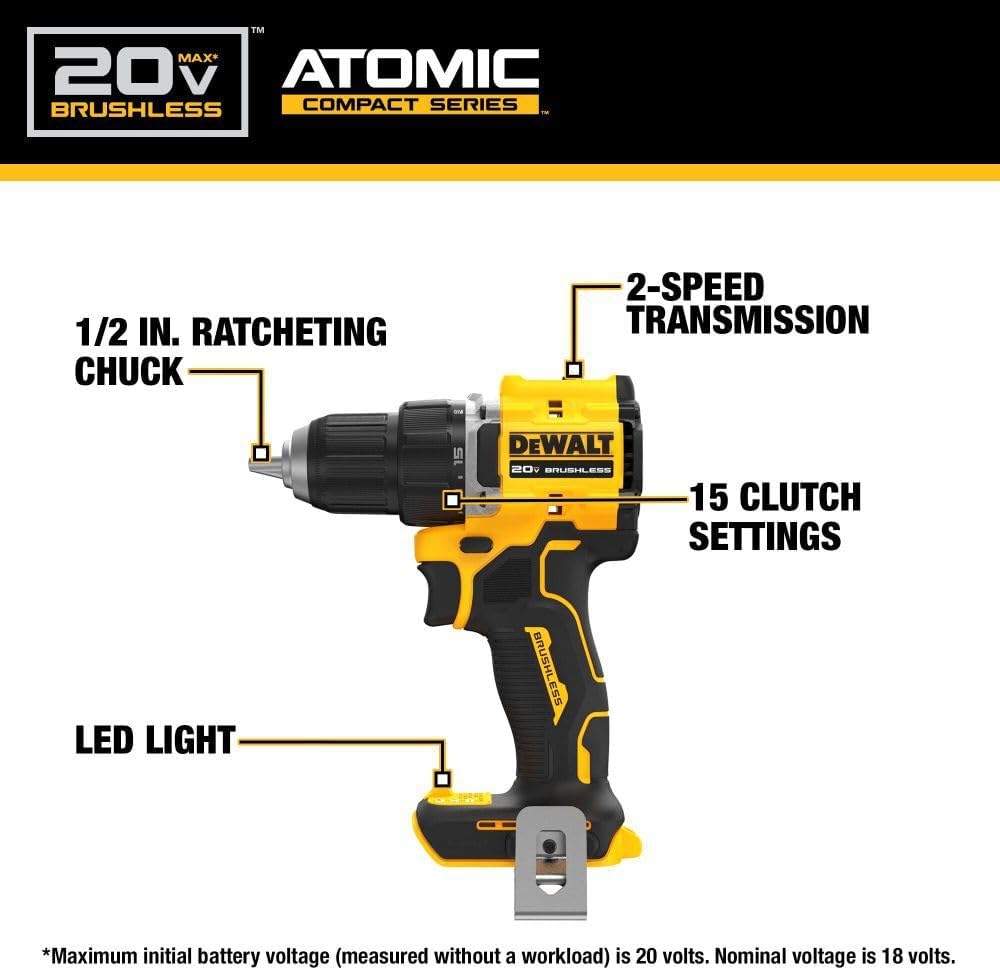
Image: Diagram highlighting the 1/2 inch ratcheting chuck, 2-speed transmission, 15 clutch settings, and LED light on the DEWALT DCD794 Drill Driver.
Жайгашуу
Батареяны орнотуу жана алып салуу
- To install the battery, align the battery pack with the rails inside the tool's handle. Slide the pack firmly into the tool until it locks into place.
- To remove the battery, press the release button on the battery pack and pull the pack out of the handle.

Image: The DEWALT DCD794 Drill Driver with a 20V battery pack attached to the base.
Бит орнотуу жана алып салуу
- To install a drill bit or driver accessory, grasp the rear half of the chuck and rotate the front half counter-clockwise until the chuck jaws open wide enough to accept the accessory.
- Insert the accessory fully into the chuck.
- Grasp the rear half of the chuck and rotate the front half clockwise until the accessory is firmly clampред.
- Алып салуу үчүн процессти артка кайтарыңыз.
Иштөө нускамалары
Ылдамдыкты тандоо
The drill driver features a 2-speed transmission for optimal performance across different applications. Use the speed selector switch located on top of the tool:
- 1-позиция (төмөн ылдамдык): For high torque applications, such as driving screws or drilling large diameter holes.
- 2-позиция (жогорку ылдамдык): For faster drilling with smaller bits.

Image: The DEWALT DCD794 Drill Driver being used to drill into wood, illustrating its 2-speed transmission capability.
Муфта орнотуулары
The adjustable clutch ring allows you to select the appropriate torque setting for your task. Rotate the ring to align the desired number with the indicator mark. Lower numbers are for driving small screws or into soft materials, while higher numbers are for driving larger screws or into harder materials. The drill symbol setting provides maximum torque for drilling applications.
Trigger Switch and LED Light
The variable speed trigger switch controls the tool's speed. Press the trigger to start the tool and vary the pressure to adjust the speed. The integrated LED work light activates when the trigger is pressed, illuminating the work surface. The light remains on for a short period after the trigger is released.
Техникалык тейлөө
Үзгүлтүксүз тейлөө оптималдуу иштешин камсыз кылат жана куралыңыздын иштөө мөөнөтүн узартат.
- Тазалоо: жумшак колдонуу, damp cloth to clean the exterior of the tool. Do not use harsh chemicals or abrasive cleaners. Keep the ventilation slots clear of dust and debris.
- Чакты тейлөө: Туура кармаш үчүн патрондун жаактарын мезгил-мезгили менен тазалап туруңуз.
- Батареяга кам көрүү: Батареяларды күн тийбеген, салкын, кургак жерде сактаңыз. Батареяларды заряды түгөнгөн абалда узак убакытка сактабаңыз.
- Текшерүү: Куралды үзгүлтүксүз текшерип туруңуз. Бузулган тетиктерди квалификациялуу тейлөөчү техникке оңдоңуз.
Проблемаларды чечүү
| Көйгөй | Мүмкүн себеп | Чечим |
|---|---|---|
| Курал башталбайт | Батарея заряддалган эмес же туура эмес орнотулган | Charge battery fully; ensure battery is securely inserted. |
| Иш учурунда электр кубатын жоготуу | Батарея заряды аз | Батареяны кайра заряддаңыз. |
| Бит патронго жылат | Chuck not tightened sufficiently or jaws are dirty | Tighten chuck firmly; clean chuck jaws. |
| Ашыкча термелүү | Bent drill bit or accessory | Replace with a straight, undamaged accessory. |
Техникалык шарттар
| Өзгөчөлүк | Спецификация |
|---|---|
| Бренд | ДЕВАЛЬТ |
| Модель номери | DCD794B-NBX |
| Power Source | Батарея менен иштейт (20 вольт) |
| Максималдуу айлануу ылдамдыгы | 1650 RPM |
| Чактын максималдуу өлчөмү | 0.5 дюйм |
| Максималдуу момент | 1.5 Ньютон метр |
| Максималдуу күч | 300 Ватт |
| Материалдын түрү | Пластик |
| Элементтин өлчөмдөрү (L x W x Y) | 6"L x 3"W x 8"H |
| Элемент Салмагы | 2.54 фунт |
Кепилдик маалымат
DEWALT provides a limited warranty for its products. For specific details regarding the warranty period, coverage, and terms for your DCD794 Drill Driver, please refer to the warranty card included with your purchase or visit the official DEWALT webсайт. Кепилдик дооматтар үчүн сатып алганыңыздын далилин сактаңыз.
Колдоо
Көбүрөөк жардам, техникалык колдоо же ыйгарым укуктуу тейлөө борборлорун табуу үчүн, расмий DEWALT сайтына кириңиз. webсайтка же кардарларды тейлөөгө кайрылыңыз. Көбүрөөк маалымат жана булактардан таба аласыз Amazonдагы DEWALT дүкөнү or the main DEWALT corporate webсайт.