
1. Киришүү
The Brifit Digital Refrigerator Freezer Thermometer provides accurate temperature readings for your refrigerator, freezer, or other indoor/outdoor environments. Its compact design and clear display make it suitable for various applications, helping you maintain optimal conditions for food preservation and other needs.
Негизги өзгөчөлүктөрү:
- MAX/MIN Temperature Recording: Displays maximum, minimum, and current temperatures simultaneously.
- Температура диапазону: -20℃ден 50℃ге чейин (-4℉ден 122℉ге чейин).
- Бирдикти алмаштыруу: Цельсий (℃) жана Фаренгейт (℉) ортосунда оңой которулуңуз.
- Суу өткөрбөйт рейтинги: IPX3 waterproof for use in refrigerated or frozen environments.
- Ийкемдүү жайгаштыруу: Features a foldable stand for tabletop use and a hook for hanging.

2. Продукт бүтүп калдыview
The Brifit Digital Thermometer features a clear LCD display and simple controls for ease of use.

Маалыматты көрсөтүү
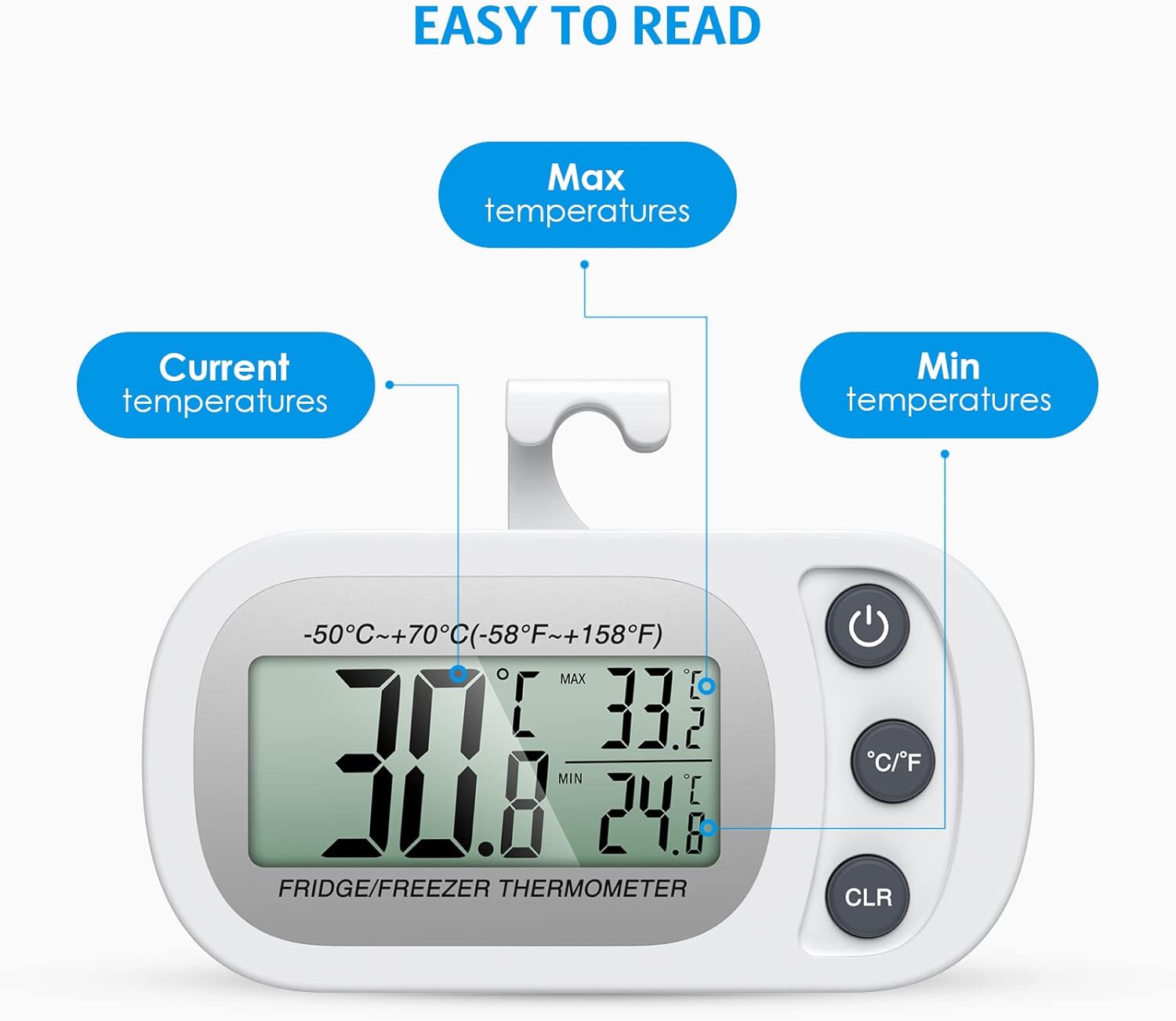
- Учурдагы температура: The large digits indicate the real-time temperature.
- MAX Temperature: The highest temperature recorded since the last reset.
- MIN Temperature: The lowest temperature recorded since the last reset.
Buttons

- Power Button (①): Аппаратты күйгүзүү же өчүрүү үчүн басыңыз.
- °C/°F Switch (②): Цельсий жана Фаренгейт температура бирдиктеринин ортосунда которулуу үчүн басыңыз.
- CLR Button (③): Press to reset the recorded MAX/MIN temperatures.
3. Орнотуу
Батарея орнотуу
The thermometer requires one CR2032 battery (one battery is typically included for initial use). If the display becomes irregular or unclear, the battery may need replacement.
- Аппараттын артындагы батарея бөлүкчөсүн табыңыз.
- Use a small screwdriver to open the screw and remove the ABS casing.
- Туура полярдуулукту (+/-) камсыз кылуу менен жаңы CR2032 батарейкасын салыңыз.
- с алмаштырыңызasing and secure the screw.
Эскертүү: Some units may have a protective film on the battery that needs to be removed before first use. If the device does not power on, check for this film or replace the battery.
Жайгаштыруу параметрлери
The thermometer offers two convenient placement methods:
- Столдун үстүнө жайгаштыруу: Use the integrated foldable stand to place the thermometer on any flat surface.
- Асма жайгаштыруу: Flip the stand to use the integrated hook, allowing you to hang the thermometer on a refrigerator shelf or other suitable location.

4. Иштөө нускамалары
Күйгүзүү/өчүрүү
басыңыз Кубат баскычы (①) once to turn the thermometer on. Press and hold the Кубат баскычы for a few seconds to turn it off.
Температура бирдиктерин которуу
басыңыз ° C / ° F которулуу (②) to toggle the temperature display between Celsius (℃) and Fahrenheit (℉).
Understanding MAX/MIN Readings
The thermometer continuously records the highest (MAX) and lowest (MIN) temperatures since the last reset. These values are displayed alongside the current temperature.
Resetting MAX/MIN Readings
To clear the recorded MAX/MIN temperatures and start a new recording cycle, press the CLR баскычы (③). The MAX/MIN values will reset to the current temperature.
5. Техникалык тейлөө
Батареяны алмаштыруу
Replace the CR2032 battery when the display becomes dim, irregular, or stops functioning. Follow the battery installation steps outlined in Section 3.
Тазалоо
Термометрди жумшак менен сүртүңүз, гamp cloth. Do not use abrasive cleaners or immerse the device in water, despite its IPX3 rating, to prevent damage to internal components.
6. Кыйынчылыктарды
- Туура эмес окуулар:
If you suspect inaccurate readings, try restarting the device by removing and reinserting the battery. Ensure the thermometer has been in the environment for several minutes to stabilize its reading. - Display is Blank or Irregular:
Check the battery. The battery may be depleted or improperly installed. Replace the CR2032 battery if necessary. Ensure any protective film on the battery has been removed. - Display Turns Off in Very Cold Temperatures:
While designed for freezer use, extreme temperatures significantly below -18℃ (0℉) may affect LCD performance. This is a characteristic of LCD technology at very low temperatures. The device should resume normal operation once the temperature rises within its specified operating range. - MAX/MIN Values Not Resetting:
Ensure you are pressing the 'CLR' button firmly. If the issue persists, try removing and reinserting the battery to perform a hard reset.
7. Техникалык шарттар
| Өзгөчөлүк | Спецификация |
|---|---|
| Модель номери | WA4W_2PCS |
| Температура диапазону | -20℃ден 50℃ге чейин (-4℉ден 122℉ге чейин) |
| Тактык | ±1℃ (±2℉) |
| Резолюция | 0.1 ℃ (0.2 ℉) |
| Power Source | 1 x CR2032 Батарея |
| Суу өткөрбөйт рейтинги | IPX3 |
| Өлчөмдөрү (болжол менен) | 88мм (L) x 46mm (W) x 16mm (D) |


8. Кепилдик жана колдоо
Brifit products are designed for reliability and performance. While specific warranty details are not provided in this manual, please refer to your purchase documentation or contact Brifit customer support for any warranty-related inquiries or technical assistance.
For further support, please visit the official Brifit webсайтка же продукт сатылып алынган сатуучу аркылуу кардарларды тейлөө бөлүмүнө кайрылыңыз.