
Introduction
Thank you for choosing the PETLIBRO 5L Automatic Pet Feeder with 1080P Camera. This device is designed to provide convenient and reliable feeding for your pets, ensuring they receive their meals on schedule while allowing you to monitor and interact with them remotely. This manual provides essential information for setting up, operating, and maintaining your feeder.

The PETLIBRO 5L Automatic Pet Feeder offers a range of features including a 1080p HD camera, night vision, two-way audio, remote feeding, in-app monitoring, and easy cleanup.
Коопсуздук нускамалары
- Тамактандыргычты колдонуудан мурун бардык көрсөтмөлөрдү кунт коюп окуп чыгыңыз.
- Бул шайман үй ичинде гана колдонуу үчүн.
- Негизги блокту сууга же башка суюктуктарга салбаңыз.
- Тамак бышыргычты күндүн түз нурунан жана жылуулук булактарынан алыс кармаңыз.
- Ensure the power cord is not damaged and is placed where pets cannot chew on it.
- Бергич менен кошо берилген оригиналдуу кубат адаптерин гана колдонуңуз.
- Always supervise children around the feeder.
- Only use dry pet food with a diameter between 2-15mm.
Пакеттин мазмуну
Пакетте бардык компоненттер бар экенин текшериңиз:
- PETLIBRO Automatic Pet Feeder (Main Unit)
- Дат баспас болоттон жасалган тамак-аш идиш
- Кубаттуу адаптер
- User Manual
- Desiccant Bag (may be pre-installed)
Продукт бүттүview
Familiarize yourself with the different parts of your PETLIBRO Automatic Pet Feeder.

The main unit of the feeder, featuring the food hopper, dispensing mechanism, 1080P camera, and control panel. A cat is shown eating from the stainless steel bowl, with a smartphone displaying the live camera feed.
- Тамак-аш бункер: Stores dry pet food.
- Lid with Twist-Lock: Secures the food hopper and keeps food fresh.
- Башкаруу панели: Buttons for manual feeding and settings.
- 1080P HD камера: Түз мониторинг жана жаздыруу үчүн.
- Инфракызыл сенсор: Detects low food levels and blockages.
- Динамик жана микрофон: эки тараптуу аудио байланыш үчүн.
- Азык-түлүк дүкөнү: Тамактын идишке куюлган жери.
- Дат баспас болоттон жасалган идиш: Оңой тазалоо үчүн алынуучу.
- Электр порту: AC адаптерин туташтыруу үчүн.
- Батарея бөлүмү: Резервдик батареялар үчүн (кошумча эмес).
Жайгашуу
1. Пакеттен чыгаруу жана чогултуу
- Таңгактан бардык компоненттерди алып салыңыз.
- Негизги берүүчү блокту тегиз, туруктуу бетке коюңуз.
- Insert the stainless steel bowl into the designated slot at the base of the feeder.
2. Электр камсыздоо
- Кубат адаптерин азыктандыргычтын кубат портуна туташтырып, аны розеткага сайыңыз.
- Бийлик үчүнtage protection, install 3 D-cell alkaline batteries (not included) into the battery compartment at the bottom of the feeder. This ensures continuous operation during power interruptions.
3. Filling the Food Hopper
- Open the Twist-Lock lid on top of the feeder.
- Pour dry pet food into the hopper. Ensure the food size is between 2-15mm.
- Капкагын бекем бурап, бекитилгенге чейин бекем жабыңыз.
4. Колдонмону орнотуу жана Wi-Fi туташуусу
- PETLIBRO тиркемесин App Store (iOS) же Google Play Store (Android) дүкөндөрүнөн жүктөп алыңыз.
- Каттоо эсебин түзүп, кириңиз.
- Follow the in-app instructions to add your feeder. Ensure your smartphone is connected to a 2.4GHz or 5GHz Wi-Fi network. The feeder supports both for a more stable connection.
- The app will guide you through connecting the feeder to your home Wi-Fi network.
5. Камераны орнотуу
- Once connected to Wi-Fi, the 1080P camera will automatically activate.
- For video recording, insert a Micro SD card (up to 256GB, not included) into the designated slot, usually located near the camera or at the bottom of the unit.
Иштөө нускамалары
1. Кол менен тамактандыруу
- Press the manual feed button on the feeder's control panel to dispense one portion of food instantly.
- Alternatively, use the 'Feed Now' option in the PETLIBRO app for immediate dispensing.
2. Scheduling Meals via App
The PETLIBRO app allows you to customize your pet's feeding schedule.

The PETLIBRO app provides an intuitive interface to set custom feeding times and amounts, and to review feeding logs.
- Open the PETLIBRO app and select your feeder.
- Navigate to the 'Feeding Schedule' section.
- Set up to 10 meals per day. For each meal, specify the time and the number of portions (1-50 portions per meal).
- Графигиңизди сактап коюңуз. Бергич программаланган убакытта тамакты автоматтык түрдө берет.
- Сенин колуңдан келет view feeding logs within the app to track your pet's meal history.
3. Two-Way Audio & Voice Recording
Communicate with your pet remotely using the two-way audio feature.

The feeder allows two-way audio communication, enabling you to speak to your pet and hear their responses through the app.
- Live Communication: In the app's live view, tap the microphone icon to speak to your pet. Your voice will be played through the feeder's speaker.
- Үн жаздыруу: Record a personalized voice message (up to 10 seconds) in the app. This message can be set to play at meal times (0-5 times per meal). A new recording will overwrite any previous one.
4. Monitoring with 1080P Camera and Night Vision
The integrated camera allows you to keep an eye on your pet at all times.

The 1080P camera provides clear vision, even at night, allowing you to monitor your pet's meals with high-definition infrared night vision.
- Access the live camera feed through the PETLIBRO app to view реалдуу убакытта сиздин үй жаныбары.
- The 145° wide-angle lens provides a broad view тамактандыруу аянтынын.
- Infrared night vision ensures clear visibility even in dark conditions.
- Videos can be stored on a Micro SD card (up to 256GB, not included).
5. Smart Alerts and Notifications
- Кыймылды жана үндү аныктоо: The feeder automatically records pet activity and saves video clips (SD card required). You will receive notifications on your phone for detected motion or sounds.
- Low Food Level Alert: The infrared sensor monitors the food level in the hopper. You will receive an alert on your phone when the food supply is low, prompting you to refill.
- Blockage Detection: The sensor also detects potential food blockages in the dispensing mechanism and will send an alert if an issue occurs.
- Wi-Fi Disconnection Alert: If the feeder loses its Wi-Fi connection, you will be notified via the app.
Техникалык тейлөө
1. Азыктандыргычты тазалоо
Үзгүлтүксүз тазалоо гигиенаны жана фидердин туура иштешин камсыздайт.
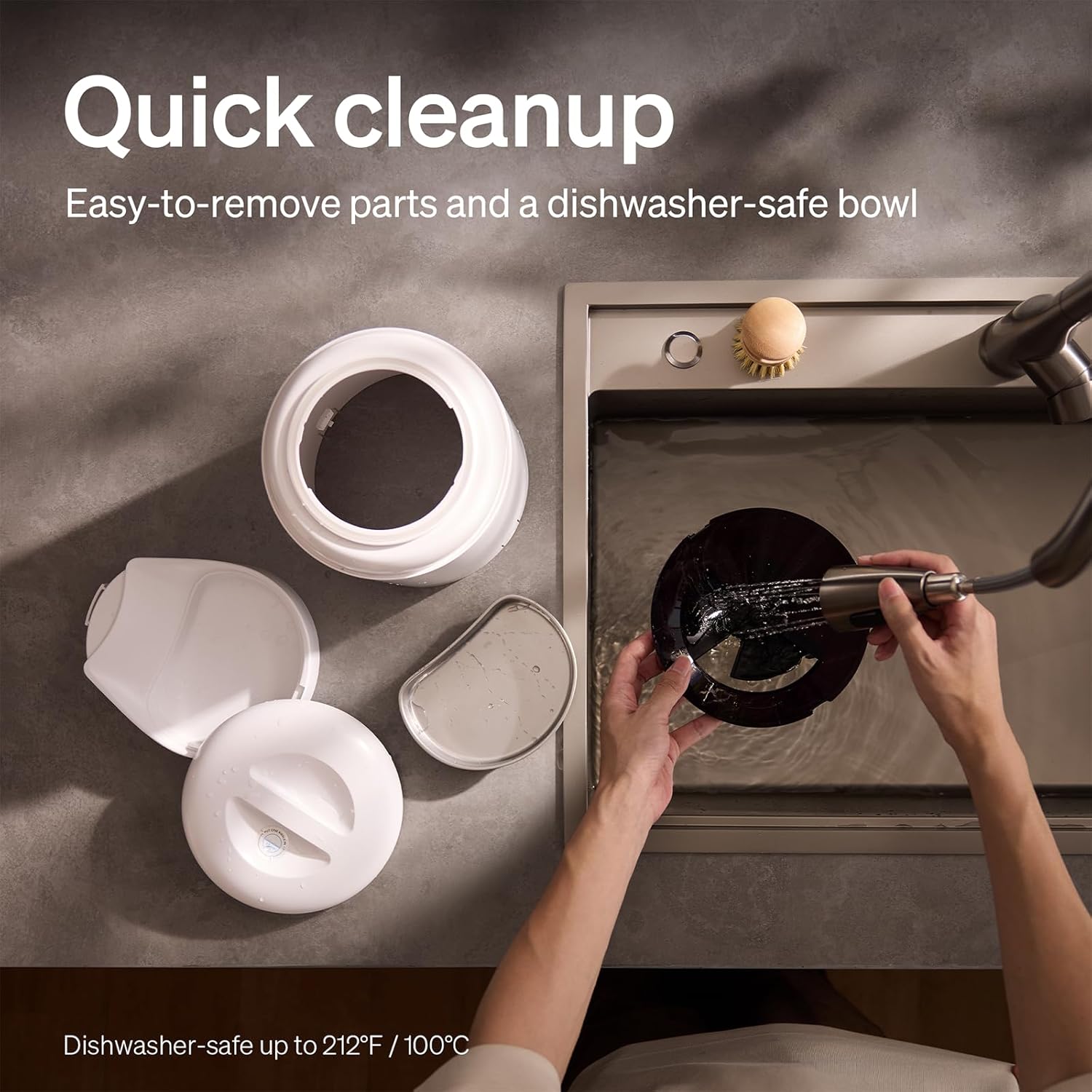
The feeder is designed for quick cleanup with easy-to-remove parts and a dishwasher-safe bowl.
- Кубатты өчүрүү: Тазалоодон мурун ар дайым розеткадан ажыратыңыз.
- Тамак-ашты алып салуу: Бункерден калган тамак-ашты бошотуңуз.
- Бөлүп салуу: Remove the food bowl, lid, and food hopper.
- Жуучу бөлүктөр: The stainless steel bowl and food hopper are dishwasher-safe (up to 100°C / 212°F) or can be hand-washed with mild soap and water.
- Негизги блок: Негизги блокту жумшак менен сүртүңүз, damp кездеме. Аны сууга салууга болбойт.
- Кылдат кургатуу: Кайра чогултуудан жана тамак-аш менен толтуруудан мурун бардык бөлүктөрү толугу менен кургатылганын текшериңиз.
2. Desiccant алмаштыруу
- The desiccant bag helps keep the food fresh. It is recommended to replace it every 15 days.
- Locate the desiccant compartment, usually under the lid.
- Remove the old desiccant bag and insert a new one.
Проблемаларды чечүү
| Көйгөй | Мүмкүн себеп | Чечим |
|---|---|---|
| Азыктандыруучу тамак бербейт. | Food blockage; empty hopper; dispensing mechanism issue. | Check for food blockages and clear them. Refill hopper if empty. Ensure food size is appropriate (2-15mm). |
| Wi-Fi ажыратылышы. | Weak Wi-Fi signal; router issues; incorrect password. | Ensure feeder is within Wi-Fi range. Restart your router. Reconnect the feeder to Wi-Fi via the app, verifying the password. |
| Camera not working or frequently disconnecting. | Poor Wi-Fi connection; app glitch; SD card issue. | Check Wi-Fi stability. Restart the feeder and the app. Ensure the SD card is properly inserted and not full. Consider a system reset if issues persist. |
| App shows "status unknown" or feeding errors. | Wi-Fi disconnection; app synchronization issue. | Verify Wi-Fi connection. Close and reopen the app. Restart the feeder. |
| Үн жаздыруу ойнобой жатат. | No recording saved; volume too low; incorrect schedule. | Ensure a voice message is recorded and saved in the app. Check the playback settings for meal times. |
Техникалык шарттар
| Өзгөчөлүк | Деталь |
|---|---|
| Модель номери | AF203 |
| Өлчөмдөрү (L x W x Y) | 12 x 10 x 27 см |
| Салмагы | 2.15 кг |
| Материал | Дат баспас болоттон жасалган (табак) |
| Кубаттуулугу | 5 литр |
| Максаттуу түрлөр | Мышык ит |
| Сунушталган Колдонуулар | Automatic indoor dog/cat feeding |
| Өзгөчөлүктөр | 1080P Camera, Smart App, Two-way Audio |
| Түс | Ак |
| Байланыш технологиясы | Wi-Fi (2.4 ГГц жана 5 ГГц) |
| Иштөө режими | Автоматтык |
| Care Instructions | Dishwasher safe (bowl) |
| Батареялар талап кылынат | No (for primary operation), Yes (for backup, 3 D-cell, not included) |
Кепилдик жана колдоо
PETLIBRO products come with a standard manufacturer's warranty. For detailed warranty information, please refer to the warranty card included in your package or visit the official PETLIBRO webсайт.
If you encounter any issues or have questions regarding your PETLIBRO Automatic Pet Feeder, please contact PETLIBRO customer support through the following channels:
- Электрондук почта: Refer to your product packaging or the PETLIBRO website for the latest support email address.
- Webсайт: Расмий PETLIBRO сайтына кириңиз webКөп берилүүчү суроолор, көйгөйлөрдү аныктоо боюнча колдонмолор жана байланыш формалары үчүн сайт.
- Колдонмодогу колдоо: The PETLIBRO app may offer a support section for direct assistance.
Please have your model number (AF203) and purchase information ready when contacting support.