
Introduction
Thank you for choosing the Hoco Y7 Smart Sport Watch. This manual provides essential information for setting up, operating, and maintaining your device. Please read it thoroughly before use to ensure optimal performance and longevity of your watch.
Пакеттин мазмуну
Пакетиңизде бардык буюмдар бар экенин текшериңиз:
- Hoco Y7 Smart Sport Watch
- Заряддоо кабели
- Колдонуучунун Колдонмосу (бул документ)

Image: The Hoco Y7 Smart Sport Watch packaging, showing the watch and its box.
Продукт бүттүview
The Hoco Y7 Smart Sport Watch features a 1.32-inch TFT OGS capacitive touch screen and a durable design. Key components include:
- Дисплей: 1.32-inch TFT OGS capacitive touch screen with 360x360 resolution.
- Каптал баскычтары: For power, menu navigation, and quick access functions.
- Сенсорлор: Located on the back for heart rate detection and other health monitoring.
- Заряддоо байланыштары: Арткы бетинде заряддоо үчүн магниттик контакттар бар.
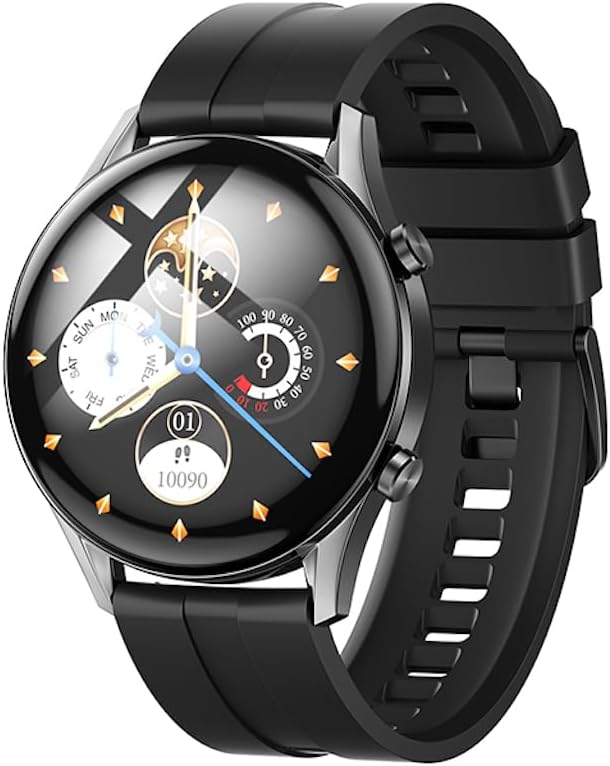
Сүрөт: алдыңкы view of the Hoco Y7 Smart Sport Watch, displaying a detailed watch face with time, date, and activity tracking.
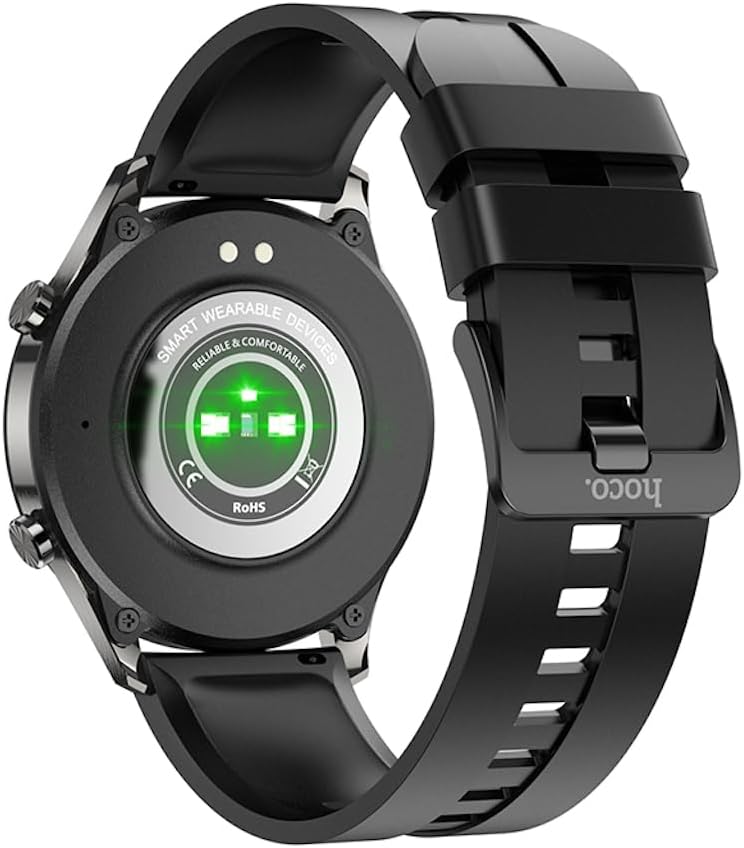
Сүрөт: Артка view of the Hoco Y7 Smart Sport Watch, showing the optical heart rate sensors and charging contacts.
Жайгашуу
1. Аппаратты заряддоо
Before first use, fully charge your Hoco Y7 Smart Sport Watch. Connect the magnetic charging cable to the charging contacts on the back of the watch and plug the USB end into a standard USB power adapter (not included) or a computer's USB port.
- Толук кубаттоо, адатта, болжол менен 2 саатты талап кылат.
- Сааттын дисплейи заряддын абалын көрсөтөт.
2. Күйгүзүү / Өчүрүү
- Күйгүзүү: Press and hold the side button until the Hoco logo appears.
- Өчүрүү: From the watch face, swipe down to access quick settings, or navigate to the settings menu. Select the power off option and confirm. Alternatively, press and hold the side button and select "Power Off" when prompted.
3. Смартфонуңуз менен жупташуу
To unlock the full features of your Hoco Y7 Smart Sport Watch, pair it with your smartphone via Bluetooth 5.0. The watch does not support direct calls, but connects for data synchronization and notifications.
- Коштоочу тиркемени жүктөп алыңыз: Издөө the official Hoco Smart Watch app on your smartphone's app store (e.g., Google Play Store for Android or Apple App Store for iOS). Install the app.
- Bluetooth иштетүү: Смартфонуңузда Bluetooth иштетилгенин текшериңиз.
- Колдонмону ачуу: Launch the Hoco Smart Watch app and follow the on-screen instructions to create an account or log in.
- Түзмөк кошуу: In the app, navigate to the "Add Device" or "Pair Device" section. The app will search for nearby Hoco Y7 watches.
- Саатыңызды тандаңыз: Once your watch appears in the app's list, select it to initiate the pairing process.
- Жупташтыруу ырастоо: Жупташтыруу өтүнүчү саатыңызда да, смартфонуңузда да пайда болушу мүмкүн. Эки түзмөктө тең жупташууну ырастаңыз.
Once paired, the watch will synchronize data with the app, and you can customize settings, receive notifications, and view ден соолук жана активдүүлүк боюнча толук маалыматтар.

Image: The Hoco Y7 Smart Sport Watch positioned next to a smartphone and laptop, illustrating its connectivity with other devices.
Иштөө нускамалары
1. Негизги навигация
- Сенсордук экран: Тандоо үчүн таптаңыз, менюлар жана экрандар аркылуу өтүү үчүн солго/оңго/өйдө/ылдый серпиңиз.
- Каптал баскычы: Press to return to the watch face, or to access the main menu from the watch face. A long press may activate power options.
2. Сааттын жүзүн өзгөртүү
From the main watch face, press and hold the screen. Swipe left or right to browse available watch faces. Tap to select and apply a new watch face. More watch faces can be downloaded and customized via the companion app.

Image: The Hoco Y7 Smart Sport Watch showing a watch face focused on health metrics like heart rate and battery percentage.
3. Ден соолуктун мониторинги
The Hoco Y7 supports various health monitoring functions:
- Жүрөктүн кагышын аныктоо: Swipe to the heart rate interface or select it from the menu. The watch will automatically measure your heart rate. Ensure the watch is snug on your wrist for accurate readings.
- Активдүүлүккө көз салуу: Күн бою баскан кадамдарды, аралыкты жана күйгөн калорияларды көзөмөлдөйт. View daily summaries on the watch or detailed reports in the app.
- Уйкунун мониторинги: Automatically monitors your sleep patterns when worn during sleep. Provides data on deep sleep, light sleep, and awake times.
4. Спорт режимдери
The watch supports multiple sport modes, including running, walking, climbing, and yoga. To start a workout:
- From the main menu, select the "Sport" or "Workout" icon.
- Choose your desired activity (e.g., Running, Walking, Climbing, Yoga).
- Tap to start the activity. The watch will begin tracking relevant metrics like duration, heart rate, and calories.
- To pause or end a workout, swipe or press the side button as indicated on screen.
5. Эскертмелер
Once paired with your smartphone, the Hoco Y7 can display notifications for calls, messages, and app alerts. Ensure notification permissions are enabled in both your phone's settings and the Hoco Smart Watch app.
6. Тил жөндөөлөрү
The watch supports 19 languages. To change the language:
- Navigate to the "Settings" menu on your watch.
- Find and select "Language".
- Тизмеден каалаган тилиңизди тандаңыз.
Техникалык тейлөө
1. Саатыңызды тазалоо
Үзгүлтүксүз тазалоо сааттын көрүнүшүн жана иштөөсүн сактоого жардам берет:
- Экранды жана денени жумшак, түксүз чүпүрөк менен сүртүңүз.
- Кежир тактар үчүн, гampчүпүрөктү бир аз суу менен. Катуу химиялык заттарды же абразивдүү материалдарды колдонуудан алыс болуңуз.
- Жакшы туташууну камсыз кылуу үчүн заряддоочу контакттарды мезгил-мезгили менен кургак чүпүрөк менен тазалап туруңуз.
2. Сууга туруктуулук (IP68)
The Hoco Y7 Smart Sport Watch is IP68 waterproof, meaning it is resistant to dust and can withstand immersion in water up to 1.5 meters for up to 30 minutes. It is suitable for daily use, hand washing, and light rain. However, it is not recommended for hot showers, saunas, or diving, as steam and high water pressure can compromise the seal.

Image: The Hoco Y7 Smart Sport Watch partially submerged in water, demonstrating its IP68 waterproof capability.
3. Батареяга кам көрүү
- Батареянын иштөө мөөнөтүн начарлатышы мүмкүн болгон экстремалдык температурадан качыңыз.
- Саатты үзгүлтүксүз кубаттап туруңуз, бирок аны көпкө чейин толугу менен зарядсыз калтырбаңыз.
- The typical battery life is up to 6 days, depending on usage.
Проблемаларды чечүү
| Көйгөй | Мүмкүн себеп | Чечим |
|---|---|---|
| Саат күйбөйт. | Батарея аз. | Charge the watch for at least 30 minutes before attempting to power on. |
| Смартфон менен жупташтыруу мүмкүн эмес. | Bluetooth өчүк; саат диапазондон тышкары; колдонмо маселеси. | Ensure Bluetooth is enabled on your phone. Keep watch close to phone. Restart both watch and phone. Reinstall the companion app. |
| Эскертмелер алынган жок. | Уруксаттар берилген эмес; колдонмо фондо иштебей жатат. | Check notification permissions in phone settings and the Hoco app. Ensure the app is running in the background. |
| Жүрөктүн кагышын так эмес көрсөткүчтөр. | Watch too loose or too tight; sensor dirty. | Adjust watch strap for a snug fit. Clean the heart rate sensor on the back of the watch. |
Техникалык шарттар
| Өзгөчөлүк | Деталь |
|---|---|
| Модел | Hoco Y7 |
| Негизги экран | TFT 1.32 inch OGS capacitive touch screen |
| Резолюция | 360 x 360 пиксель |
| CPU | Realtek 8762D |
| Эс | RAM192KB + ROM128MB + FLASH 128MB |
| Bluetooth версиясы | 5.0 (does not support calls) |
| Батарея сыйымдуулугу | 330mAh |
| Батареянын иштөө мөөнөтү | 6 күнгө чейин (типтүү колдонуу) |
| Суу өткөрбөйт рейтинги | IP68 |
| Сенсорлор | Жүрөктүн кагышын аныктоо |
| Supported Sports Modes | Running, Walking, Climbing, Yoga, etc. |
| Колдоого алынган тилдер | 19 languages (English, Simplified Chinese, Russian, Arabic, Vietnamese, Thai, Polish, Spanish, Malay, Greek, French, Italian, German, Portuguese, Indonesian, Turkish, Japanese, Korean, Ukrainian) |
| Operating System (Companion App) | Android (as per product specifications, likely refers to app compatibility) |
| Элемент Салмагы | 173 г |
Кепилдик жана колдоо
For product support, technical assistance, or warranty inquiries, please contact your retailer or the official HOCO customer service. Refer to the product packaging or the HOCO official webбайланыш маалыматы үчүн сайт.
Please note that while extended warranty options may be available from third-party providers, any standard manufacturer's warranty terms are typically provided at the point of purchase or through official HOCO channels.