
1. Киришүү
Сатып алганыңыз үчүн рахматasing the Dpofirs LMD-750 Portable DVD Player. This device is designed to provide versatile entertainment on the go, at home, or in the office. Featuring a 270° rotating HD LCD screen, multi-format disc support, USB/SD card playback, analog TV function, FM radio, and game capabilities, it offers a comprehensive multimedia experience. Please read this manual carefully to ensure proper use and to maximize the performance and longevity of your device.
2. Коопсуздук маалыматы
- Аппаратты жамгырдын, нымдуулуктун же экстремалдык температуранын таасиринде калтырбаңыз.
- Аппаратты жылуулук булактарынын жанына же тике күн нуруна коюудан алыс болуңуз.
- Use only the provided power adapter and car adapter.
- Аппаратты өз алдынча бөлүүгө же оңдоого аракет кылбаңыз. Квалификациялуу тейлөө кызматкерлерине кайрылыңыз.
- Аппаратты күчтүү магнит талаасынан алыс кармаңыз.
- Аппаратты иштетип жатканда туура желдетүүнү камсыз кылыңыз.
- Remove discs when transporting the player to prevent damage.
3. Пакеттин мазмуну
Сураныч, пакетте төмөнкү нерселерди текшериңиз:
- 1 x Dpofirs LMD-750 Portable DVD Player
- 1 x Алыстан башкаруу
- 1 x Power Adapter (EU Plug)
- 1 х унаа адаптери
- 1 х AV Cable
- 1 Антеннаны х
- 1 x Gamepad
- 1 x Game Disc
- 1 x User Manual
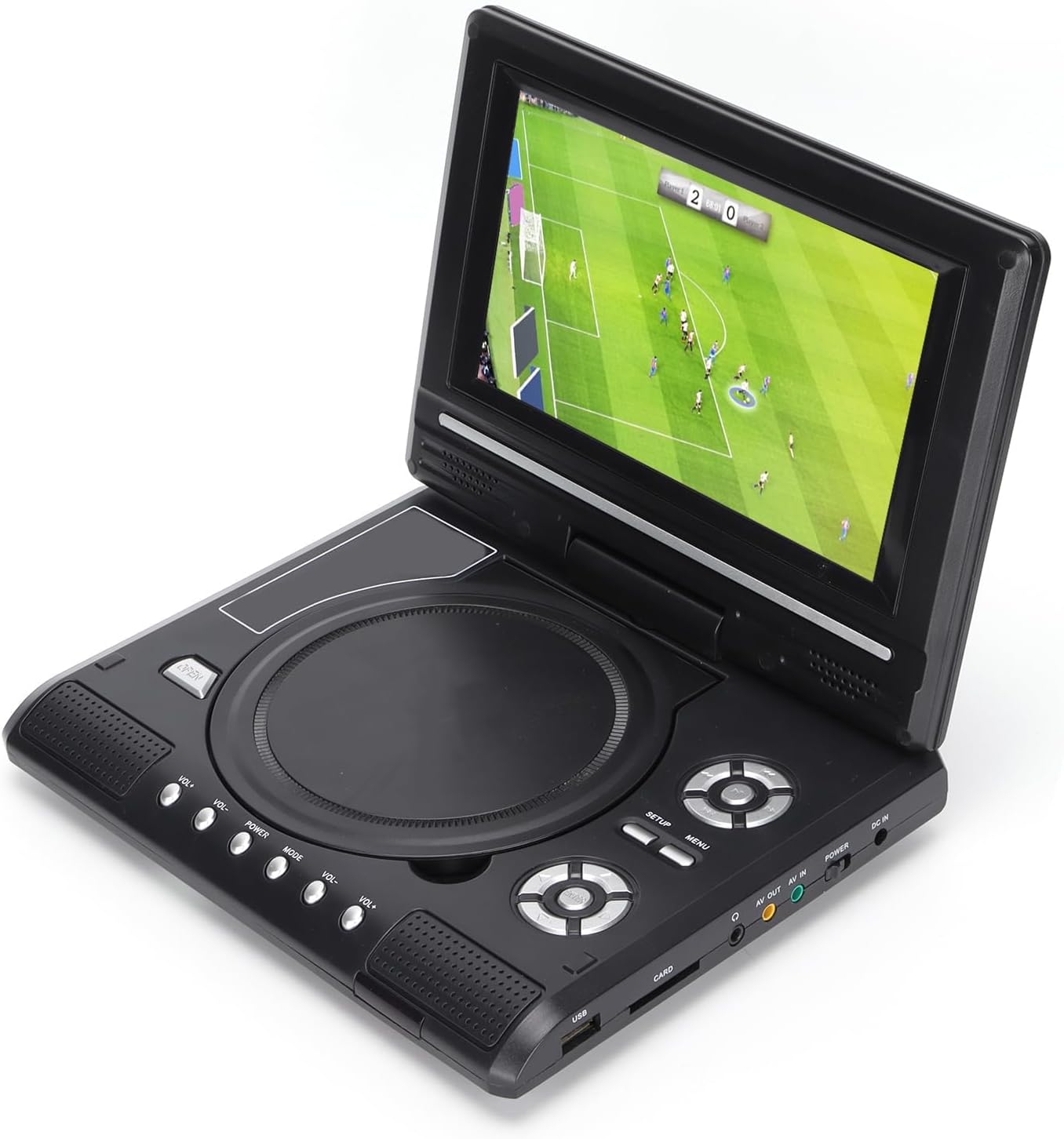
Image: All accessories included with the Dpofirs LMD-750 Portable DVD Player.
4. Продукт бүтүп калдыview
The Dpofirs LMD-750 features a compact design with intuitive controls and multiple connectivity options.

Сүрөт: алдыңкы view of the Dpofirs LMD-750 Portable DVD Player with the screen open.

Сүрөт: каптал view detailing the input/output ports.

Сүрөт: Жогорку view of the player when closed.
Башкаруу каражаттары жана порттор:
- Экран: 6.8"/8.5" HD LCD, 270° rotatable.
- Диск лоток: For DVD/CD media.
- Башкаруу баскычтары: Play/Pause, Stop, Fast Forward/Rewind, Next/Previous, Setup, Menu, Volume +/-.
- USB порт: USB флэш-дисктерди туташтыруу үчүн.
- CARD Slot: For inserting memory cards (e.g., SD card).
- Гарнитура уячасы: Жеке угуу үчүн.
- AV OUT: Audio/Video output to external display.
- AV IN: Audio/Video input from external source.
- POWER которуштуруу: To turn the device On/Off.
- DC IN: Power input for adapter.
5. Орнотуу
5.1 Батареяны заряддоо
Before first use, fully charge the built-in 1500mAh lithium battery. Connect the power adapter to the DC IN port on the player and plug it into a wall outlet (110-240V 50/60Hz). The charging indicator will illuminate. Once fully charged, the indicator may change color or turn off. A full charge provides approximately 30-60 minutes of continuous playback, depending on usage.
5.2 Кубатты туташтыруу
- Үйдө колдонуу: Connect the AC power adapter to the DC IN port and a wall socket.
- Унаа колдонуу: Connect the car adapter to the DC IN port and your vehicle's cigarette lighter socket.
5.3 Connecting to an External Display (AV OUT)
үчүн view content on a larger screen:
- AV кабелинин бир учун DVD ойноткучтун AV OUT портуна туташтырыңыз.
- Connect the other end of the AV cable to the corresponding AV IN ports (Yellow for Video, White/Red for Audio) on your TV or monitor.
- Тышкы дисплейиңизден туура AV киргизүү булагын тандаңыз.
5.4 Connecting External Devices (AV IN)
To display content from an external source on the DVD player's screen:
- Connect one end of the AV cable to the AV IN port on the DVD player.
- Connect the other end of the AV cable to the AV OUT ports of your external device (e.g., another DVD player, game console).
- Switch the DVD player to AV IN mode (refer to Operating Instructions).
6. Иштөө нускамалары
6.1 Күйгүзүү/өчүрүү
жылдырыңыз КҮЧ switch to the "ON" position to turn on the player. Slide it to "OFF" to power down.
6.2 Экранды айландыруу
The LCD screen can rotate up to 270 degrees. Gently adjust the screen to your desired viewing angle. This allows for flexible viewар кандай чөйрөлөрдө жашоо.
6.3 Үндү башкаруу
колдонуу VOL+ жана VOL- buttons on the player or remote control to adjust the audio volume.
6.4 Меню Навигациясы
басыңыз МЕНЮ button to access the main menu. Use the directional buttons (up, down, left, right) to navigate and the OK Тандоолорду ырастоо үчүн баскычын басыңыз. ЖАЙГАШУУ тутум орнотууларына кирүү үчүн.
7. Медиа ойнотуу
7.1 Дискти ойнотуу (DVD/CD)
- Диск капкагын ачыңыз.
- Carefully place a compatible disc (DVD, DVD±R, DVD±RW, VCD, CD, CD±R, CD±RW) onto the spindle with the label side facing up.
- Close the disc cover securely.
- The player will automatically detect and begin playback. If not, press the ОЙНОО баскычы.

Image: Player displaying video content.

Image: Player displaying a sports event.
7.2 USB/SD картаны ойнотуу
- USB флэш-дискти салыңыз USB port or a memory card into the CARD уяча.
- The player will automatically switch to USB/Card mode or prompt you to select the source.
- Сиздин аркылуу чабыттоо files using the directional buttons and press OK ойноо.
Колдоого алынган форматтар: DIVX, AV/VOB, MPG, MP3, MP4, WMA, JPEG, TXT, RMVB.
The player features an intelligent power-off memory function, resuming playback from where it stopped after a power interruption.
8. TV Function
The Dpofirs LMD-750 includes an analog TV tuner.
- Connect the included antenna to the antenna port on the player.
- Switch the player to TV mode (usually via the РЕЖИМ button or menu selection).
- Perform an automatic channel scan in the TV settings menu to find available analog channels.
- Channel reception quality depends on local signal strength.
Supported TV Standards: PAL, NTSC, SECAM (optional).
9. Game Function
Enjoy gaming with the included gamepad and game disc.
- Connect the gamepad to the designated game port on the player.
- Insert the game disc into the disc tray.
- Select the game function from the main menu.
- Choose from the available games on the disc (up to 300 games).
10. Техникалык тейлөө
10.1 Аппаратты тазалоо
- Плеердин сыртын жумшак, кургак чүпүрөк менен сүртүңүз.
- Суюк тазалагычтарды же абразивдүү материалдарды колдонбоңуз.
- For the screen, use a soft, lint-free cloth specifically designed for LCD screens.
10.2 Дискке кам көрүү
- Манжа издерин болтурбоо үчүн дисктерди четинен кармаңыз.
- Дисктерди ортосунан сыртка карай сүртүп, жумшак, түксүз чүпүрөк менен тазалаңыз.
- Store discs in their cases to prevent scratches.

Image: Internal disc mechanism.
11. Кыйынчылыктарды
| Көйгөй | Мүмкүн себеп | Чечим |
|---|---|---|
| Күч жок | Battery drained; Power adapter not connected; Power switch OFF. | Charge the battery; Connect power adapter; Slide POWER switch to ON. |
| Диск ойнотулбайт | Disc inserted incorrectly; Disc dirty or scratched; Incompatible disc format. | Insert disc correctly (label up); Clean or replace disc; Use supported disc format. |
| Үн жок | Volume too low; Mute function active; Headphone connected. | Increase volume; Deactivate mute; Disconnect headphones if using speakers. |
| Начар сыналгы кабылдамасы | Weak signal; Antenna not positioned correctly. | Adjust antenna position; Rescan channels; Check local signal strength. |
| Пульт иштебей жатат | Batteries drained or inserted incorrectly; Obstruction between remote and player. | Replace batteries (2x AAA); Ensure correct polarity; Remove obstructions. |
12. Техникалык шарттар
| Модель номери | LMD-750 (Dpofirsrgi5bmonx0-13) |
| Материал | ABS |
| Түс | Кара |
| Screen Size | 6.8" / 8.5" (diagonal, depending on variant) |
| Дисплей түрү | LCD |
| Display Resolution | 234 x 480 x RGB (native), supports up to 1280 x 720, 1366 x 768 |
| Киргизүү көлөмүtage | 110-240V 50/60Hz |
| Output Voltage | 12V |
| Батарея сыйымдуулугу | 1500mAh Lithium Battery (built-in) |
| Алыстан башкаруунун батареясы | 2 x AAA батарейкалар (киргизилген эмес) |
| Колдоого алынган диск форматтары | DVD, DVD±R, DVD±RW, VCD, MP3, MP4, CD±R, CD±RW |
| Supported Media Formats (USB/Card) | DIVX, AV/VOB, MPG, MP3, MP4, WMA, JPEG, TXT, RMVB |
| TV системасы | PAL, NTSC, SECAM (full system) |
| Кабыл алуу каналдары | LHF1-5, VHF6-12, UHF13-69, ATV |
| Аудио коддоо технологиясы | 96кГц/24бит |
| Динамикалык диапазон | ≥ 80дБ |
| Ызы-чуунун катышы | ≥ 70дБ |
| Каналды изоляциялоо | ≥ 70дБ |
| Байланыш технологиясы | USB, Composite Video |
| Өндүрүүчү | Dpofirs |
| Келип чыккан өлкө | Кытай |
13. Кепилдик жана колдоо
Кепилдик жөнүндө маалымат жана кардарларды колдоо кызматы үчүн, сатып алууңуз менен кошо берилген документтерди караңыз же сатуучуга кайрылыңыз. Кепилдик боюнча дооматтар үчүн сатып алууну тастыктаган документти сактап коюңуз.