
1. Орнотуу
This section guides you through the initial setup of your Natec ATX NPC-2038 Semi-Tower PC Case, from unpacking to component installation.
1.1 Пакеттен чыгаруу
- Carefully open the packaging and remove the PC case.
- Inspect the case for any signs of damage during transit. If damage is found, contact your retailer immediately.
- Remove all internal packaging materials and accessories. Keep the packaging for future transport or warranty claims.
1.2 Компонентти идентификациялоо
Familiarize yourself with the key components and features of your PC case.
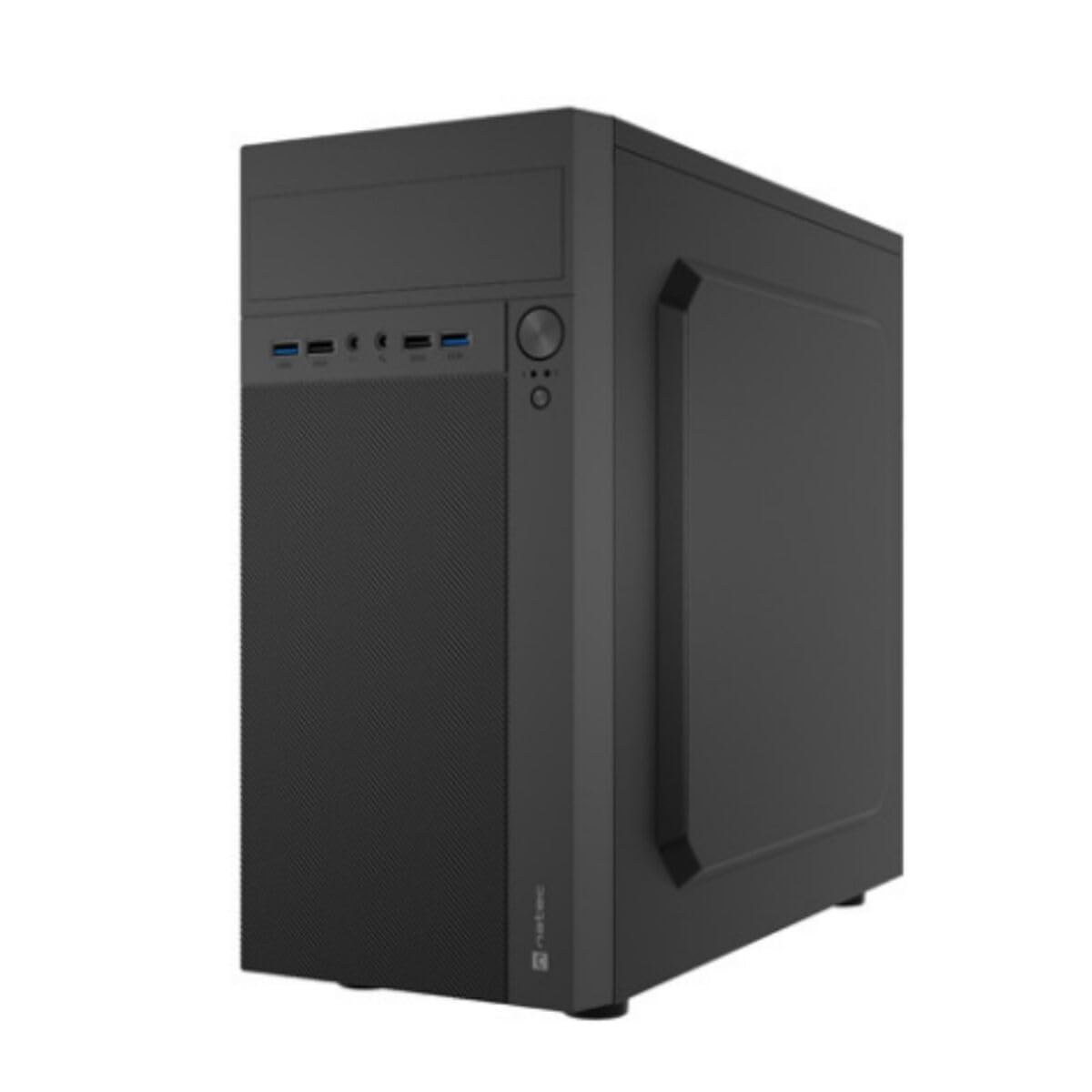
Сүрөт 1: Алдыңкы жана каптал view of the Natec ATX NPC-2038 Semi-Tower PC Case, highlighting its compact dimensions. The front panel features USB ports, audio jacks, and power/reset buttons. The case measures approximately 3.9 inches in depth, width, and height, indicating a compact design suitable for various setups.
- Алдыңкы панели: Includes power button, reset button, USB 2.0 ports, USB 3.0 port, and audio input/output jacks.
- Каптал панелдер: Removable panels for easy access to internal components.
- Арткы Panel: Features expansion slots and an opening for the motherboard I/O shield.
- Ички булуңдар: Provides space for 3.5-inch hard drives and other storage devices.
1.3 Орнотуу
- Ишти даярдоо: Lay the case on its side and remove the side panel(s) by unscrewing the thumb screws at the rear.
- Motherboard орнотуу: Secure the Mini ATX motherboard onto the standoffs provided. Ensure all screws are tightened appropriately.
- Электр булагы орнотуу: Mount the power supply unit (PSU) in the designated front mount area. Connect the necessary power cables to the motherboard and other components.
- Сактагыч дисктерди орнотуу: Install 3.5-inch hard drives into the internal bays. Secure them with screws.
- Кеңейтүү карталарын орнотуу: Remove the necessary expansion slot covers and install any graphics cards or other expansion cards.
- Алдыңкы панелдик кабелдерди туташтыруу: Connect the front panel USB, audio, power, and reset cables to the corresponding headers on your motherboard. Refer to your motherboard manual for specific pin layouts.
- Кабелдик башкаруу: Route cables neatly to ensure optimal airflow and a clean build.
- Ишти жабуу: Reattach the side panel(s) and secure them with the thumb screws.
2. Иштөө нускамалары
This section details how to power on your system and utilize the front panel connections.
2.1 Күйгүзүү
- Бардык тышкы перифериялык түзүлүштөр (монитор, клавиатура, чычкан) туташып турганын текшериңиз.
- Connect the power cable from your power supply unit to a wall outlet.
- Press the power button located on the front panel of the case. The system should initiate startup.
2.2 Front Panel Connections
The front panel provides convenient access to various ports for your peripherals.
- USB 2.0 порттору (x2): For connecting standard USB devices such as keyboards, mice, and printers.
- USB 3.0 порту (x1): For connecting high-speed USB devices like external hard drives or flash drives, offering faster data transfer rates.
- Audio Input (Microphone): Connect your microphone for voice communication.
- Audio Output (Headphones): Connect your headphones or speakers for audio playback.
3. Техникалык тейлөө
Regular maintenance helps ensure the longevity and optimal performance of your PC components.
3.1 Тазалоо
- Сырткы: жумшак колдонуу, damp Корпустун сырткы беттерин сүртүү үчүн чүпүрөк колдонуңуз. Абразивдүү тазалоочу каражаттардан алыс болуңуз.
- Ички иштер: Periodically open the case and use compressed air to remove dust buildup from fans, heatsinks, and other components. Ensure the system is powered off and unplugged before cleaning the interior.
- Чаң чыпкалары: If your case includes dust filters, remove and clean them regularly to maintain good airflow.
3.2 Аба агымын башкаруу
Proper airflow is crucial for cooling your components. Ensure that the case fans are clean and unobstructed. Consider the direction of airflow (intake vs. exhaust) to optimize cooling efficiency.
4. Кыйынчылыктарды
This section addresses common issues you might encounter with your PC case and offers potential solutions.
| Көйгөй | Мүмкүн себеп | Чечим |
|---|---|---|
| Система күйбөйт. | Power cable disconnected, PSU switch off, front panel power button not connected correctly. | Check power cable connection, ensure PSU switch is on, verify front panel power cable connection to motherboard. |
| USB ports not functioning. | Алдыңкы панелдеги USB кабелдери энелик платага туташкан эмес. | Ensure USB 2.0 and USB 3.0 headers are correctly connected to the motherboard. |
| Audio jacks not working. | Front panel audio cable not connected to motherboard. | Verify the HD Audio cable is securely connected to the motherboard's audio header. |
| Компоненттердин ашыкча ысып кетиши. | Poor airflow, dust buildup. | Clean dust filters and internal components. Ensure fans are properly oriented for optimal airflow. |
5. Техникалык шарттар
Detailed technical specifications for the Natec ATX NPC-2038 Semi-Tower PC Case.
| Өзгөчөлүк | Нарк |
|---|---|
| Бренд | Натек |
| Модель аты | HELIX (NPC-2038) |
| Иштин түрү | Ара Tower |
| Motherboard шайкештиги | Mini ATX |
| Түс | multicoloured (Black) |
| Материал | Legierter Stahl (кошулма болот) |
| Кубат менен камсыздоону орнотуу түрү | Front Mount |
| Муздатуу ыкмасы | Аба |
| Fan Size | 120 миллиметр |
| Күйөрмандардын саны | 1 (pre-installed, if applicable) |
| Total Expansion Slots Quantity | 4 |
| Total USB 2.0 Ports | 2 |
| Total USB 3.0 Ports | 1 |
| Internal Bays Quantity | 3 (for 3.5 Inches Hard Disk Form Factor) |
| Элемент Салмагы | 1 килограмм |
| Элементтин өлчөмдөрү (D x W x Y) | 3.94"D x 3.94"W x 3.94"H (Approximate, based on provided data) |
| Продукт үчүн сунушталган колдонуу | General-Purpose Computing |
6. Кепилдик маалыматы
Natec products are manufactured to high-quality standards. This product is covered by a manufacturer's warranty against defects in materials and workmanship. The specific duration and terms of the warranty may vary by region and retailer. Please retain your proof of purchase for warranty claims. For detailed warranty information, refer to the documentation provided with your purchase or visit the official Natec webсайт.
7. Колдоо
If you encounter any issues not covered in this manual or require further assistance, please contact Natec customer support or your retailer. You can typically find contact information on the official Natec webсайтында же продуктунун таңгагында.
- Онлайн колдоо: Visit the official Natec webКөп берилүүчү суроолор, драйверлер жана колдоо булактары үчүн сайт.
- Сатуучу менен байланыш: For purchase-related issues or initial troubleshooting, your retailer may be able to provide immediate assistance.