
Introduction
Thank you for choosing the HOCO EQ3 True Wireless Earbuds. This manual provides essential information for setting up, operating, and maintaining your earbuds to ensure optimal performance and longevity. The EQ3 earbuds feature Bluetooth 5.3 for stable connectivity, touch controls, clear stereo sound with high bass, and a water-resistant design.
Кутуда эмне бар
- HOCO EQ3 True Wireless Earbuds
- Заряддоо кутусу
- USB-C заряддоо кабели
- Кулак жаздыкчалары (бир нече өлчөмдө)
- Коргоочу кап
Продукт бүттүview
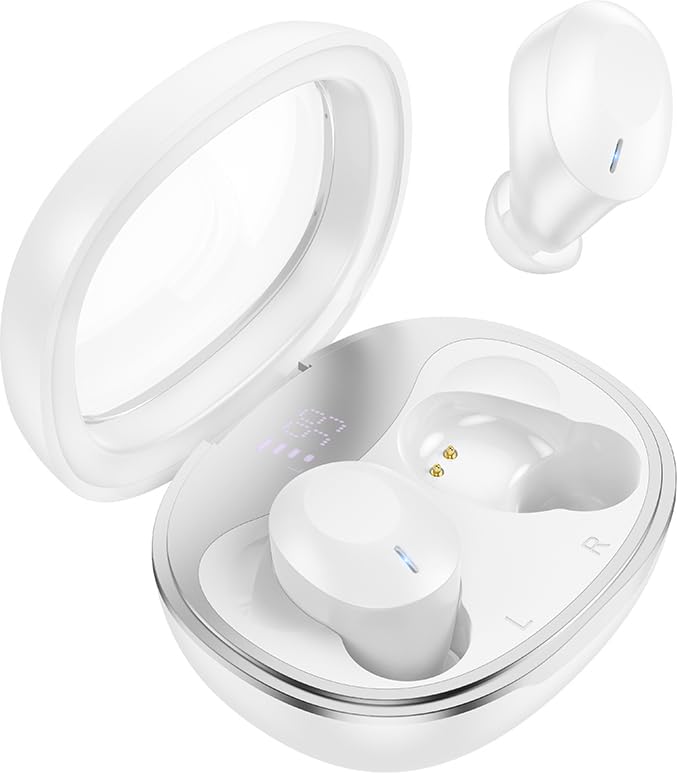
The HOCO EQ3 True Wireless Earbuds are housed in a compact, transparent charging case, designed for portability and convenience.

This infographic highlights key features such as extended battery life, high-fidelity sound quality, Bluetooth 5.3 connectivity, and intuitive touch controls.
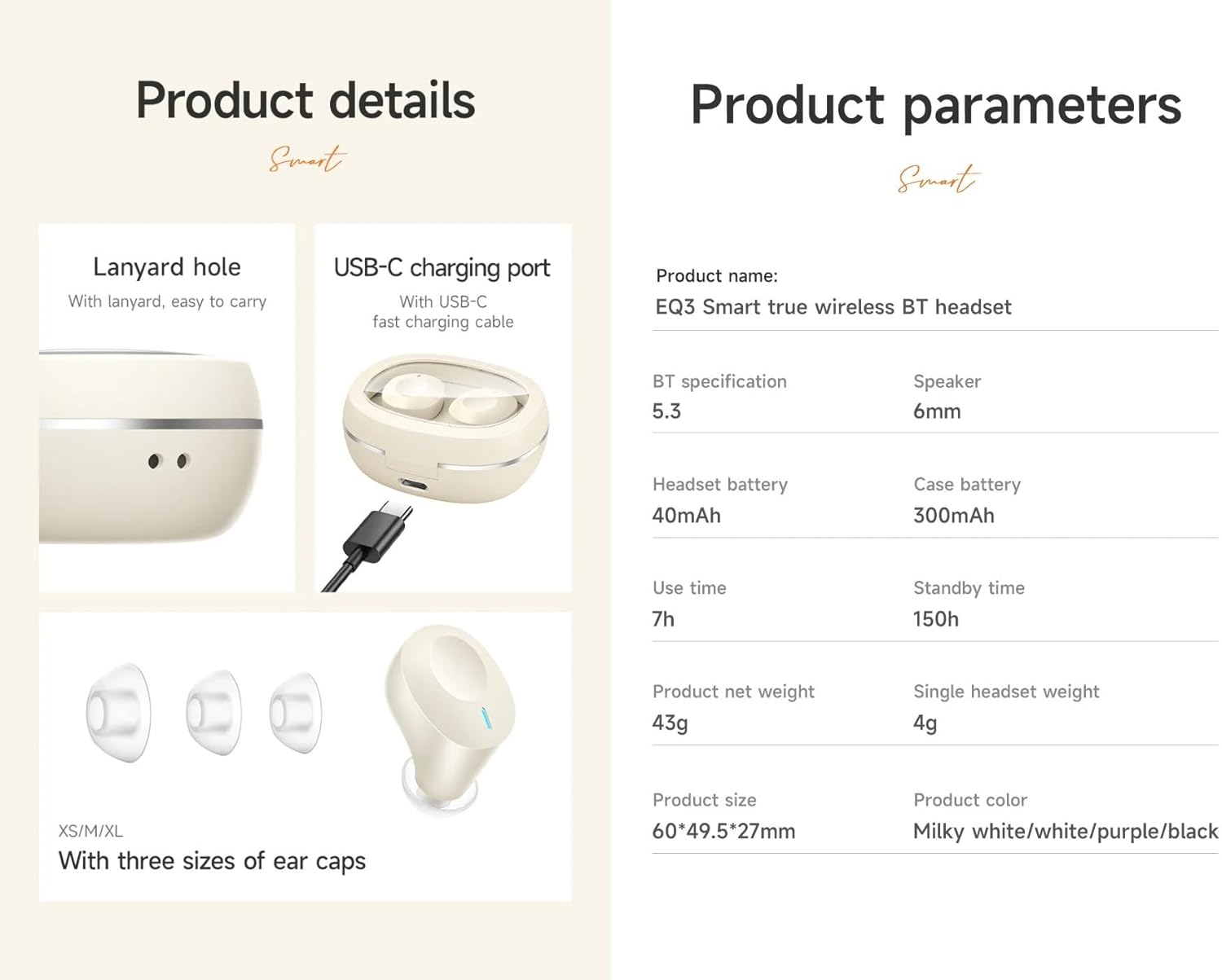
Деталдаштырылган view of the earbuds' design, including the USB-C charging port, lanyard hole, and available ear cap sizes for a customized fit. Product parameters are also listed.
Жайгашуу
1. Кулакчындарды жана кутуну кубаттоо
Before first use, fully charge the earbuds and the charging case. Connect the provided USB-C cable to the charging port on the case and to a power source. The LED digital display on the case will indicate the charging status. The earbuds charge automatically when placed inside the case.
2. Түзмөк менен жупташтыруу
- Ensure the charging case has sufficient power and the earbuds are inside.
- Open the lid of the charging case. The earbuds will automatically enter pairing mode, indicated by a flashing light (if applicable).
- Түзмөгүңүздө (смартфон, планшет ж.б.) Bluetooth иштетиңиз жана жеткиликтүү түзмөктөрдү издеңиз.
- Select "HOCO EQ3" from the list of devices.
- Once connected, the earbuds will indicate successful pairing, and the LED light will stop flashing.
The earbuds support master-slave switching, allowing either earbud to be used independently after initial pairing.

The earbuds connect automatically to your paired device when the charging case is opened.
3. Кулакчын тагынуу
Select the ear cushions that provide the most comfortable and secure fit for your ears. The HOCO EQ3 earbuds are designed for a semi-in-ear fit, ensuring comfort during extended use.

The semi-in-ear design ensures a light and comfortable fit for prolonged listening.
Кулакчындарды иштетүү
Touch Controls
The HOCO EQ3 earbuds feature intuitive touch controls on each earbud. The functions are as follows:
- Бир жолу басуу (сол/оң): Музыканы ойнотуу/тындыруу.
- Double Tap (L/R): Кийинки трек.
- Triple Tap (L/R): Мурунку трек.
- Long Press (L/R) for 2 seconds: Activate voice assistant (e.g., Siri).

Detailed guide to the touch control functions on the HOCO EQ3 earbuds.
Чалууларды жасоо
The earbuds support clear calls with stereo sound. Use the touch controls to manage calls:
- Бир жолу таптоо: Answer/End a call.
- Узак басуу: Кирүүчү чалууну четке кагуу.
Үн жардамчысы
Activate your device's voice assistant by long-pressing either earbud for 2 seconds. This allows for hands-free control of your device.
Техникалык тейлөө
Тазалоо
Regularly clean your earbuds and charging case to maintain optimal performance and hygiene. Use a soft, dry, lint-free cloth. For ear tips, gently remove them and clean with a mild soap solution, then rinse and dry thoroughly before reattaching. Do not use harsh chemicals or abrasive materials.
Сактагыч
Колдонбогондо, кулакчындарды чаңдан, бузулуудан жана кубатталган бойдон калуудан сактоо үчүн кубаттоочу кутучага салып сактаңыз. Корпусту күн нурунан жана экстремалдык температурадан алыс салкын, кургак жерде сактаңыз.
Проблемаларды чечүү
- Кулакчындар жупташкан жок: Ensure both earbuds are charged. Place them back in the case, close the lid, wait a few seconds, then open the lid to re-enter pairing mode. Delete "HOCO EQ3" from your device's Bluetooth list and try pairing again.
- Бир гана кулакчын иштейт: Ensure both earbuds are charged. Try placing both earbuds back in the case, closing the lid, and then reopening it. This often resets the connection between the two earbuds.
- Үн жок: Туташкан түзмөгүңүздүн үн деңгээлин текшериңиз. Кулакчындар туура жупташтырылганын жана аудио чыгыш катары тандалганын текшериңиз.
- Заряддоо маселелери: Verify the USB-C cable is securely connected to both the charging case and the power source. Ensure the charging contacts on the earbuds and inside the case are clean and free of debris.
- Үн жардамчысы жооп бербей жатат: Кулакчындар түзмөгүңүзгө туташып турганын жана үн жардамчысы функциясы түзмөгүңүздө иштетилгенин текшериңиз.
Техникалык шарттар
| Модель аты | EQ3 |
| Bluetooth версиясы | 5.3 |
| Bluetooth чип | JL AC6983D2 |
| Заряддоо корпусунун батареясынын сыйымдуулугу | 300mAh |
| Гарнитуранын Батарея сыйымдуулугу | 40mAh |
| Single Headset Use Time | 7 саатка чейин |
| Total Use Time (with charging case) | 28 саатка чейин |
| Күтүү убактысы | 150 саат |
| Заряддоонун корпусунун өлчөмдөрү | 60 x 49.5 x 27 мм |
| Жалпы салмагы (корпус + кулакчын) | 43г |
| Single Headset Weight | 4g |
| Динамик өлчөмү | 6мм |
| Сууга туруктуулук деңгээли | Сууга чыдамдуу |
| Башкаруу ыкмасы | тийүү |
| Noise Control | Активдүү ызы-чууну жокко чыгаруу |
Кепилдик маалымат
HOCO products are covered by a limited warranty against manufacturing defects. Please refer to the warranty policy provided at the time of purchase or visit the official HOCO webтолук шарттары жана шарттары үчүн сайт. Кепилдик дооматтар үчүн сатып алганыңыздын далилин сактаңыз.
Кардарларды колдоо
For further assistance, technical support, or inquiries regarding your HOCO EQ3 True Wireless Earbuds, please contact HOCO customer service through their official webсайты же продуктунун таңгагында берилген байланыш маалыматы.