
1. Киришүү
This manual provides essential information for the proper use and maintenance of your DCU TECNOLOGIC Curved Glass Pro Smartwatch. Please read it carefully before using the device to ensure optimal performance and longevity.

Сүрөт 1.1: Алдыңкы view of the DCU TECNOLOGIC Curved Glass Pro Smartwatch, showing its curved display and health tracking interface.
2. Продукт бүтүп калдыview
The DCU TECNOLOGIC Curved Glass Pro Smartwatch features a 1.83-inch high-definition touch screen with a curved glass design for an immersive visual experience and improved ergonomics. It is designed to adapt comfortably to your wrist.
Негизги өзгөчөлүктөрү:
- Дисплей: 1.83-inch High-Definition Touch Screen, customizable with various designs or personal photos.
- Байланыш: Bluetooth for calls and notifications.
- Ден соолук мониторинги: Heart rate, blood oxygen, blood pressure, step counter, calorie tracking, sleep control, sedentary lifestyle alarm, water and medication reminders.
- Спорт режимдери: 123 integrated sports modes, including walking, running, cycling, yoga, jumping rope, rowing, and spinning.
- Суу каршылык: IP67 rating, submersible up to 1 meter for 30 minutes in fresh water.
- Кошумча функциялар: App notifications, Bluetooth call function with 8 favorite contacts, voice assistant, remote photo control, music player control, weather information, alarm clock, timer, and do not disturb mode.
- Шайкештик: iOS 9.0 or above and Android 5.0 or higher devices. Compatible with Google Fit and Apple Health.

Image 2.1: The smartwatch showcasing its 1.83-inch high-definition touch screen with a customizable watch face.
3. Орнотуу
3.1 Акылдуу саатты кубаттоо
Before initial use, fully charge your smartwatch. Connect the charging cable to the charging port on the back of the watch and to a standard USB power adapter (not included). A full charge typically provides 5-7 days of active use or 10-15 days in standby mode. Charging time is approximately 1 day.

Image 3.1: The smartwatch connected to a charger, illustrating the charging process.
3.2 Смартфонуңуз менен жупташуу
- Смартфонуңуздун Bluetooth иштетилгенин текшериңиз.
- Download the official companion app for the DCU TECNOLOGIC Curved Glass Pro Smartwatch from your device's app store (compatible with iOS 9.0+ and Android 5.0+).
- Open the app and follow the on-screen instructions to search for and connect to your smartwatch.
- Смартфонуңузда да, акылдуу саатыңызда да жупташтыруу өтүнүчүн ырастаңыз.
Once paired, the smartwatch will synchronize data and allow access to features like notifications and call functions.

Image 3.2: The smartwatch displaying its compatibility with Google Fit and Apple Health applications.
4. Иштөө нускамалары
4.1 Негизги навигация
The smartwatch features a full touch screen. Swipe left, right, up, or down to navigate through menus and access different functions. Tap to select an option or open an application.
4.2 Эскертүүлөр жана чалуулар
- Эскертмелер: Once paired, the smartwatch will display notifications from your connected smartphone apps.
- Чакыруу функциясы: Use the Bluetooth call function to make and receive calls directly from your watch. You can store up to 8 favorite contacts for quick dialing.
4.3 Ден соолуктун мониторинги
Акылдуу саат ден соолуктун ар кандай көрсөткүчтөрүн үзгүлтүксүз көзөмөлдөп турат:
- Heart Rate, Blood Oxygen, Blood Pressure: Access these measurements through the dedicated health apps on the watch.
- Step Counter & Calories: Tracks your daily activity and estimated calorie burn.
- Уйкуну көзөмөлдөө: Monitors your sleep patterns.
- Sedentary Alarm: Аракетсиз убакыттан кийин көчүп кетүүнү эскертет.
- Эскерткичтер: Set reminders to drink water or take medication.
4.4 Спорт режимдери
Select from 123 sports modes to track your workouts accurately. Common modes include walking, running, cycling, yoga, jumping rope, rowing, and spinning. The watch will record relevant data for your chosen activity.
4.5 Customization and Additional Functions
- Саат жүзүн ыңгайлаштыруу: Personalize your watch face with multiple designs or upload personal photos from your gallery via the companion app.
- Үн жардамчысы: Смартфонуңуздун үн жардамчысына түз сааттан кириңиз.
- Алыстан башкаруу: Control your smartphone's camera for remote photo taking and manage music playback.
- Утилиталар: Access weather information, set alarms, use the timer, and stopwatch.
- "Тынчымды алба" режими: Белгилүү убакыттарда эскертмелердин үнүн басуу.
- Оюндар: The smartwatch includes 4 pre-installed games.
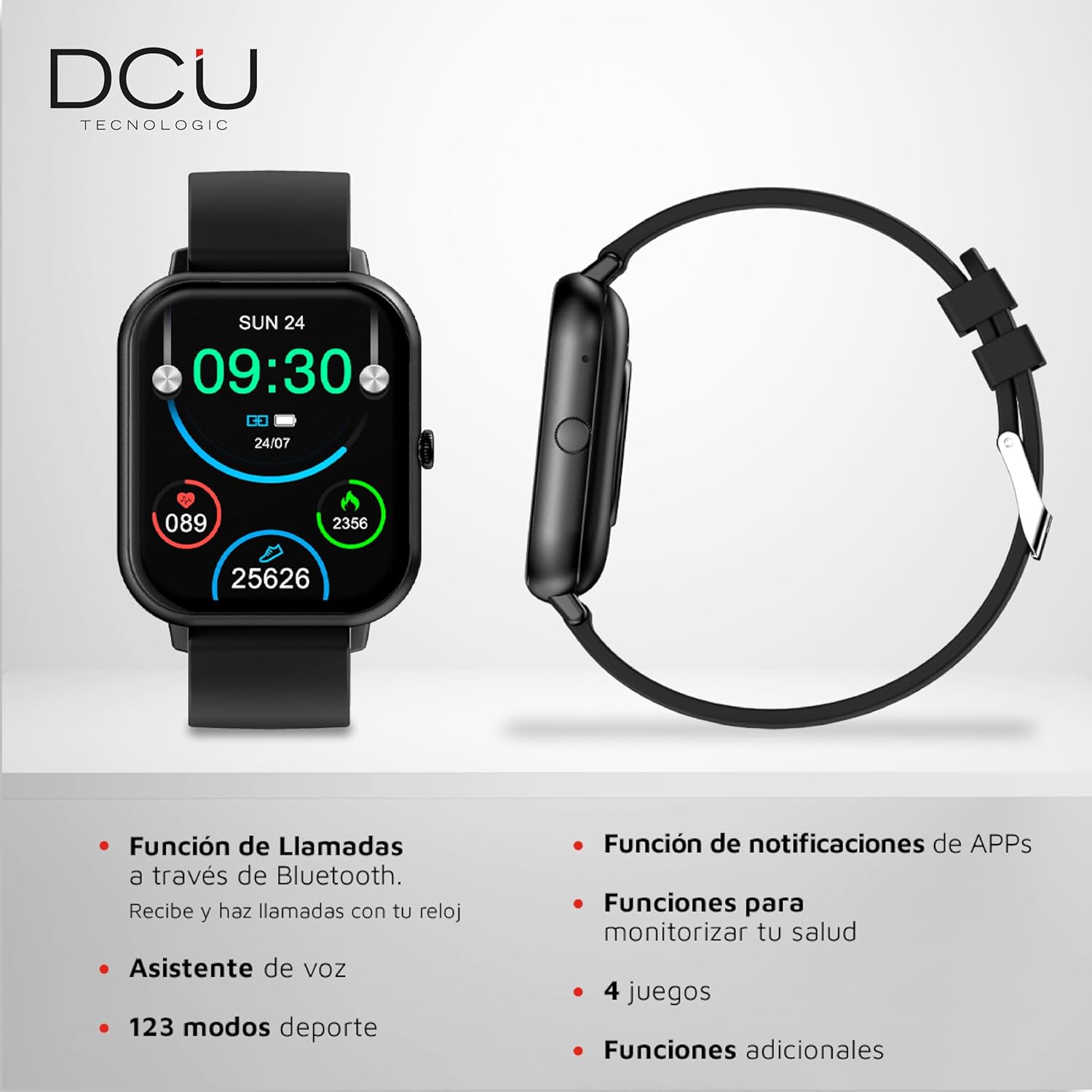
Image 4.1: The smartwatch interface showing icons for calls, notifications, health monitoring, and sports modes.
5. Техникалык тейлөө
5.1 Тазалоо
To clean your smartwatch, gently wipe the screen and body with a soft, dry, lint-free cloth. For stubborn smudges, slightly dampen the cloth with water. Avoid using harsh chemicals, abrasive materials, or strong cleaning agents.
5.2 Сууга туруктуулук
The smartwatch has an IP67 water resistance rating, meaning it is protected against dust and can withstand immersion in fresh water up to 1 meter for a maximum of 30 minutes. It is suitable for daily use and splashes, but it is not recommended for use in salt water, hot water, saunas, or during diving activities, as this may compromise its water resistance over time.

Сүрөт 5.1: Арткы view of the smartwatch, highlighting the sensors and the anti-static silicone strap.
6. Кыйынчылыктарды
Эгерде сиз акылдуу саатыңыз менен көйгөйлөргө туш болсоңуз, төмөнкү кеңири таралган чечимдерди караңыз:
- Түзмөк күйбөй жатат: Ensure the smartwatch is fully charged. Connect it to the charger and wait a few minutes before attempting to power it on again.
- Смартфон менен жупташтырууга мүмкүн эмес: Check that Bluetooth is enabled on your phone and the smartwatch is within range. Restart both devices and try pairing again. Ensure the companion app is updated to the latest version.
- Туура эмес ден соолук маалыматы: Саат өтө тар же өтө бош эмес, билегиңизге бекем тагылганын текшериңиз. Сааттын артындагы сенсорлорду тазалаңыз.
- Билдирмелер көрүнбөйт: Verify that app notifications are enabled in your smartphone's settings and within the smartwatch's companion app. Ensure the smartwatch is properly connected via Bluetooth.
- Экран жооп бербейт: Акылдуу саатты өчүрүп күйгүзүп көрүңүз. Эгер көйгөй чечилбесе, экрандын таза жана кургак экенин текшериңиз.
For persistent issues, please refer to the support section.
7. Техникалык шарттар
| Бренд | DCU TECNOLOGIC |
| Модель номери | 34157025 |
| Операция системасы | AsteroidOS |
| Screen Size | 1.83 дюйм |
| Дисплей түрү | Digital, Touchscreen |
| Байланыш | Bluetooth, WiFi |
| Батарея түрү | Литий полимери |
| Батарея сыйымдуулугу | 1000 мАч |
| Батареянын иштөө мөөнөтү (болжол менен) | 5-7 days (use), 10-15 days (standby) |
| Суу каршылык | IP67 (up to 1m for 30 mins in fresh water) |
| Шайкеш түзмөктөр | Smartphone, Tablet (iOS 9.0+, Android 5.0+) |
| Өзгөчөлүктөр | Curved Glass Screen, Customizable HD Touch Screen, Multi-Health Monitoring, 123 Sports Modes |
| Пакеттин өлчөмдөрү | 21.5 x 14.9 x 3.9 см |
| Салмагы | 160 г |
8. Кепилдик
The DCU TECNOLOGIC Curved Glass Pro Smartwatch comes with a 3 жылдык кепилдик from the date of purchase. This warranty covers manufacturing defects under normal use. It does not cover damage caused by misuse, accidents, unauthorized modifications, or failure to follow the instructions in this manual. Please retain your proof of purchase for warranty claims.
9. Колдоо
For further assistance, technical support, or warranty inquiries, please contact DCU TECNOLOGIC customer service. Refer to the official DCU TECNOLOGIC webБайланыш маалыматы үчүн сайтка же сатып алуу документтериңизге кайрылыңыз.