
1. Киришүү
This manual provides detailed instructions for the MokerLink 5-Port 2.5 Gigabit PoE Switch with 10G SFP+. This unmanaged network switch is designed to enhance your network performance with high-speed connectivity and Power over Ethernet capabilities. It features 5 x 2.5 Gigabit Ethernet ports and 1 x 10G SFP+ port, making it suitable for various applications from home entertainment to small office networks.

Сүрөт 1.1: Алдыңкы view of the MokerLink 5-Port 2.5 Gigabit PoE Switch, showcasing анын компакттуу дизайны жана портунун жайгашуусу.
2. Пакеттин мазмуну
Пакетиңизге төмөнкү буюмдардын киргизилгенин текшериңиз:
- MokerLink 5-Port 2.5 Gigabit PoE Switch (Model: 5*2.5G POE)
- Кубаттуу адаптер
- User Manual
Эгерде кандайдыр бир нерселер жок болсо же бузулса, кардарларды колдоо менен байланышыңыз.
3. Продукциянын өзгөчөлүктөрү
- 2.5G Ethernet Ports: Equipped with 5 x 2.5 Gigabit Ethernet Ports, compliant with IEEE802.3bz (2.5G) standard, supporting 10/100/1000Mbps and 2.5G adaptive speeds.
- 10G SFP+ Uplink: Includes 1 x 10G SFP+ Port, compatible with 1G/2.5G SFP modules (module not included). This provides high-bandwidth uplink capabilities.
- PoE+ колдоосу: Ports 1-4 support IEEE802.3af/at Power over Ethernet, with each port delivering up to 30W. The switch has a total PoE power budget of 65W. Note: This switch does not support passive 24V PoE.
- Жогорку аткаруу: Features a 45Gbps backplane bandwidth for excellent data forwarding and a packet forwarding rate of 33.48Mpps.
- Башкарылбаган "Plug and Play": Requires no configuration. Simply connect the power cord and Ethernet cables for immediate operation. Supports auto MDI/MDIX and auto-negotiation.
- Durable and Silent Design: Constructed with a metal casing for durability and efficient heat dissipation. The fanless design ensures quiet operation and low energy consumption.
- Ийкемдүү орнотуу: Supports both desktop placement and wall-mounting.
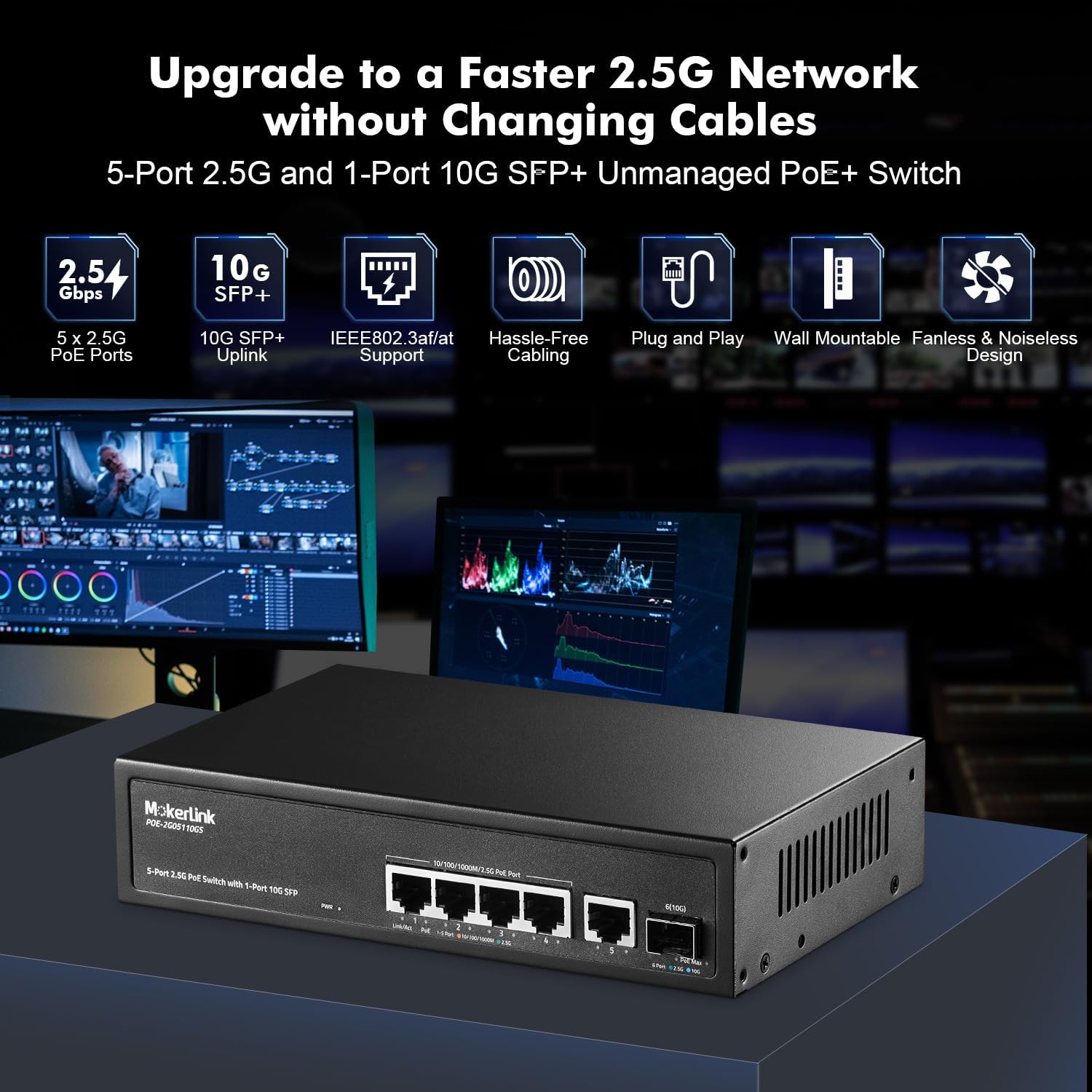
Сүрөт 3.1: Бүттүview of the switch highlighting key features like 2.5G PoE ports, 10G SFP+ uplink, IEEE802.3af/at support, plug and play, wall mountable, and fanless design.

Image 3.2: Diagram illustrating PoE+ support, showing how the switch powers devices like IP cameras and wireless access points, while also connecting to non-PoE devices.
4. Орнотуу
The MokerLink 5-Port 2.5 Gigabit PoE Switch is designed for easy plug-and-play installation.
4.1 Которгучту туташтыруу
- Кубат туташуу: Connect the provided power adapter to the DC input port on the switch and then plug it into a standard electrical outlet. The Power LED indicator will illuminate.
- Тармактык түзмөктүн туташуусу: Connect your network devices (e.g., computers, routers, NAS, WiFi 6 APs) to the 2.5G Ethernet ports (1-5) using standard Ethernet cables (CAT5e, CAT6, or CAT6a recommended for optimal performance).
- PoE түзмөгүнүн туташуусу: For Power over Ethernet devices (e.g., IP cameras, VoIP phones, wireless access points), connect them to PoE ports 1-4. The switch will automatically detect and provide power if the device is IEEE802.3af/at compliant.
- Uplink Connection (Optional): If using the 10G SFP+ port for an uplink, insert a compatible SFP module (not included) and connect it to your network backbone or another switch.

Image 4.1: The switch connected to various 2.5G devices like a NAS, WiFi 6 AP, router, laptop, and gaming PC, demonstrating its application in a high-performance network.
4.2 Физикалык орнотуу
Коммутаторду дубалга орнотууга же жумушчу столдун үстүнө коюуга болот.
- Иш тактада жайгаштыруу: Place the switch on a flat, stable surface, ensuring adequate ventilation around the device.
- Дубалга орнотуу: Use appropriate screws and anchors (not included) to secure the switch to a wall. The device features mounting holes on its underside for this purpose. Ensure the mounting location allows for proper cable management and ventilation.

Image 4.2: The switch demonstrating its wall-mounting capability and fanless design for silent operation and good heat dissipation.
5. Иштөө нускамалары
Once connected, the switch operates automatically without requiring any user configuration.
5.1 LED көрсөткүчтөрү
The front panel features LED indicators to display the switch's status:
- PWR (Power Indicator):
- Күйүк: Күйгүзүлгөн
- Өчүк: Өчүк
- Link/Act (Per Port):
- Orange (Left): 10/100/1000Mbps connection
- Green (Left): 2.5Gbps connection
- Flashing: Data activity
- PoE (Per Port 1-4):
- Green (Right): PoE on
- Off: PoE off
- PoE Max (PoE Power Light):
- Green: Usage < 90%
- Flashing: Usage 90% - 95%
- On: Usage > 95% (Indicates high PoE power consumption)
- SFP+ Link/Act (10G SFP+ Port):
- Blue: 10Gbps connection
- Green: 2.5Gbps connection
- Flashing: Data activity

Сүрөт 5.1: Детальдуу view of the switch's ports and LED indicators, explaining their functions for monitoring network and PoE status.
5.2 Видео көрсөтүү
Бул видеону генерал үчүн көрүңүзview of MokerLink PoE switch functionality and setup. While this video features an 11-port model, the basic principles of connection and operation are similar.
Video 5.2: An official MokerLink video demonstrating features and setup of a similar PoE switch model.
6. Техникалык тейлөө
The MokerLink 5-Port 2.5 Gigabit PoE Switch is designed for low maintenance due to its fanless operation and durable metal casing.
- Тазалоо: Periodically wipe the exterior of the switch with a soft, dry cloth to remove dust. Do not use liquid cleaners or aerosols.
- Вентиляция: Ensure the switch is placed in a well-ventilated area. Although fanless, proper airflow helps maintain optimal operating temperature. Avoid blocking the ventilation holes on the sides of the device.
- Power Cycle: Эгерде сиз тармак көйгөйлөрүнө туш болсоңуз, жөнөкөй кубаттоо цикли (кубат адаптерин сууруп, 10 секунд күтүп, кайра сайып коюу) көп учурда анча чоң эмес көйгөйлөрдү чече алат.
7. Кыйынчылыктарды
If you encounter issues with your MokerLink PoE Switch, refer to the following common troubleshooting steps:
- Кубат жок:
- Кубат адаптери өчүргүчкө да, иштеп жаткан розеткага да бекем туташтырылганын текшериңиз.
- Check if the Power LED is illuminated. If not, try a different power outlet.
- Портто шилтеме/аракет жок:
- Ethernet кабелинин коммутатордун портуна жана тармактык түзмөгүнө бекем туташтырылганын текшериңиз.
- Башка Ethernet кабелин колдонуп көрүңүз.
- Туташкан аппараттын күйгүзүлгөнүн жана туура иштегенин текшериңиз.
- Check the Link/Act LED for the specific port. If it's off, there might be no connection or a faulty cable/device.
- PoE түзмөгү электр кубатын албай жатат:
- Ensure the PoE device is connected to one of the PoE-enabled ports (1-4).
- Verify that the PoE device is IEEE802.3af/at compliant. This switch does not support passive 24V PoE.
- Check the PoE LED for the specific port. If it's off, the device might not be drawing power or is incompatible.
- Monitor the PoE Max LED. If it's solid orange, the total power budget might be exceeded. Disconnect some PoE devices or use devices with lower power consumption.
- Жай тармак ылдамдыгы:
- Ensure you are using CAT5e, CAT6, or CAT6a Ethernet cables for 2.5G connections. Older or lower-quality cables may limit speed.
- Verify that your connected devices (e.g., network cards, routers) support 2.5G Ethernet.
- Check the Link/Act LED color for the port; green indicates 2.5Gbps, orange indicates 1Gbps or lower.
- Ашыкча ысып кетүү:
- Ensure the switch is in a well-ventilated area and its ventilation holes are not obstructed.
- Коммутаторду жабык жайларга же жылуулук булактарынын жанына койбоңуз.
- If the device feels excessively hot, consider reducing the number of connected PoE devices if the PoE Max LED indicates high usage.
8. Техникалык шарттар
| Өзгөчөлүк | Спецификация |
|---|---|
| Модель номери | 5*2.5G POE (POE-2G05110GS) |
| Порттар | 5 x 2.5G Ethernet Ports, 1 x 10G SFP+ Port |
| PoE стандарты | IEEE802.3af/at (Ports 1-4) |
| PoE порту үчүн максималдуу кубаттуулук | 30 Вт |
| Жалпы PoE кубаттуулугу бюджети | 65 Вт |
| Арткы панелдин өткөрүү жөндөмдүүлүгү | 45Gbps |
| Пакетти жөнөтүү ылдамдыгы | 33.48Mpps |
| MAC дарек столунун көлөмү | 4K |
| Jumbo Frame | 12K байт |
| Которуу түрү | Башкарылбайт |
| Өлчөмдөрү (L x W x Y) | 25 x 20 x 8 см |
| Салмагы | 880 г |
| Иштин материалы | Металл |
| Түс | Кара |
| Тtage | 24 Вольт (Кубат адаптерине киргизүү) |
| Шайкеш түзмөктөр | Desktop, Gaming Console, Server, NAS, WiFi 6 AP |

Image 8.1: Physical dimensions of the MokerLink 5-Port 2.5 Gigabit PoE Switch.
9. Кепилдик жана колдоо
This MokerLink product comes with a 1 жылдык кепилдик сатып алынган күндөн тартып.
For technical support, troubleshooting assistance, or warranty claims, please contact MokerLink customer service through the retailer where the product was purchased or visit the official MokerLink webбайланыш маалыматы үчүн сайт.
Кепилдикти текшерүү үчүн сатып алганыңыздын далилин сактап коюңуз.