
Introduction
This manual provides essential information for the safe and efficient use of your SANSUI JSW50GSUHD 50-inch 4K Ultra HD Smart Google LED TV. Please read these instructions thoroughly before operating the television and retain them for future reference.

Сүрөт: алдыңкы view of the SANSUI JSW50GSUHD 50-inch 4K Ultra HD Smart Google LED TV.
Коопсуздук маалыматы
Always follow basic safety precautions when using this television to reduce the risk of fire, electric shock, and injury. Keep the TV away from water and moisture. Do not block ventilation openings. Use only attachments/accessories specified by the manufacturer. Refer all servicing to qualified service personnel.
Кутуда эмне бар
Кутучаны кылдаттык менен ачып, бардык буюмдардын бар экенин текшериңиз:
- 1 x SANSUI JSW50GSUHD 50-inch TV
- 1 x Алыстан башкаруу
- 1 pair x AAA Batteries (for remote)
- 1 set x Base Stand
- 2 pairs x Screws (for stand)
- 1 set x Wall Mounting Kit (if included)
- 1 x Колдонуучунун колдонмосу & Кепилдик картасы
- 1 x Кубат кабели
- 1 x Mini AV cable
Жайгашуу
1. TV жайгаштыруу
Place the TV on a stable, flat surface using the provided base stand, or mount it on a wall using a compatible VESA 100 x 100 mm wall mount (sold separately). Ensure adequate ventilation around the TV.

Image: The SANSUI JSW50GSUHD TV placed on a media console with its stand.
2. Тышкы түзмөктөрдү туташтыруу
Сиздин SANSUI TV ар кандай туташуу параметрлерин сунуштайт:
- HDMI порттору (3): Blu-ray ойноткучтарын, оюн консолдорун, приставкаларды ж.б. туташтырыңыз.
- USB порттору (2): Медиа ойнотуу үчүн USB дисктерди туташтырыңыз.
- AV (Mini) Port: Композиттик видео жана стерео аудиону колдонгон эски түзмөктөр үчүн.
- Ethernet (LAN) порту: Зымдуу интернет байланышы үчүн.
- Antenna/RF Input: Антеннаны же кабелдик телекөрсөтүүнү туташтыруу үчүн.
- Оптикалык аудио чыгаруу: Тышкы аудио системаларына туташуу үчүн.
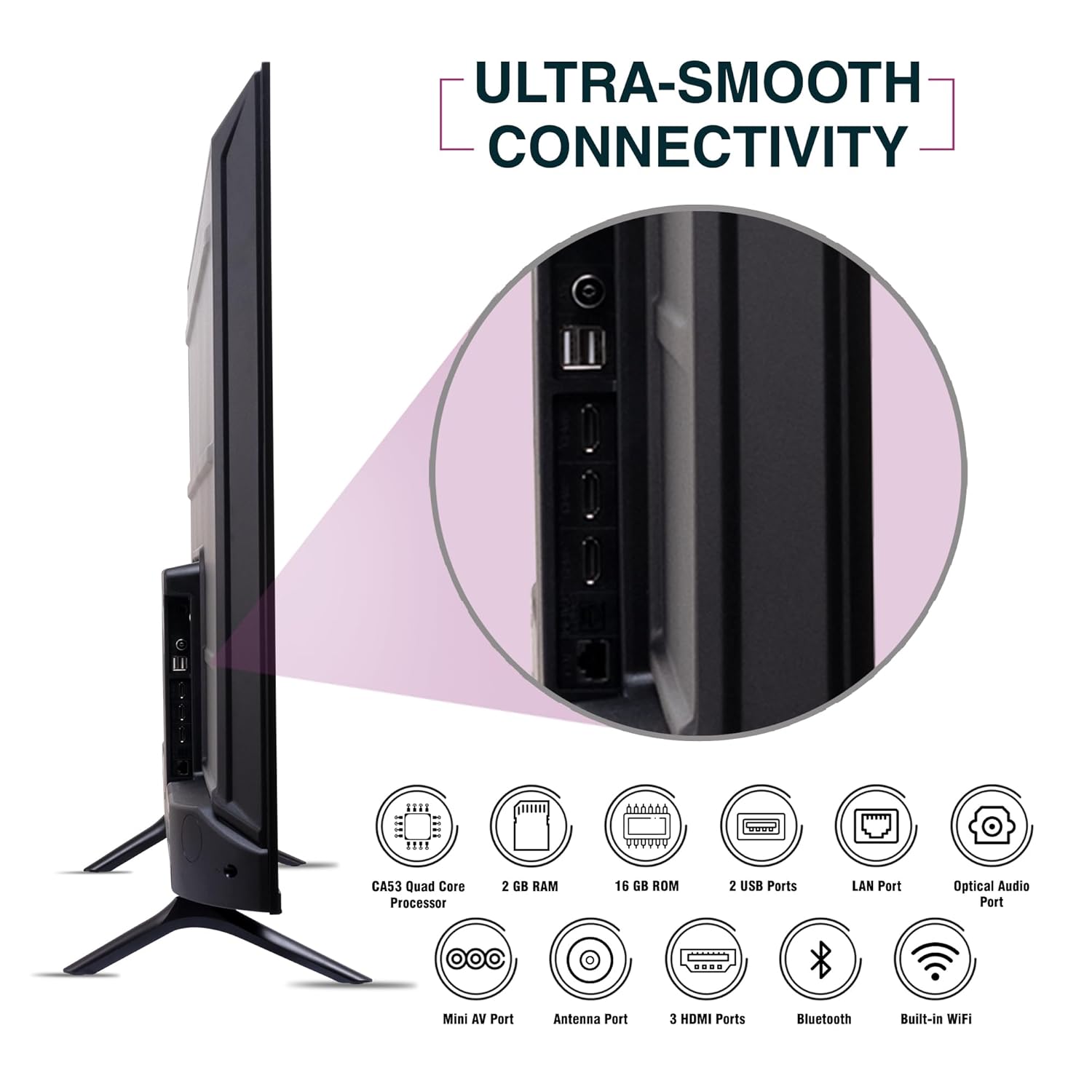
Сүрөт: каптал view of the SANSUI JSW50GSUHD TV highlighting the various input and output ports.
3. Power Connection
Connect the power cable to the TV's power input and then to a wall outlet. The TV supports 100-240 VAC, 50-60 Hz.
4. Алыстан башкарууну орнотуу
Туура полярдуулукту камсыз кылуу менен эки AAA батарейканы алыстан башкарууга кыстарыңыз.
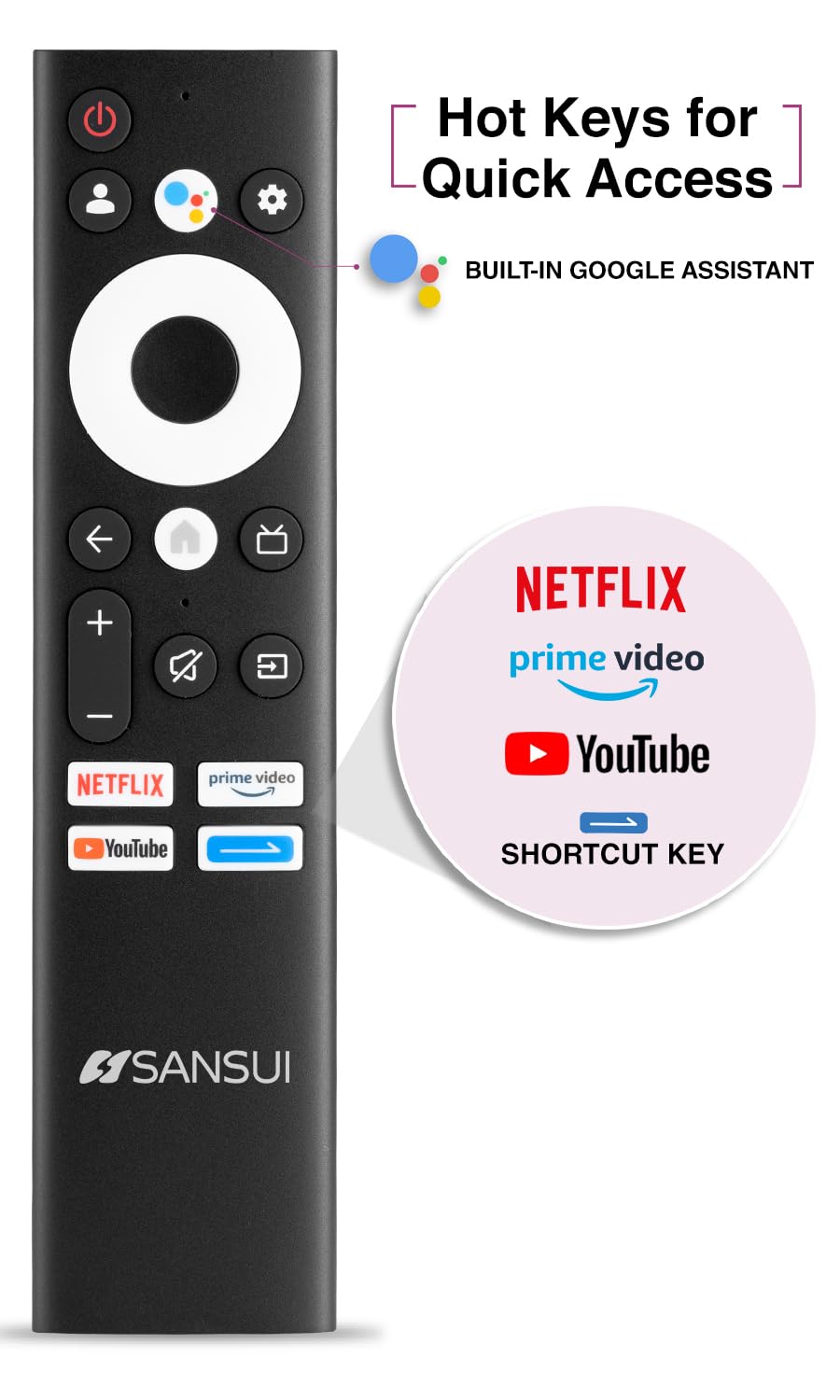
Image: The SANSUI JSW50GSUHD remote control, showing button layout and hot keys.
5. Баштапкы орнотуу (Google TV)
Upon first power-on, the TV will guide you through the initial setup process. This includes selecting your language, connecting to Wi-Fi, signing in with your Google account, and configuring Google TV settings. Follow the on-screen prompts.
Телевизоруңузду иштетүү
1. Негизги функциялар
- Күч: Телевизорду күйгүзүү же өчүрүү үчүн пульттагы кубат баскычын басыңыз.
- Көлөмү: Үн деңгээлин тууралоо үчүн Үндү катуулатуу/акырындатуу баскычтарын колдонуңуз.
- Киргизүү булагы: Press the Source button to select between HDMI, AV, TV, and other inputs.
- Навигация: Менюларды башкаруу үчүн багыттоочу панелди жана OK баскычын колдонуңуз.
2. Акылдуу телевизордун функциялары (Google TV)
Your TV runs on Google TV, providing access to a wide range of streaming services and smart features.
- Google Жардамчысы: Use the dedicated button on your remote for voice commands to search for content, control smart home devices, and get information.
- Кыналган Chromecast: Мазмунду шайкеш смартфонуңуздан, планшетиңизден же компьютериңизден түздөн-түз сыналгыга чыгарыңыз.
- Колдонмолор: Access popular streaming apps like Netflix, Prime Video, Disney+ Hotstar, and YouTube directly from the Google TV interface. Download more apps from the Google Play Store.
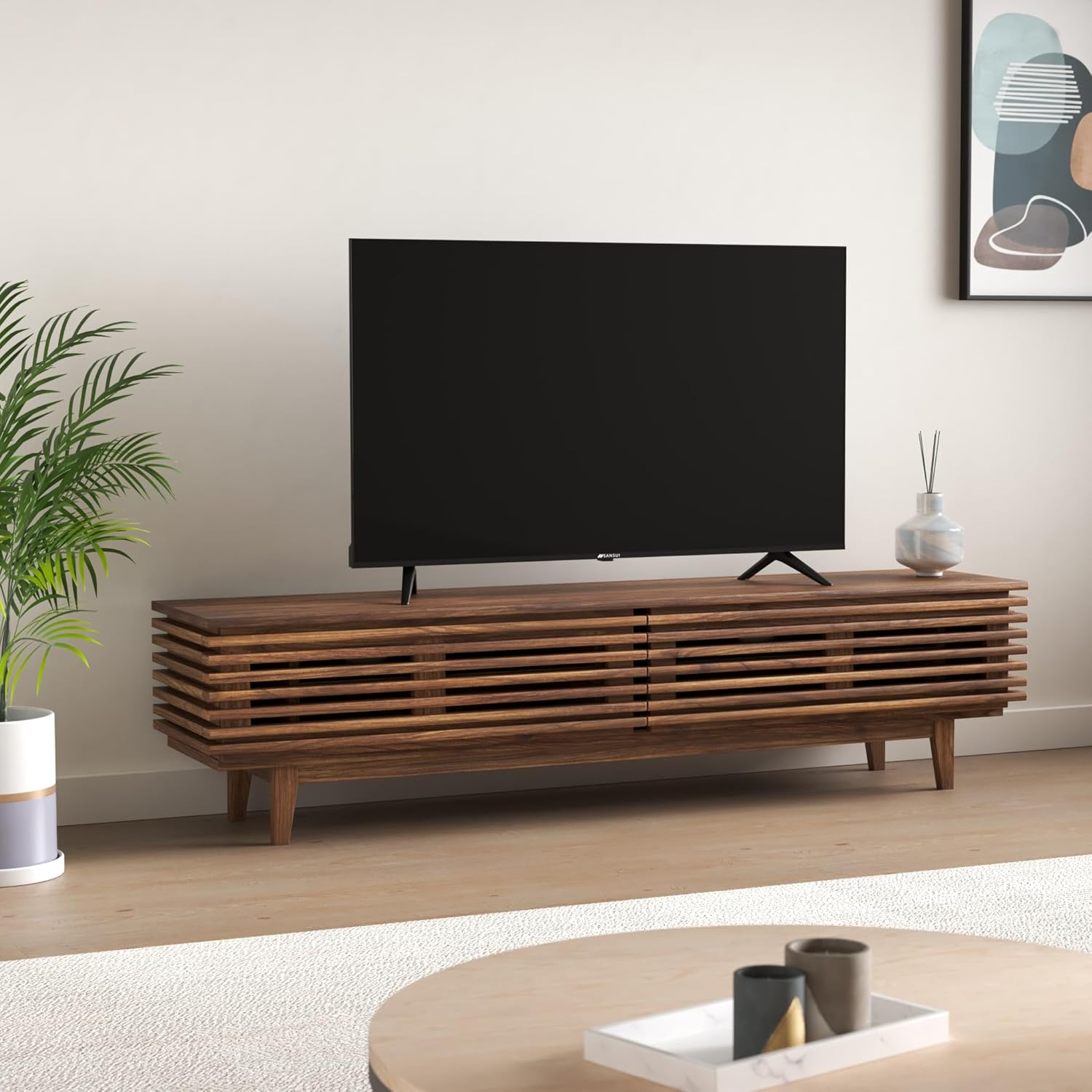
Image: The Google TV home screen displaying various streaming applications and content suggestions.
3. Display and Audio Enhancements
- 4K Ultra HD: Enjoy stunning clarity and detail with 3840x2160 resolution.
- HDR10: Experience enhanced contrast and a wider range of colors with HDR10 content.
- Zen Panel: The A+ Zen panel dynamically enhances visual content with uniform light dispersal for improved picture quality.
- Алкаксыз дизайн: Иммерсив үчүн экрандын мейкиндигин кеңейтет viewтажрыйбасы.
- Dolby Audio жана DTS Studio Үнү: Delivers rich, clear, and immersive audio with 20W output.

Сүрөт: Жакын план view of the SANSUI JSW50GSUHD TV showcasing its bezel-less design with a vibrant nature scene.

Image: An illustration demonstrating the advanced light dispersal technology of the Zen Panel for enhanced hues.
Техникалык тейлөө
1. Тазалоо
Экранды тазалоо үчүн аны жумшак, түксүз чүпүрөк менен акырын сүртүңүз. өжөр белгилери үчүн, бир аз гampen the cloth with water or a screen cleaner specifically designed for TVs. Do not spray liquid directly onto the screen. Clean the TV body with a soft, dry cloth.
2. Программалык камсыздоону жаңыртуу
Сиздин Google TV автоматтык программа жаңыртууларын алышы мүмкүн. Бул жаңыртууларды алуу үчүн сыналгыңыз интернетке туташып турганын текшериңиз, алар майнаптуулугун жакшыртат жана жаңы функцияларды кошо алат.
Проблемаларды чечүү
Телевизоруңузда көйгөйлөргө туш болсоңуз, төмөнкү жалпы чечимдерди караңыз:
| Көйгөй | Мүмкүн чечим |
|---|---|
| Күч жок | Кубат кабелинин телевизорго жана дубалдагы розеткага бекем туташтырылганын текшериңиз. Розетканын иштеп турганын текшериңиз. |
| Сүрөт/Үн жок | Verify the correct input source is selected. Check cable connections to external devices. Try a different HDMI port. |
| Пульт иштебейт | Батареяларды текшерип, алмаштырыңыз. Пульт менен телевизордун инфракызыл сенсорунун ортосунда эч кандай тоскоолдуктар жок экенин текшериңиз. |
| Wi-Fi туташуу маселелери | Restart your router and modem. Reconnect the TV to the Wi-Fi network in the settings. Ensure the TV is within range of your router. |
| Сүрөттүн сапаты маселелери | Сыналгы менюсунда сүрөт жөндөөлөрүн (жарыктык, контраст, түс) тууралаңыз. Мазмун булагы жогорку сапатта болушун камсыз кылуу. |
If problems persist, perform a factory reset via the TV settings menu (Settings > System > About > Reset). Note that a factory reset will erase all personal data and settings.
Техникалык шарттар
Detailed technical specifications for the SANSUI JSW50GSUHD TV:
- Экрандын өлчөмү: 127 Centimetres (50 Inches)
- Дисплей технологиясы: LED
- Чечим: 4K Ultra HD (3840x2160)
- Жаңыртуу ылдамдыгы: 60 Гц
- Өзгөчөлүктөр: Bezel-Less Design, Browser, Chromecast, Parental Controls, Sleep Timer, Google TV, Google Assistant, Voice Search Smart Remote
- Байланыш: 3 HDMI ports, 2 USB ports, 1 AV (mini), Bluetooth, Wi-Fi, Ethernet (LAN), Optical Audio
- Аудио чыгаруу: 20W with Dolby Audio and DTS Studio Sound
- Процессор: CA53 Quad core Processor
- Эстутум: RAM 2GB, ROM 16GB (FLASH)
- Операция системасы: Google TV
- Продукциянын өлчөмдөрү (D x W x Y): 9D x 111W x 71.7H Сантиметр
- Элемент Салмагы: 9300 грамм
- Энергияны керектөө: 130 Ватт
- VESA тоо стандарты: 100 x 100 мм
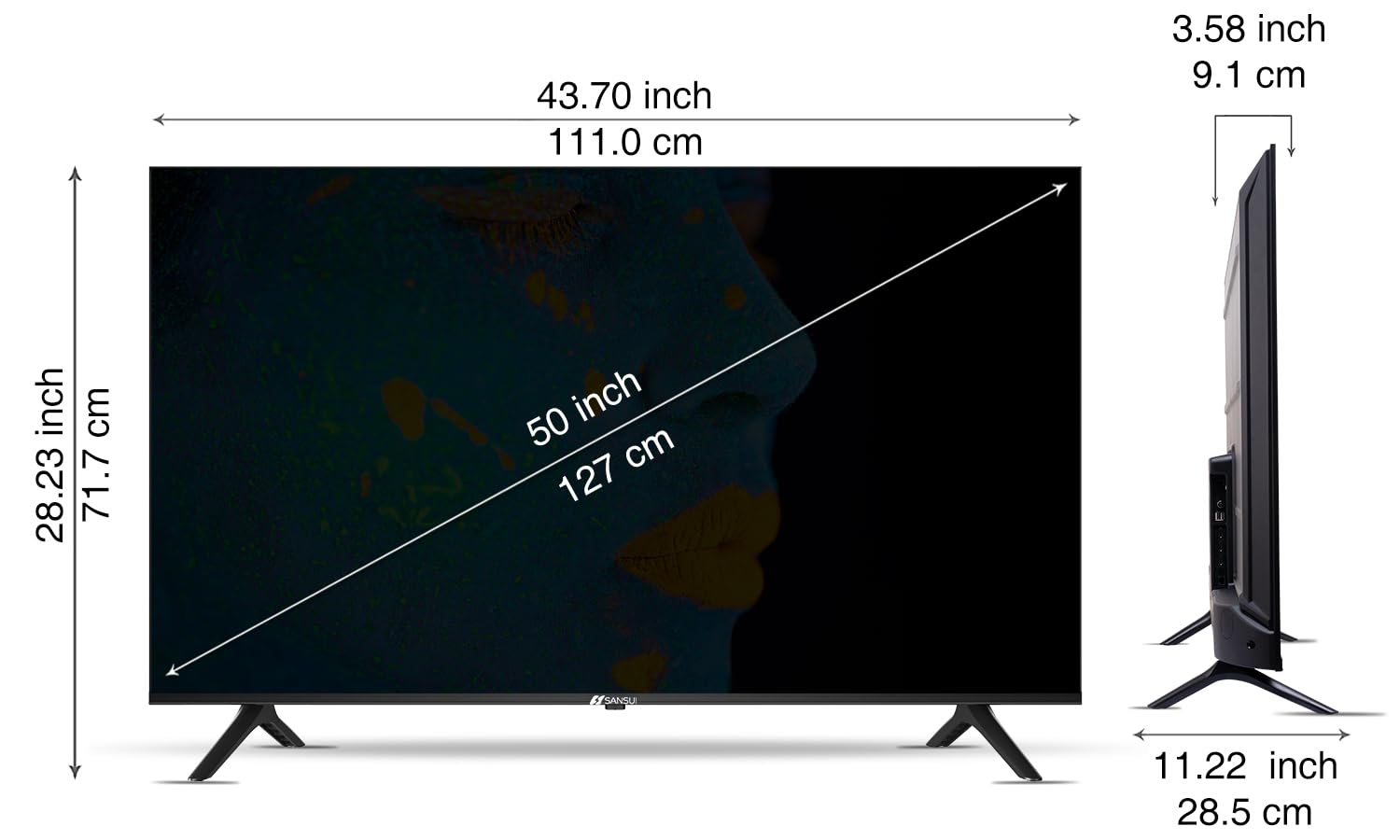
Image: Diagram illustrating the dimensions of the SANSUI JSW50GSUHD 50-inch TV.
Кепилдик жана колдоо
Your SANSUI JSW50GSUHD TV comes with a 1-year comprehensive warranty, plus an additional 1-year warranty on the panel, provided by the brand from the date of purchase.
For warranty support or any technical assistance, please contact SANSUI customer care:
- Акысыз номер: 1800 419 3777
- Электрондук почта: sansuicare@jainaindia.com
Manufacturer: PG Electroplast Limited
Importer: Jaina India Pvt Ltd.