
1. Коопсуздук маалыматы
- This product is intended for children aged 3 to 12 years. Adult supervision is recommended during use.
- Do not disassemble or attempt to repair the camera. Contact support if issues arise.
- Keep the camera away from water and excessive moisture to prevent damage.
- Заряддоо үчүн берилген USB кабелин гана колдонуңуз.
- The thermal print paper is a consumable item. Ensure replacements are compatible.
2. Пакеттин мазмуну
Пакетиңизде бардык буюмдар бар экенин текшериңиз:
- 1 x GREENKINDER X6 Kids Instant Print Camera
- 1 x 32 ГБ MicroSD картасы
- 3 x Rolls of Thermal Print Paper
- 1 x Lanyard
- 1 х USB-C кубаттоо кабели
- 1 x Cartoon Sticker Set
- 5 x Color Pens
- 1 x User Manual
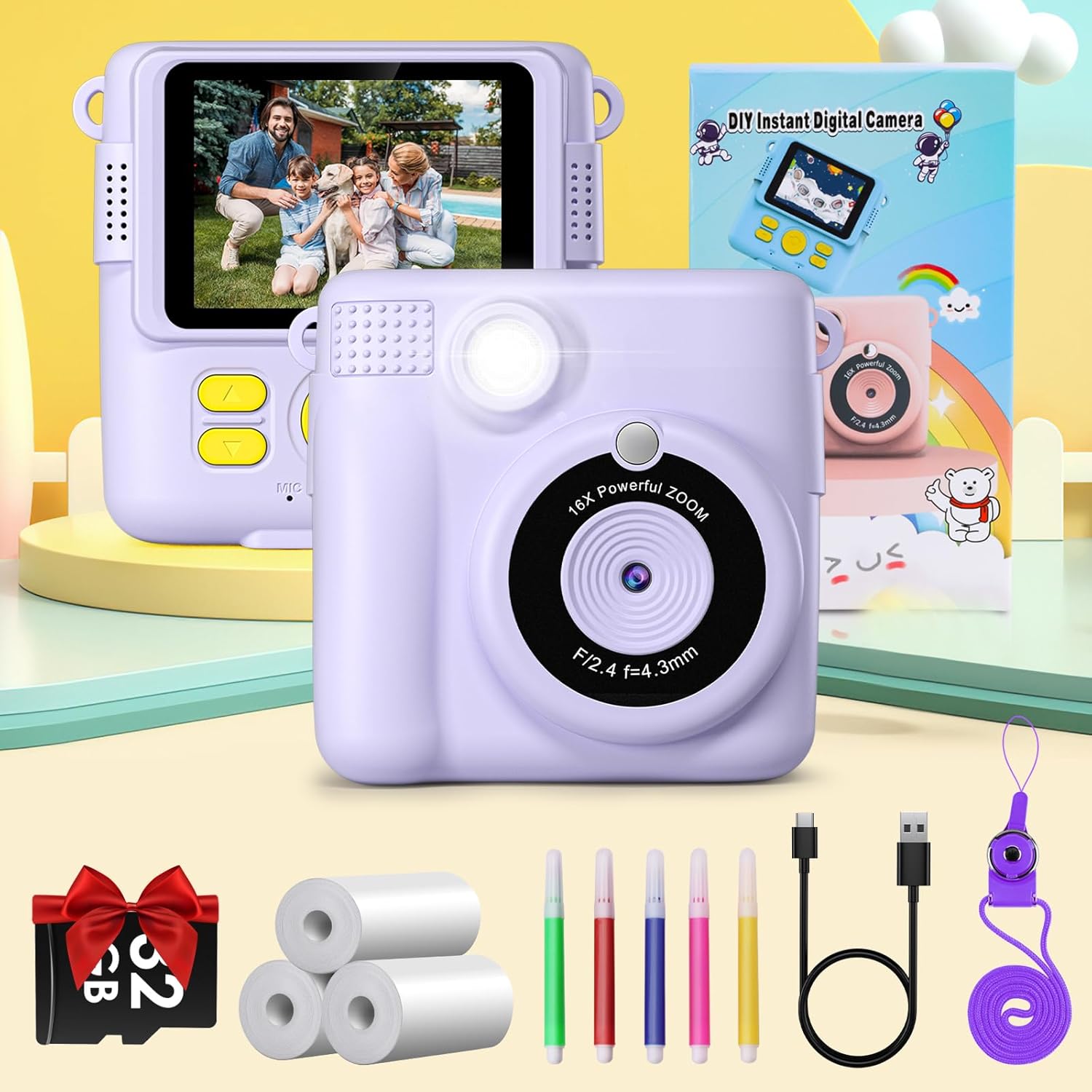
Figure 2.1: Complete package contents of the GREENKINDER X6 camera.
3. Продукт бүтүп калдыview
Камеранын компоненттери менен таанышыңыз:

Сүрөт 3.1: Алдыңкы жана арткы views of the GREENKINDER X6 camera with key features highlighted.
- Объектив: Main camera lens for capturing photos and videos.
- Flash: Жарык аз шарттарда жарыкты камсыз кылат.
- 2.4 дюймдук LCD экран: үчүн viewing photos, videos, and navigating menus.
- Башкаруу баскычтары: Power, Shutter, Navigation (Up/Down/Left/Right), OK/Menu.
- Print Output Slot: Where instant prints emerge.
- MicroSD картасынын уячасы: For memory expansion (32GB card included).
- USB-C порту: Заряддоо жана маалыматтарды өткөрүү үчүн.
4. Орнотуу
4.1 Батареяны заряддоо
The camera is equipped with a 1000mAh lithium-polymer battery. Before first use, fully charge the camera.
- Берилген USB-C кабелин камеранын USB-C портуна туташтырыңыз.
- Кабелдин экинчи учун USB кубат адаптерине (кошумча эмес) же компьютердин USB портуна туташтырыңыз.
- Кубаттоо индикатору күйөт. Кубаттоо аяктаганда ал өчөт же түсүн өзгөртөт.
4.2 MicroSD картасын салуу
A 32GB MicroSD card is included for storing photos and videos.
- Камераңыздын капталынан MicroSD карта уячасын табыңыз.
- MicroSD картаны алтын түстүү контакттары ылдый каратып, ордуна чыкылдаганча салыңыз.
- Чыгаруу үчүн картаны чыкылдагыча акырын түртүңүз, анан коё бериңиз, ошондо ал чыгып калат.
4.3 Loading Print Paper
The camera uses thermal print paper for instant black and white prints. Three rolls are included.
- Gently push the part of the camera with the lens upwards to open the paper compartment.
- Insert a roll of thermal print paper into the compartment, ensuring the paper feeds out from the top.
- Close the camera by pushing the two parts back together until they click securely.

Figure 4.1: Steps for loading thermal print paper.
5. Иштөө нускамалары
5.1 Күйгүзүү/өчүрүү
- Күйгүзүү үчүн, Күйгүзүү баскычын бир нече секунд басып туруңуз.
- Өчүрүү үчүн, экран өчкөнгө чейин Кубат баскычын кайра басып, кармап туруңуз.
5.2 Basic Photography and Instant Printing
The camera allows for instant black and white prints using thermal technology.
- Камераны күйгүзүңүз.
- 2.4 дюймдук LCD экранды колдонуп, сүрөтүңүздү кадрга алыңыз.
- Сүрөткө тартуу үчүн жапкычты басыңыз.
- The camera will automatically print the photo in black and white from the output slot.
5.3 Видео жаздыруу
Record moments in 1080P resolution.
- Navigate to video mode using the menu buttons.
- Жазууну баштоо үчүн жапкычты басыңыз.
- Жазууну токтотуу үчүн Жабуу баскычын дагы бир жолу басыңыз.

Figure 5.1: Demonstrating 1080P video, time-lapse, and burst shooting features.
5.4 Өзгөчөлүктөр
- 16x Digital Zoom: Use the navigation buttons to zoom in or out before taking a photo.
- Flash: Activate or deactivate the flash for improved lighting in dark environments.
- Убакыттын өтүшү: Set the camera to take photos automatically at intervals of 3, 5, or 10 seconds.
- Шаттангыла атуу: Capture multiple photos in quick succession by holding down the shutter button.
- Оюндар: The camera includes built-in puzzle games for entertainment. Access them via the menu.
- Filters and Frames: Apply various fun filters and decorative frames to your photos before printing or saving.

Figure 5.2: 16x Zoom and Flash functionality.

5.3-сүрөт: Мисamples of different frames and filters.
5.5 Өз колуңуз менен боёо
After printing black and white photos, use the included color pens to personalize them.

Figure 5.4: DIY coloring of instant prints.
6. Техникалык тейлөө
6.1 Камераны тазалоо
- Камеранын корпусун тазалоо үчүн жумшак, кургак чүпүрөктү колдонуңуз.
- Линза үчүн атайын линза тазалоочу чүпүрөктү колдонуңуз.
- Суюк тазалагычтарды же абразивдүү материалдарды колдонбоңуз.
6.2 Storing the Camera
- Камераны салкын, кургак жерде, күндүн нуру түз тийбеген жерде сактаңыз.
- Remove the MicroSD card if storing for extended periods.
6.3 Батареяга кам көрүү
- Charge the battery regularly, even if the camera is not in frequent use, to maintain battery health.
- Батареяны бат-баттан толук кубаттап калуудан алыс болуңуз.
6.4 Replacing Print Paper
When the print paper runs out, you can purchase compatible thermal print paper. Издөө ASIN: B0C52Q298V for refills.
7. Кыйынчылыктарды
| Көйгөй | Мүмкүн себеп | Чечим |
|---|---|---|
| Камера күйбөйт. | Батарея аз. | Charge the camera fully using the provided USB-C cable. |
| Сүрөткө/видео тартууга болбойт. | No MicroSD card inserted or card is full. | Insert a MicroSD card or delete old fileорун бошотуу үчүн. |
| Prints are blank or faded. | Print paper is incorrectly loaded or has run out. | Check paper orientation and ensure it is loaded correctly. Replace the paper roll if empty. |
| Камера катып калат же жооп бербей калат. | Программанын катасы. | Press and hold the Power button for 10 seconds to force a restart. |
8. Техникалык шарттар
| Өзгөчөлүк | Деталь |
|---|---|
| Бренд | GREENKINDER |
| Модел | X6 |
| Продукт түрү | Instant Print Camera (DSLR type) |
| Түс | сирень |
| Экран | 2.4 дюймдук LCD |
| Video Resolution | 1080p |
| Натыйжалуу дагы эле чечим | 12 мегапиксел |
| Digital Zoom | 16x |
| Байланыш технологиясы | USB-C |
| Эс | MicroSD картасын колдойт (32 ГБ кошо) |
| Батареянын курамы | Литий-полимер (1000 мАч) |
| Өзгөчөлүктөр | Time-lapse, Flash, Burst Shooting, Games, Filters, Frames |
| Элемент Салмагы | 250 грамм |
| Модель жылы | 2023 |
9. Кепилдик жана колдоо
For warranty information or technical support, please refer to the contact details provided with your purchase or visit the official GREENKINDER webсайт. Сатып алганыңыздын далили катары сатып алуу дүмүрчөгүңүздү сактаңыз.