
1. Киришүү
Thank you for choosing the Deko TV PRO2 DVB-T2 HEVC Digital Terrestrial Receiver. This device allows you to receive digital terrestrial television broadcasts (DVB-T2) with HEVC (H.265) encoding, providing high-quality video and audio. This manual will guide you through the setup, operation, and maintenance of your new receiver to ensure optimal performance and enjoyment.
2. Кутунун Мазмуну
Пакеттин мазмунун кылдат текшериңиз. Эгерде кандайдыр бир буюмдар жок же бузулуп калса, сатуучуга кайрылыңыз.
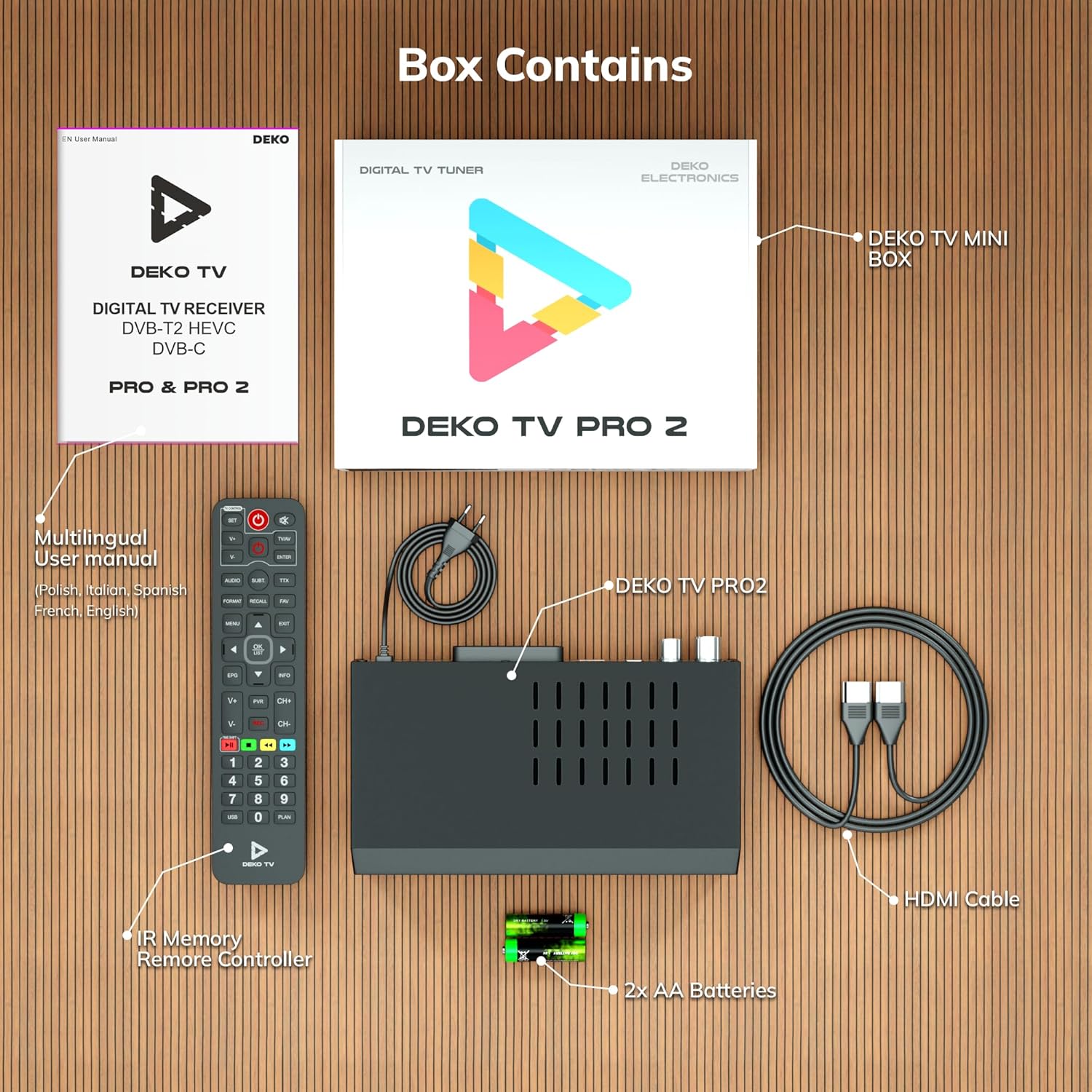
2.1-сүрөт: Deko TV PRO2 Box Contents. The image displays the Deko TV PRO2 receiver, a multilingual user manual, an IR remote control, two AA batteries, a power cable, and an HDMI cable.
- Deko TV PRO2 Digital Terrestrial Receiver
- IR Remote контроллер
- 2x AAA батареялары
- Электр кабели
- HDMI кабели
- Көп тилдүү колдонуучу колдонмо
3. Продукциянын өзгөчөлүктөрү
The Deko TV PRO2 offers a range of features designed to enhance your viewтажрыйбасы:

3.1-сүрөт: Deko TV PRO2 Key Features. This image illustrates the main functionalities including DVB-T2 Terrestrial reception, Timeshift, HEVC H.265 Codec support, Personal Video Recorder (PVR), universal compatibility, and Crystal Clear Full HD output.
- DVB-T2 Terrestrial: Supports the latest digital terrestrial broadcasting standard.
- HEVC H.265 Codec: Ensures efficient video compression for high-quality picture.
- Жалпы шайкештик: Works with both modern and older television models.
- Timeshift: Pause live TV and resume watching later.
- Personal Video Recorder (PVR): Record your favorite programs to a connected USB storage device.
- Crystal Clear Full HD: Delivers high-definition video output.
- Кош USB порттары: For media playback and PVR functionality.
4. Орнотуу колдонмосу
4.1. Физикалык байланыштар
Before powering on the device, ensure all necessary connections are made.

4.1-сүрөт: Rear Panel Connections. This image details the rear panel of the Deko TV PRO2, indicating the RF IN, RF LOOP THROUGH, two USB ports, HDMI output, and SCART connector.
- Антенна туташуу: Сиздин жер үстүндөгү антенна кабелин туташтырыңыз RF IN port on the back of the receiver. If you have another device (e.g., a TV with an integrated tuner) that also needs an antenna signal, you can connect it to the RF LOOP THROUGH порт.
- TV Connection (HDMI): For high-definition video and audio, connect an HDMI cable from the HDMI port on the receiver to an HDMI input on your television.
- TV Connection (SCART): For older televisions, connect a SCART cable from the SCART ресивердеги портту телевизоруңуздагы SCART киргизүүгө. (Note: Do not use both HDMI and SCART simultaneously for video output.)
- USB түзмөктөрү: Insert USB storage devices (for PVR or media playback) into the USB ports. The device has two USB ports.
- Кубат туташуу: Connect the power cable to the receiver and then plug it into a wall outlet.
4.2. Алыстан башкаруунун батареясын орнотуу
Open the battery compartment on the back of the remote control and insert two AAA batteries, ensuring correct polarity (+/-). Close the compartment.
4.3. Баштапкы күйгүзүү жана каналды издөө
- Бардык байланыштар коопсуз экенин текшериңиз.
- Turn on your television and select the correct HDMI or SCART input source corresponding to where the Deko TV PRO2 is connected.
- Power on the Deko TV PRO2 using the power button on the front panel or the remote control.
- The first time you power on the receiver, an initial setup wizard will appear. Follow the on-screen instructions to select your language, country, and initiate an automatic channel scan. This process will find and store all available digital terrestrial channels.
- Скандоо аяктагандан кийин, сиз мүмкүн болушу керек view каналдар.
5. Иштөө нускамалары
5.1. Телевизордун негизги функциялары
- Канал тандоо: колдонуу CH + / CH- buttons or the numeric keypad on the remote control to change channels.
- Үндү көзөмөлдөө: колдонуу VOL + / VOL- алыстан башкаруудагы баскычтар.
- Менюга кирүү: басыңыз МЕНЮ button to access the main menu for settings and features.
- Электрондук программалык колдонмо (EPG): басыңыз EPG баскычына view program information and schedules.
- Маалымат дисплей: басыңыз INFO Учурдагы каналдын жана программанын чоо-жайын көрсөтүү үчүн баскычты басыңыз.
5.2. USB медиа ойнотуу
The Deko TV PRO2 supports media playback from USB storage devices.
- Insert a USB flash drive or external hard drive into one of the USB ports.
- Navigate to the "Media" or "USB" section in the main menu.
- Ойноткуңуз келген медиа түрүн тандаңыз (мисалы, Видео, Музыка, Фото).
- Сиздин fileс жана ойнотуу үчүн каалаган мазмунду тандаңыз.
5.3. PVR (Personal Video Recorder) and Timeshift
To use PVR and Timeshift functions, a USB storage device must be connected and formatted by the receiver.
- Жаздыруу: Программаны көрүп жатканда, баскычын басыңыз REC button on the remote control to start recording. Press ТОКТОТ to end the recording. Recorded programs can be accessed via the "PVR" or "Recordings" menu.
- Timeshift: басыңыз ТЫНЫГУУ button during live TV to activate Timeshift. The program will pause, and recording will begin in the background. You can then use ОЙНОО, ТЕЗ АЛГА, жана КАЙРА АЙРУУ buttons to control playback. Press ТОКТОТ to exit Timeshift and return to live TV.
5.4. Internet and Multimedia Features (Optional Wi-Fi Adapter)
The Deko TV PRO2 supports internet connectivity via a compatible USB Wi-Fi adapter (sold separately). Once connected, you can access certain online multimedia features.

5.1-сүрөт: Internet Connectivity. This image shows the Deko TV PRO2 with an optional USB Wi-Fi adapter, indicating support for Wi-Fi, YouTube, and IPTV functionalities.
- Insert a compatible USB Wi-Fi adapter into one of the USB ports.
- Go to the "Network Settings" in the main menu to configure your Wi-Fi connection.
- Once connected, you may find options for applications like YouTube or IPTV within the receiver's menu, depending on the firmware version.
6. Техникалык тейлөө
- Тазалоо: Use a soft, dry cloth to clean the receiver. Do not use liquid or aerosol cleaners.
- Вентиляция: Кабылдагычтын жетиштүү желдетилишин камсыз кылыңыз. Желдетүү тешиктерин жаппаңыз.
- Программалык камсыздоо жаңыртуулары: Мезгил-мезгили менен өндүрүүчүнүн текшерүү webжеткиликтүү программалык камсыздоо жаңыртуулары үчүн сайт. Жаңыртуулар иштин натыйжалуулугун жакшыртып, жаңы функцияларды кошо алат. Жаңыртуу менен берилген көрсөтмөлөрдү кылдаттык менен аткарыңыз.
7. Кыйынчылыктарды
| Көйгөй | Мүмкүн себеп | Чечим |
|---|---|---|
| Сүрөт же үн жок | Incorrect TV input selected; loose cables; receiver not powered on. | Select the correct HDMI/SCART input on your TV. Check all cable connections. Ensure the receiver is powered on. |
| "Сигнал жок" билдирүүсү | Antenna not connected; poor antenna signal; no channels scanned. | Check antenna connection. Adjust antenna position. Perform a channel scan (refer to Section 4.3). |
| Пульт иштебей жатат | Batteries are dead or incorrectly inserted; obstruction between remote and receiver. | Replace batteries with new AAA batteries, ensuring correct polarity. Remove any obstructions. Point the remote directly at the receiver. |
| USB'ге жаздыруу мүмкүн эмес | USB device not connected or formatted; insufficient storage space. | Ensure USB device is properly connected. Format the USB device via the receiver's menu (this will erase all data). Check available storage space. |
8. Техникалык шарттар
| Өзгөчөлүк | Деталь |
|---|---|
| Бренд | Deko |
| Модель номери | PRO2 |
| Байланыш технологиясы | USB |
| Байланыштар | USB, Wi-Fi (via adapter), HDMI, SCART, RF IN, RF LOOP THROUGH |
| Шайкеш түзмөктөр | Телевидение |
| Өзгөчөлүктөр | Connected and multimedia functions, universal remote control |
| Жалпы USB порттору | 2 |
| Жалпы HDMI порттору | 1 |
| Аудио коддоо | DD |
| Аудио чыгаруу режими | Стерео, айлана |
| Көлөмдүү үн каналынын конфигурациясы | 2.1 |
| Алыстан башкаруу түрү | Алыстан башкаруу |
| Батареялар талап кылынат | 2 AAA batteries (Zinc-carbon) |
9. Кепилдик жана колдоо
The Deko TV PRO2 receiver comes with a standard manufacturer's warranty. Please refer to the warranty card included in your package or contact your retailer for specific warranty terms and conditions.
For technical support, troubleshooting assistance beyond this manual, or inquiries about spare parts and software updates, please visit the official Deko Electronics webсайтка же кардарларды тейлөө бөлүмүнө кайрылыңыз. Байланыш маалыматы, адатта, продуктунун таңгагында же өндүрүүчүнүн дарегинде тапса болот webсайт.