
awei T86
awei T86 ENC Noise Canceling Earbuds User Manual
Модел: T86
Introduction
Welcome to the user manual for your awei T86 ENC Noise Canceling Earbuds. This guide provides detailed instructions on how to set up, operate, maintain, and troubleshoot your earbuds to ensure optimal performance and longevity. Please read this manual carefully before using the product.
Продукт бүттүview
The awei T86 earbuds are designed to deliver a high-fidelity audio experience with advanced Environmental Noise Cancellation (ENC) technology. They feature a digital display charging case for convenience and extended battery life.

1-сүрөт: awei T86 Earbuds and Charging Case. This image shows the black awei T86 earbuds resting in their transparent charging case, which features a digital battery display showing "100".

2-сүрөт: awei T86 Earbuds in various colors. This image displays the awei T86 earbuds and their charging cases in multiple colors (blue, white, orange) on a colorful, layered background, highlighting the "Jelly Bean Style" and "Classy Melodies and Colors".
Техникалык шарттар
| Өзгөчөлүк | Деталь |
|---|---|
| Bluetooth схемасы | Jieli AD6976D8, V5.3 |
| Talk Time | 7 саат |
| Ойнотуу убактысы | 6 саат |
| Заряддоо убактысы | 1.5 саат |
| Наушниктердин Батарея сыйымдуулугу | 35mAh * 2 (with protective IC) |
| Заряддоо корпусунун батареясынын сыйымдуулугу | 300mAh (with protective plate) |
| Horn Size | φ13mm/32Ω |
| Өлчөмдөр | 61.3 * 47.5 * 25 мм (кубаттоочу кутуча) |
| ENC Depth (4 mics for voice call) | > -40dB |
| Суу өткөрбөйт рейтинги | IPX6 |
Эскертүү: Техникалык мүнөздөмөлөр алдын ала эскертүүсүз өзгөртүлүшү мүмкүн.
Орнотуу колдонмосу
1. Баштапкы заряддоо
Before first use, fully charge the earbuds and the charging case. The digital display on the case will indicate the battery level.
- Кулакчындардын экөөнү тең зарядкага салыңыз.
- Заряддоо кутучасын USB кубат булагына туура келген кубаттоо кабели аркылуу туташтырыңыз.
- The display will show charging progress. A full charge typically takes about 1.5 hours.
2. Түзмөк менен жупташтыруу
The awei T86 earbuds use Bluetooth 5.3 for a stable and efficient connection.
- Кулакчындар кубаттоочу кутуда жана кутуда кубат бар экенин текшериңиз.
- Open the charging case lid. The earbuds will automatically enter pairing mode (indicated by flashing lights on the earbuds, if applicable, or a voice prompt).
- Түзмөгүңүздө (смартфон, планшет, компьютер) Bluetooth жөндөөлөрүнө өтүп, Bluetooth күйгүзүңүз.
- Издөө available devices. You should see "awei T86" in the list.
- Select "awei T86" to connect. Once connected, a voice prompt will confirm the successful pairing.
Note: If pairing fails, place the earbuds back in the case, close the lid, wait a few seconds, and then repeat the steps.

3-сүрөт: Bluetooth 5.3 connection. This image illustrates the Bluetooth 5.3 technology, showing an earbud with internal components and a "5.3" display, emphasizing smooth, anti-electromagnetic interference, and low power consumption connectivity.
Иштөө нускамалары
Touch Controls
The awei T86 earbuds feature intuitive touch controls for various functions:
| Акция | Функция |
|---|---|
| Бир таптоо (Сол/Оң гарнитура) | Музыка ойнотуу/тындыруу, Чалууга жооп берүү/аяктоо |
| Эки жолу таптаңыз (оң кулакчын) | Кийинки трек |
| Эки жолу таптаңыз (Сол кулакчын) | Мурунку трек |
| Үч жолу таптап (сол/оң кулакчын) | Үн жардамчысын жандырыңыз |
| Long Press (2 seconds, Left/Right Earbud) | Чакырууну четке кагуу |
| Long Press (3 seconds, Left/Right Earbud) | Toggle ENC/Transparency Mode (if applicable) |
Экологиялык ызы -чууну жокко чыгаруу (ENC)
The awei T86 earbuds are equipped with ENC technology, utilizing four microphones to accurately pick up your voice and reduce ambient noise during calls, ensuring clear communication.

4-сүрөт: ENC Voice Call for HD Speaking & Listening. This image shows a person wearing the awei T86 earbuds in a public setting, illustrating how the ENC technology helps pick up voice and reduce ambient noise for clear communication.
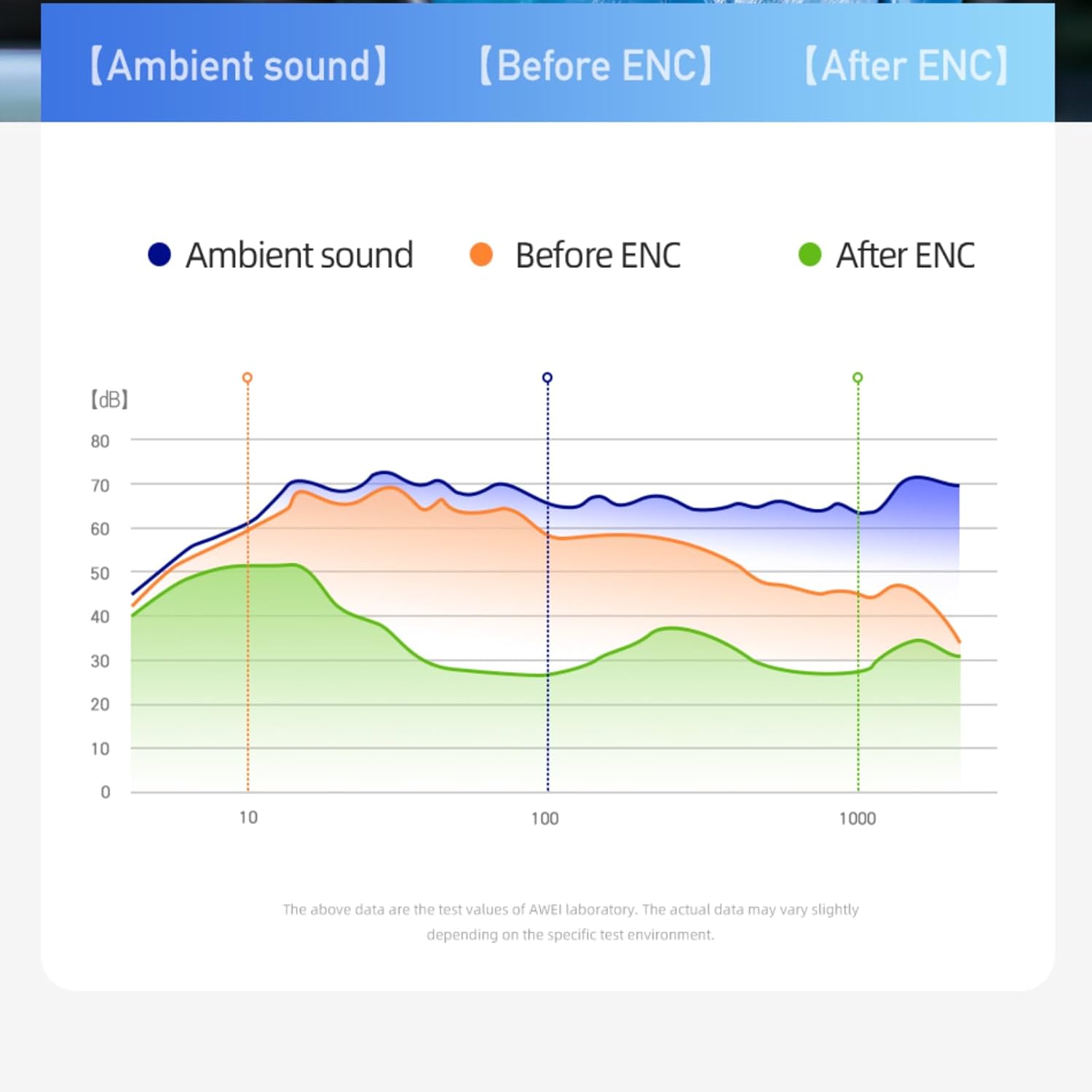
5-сүрөт: ENC Noise Reduction Graph. This graph visually represents the effectiveness of ENC, comparing ambient sound levels ("Ambient sound"), sound before ENC ("Before ENC"), and sound after ENC ("After ENC") across different frequencies, showing significant noise reduction.
Техникалык тейлөө жана кам көрүү
Proper maintenance ensures the longevity and optimal performance of your awei T86 earbuds.
- Тазалоо: Кулакчындарды жана заряддоо кутусун жумшак, кургак, түксүз чүпүрөк менен дайыма тазалап туруңуз. Абразивдүү тазалагычтарды же эриткичтерди колдонбоңуз.
- Суу каршылык: The earbuds have an IPX6 waterproof rating, meaning they are resistant to strong jets of water. However, they are not designed for submersion. Avoid exposing them to excessive moisture or liquids.
- Сактагыч: Колдонулбаганда, кулакчындарды коргоо жана кубаттоо үчүн кубаттоочу кутучага сактаңыз. Күн нурунан жана экстремалдык температурадан алыс салкын, кургак жерде сактаңыз.
- Батареяга кам көрүү: Батареянын кубатын сактоо үчүн, кулакчындарды жана кубаттоочу кутучаны тез-тез толук зарядсыздандырбаңыз. Аларды дайыма колдонбосоңуз да, үзгүлтүксүз кубаттап туруңуз.
Проблемаларды чечүү
If you encounter issues with your awei T86 earbuds, refer to the following common problems and solutions:
| Көйгөй | Мүмкүн чечим |
|---|---|
| Кулакчындар жупташкан жок |
|
| Бир кулактын үнү чыкпайт |
|
| Көлөмү төмөн же үн сапаты начар |
|
| Заряддоо куту заряддалбай жатат |
|
Эгер көйгөй чечилбесе, кардарларды колдоо менен байланышыңыз.
Кепилдик жана колдоо
Your awei T86 earbuds come with a manufacturer's warranty. Please refer to the warranty card included in your product packaging for specific terms and conditions.
For technical support, warranty claims, or further assistance, please contact awei customer service through their official webсайтка же продуктуну сатып алган сатуучуга.
Онлайн ресурстар:
- Official awei Webсайт: www.awei.com (Эскертүү: Бул толтургуч URL, Сураныч, туура өнүм документациясын караңыз URL.)
Note: The product information provided in this manual is for reference only. Due to continuous product improvement, the actual product may differ slightly.
Ask a question about this manual
Ask about setup, troubleshooting, compatibility, parts, safety, or missing instructions. Manuals+ will review the question and use this page’s manual context to help answer it.