
1. Киришүү
Бул колдонмо Meta Quest 3 512GB виртуалдык чындык гарнитураңызды коопсуз жана натыйжалуу колдонуу үчүн маанилүү маалыматты берет. Түзмөктү иштетүүдөн мурун бул көрсөтмөлөрдү кылдат окуп чыгыңыз. Келечекте колдонуу үчүн бул колдонмону сактап коюңуз.

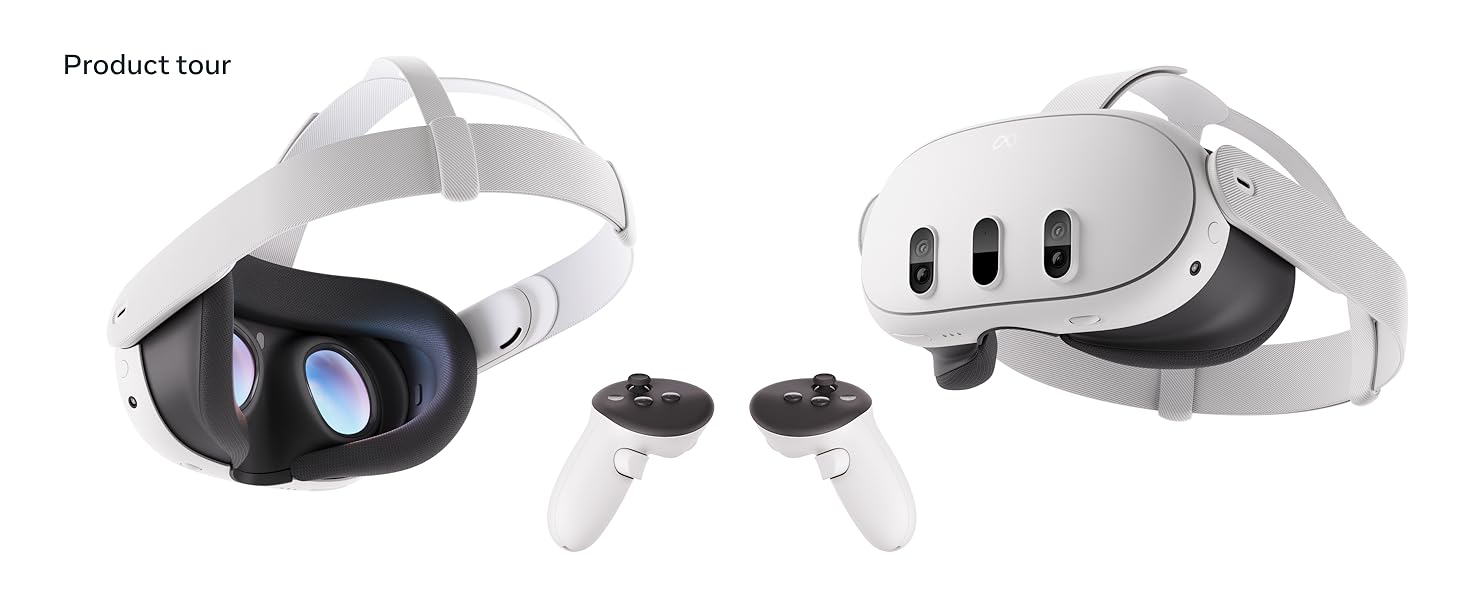
Сүрөт 1.1: Meta Quest 3 гарнитурасы жана ага коштолгон Touch Plus контроллерлери. Гарнитура аралаш реалдуулук мүмкүнчүлүктөрү үчүн бир нече алдыңкы камералары бар жылмакай, ак түстөгү дизайнга ээ. Контроллерлер виртуалдык чөйрөдө ыңгайлуу кармоо жана так өз ара аракеттенүү үчүн эргономикалык формада жасалган.
2. Коопсуздук маалыматы
Жаракат алуунун, ыңгайсыздыктын же мүлккө зыян келтирүүнүн алдын алуу үчүн, Meta Quest 3 гарнитураңыз менен кошо берилген бардык коопсуздук эскертүүлөрүн жана көрсөтмөлөрүн окуп чыгып, аткарыңыз. Түзмөктү колдонуп жатканда айланаңызга ар дайым көңүл буруңуз. Оюн аянтчаңызды тоскоолдуктардан тазалап, кыймылдоо үчүн жетиштүү орун камсыз кылыңыз. Эгерде ыңгайсыздык сезсеңиз, колдонууну дароо токтотуңуз.
3. Кутуда эмне бар
Кутудан чыгарууда бардык компоненттер бар экенин текшериңиз:
- Жөнгө салынуучу алдын ала орнотулган стандарттуу бет интерфейси бар Meta Quest 3 гарнитурасы
- 2 Touch Plus контроллерлери
- Билек боолору (контроллерлер үчүн)
- AA батарейкалары (контроллерлер үчүн)
- Заряддоо кабели
- Кубаттуу адаптер

Сүрөт 3.1: An overview Meta Quest 3 гарнитурасынын жана анын эки Touch Plus контроллеринин. Бул сүрөттө продукт менен кошо берилген негизги компоненттер баса белгиленет, көрсөтүүasing алардын конструкциясы жана салыштырмалуу өлчөмдөрү.
4. Орнотуу
4.1 Алгачкы заряддоо
Биринчи жолу колдонуудан мурун, Meta Quest 3 гарнитурасын берилген кубаттоочу кабель жана кубат адаптери аркылуу толук кубаттаңыз. Кубаттоо порту гарнитуранын капталында жайгашкан. Толук кубаттоо, адатта, болжол менен 2.5 саатты талап кылат.
4.2 Controller Батареяны орнотуу
Кошумча AA батареяларын ар бир Touch Plus контроллерине салыңыз. Батарея бөлүмү ар бир контроллердин туткасында жайгашкан. Туура полярдуулукту текшериңиз.
4.3 Гарнитураны тууралоо жана жөндөө
Гарнитураны башыңызга коюп, боолорду бекем, бирок ыңгайлуу кылып тууралаңыз. Үстүнкү жана каптал боолорду бекем жана бошотсо болот. Көрүүнү так камсыз кылуу үчүн гарнитуранын астыңкы жагындагы дөңгөлөктү колдонуп, каректердин ортосундагы аралыкты (IPD) тууралаңыз. Беттин интерфейсин оптималдуу ыңгайлуулук жана көрүү талаасы үчүн да тууралоого болот. view.
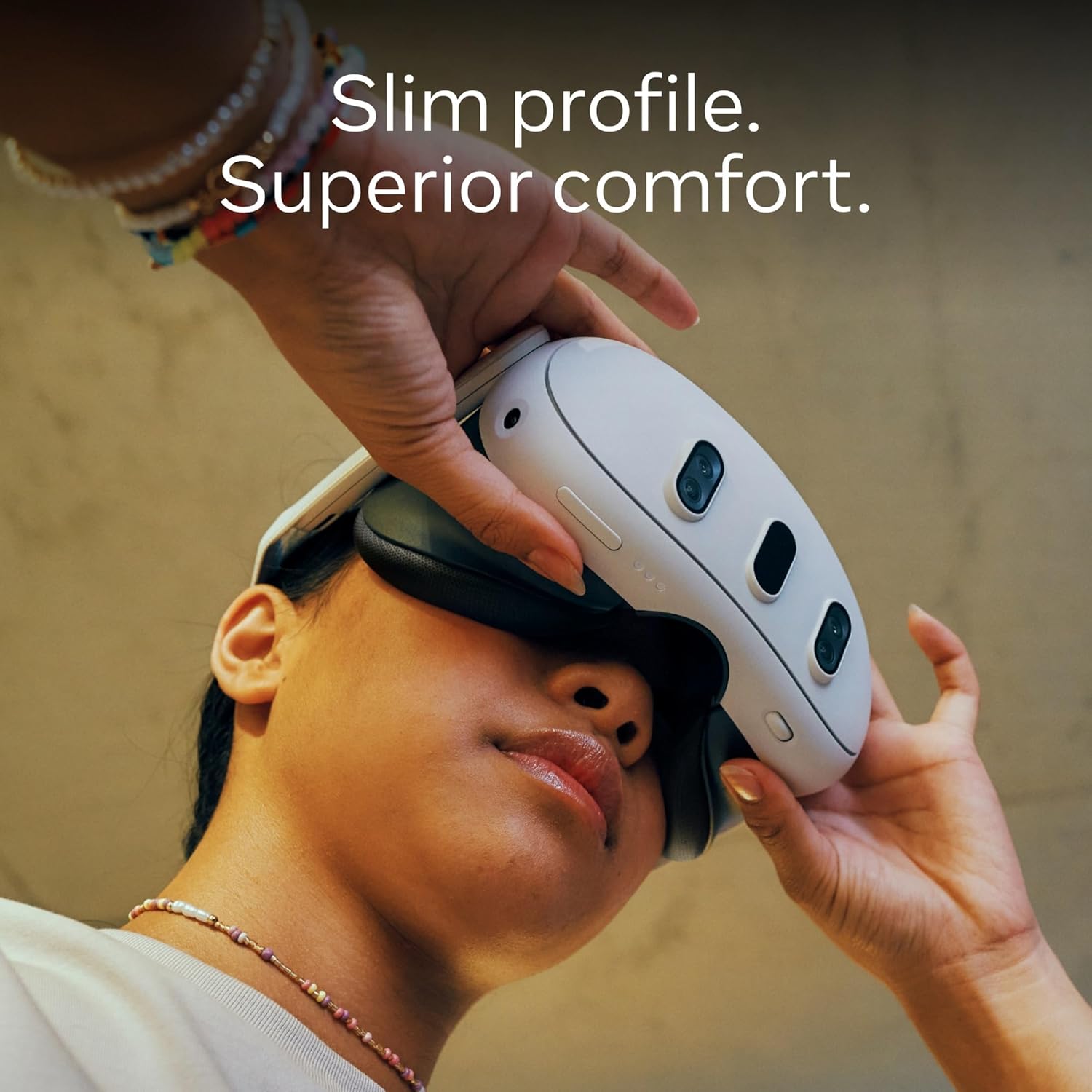
Сүрөт 4.1: Колдонуучу Meta Quest 3 гарнитурасын тууралап, анын сымбаттуулугун көрсөтүп жататfile жана кантип ыңгайлуу отурууга болот. Дизайн узак убакытка кийүү үчүн көлөмүн азайтууну баса белгилейт.
4.4 Программалык камсыздоону жана аккаунтту орнотуу
Гарнитураны күйгүзүңүз. Wi-Fi'га туташуу жана Meta аккаунтуңуз менен кирүү үчүн экрандагы көрсөтмөлөрдү аткарыңыз. Эгер сизде Meta аккаунтуңуз жок болсо, сизден аны түзүү суралат. Коопсуз оюн аянтчаңызды аныктоо үчүн Guardian чек ара системаңызды орнотууну камтыган баштапкы окуу куралын аягына чыгарыңыз.
5. Иштөө
5.1 Негизги навигация
Meta Quest 3 интерфейсинде Touch Plus контроллерлерин же кол менен көзөмөлдөөнү колдонуп багыт алыңыз. Кол менен көзөмөлдөө виртуалдык объектилер менен жылаңач колуңуз менен өз ара аракеттенүүгө мүмкүндүк берет, ал эми контроллерлер оюндар жана белгилүү бир тиркемелер үчүн так киргизүүнү сунуштайт.
5.2 Аралаш реалдуулук тажрыйбалары
Meta Quest 3 толук түстүү өткөрмө функцияга ээ, бул сизге санариптик мазмундун үстүнө коюлганда физикалык айлана-чөйрөңүздү көрүүгө мүмкүндүк берет. Бул виртуалдык объектилер сиздин реалдуу дүйнөдөгү чөйрөңүзгө аралашкан аралаш реалдуулук колдонмолорун иштетет. Гарнитуранын капталын эки жолу басуу же тез жөндөөлөр менюсу аркылуу өткөрмө функцияны иштетиңиз.

Сүрөт 5.1: Колдонуучу Meta Quest 3 менен аралаш реалдуулук тажрыйбасына катышып, виртуалдык элементтердин физикалык чөйрө менен кантип өз ара аракеттене аларын көрсөтүп жатат. Колдонуучу Touch Plus контроллерлерин кармап турат, бул активдүү оюнду көрсөтүп турат.
5.3 Виртуалдык реалдуулук тажрыйбалары
Толук чөмүлүү үчүн гарнитура кеңири мүмкүнчүлүктөрдү камсыз кылат view жана жогорку чечилиштеги дисплейлер. Виртуалдык реалдуулук оюндарын жана тиркемелерин жүктөп алуу жана ишке киргизүү үчүн Meta Quest дүкөнүнө кириңиз. Оптималдуу иштөө жана ыңгайлуулук үчүн оюн ичиндеги жөндөөлөрдү тууралаңыз.
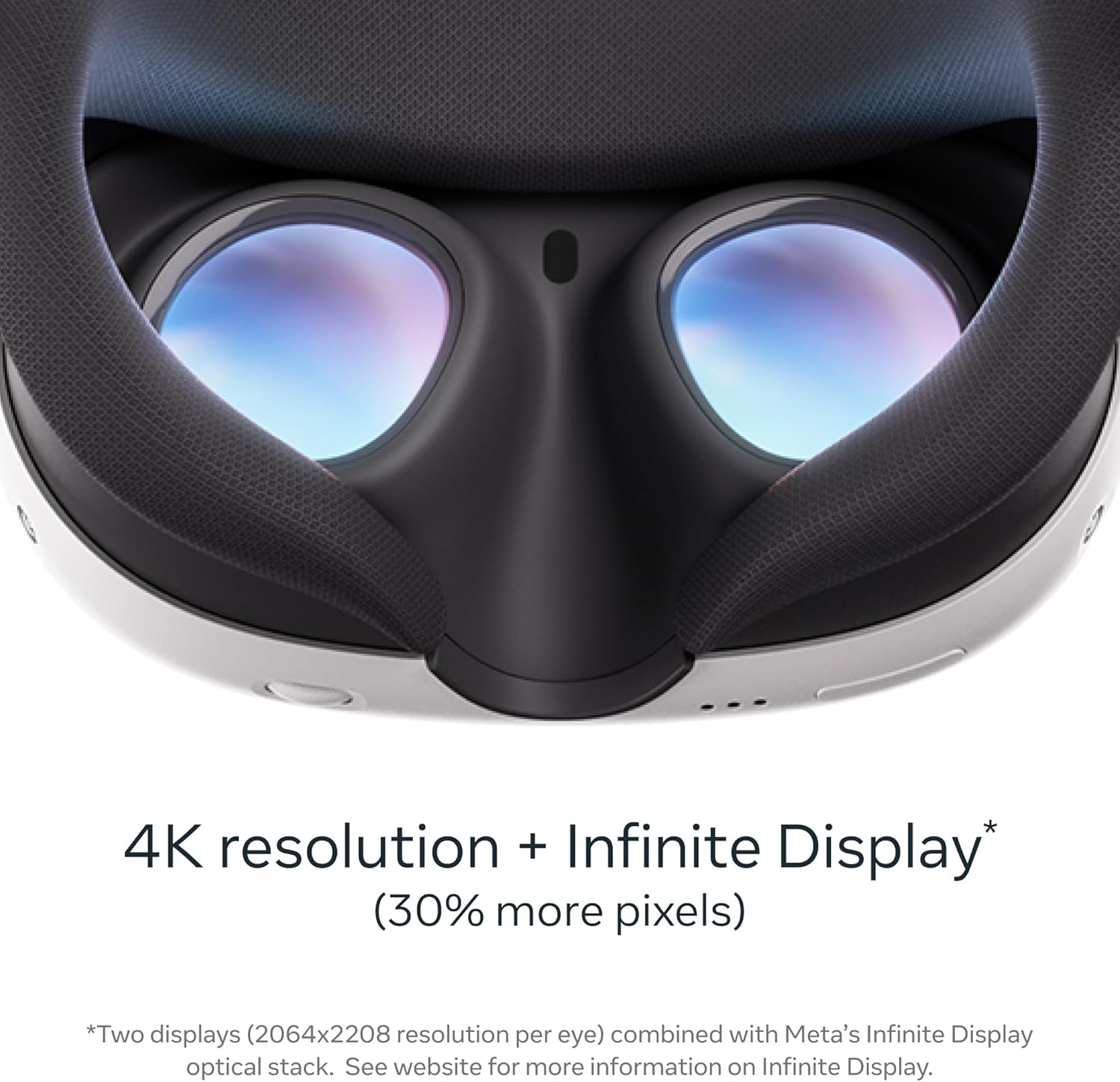
Сүрөт 5.2: деталдуу view Meta Quest 3түн ички линзаларынын жана бет интерфейсинин көрүнүшү. Бул жакындан тартылган сүрөт 4K чечилиши үчүн иштелип чыккан оптикалык системаны жана кеңири тармакты баса белгилейт. view, виртуалдык тажрыйбага иммерсивдүү салым кошуу.
5.4 Көңүл ачуу жана өндүрүмдүүлүк
Meta Quest 3 кино көрүү, интернетте серептөө үчүн колдонулушу мүмкүн webжана өндүрүмдүүлүк боюнча тапшырмалар. Жеке театр тажрыйбасын же көп мониторлуу жумуш мейкиндигин түзүү үчүн виртуалдык экрандарды колдонуңуз.

5.3-сүрөт: Meta Quest 3 гарнитурасынын ичинде көрсөтүлгөн чоң виртуалдык экранда мазмунду көрүп жатып, диванда эс алып жаткан колдонуучу. Бул түзмөктүн каалаган жерде жеке кинематографиялык тажрыйба түзүү мүмкүнчүлүгүн көрсөтүп турат.
5.5 Батареяны башкаруу
Гарнитуранын батареясынын иштөө мөөнөтү колдонулушуна жараша болжол менен 2-3 саатты түзөт. Батареянын деңгээлин гарнитуранын интерфейси аркылуу көзөмөлдөңүз. Узак убакытка чейин иштөө үчүн шайкеш келген тышкы кубат банкын колдонууну карап көрүңүз.
6. Техникалык тейлөө
6.1 Гарнитураны жана линзаларды тазалоо
Гарнитуранын сыртын акырын тазалоо үчүн кургак микрофибра чүпүрөктү колдонуңуз. Линзалар үчүн линзаларды тазалоочу атайын чүпүрөктү колдонуңуз. Суюк тазалоочу каражаттарды, спиртти же абразивдүү материалдарды колдонбоңуз, анткени алар линзаларга жана ички компоненттерге зыян келтириши мүмкүн. Линзаларга түз күн нурунун тийүүсүнөн алыс болуңуз, анткени бул экрандын туруктуу бузулушуна алып келиши мүмкүн.
6.2 Контроллерге кам көрүү
Контроллерлерди кургак же бир аз кургак чүпүрөк менен сүртүңүзamp кездеме. Жаңы батареяларды салуудан мурун батарея бөлүмдөрүнүн кургак экенин текшериңиз. Контроллерлерди түшүрүп албоодон же аларды өтө жогорку температурага дуушар кылбоодон алыс болуңуз.
6.3 Сактоо
Meta Quest 3 түзмөгүн салкын, кургак, күн нуру түз тийбеген жерде сактаңыз. Түзмөктү чаңдан жана физикалык зыяндан коргоо үчүн түпнуска таңгагын же атайын алып жүрүүчү сумканы колдонуңуз.
7. Кыйынчылыктарды
7.1 Жалпы маселелер жана чечимдер
- Гарнитура күйбөй жатат: Гарнитуранын толук заряддалганын текшериңиз. Башка розетканы же кубаттоочу кабелди колдонуп көрүңүз.
- Контроллерлер жупташпай жатат: Контроллердин батареяларын текшериңиз. Гарнитураны жана контроллерлерди өчүрүп-күйгүзүңүз. Контроллерлерди гарнитуранын жөндөөлөр менюсу аркылуу кайра жупташтырыңыз.
- Көрүүнүн бүдөмүктөшү: Гарнитуранын өлчөмүн жана IPD (каректердин ортосундагы аралык) дөңгөлөгүн тууралаңыз. Линзаларды тазалаңыз.
- Көз салуу маселелери: Оюн аянтчаңызда жетиштүү жарык бар экенин текшериңиз. Чагылган беттерди тазалаңыз. Guardian системасын кайра орнотуңуз.
- Wi-Fi туташуу көйгөйлөрү: Роутериңизди жана гарнитураңызды өчүрүп-күйгүзүңүз. Wi-Fi тармагыңыздын иштөө аймагында экениңизди текшериңиз.
7.2 Заводдук абалга кайтаруу
Заводдук жөндөөлөргө кайтаруу гарнитураңыздагы бардык маалыматтарды өчүрүп, аны баштапкы жөндөөлөрүнө кайтарат. Бул программалык камсыздоонун туруктуу көйгөйлөрүн чече алат. Расмий Meta Quest колдоо кызматына кайрылыңыз webбаштапкы абалга кайтаруу боюнча толук нускамаларды алуу үчүн сайт.
8. Техникалык шарттар
| Өзгөчөлүк | Деталь |
|---|---|
| Модель номери | 899-00585-01 |
| Сактоо сыйымдуулугу | 512 ГБ |
| Display Resolution | Ар бир көзгө 2064x2208 пиксель (4K+ Чексиз Дисплей) |
| Процессор | Qualcomm Snapdragon XR2 2-муундагы процессор |
| талаасы View | 360 градус |
| Байланыш | Bluetooth, WiFi |
| Элемент Салмагы | 14.1 унция |
| Продукциянын өлчөмдөрү | 4.72 x 4.72 x 4.72 дюйм |
| Камтылган компоненттер | Гарнитура, 2 Touch Plus контроллери, Билек боолору, AA батарейкалары, Кубаттоочу кабель, Кубат адаптери |
8.1-сүрөт: Meta Quest 3түн негизги өзгөчөлүктөрүн көрсөткөн диаграмма, анын ичинде толук түстүү өткөрүү үчүн кош RGB камералары, 4K+ чексиз дисплейи, күчтүү GPU жана Touch Plus контроллерлериндеги TruTouch Haptics.
9. Кепилдик жана колдоо
9.1 Продукциянын кепилдиги
Meta Quest 3 гарнитураңыз чектелген кепилдик менен камтылган. Кепилдиктин камтылышы, шарттары жана эрежелери тууралуу маалыматты расмий Meta Quest сайтынан тапса болот. webсайтында же продуктунун таңгагынын ичинде. Кепилдик талаптары үчүн сатып алганыңызды тастыктаган документти сактап коюңуз.
9.2 Кардарларды колдоо
Көбүрөөк жардам, техникалык колдоо же көйгөйлөр жөнүндө кабарлоо үчүн, расмий Meta Quest колдоо кызматына баш багыңыз webсайт. The webсайт кардарларды тейлөө өкүлдөрү үчүн Көп берилүүчү суроолорду, көйгөйлөрдү чечүү боюнча көрсөтмөлөрдү жана байланыш маалыматын берет.
Расмий мета колдоо: https://www.meta.com/quest/support/