
1. Продукт бүтүп калдыview
The UNI-T UT372 is a non-contact digital laser tachometer designed for measuring the rotational speed (RPM) and count of objects. It utilizes a laser pointer and reflective tape to provide accurate and stable measurements without physical contact. This device is suitable for various industrial and scientific applications.
Негизги өзгөчөлүктөрү:
- 5-digit LCD screen with RPM/count and time dual display.
- Measurement modes: MAX (Maximum), MIN (Minimum), AVG (Average), and Normal.
- Жөнгө салынуучу сampling rate (0.5-255 seconds).
- Automatic power-off function (cancelable).
- Selectable laser pointer (on/off).
- Clock and time setting capabilities.
- Маалыматты кармоо функциясы.
- Low power consumption, allowing for approximately 40 hours of continuous operation.
- Equipped with a USB interface for data transfer (UT372 only).
- Certified with CE and UKCA standards.
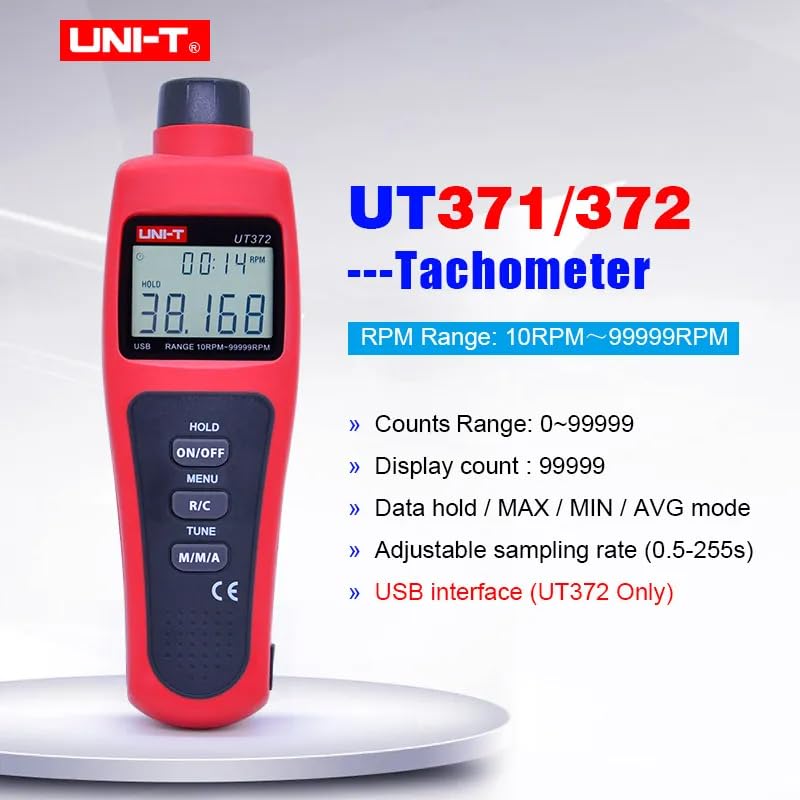
Image 1.1: The UNI-T UT372 tachometer displaying its main features and specifications.
2. Коопсуздук маалыматы
Түзмөктү иштетүүдөн мурун бардык коопсуздук көрсөтмөлөрүн окуп чыгып, түшүнүп алыңыз. Бул көрсөтмөлөрдү аткарбоо жаракат алууга же түзмөккө зыян келтирүүгө алып келиши мүмкүн.
- Do not look directly into the laser beam. The laser is a Class 2 laser product.
- Do not attempt to modify or disassemble the device. Repairs should only be performed by qualified personnel.
- Колдонуудан мурун батарея бөлүмүнүн бекем жабылганын текшериңиз.
- Агып кетпеш үчүн аппарат узак убакыт бою колдонулбаса, батареяларды алып салыңыз.
- Keep the device away from water, dust, and extreme temperatures.
3. Пакеттин мазмуну
Carefully unpack the box and check if all items are present and undamaged. If any item is missing or damaged, contact your supplier.
- UNI-T UT372 Digital Laser Tachometer
- Рефлектордук лента
- USB Interface Cable (for UT372 only)
- PC Software CD (for UT372 only)
- English User Manual
- Batteries (1.5V LR6 x 4)

Image 3.1: The UNI-T UT372 tachometer and its standard accessories as packaged.
4. Product Layout and Panel Introduction
Familiarize yourself with the components and controls of your UT372 tachometer.

Сүрөт 4.1: алдыңкы жана каптал view of the UT372 tachometer with labeled components.
- Tachometer Light Source: Өлчөө үчүн лазер нурун чыгарат.
- LCD дисплей: Shows measurement readings, modes, and other indicators.
- HOLD / ON/OFF Button: Press to power on/off the device. Short press to activate/deactivate data hold.
- MENU баскычы: Accesses the menu for settings adjustments.
- R/C (RPM / Counts) Button: Toggles between RPM and Count measurement modes.
- TUNE Button: Used for adjusting settings within the menu.
- M/M/A (MAX/MIN/AVG) Button: Cycles through Maximum, Minimum, and Average measurement modes.
- USB Port (UT372 only): Маалыматтарды өткөрүп берүү үчүн компьютерге туташуу үчүн.
5. Орнотуу жана Батареяны орнотуу
5.1 Батареяны орнотуу
- Аппараттын артындагы батарея бөлүкчөсүнүн капкагын табыңыз.
- Капкагын жылдырып же бурап ачуу менен ачыңыз.
- Insert four 1.5V LR6 (AA) batteries, ensuring correct polarity (+/-).
- Батарея уясынын капкагын бекем жабыңыз.
5.2 Applying Reflective Tape
For accurate non-contact measurement, apply a piece of reflective tape to the rotating object whose speed or count you wish to measure. Ensure the tape is clean and securely attached.
6. Иштөө нускамалары
6.1 Күйгүзүү/өчүрүү
басыңыз HOLD / ON/OFF button to turn the tachometer on or off.
6.2 RPM Measurement
- Ensure the device is in RPM measurement mode (indicated on the LCD). If not, press the R/C которуштуруу үчүн баскыч.
- Point the laser beam at the reflective tape on the rotating object.
- Maintain a measurement distance between 50mm and 200mm (2 to 8 inches) from the target.
- The RPM reading will be displayed on the LCD.
- Эскертүү: If no signal is detected within 7 seconds, the LCD will display "0.0000". If the RPM exceeds 99999, the LCD will display "OL" (Overload).

Image 6.1: Illustrates the correct distance and method for RPM measurement.
6.3 Counts Measurement
- басыңыз R/C button to switch to Count measurement mode.
- Point the laser beam at the reflective tape on the object.
- The device will count the number of times the laser beam reflects off the tape.
6.4 Mode Selection (MAX/MIN/AVG)
басыңыз M/M/A button repeatedly to cycle through the following display modes:
- МАКС: Displays the maximum measured value.
- МИН: Displays the minimum measured value.
- AVG: Displays the average measured value.
- Кадимки: Displays the current real-time measurement.
6.5 Маалыматтарды кармоо
During measurement, a short press of the HOLD / ON/OFF button will freeze the current reading on the display. Press it again to release the data hold and resume live measurement.
6.6 СampRate Adjustment
Сampling rate can be adjusted from 0.5 to 255 seconds. Refer to the detailed user manual for specific steps on how to access and change this setting via the МЕНЮ жана КОНУН баскычтар.
6.7 USB Interface (UT372 Only)
The UT372 model features a USB port for connecting to a computer. Use the provided USB cable and PC software CD to transfer measurement data for analysis and logging. Follow the instructions provided with the software for installation and operation.
7. Техникалык тейлөө
- Тазалоо: Аппаратты тазалоо үчүн жумшак, кургак чүпүрөктү колдонуңуз. Абразивдүү тазалагычтарды же эриткичтерди колдонбоңуз.
- Сактагыч: Store the tachometer in a cool, dry place away from direct sunlight and extreme temperatures. Remove batteries if storing for extended periods.
- Чагылдыруучу лента: Ensure the reflective tape is clean and free from damage for accurate readings. Replace as needed.
8. Кыйынчылыктарды
- Түзмөк күйбөйт: Батареянын орнотулушун текшерип, батарейкалары түгөнүп калбагандыгын текшериңиз. Керек болсо алмаштырыңыз.
- "0.0000" displayed during RPM measurement: Ensure the laser is correctly aimed at the reflective tape and the measurement distance is within 50-200mm. Check if the reflective tape is properly applied and clean.
- "OL" көрсөтүлөт: The measured RPM exceeds the device's maximum range (99999 RPM).
- Туура эмес окуулар: Verify the reflective tape is securely attached and clean. Ensure the target object is stable during measurement. Check for any obstructions in the laser path.
- Батареянын төмөн көрсөткүчү: Replace batteries promptly when the low battery icon appears on the display.
9. Техникалык шарттар
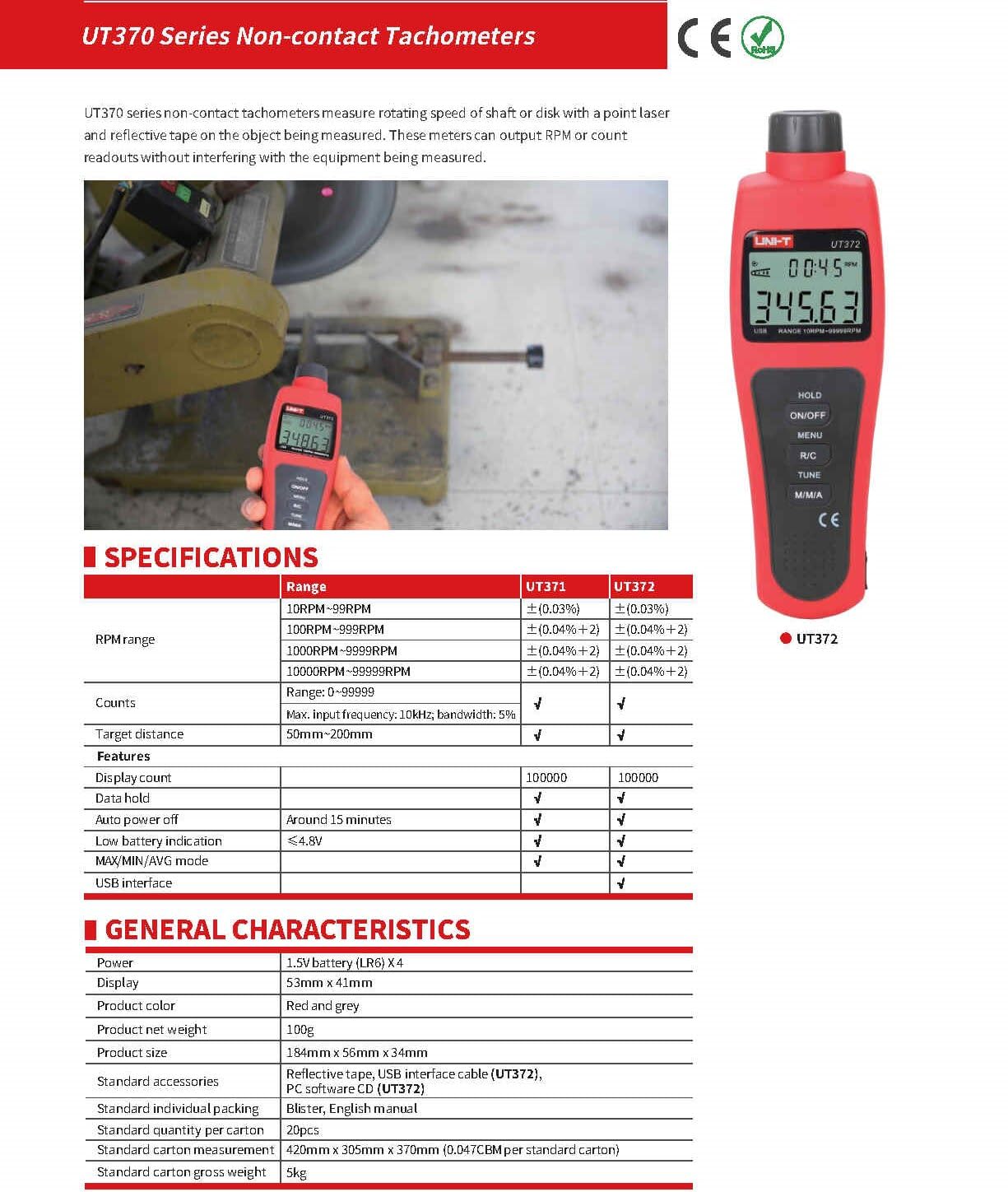
Image 9.1: Detailed specifications for the UT370 series tachometers.
| Параметр | UT372 Specification |
|---|---|
| RPM диапазону | 10 RPM ~ 99999 RPM (Accuracy: ±(0.04%+2)) |
| Counts Range | 0 ~ 99999 |
| Дисплейдин саны | 99999 |
| Максаттуу аралык | 50мм ~ 200мм |
| Максималдуу киргизүү жыштыгы | 10kHz, bandwidth: 5% |
| Күч | 1.5V Battery (LR6) x 4 |
| Дисплей | 53 мм x 41 мм ЖК |
| Продукт түсү | Кызыл жана боз |
| Продукттун таза салмагы | 100г |
| Продукт өлчөмү | 184мм x 56мм x 34мм |
| Авто өчүрүү | Around 15 minutes (cancelable) |
| Батареянын төмөн көрсөткүчү | <4.8V |
| USB интерфейси | Ооба |
| Иштөө температурасы | 0°Cден 50°Cге чейин (32°F—122°F) |
| Сактоо температурасы | -20°Cден 60°Cге чейин (-4°Fтен 140°Fге чейин) |
| Нымдуулук | <80% RH (конденсацияланбаган) |
10. Кепилдик жана колдоо
UNI-T products are designed and manufactured to high quality standards. For warranty information, technical support, or service, please refer to the warranty card included with your product or contact your local UNI-T distributor or customer service center. Please have your product model number (UT372) and purchase date available when contacting support.