
1. Киришүү
This manual provides essential information for the safe and efficient use of your iWALK USB-C Portable Charger, Model DBL5000PNC. Please read these instructions carefully before using the product.
2. Продукт бүтүп калдыview
The iWALK USB-C Portable Charger is a compact power bank designed for on-the-go charging. It features an integrated USB-C connector for direct device charging and a digital display to monitor battery status.

Image: iWALK USB-C Portable Charger connected to a smartphone, showing its compact design.
Компоненттери:
- Integrated USB-C Connector: For direct connection to compatible devices.
- Санариптик дисплей: Shows the remaining battery capacity of the power bank.
- Кубат баскычы: Activates the digital display and initiates charging.
- USB-C киргизүү порту: For recharging the portable charger itself.

Image: Close-up of the iWALK USB-C Portable Charger's digital display, indicating battery percentage.
3. Орнотуу
Power Банктын алгачкы заряддоосу:
- Connect the provided USB-C charging cable to the USB-C input port on the side of the iWALK portable charger.
- USB-C кабелинин экинчи учун туура келген USB кубат адаптерине сайыңыз (кошумча эмес).
- The digital display will show the charging progress. Charge until the display shows 100%.
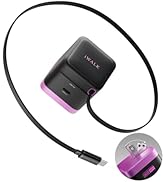
Image: The iWALK portable charger connected to a USB-C cable for recharging.
4. Иштөө нускамалары
Аспабыңызды кубаттоо:
- Remove the protective cap from the integrated USB-C connector.
- Align the integrated USB-C connector with your device's USB-C charging port.
- Gently push the portable charger onto your device until it is securely connected.
- Press the power button on the portable charger to begin charging. The digital display will show the power bank's remaining charge.
- To stop charging, simply disconnect the portable charger from your device.

Image: A smartphone connected to the iWALK USB-C Portable Charger, illustrating direct charging.
5. Өзгөчөлүктөрү
- Кеңири шайкештик: Designed for iPhone 15/16 series, Samsung S25, S24, S23 Ultra series, Galaxy, Pixel, LG, Huawei, OnePlus, and other USB-C Android phones.
- 20W тез кубаттоо: Capable of charging an iPhone 15 from 0% to 50% in approximately 30 minutes.
- Smart Power Management: A digital display tracks the 4,800mAh capacity and charging progress in real-time.
- Mini & Lightweight: Compact design allows for easy portability in pockets or small bags.
- 4,800mAh кубаттуулугу: Provides sufficient power for a complete charge of an iPhone 15.

Image: A visual representation of the iWALK portable charger's compatibility with iPhone 15 series and various Android devices.

Image: A graphic demonstrating the 20W fast charging capability, showing an iPhone 15 charging from 0% to 50% in 30 minutes.
6. Техникалык шарттар
| Атрибут | Нарк |
|---|---|
| Продукциянын өлчөмдөрү | 3 x 1 x 2 дюйм |
| Элемент Салмагы | 6.4 унция |
| Элемент моделинин номери | DBL5000PNC |
| Батарея сыйымдуулугу | 4800 миллионamp Саат |
| Батареялар талап кылынат | 1 C батарейка (кошулган) |
| Туташтыргыч түрү | USB түрү C |
| Өзгөчөлүктөр | Auto Shut-Off, Fast Charging, LED Indicator Lights, Pocket Size, Slim |
| Өндүрүүчү | U2O GLOBAL CO., LTD. |
7. Кыйынчылыктарды
- Түзмөк кубатталбай жатат: Ensure the portable charger is adequately charged. Verify the connection between the charger and your device is secure.
- Portable charger not recharging: Check that the USB-C charging cable is properly connected to both the power bank and the power adapter. Ensure the power adapter is functioning correctly.
- Санарип дисплей иштебейт: Press the power button to activate the display. If it remains unresponsive, the battery may be fully depleted or require service.
8. Техникалык тейлөө
- Keep the portable charger dry and away from moisture.
- Аппаратты экстремалдык температурага (ысык же муздак) тийгизбеңиз.
- Аппаратты жумшак, кургак чүпүрөк менен тазалаңыз. Катуу химиялык заттарды же абразивдүү материалдарды колдонбоңуз.
- Көчмө кубаттагычты колдонбогон учурда салкын, кургак жерде сактаңыз.
9. Кепилдик жана колдоо
For warranty information or technical support, please refer to the documentation included with your product or visit the official iWALK webсайт. Сатып алганыңыздын далили катары сатып алуу дүмүрчөгүңүздү сактаңыз.