
ANKEWAY AW1010
ANKEWAY Double Din Car Stereo User Manual
Модель: AW1010
1. Киришүү
Thank you for choosing the ANKEWAY Double Din Car Stereo. This advanced car audio receiver features a 7-inch touchscreen, integrating wireless CarPlay and Android Auto for seamless smartphone connectivity. Equipped with Bluetooth, WiFi, RDS/FM radio, GPS navigation, and support for a backup camera, this unit provides a comprehensive in-car entertainment and navigation solution. This manual provides detailed instructions for installation, operation, and troubleshooting to ensure optimal performance and user experience.

Image: The ANKEWAY 7-inch Double Din Car Stereo, highlighting its compatibility with CarPlay and Android Auto.
2. Коопсуздук маалыматы
Please read all safety instructions carefully before installation and operation. Failure to follow these guidelines may result in injury or damage to the device or vehicle.
- Always consult a professional for installation if you are unsure about any wiring or electrical connections.
- Аппаратты айдоодон алаксыта тургандай иштетпеңиз. Ар дайым жол коопсуздугун биринчи орунга коюу.
- Кыска туташуунун алдын алуу үчүн бардык туташуулардын коопсуз жана туура изоляцияланганын текшериңиз.
- Аппаратты экстремалдык температурага, түз күн нуруна узак убакытка же ашыкча нымдуулукка дуушар кылуудан алыс болуңуз.
- Үндүн көлөмүн тышкы трафиктин үндөрүн угууга мүмкүндүк берген деңгээлде кармаңыз.
3. Пакеттин мазмуну
Орнотууну баштоодон мурун пакетте бардык элементтер бар экенин текшериңиз:
- ANKEWAY Double Din Car Stereo Unit
- Электр жабдыктары
- GPS антеннасы
- USB кабелдери (кош)
- Тышкы микрофон
- Арткы View Камера
- RCA кабелдери
- Монтаждоо кронштейндери жана буроолор
- Колдонуучунун Колдонмосу (бул документ)

Сүрөт: бүттүview of the main unit and included accessories.
4. Продукциянын өзгөчөлүктөрү
The ANKEWAY AW1010 Car Stereo is designed with a range of features to enhance your driving experience:
- Android системасы: Runs on an Android operating system with 2GB RAM and 32GB internal storage, allowing app installation via the Play Store.
- Зымсыз CarPlay & Android Auto: Seamlessly integrate your iPhone or Android smartphone for navigation, music, calls, and voice commands. Supports both wired and wireless connections.
- 7.0-inch HD 1080P IPS Touch Screen: High-definition, sensitive, and transparent display with 2.5D curved edge for clear visuals and responsive interaction.
- Mirror шилтемеси: Project your phone's display directly onto the car stereo screen.
- Байланыш: Dual USB ports, Bluetooth for hands-free calls and music streaming, WiFi for internet access, and support for external steering wheel controls (SWC).
- GPS навигациясы: Built-in GPS module with pre-installed navigation software (e.g., TomTom, Here WeGO).
- Аудио/видео чыгаруу: 4x60W audio output and 1080P HD video support. Features an equalizer for sound customization (Pop, Rock, Jazz, etc.).
- Арткы камера киргизүү: Includes a backup camera for enhanced safety during reversing.
- Радио: RDS/FM radio tuner for clear reception.

Image: Visual representation of the car stereo's core features.

Image: Detail of the HD Full Touch Screen technology.
5. Орнотуу жана орнотуу
Proper installation is crucial for the performance and longevity of your car stereo. It is recommended to have the unit installed by a qualified professional.
5.1 Электр өткөргүч схемасы
Refer to the following diagram for correct wiring connections. Ensure all wires are connected to their corresponding terminals in your vehicle's wiring harness.

Image: Main Cable Wiring Diagram.
- Speaker Connections (RL/RR/FL/FR): Connect to your vehicle's 4 speakers.
- ANT-CONT: Connect to the antenna control wire (if applicable).
- Lamp Control (ILL): Connect to the car's front small light wire.
- Back (REVERSE): Connect to the rear camera signal input cable.
- KEY1(KEY2): Use one of these cables to connect to the signal output cable of your car's Steering Wheel Control (SWC). If KEY1 is not compatible, select KEY2.
- GND: Connect to the battery negative/iron/ground.
- B+: Connect to the car battery positive.
- ACC: Connect to the car ignition detection cable.
5.2 Физикалык орнотуу
- Унааңыздагы стереону этияттык менен алып салыңыз.
- Connect the ANKEWAY stereo's wiring harness to your vehicle's harness according to the diagram.
- Connect the GPS antenna, WiFi antenna, and external microphone. Position the GPS antenna in a location with a clear view of the sky (e.g., dashboard or windshield).
- Арткы жагын орнотуу view camera and connect its video and power cables to the stereo.
- Secure the stereo unit into the dashboard using the provided mounting brackets and screws.
- Test all functions (power, audio, radio, GPS, camera, Bluetooth, CarPlay/Android Auto) before fully reassembling the dashboard.
6. Иштөө нускамалары
The ANKEWAY car stereo features an intuitive touchscreen interface. Here are basic operating guidelines:
6.1 Сенсордук экрандын иштеши
Navigate through menus and control functions by tapping, swiping, and dragging on the 7-inch IPS touchscreen. The interface is designed to be responsive and user-friendly.

Image: Various screen interfaces of the car stereo.
6.2 Рулду башкаруу (SWC)
If your vehicle supports steering wheel controls, you can configure them to operate the stereo. Access the 'Steering Learn' or 'SWC Settings' menu in the system settings to map your vehicle's steering wheel buttons to the stereo's functions (e.g., volume up/down, track skip, mode change).

Сүрөт: Рулду башкарууну үйрөнүү интерфейси.
7. Байланыш
7.1 Wireless CarPlay & Android Auto
This unit supports both wireless and wired CarPlay and Android Auto. To connect wirelessly:
- Смартфонуңузда Bluetooth жана Wi-Fi иштетилгенин текшериңиз.
- On the car stereo, go to the CarPlay/Android Auto application.
- Follow the on-screen prompts to pair your phone via Bluetooth. Once paired, the system will automatically establish a Wi-Fi connection for CarPlay/Android Auto functionality.
This allows access to navigation apps (e.g., Waze, Google Maps), music streaming (e.g., Spotify, YouTube Music), hands-free calling, and voice assistants (Siri, Google Assistant) directly from the stereo display.

Image: CarPlay interface on the stereo and smartphone integration.

Image: Android Auto interface with Spotify.

Image: Wireless CarPlay and Android Auto with voice command examples.
Bluetooth 7.2
Телефонуңузду Bluetooth аркылуу жупташтырып, үнсүз чалуу жана аудио агымы.
- On the stereo, go to the Bluetooth application.
- Телефонуңузда Bluetooth'ду иштетип, жеткиликтүү түзмөктөрдү издеңиз.
- Select 'ANKEWAY' (or similar device name) from the list and confirm pairing.
- Туташкандан кийин, сиз унаанын динамиктери аркылуу чалууларды жасай/кабыл ала жана музыка ойной аласыз.
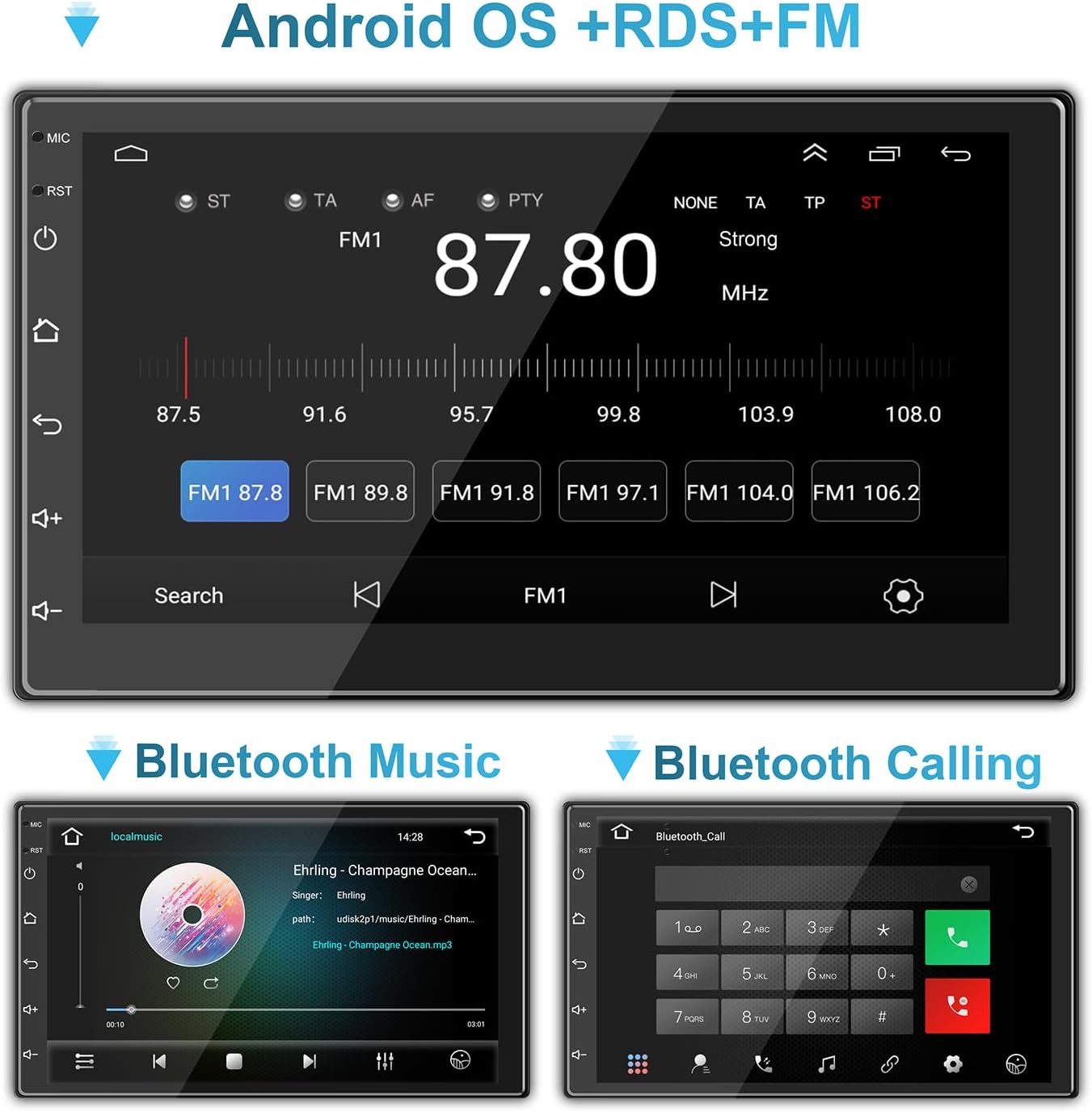
Image: Bluetooth music and calling interfaces.
7.3 WiFi & Internet
Connect the stereo to a Wi-Fi network (e.g., mobile hotspot) to access online features, download apps, and stream content.
- Go to 'Settings' on the stereo and select 'Wi-Fi'.
- Wi-Fi күйгүзүңүз жана тизмеден каалаган тармакты тандаңыз.
- Суралган болсо, сырсөздү киргизип, туташыңыз.

Image: Connecting to mobile WiFi and streaming content.

Image: WiFi and Bluetooth connectivity features.
7.4 Mirror Link
Mirror Link allows you to display your smartphone's screen directly on the car stereo. This feature is typically accessed via a dedicated app on the stereo and may require a wired USB connection for initial setup.
8. GPS навигациясы
The stereo comes with a built-in GPS module and pre-installed navigation software. Ensure the GPS antenna is properly installed and has a clear view так жайгаштыруу үчүн асман.
- Access the navigation application from the main menu.
- Enter your destination, and the system will provide turn-by-turn directions.
- Maps can be updated via Wi-Fi connection or by downloading map data to the unit's storage.
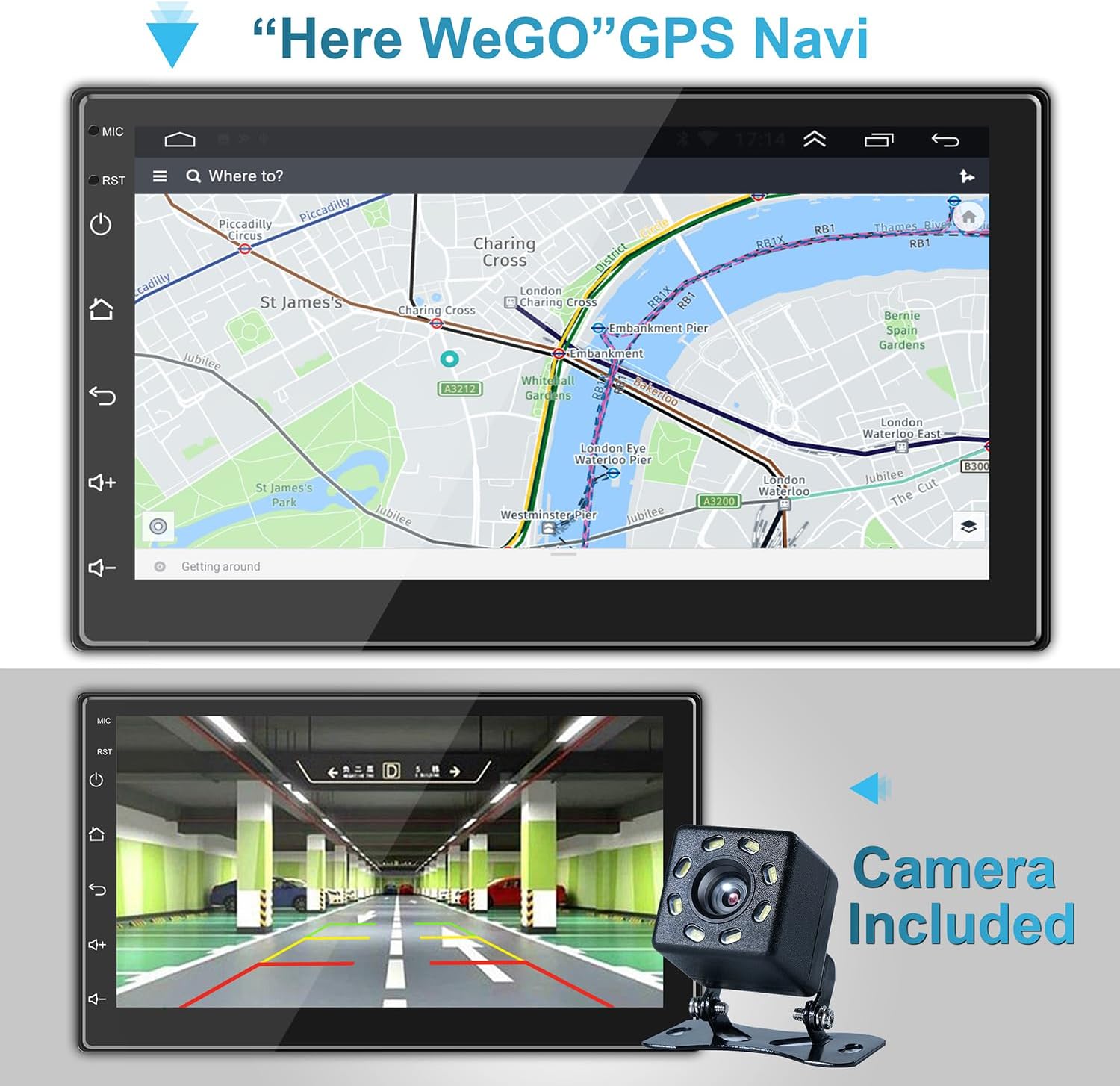
Сүрөт: GPS навигация интерфейси.

Image: GPS Navigation within CarPlay.
9. Резервдик камера
Камтылган резервдик камера автоматтык түрдө артын көрсөтөт view on the stereo screen when the vehicle is shifted into reverse gear. This feature significantly aids in safe parking and maneuvering.
- Ensure the camera is properly installed and connected to the 'Back (REVERSE)' input on the stereo's wiring harness.
- Экран автоматтык түрдө камерага өтөт view арткы тиштүү тиштүү болгондо.
Image: Backup camera view on the stereo screen.
10. Multimedia Settings
The stereo supports various multimedia functions, including audio playback and video viewing.
10.1 Audio Equalizer
Customize your audio experience using the built-in equalizer. Access the equalizer settings to adjust sound effects and music styles (e.g., Pop, Rock, Jazz, Classical, Custom).
10.2 Видеону ойнотуу
The unit supports 1080P HD video playback from USB drives or streaming via connected Wi-Fi. Ensure video files are in compatible formats (e.g., H.264).
Image: High-definition video playback.
11. Техникалык тейлөө
To ensure the longevity and optimal performance of your ANKEWAY car stereo, follow these maintenance tips:
- Тазалоо: Сенсордук экранды жана түзмөктүн сыртын тазалоо үчүн жумшак, кургак чүпүрөктү колдонуңуз. Өтө катуу тактар үчүн, бир азampчүпүрөккө суу же экранды тазалоочу каражат. Абразивдүү материалдардан же катуу химиялык заттардан алыс болуңуз.
- Температура: Do not expose the unit to extreme temperatures. Prolonged exposure to direct sunlight or very cold conditions can affect performance and lifespan.
- Программалык камсыздоо жаңыртуулары: Periodically check for software updates from the manufacturer to ensure the best performance and access to new features. Updates can often be downloaded via Wi-Fi.
- Байланыштары: Маал-маалы менен бардык зымдарды байланыштарды текшерип, алардын коопсуз жана коррозияга учурабагандыгын текшерип туруңуз.
12. Кыйынчылыктарды
Унаа стереоңузда көйгөйлөргө туш болсоңуз, төмөнкү жалпы көйгөйлөрдү жана чечимдерди караңыз:
| Көйгөй | Мүмкүн себеп | Чечим |
|---|---|---|
| Күч жок | Электр туташуусу бошоп калган; сактагыч күйүп кеткен; зымдар туура эмес туташтырылган. | Check ACC and B+ wiring; Inspect fuse in the vehicle's fuse box and on the stereo's harness; Ensure proper grounding. |
| Үн жок | Динамиктин зымдары ажыратылган; Үн өтө төмөн; Үнсүз функция активдүү; Туура эмес аудио жөндөөлөрү. | Verify speaker connections; Increase volume; Check if mute is on; Adjust audio output settings. |
| Bluetooth/Wi-Fi байланыш көйгөйлөрү | Phone not discoverable; Incorrect pairing; Weak signal; Software glitch. | Ensure phone's Bluetooth/Wi-Fi is on and discoverable; Re-pair device; Move closer to Wi-Fi source (for hotspot); Restart stereo and phone. |
| CarPlay/Android Auto туташпай жатат | Incorrect USB cable; Phone software outdated; App not installed/updated; Wireless connection issues. | Use a high-quality USB cable; Update phone OS and CarPlay/Android Auto apps; Ensure Bluetooth and Wi-Fi are active for wireless connection. |
| GPS сигналы жоголду/так эмес | GPS antenna obstructed or disconnected; Poor satellite reception. | Ensure GPS antenna is securely connected and placed in a clear area (e.g., dashboard); Move vehicle to an open area. |
| Арткы камера көрсөтүлбөй жатат | Camera power/video cable disconnected; Reverse trigger wire (BACK) not connected. | Check camera connections; Ensure the 'BACK' wire is correctly connected to the vehicle's reverse light trigger. |
If the problem persists after trying these solutions, please contact ANKEWAY customer support for further assistance.
13. Техникалык шарттар
| Өзгөчөлүк | Спецификация |
|---|---|
| Модель номери | AW1010 |
| Продукциянын өлчөмдөрү | 1.73"D x 7.01"W x 3.98"H (4.39 x 17.81 x 10.11 см) |
| Элемент Салмагы | 2.38 фунт (1.08 кг) |
| Screen Size | 7 дюйм (18 см) |
| Операция системасы | Android |
| Эстутум (RAM) | 2 ГБ |
| Сактагыч (ROM) | 32 ГБ |
| Байланыш технологиясы | USB, RCA, Cable, Bluetooth, WiFi |
| Өзгөчөлүктөр | Wireless Android Auto, Wireless Apple CarPlay, Mirror Link, GPS Navigation, RDS/FM Radio |
| Аудио чыгаруу режими | Стерео |
| Чыгуу күчү | 4 х 60 Ватт |
| Видеону коддоо | H.264 |

Image: Product dimensions and rear panel layout.
14. Кепилдик жана колдоо
For warranty information, technical support, or any inquiries regarding your ANKEWAY Double Din Car Stereo, please contact ANKEWAY customer service. Refer to the contact information provided with your purchase or visit the official ANKEWAY webколдоо булактары үчүн сайт.
Ask a question about this manual
Ask about setup, troubleshooting, compatibility, parts, safety, or missing instructions. Manuals+ will review the question and use this page’s manual context to help answer it.