
IPASON G-SLIM
IPASON G-SLIM Desktop PC User Manual
Model: G-SLIM | Brand: IPASON
1. Киришүү
Сатып алганыңыз үчүн рахматasing the IPASON G-SLIM Desktop PC. This compact and powerful system is designed for both business and personal use, offering stable performance and a space-saving design. This manual provides essential information for setting up, operating, maintaining, and troubleshooting your new computer.
2. Коопсуздук маалыматы
Please read the following safety guidelines carefully before using your IPASON G-SLIM Desktop PC to ensure safe operation and prevent damage.
- Электр камсыздоо: Use only the provided power cable and connect to a grounded outlet. Do not overload power strips.
- Вентиляция: Ensure proper airflow around the PC. Do not block ventilation openings. Maintain at least 10cm clearance on all sides.
- Курчап турган чөйрө: Operate the PC in a dry, stable environment away from direct sunlight, heat sources, and excessive dust or moisture.
- Колдонуу: Avoid dropping or subjecting the PC to strong impacts.
- Тейлөө: Do not attempt to open or repair the PC yourself. Refer all servicing to qualified personnel.

Figure 2.1: The IPASON G-SLIM Desktop PC undergoes rigorous testing to ensure reliability and stability, including 3C certification, drop tests, and temperature/noise control tests.
3. Пакеттин мазмуну
Пакетте бардык буюмдар бар экенин текшериңиз:
- IPASON G-SLIM Desktop PC
- Электр кабели
- Колдонуучунун Колдонмосу (бул документ)
- WPS Office License Key (if applicable)
4. Продукт бүтүп калдыview
The IPASON G-SLIM is a compact tower PC designed for efficiency and performance. Its slim profile allows it to fit into various workspaces.

Сүрөт 4.1: Алдыңкы view of the IPASON G-SLIM Desktop PC, highlighting its sleek design and accessible front ports.
4.1 алдыңкы панели
- Кубат баскычы: Компьютерди күйгүзүү же өчүрүү үчүн.
- USB порттору: Convenient access for connecting USB devices.
- Аудио уячалары: Наушниктер жана микрофон үчүн.
4.2 Арткы панель
The rear panel contains various ports for connecting your monitor, network, and other peripherals.

Figure 4.2: Dimensions and various views of the IPASON G-SLIM Desktop PC, including the rear panel with its array of connectivity ports.
- Видео чыгаруу порттору: (e.g., HDMI, DisplayPort, VGA) for connecting monitors.
- USB порттору: Additional USB 2.0 and USB 3.0 ports for peripherals.
- LAN порту: Зымдуу тармак туташуусу үчүн.
- Аудио порттор: Линияга киргизүү, линиядан чыгаруу жана микрофон уячалары.
- Кубат киргизүү: Электр кабелин туташтыруу үчүн.
5. Орнотуу
5.1 Перифериялык түзүлүштөрдү туташтыруу
- Монитор: Мониторуңузду арткы панелдеги видео чыгаруу портторунун бирине туташтырыңыз (мисалы, HDMI, DisplayPort).
- Баскычтоп жана чычкан: Connect your keyboard and mouse to any available USB ports.
- Тармак: For a wired connection, connect an Ethernet cable from your router/modem to the LAN port on the rear panel.
- Аудио: Connect speakers or headphones to the appropriate audio jacks.
5.2 Кубат туташтыруу
- Insert the provided power cable into the power input port on the rear of the PC.
- Электр кабелинин экинчи учун жерге туташтырылган электр розеткасына сайыңыз.
5.3 Алгачкы жүктөө
- Компьютердин алдыңкы панелиндеги кубат баскычын басыңыз.
- The system will boot up and guide you through the initial Windows 11 setup process. Follow the on-screen instructions to configure your language, region, network, and user account.
6. Operating System (Windows 11)
Your IPASON G-SLIM Desktop PC comes pre-installed with Windows 11, offering a modern and intuitive user experience.
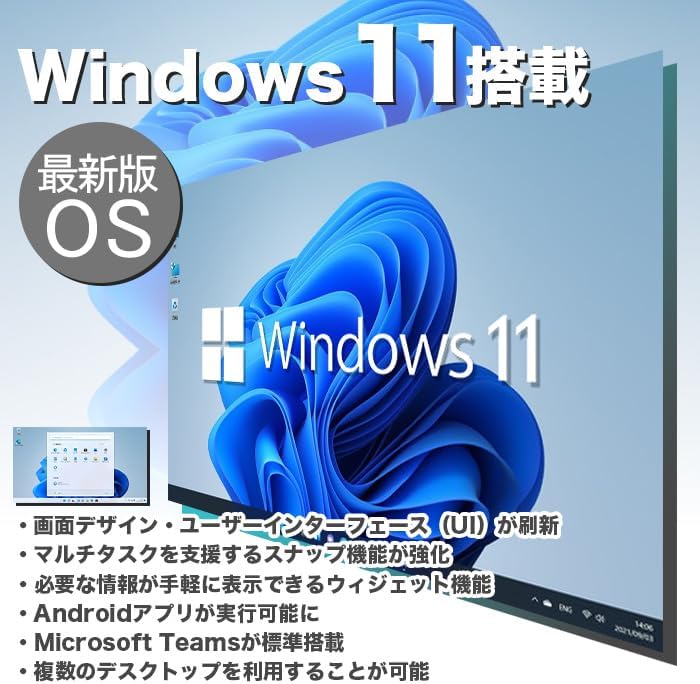
Figure 6.1: Windows 11 interface, showcasing its new design and features.
6.1 Key Features of Windows 11
- Redesigned User Interface (UI): A fresh, clean design with a centered Start menu and taskbar.
- Өркүндөтүлгөн көп тапшырмалуулук: Snap Layouts and Snap Groups make organizing windows easier.
- Виджеттер: A personalized feed for quick access to information.
- Android App Support: Run Android applications directly on your PC (requires Amazon Appstore).
- Microsoft Teams интеграциясы: Built-in chat and video conferencing.
- Multiple Desktops: Organize your workspace with virtual desktops.
6.2 WPS кеңсеси
Your PC includes WPS Office, a Microsoft-certified office suite with high compatibility with Microsoft Office documents. You can use it for word processing, spreadsheets, and presentations.
7. Performance Features
The IPASON G-SLIM is equipped with components chosen for a balance of performance and cost-effectiveness, making it suitable for various tasks, including business applications and light gaming.
7.1 Процессор (CPU)
Features a 12th Generation Intel Core i3 processor, offering improved performance over previous generations for everyday computing and multitasking.
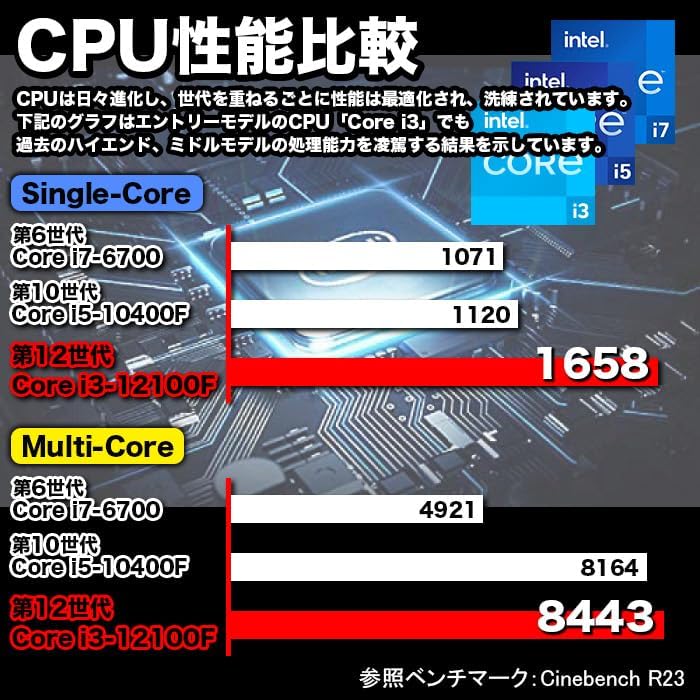
Figure 7.1: CPU Performance Comparison, demonstrating the significant performance improvements of the 12th Gen Intel Core i3.
7.2 Memory (RAM)
Equipped with 8GB of DDR4-3200 RAM, enabling smooth multitasking and efficient handling of multiple applications simultaneously.
7.3 Storage (SSD)
Utilizes a 256GB NVMe M.2 SSD, providing significantly faster data transfer speeds compared to traditional SATA SSDs (approximately 7 times faster), resulting in quicker boot times and application loading.

Figure 7.2: The IPASON G-SLIM Desktop PC is designed for stable high performance, suitable for various business scenarios.
8. Техникалык тейлөө
8.1 Тазалоо
- Сырткы: жумшак колдонуу, damp cloth to wipe the exterior of the PC. Avoid abrasive cleaners or solvents.
- Вентиляция: Periodically use compressed air to clear dust from the ventilation openings to ensure optimal cooling.
8.2 Программалык камсыздоо жаңыртуулары
- Системанын туруктуулугун, коопсуздугун жана иштешин камсыз кылуу үчүн Windows жаңыртууларын дайыма текшерип, орнотуп алыңыз.
- Keep your drivers updated for optimal hardware performance. You can usually find driver updates on the IPASON support webсайтында же Windows Update аркылуу.
9. Кыйынчылыктарды
This section addresses common issues you might encounter with your IPASON G-SLIM Desktop PC.
| Көйгөй | Мүмкүн себеп | Чечим |
|---|---|---|
| PC күйбөйт. | Power cable not connected properly; Power outlet issue. | Ensure power cable is securely connected to both PC and outlet. Try a different outlet. |
| Монитордо дисплей жок. | Monitor cable loose; Incorrect input source on monitor. | Check monitor cable connections. Select correct input source on your monitor. |
| Жай аткаруу. | Too many programs running; System not updated. | Close unnecessary applications. Check for and install Windows updates. |
| Интернет байланышы жок. | Ethernet cable loose; Router/modem issue. | Check Ethernet cable connection. Restart your router/modem. |
Эгер бул жерде көрсөтүлбөгөн маселелерге туш болсоңуз же сунушталган чечимдер көйгөйдү чечпесе, кардарларды колдоо кызматына кайрылыңыз.
10. Техникалык шарттар
Detailed technical specifications for the IPASON G-SLIM Desktop PC (Model: G-SLIM, ASIN: B0CDKLF6X6).
| Өзгөчөлүк | Спецификация |
|---|---|
| Бренд | IPASON |
| Модель номери | G-SLIM |
| Форма фактору | Small Form Factor Tower |
| Өлчөмдөрү (W×D×H) | 100 мм × 336 мм × 350 мм |
| Салмагы | 3 кг |
| Операция системасы | Windows 11 |
| CPU бренди | Intel |
| CPU түрү | 12-муундагы Intel Core i3 |
| CPU ылдамдыгы | 3.3 ГГц |
| Процессор розеткасы | LGA 1700 |
| RAM сыйымдуулугу | 8 ГБ |
| Memory Type | DDR4-3200 SDRAM |
| Эс тутумдун максималдуу сыйымдуулугу | 16 ГБ |
| Сактоо сыйымдуулугу | 256 ГБ |
| Сактагыч түрү | NVMe M.2 SSD |
| Графикалык тездеткич | Intel UHD Graphics 620 (Интеграцияланган) |
| VRAM сыйымдуулугу | 4 GB (Shared) |
| USB 2.0 порттору | 3 |
| USB 3.0 порттору | 5 |
| Электр камсыздоо | 300W SFX |
| Оптикалык диск | камтылган эмес |
| Зымдуу LAN порту | Ооба |
| Алдын ала орнотулган Программа | WPS Office |
11. Кепилдик жана колдоо
IPASON is committed to providing high-quality products and reliable customer support.
11.1 Продукциянын кепилдиги
Your IPASON G-SLIM Desktop PC comes with a 1 жылдык кепилдик against manufacturing defects. This warranty covers hardware malfunctions under normal use conditions. Please retain your proof of purchase for warranty claims.
11.2 Кардарларды колдоо
For technical assistance, troubleshooting, or warranty inquiries, please contact the seller, Pasoul Store, through the Amazon platform. They are the authorized reseller and can provide direct support.
You can also visit the official IPASON brand store on Amazon for more information and product updates: IPASON Brand Store
Ask a question about this manual
Ask about setup, troubleshooting, compatibility, parts, safety, or missing instructions. Manuals+ will review the question and use this page’s manual context to help answer it.