
Introduction
Thank you for choosing the Shanqiu Mini UPS Battery Backup. This device is designed to provide uninterrupted power to your essential electronic devices during power outages, ensuring continuous operation for items such as routers, modems, and security cameras. Please read this manual carefully to understand the product's features, setup, operation, and maintenance to ensure optimal performance and safety.

Image: The Shanqiu Mini UPS Battery Backup, a compact black device with multiple output ports and power indicator lights.
Продукт бүттүview
Негизги өзгөчөлүктөрү
- Uninterruptible Power Supply: Provides continuous power during outages for compatible devices.
- Кеңири шайкештик: Suitable for routers, modems, security cameras, telephones, fax machines, printers, fingerprint recorders, and LED strip lights.
- Бир нече чыгаруу параметрлери: Features 1x USB 5V, 1x DC 5V, 1x DC 9V, and 2x DC 12V outputs, allowing simultaneous connection of multiple devices.
- Жогорку кубаттуулуктагы батарея: Built-in 20000mAh (74Wh) Lithium Polymer battery.
- Power Bank функциясы: The standard USB output allows the device to function as a power bank for charging mobile devices.
- Мыкты курулуш: Durable aluminum housing.
- Комплекстүү коргоо: Includes short circuit protection, voltage fluctuation protection, overcharge protection, over-discharge protection, and temperature protection for safe operation.
Пакеттин мазмуну
Пакетиңизде бардык буюмдар бар экенин текшериңиз:
- 1 x Shanqiu Mini UPS (Model: FX 5-12Pro-AC)
- 1 х Колдонуучунун колдонмосу (бул документ)
- 1 x AC Charging Cable (EU / US plug compatible)
- 2 x DC Output Cables
- 6 x DC Converter Adapters
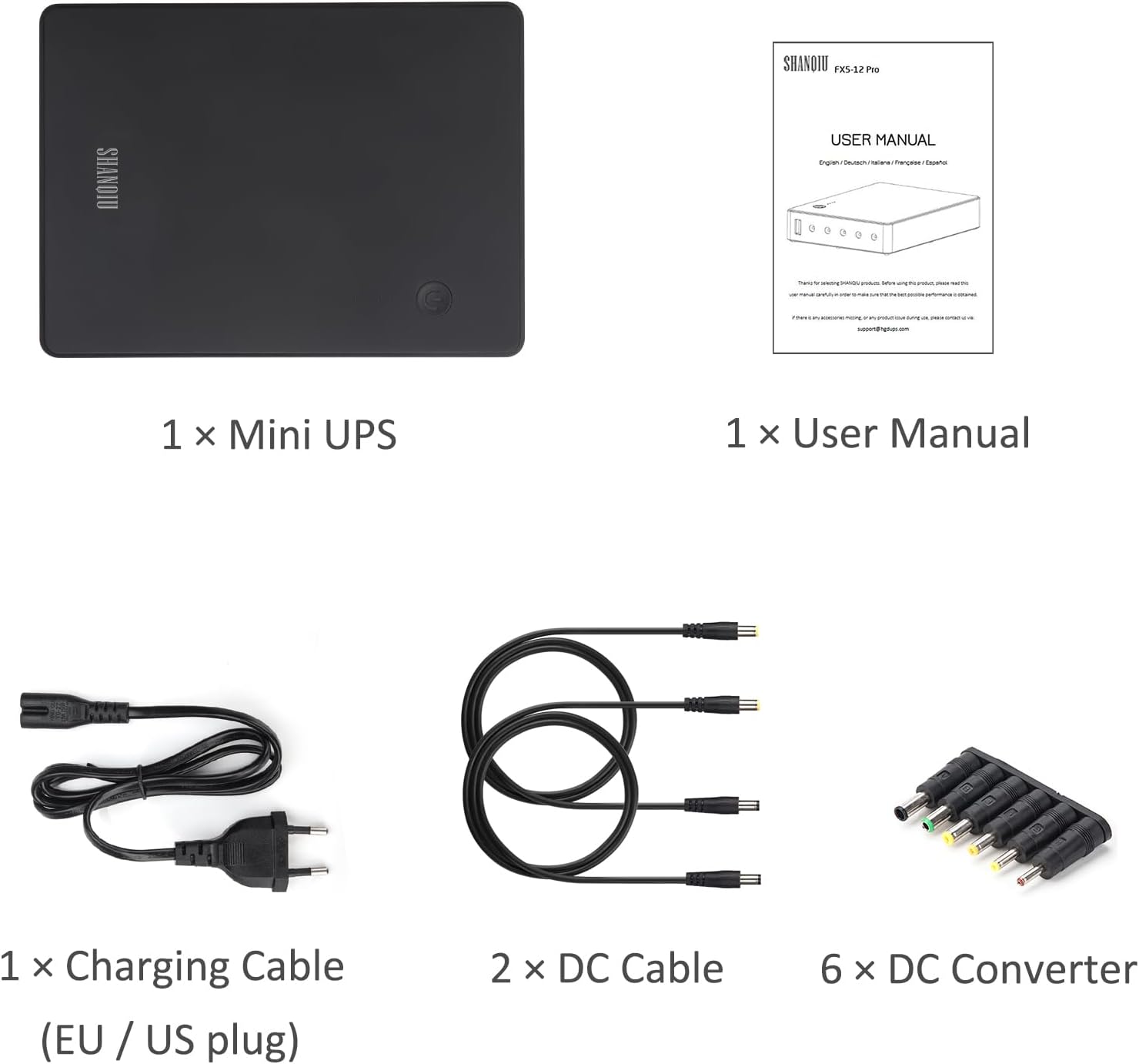
Image: A visual representation of the package contents, including the UPS unit, user manual, charging cable, DC cables, and DC adapters.
Коопсуздук маалыматы
To prevent damage to the device or injury to yourself and others, please observe the following safety precautions:
- Аппаратты сууга, нымдуулукка же экстремалдык температурага тийгизбеңиз.
- Аппаратты түшүрүүдөн же катуу таасирлерден сактаныңыз.
- Do not attempt to disassemble, repair, or modify the device. This will void the warranty and may cause hazards.
- Ensure proper ventilation around the UPS during operation.
- Use only the provided charging cable and DC output cables.
- тtage and current requirements of your connected devices match the output specifications of the UPS. Incorrect voltage can damage your devices.
- Балдар жетпеген жерде сактаңыз.

Image: The Shanqiu Mini UPS with its ports clearly labeled: ON/OFF button, 5V USB output, 5V DC output, 9V DC output, two 12V DC outputs, and AC INPUT.

Сүрөт: ички view of the Shanqiu Mini UPS, highlighting its chipset, temperature, battery, and voltage/current protection mechanisms.
Орнотуу нускамалары
Follow these steps to set up your Shanqiu Mini UPS:
- Charge the UPS: Connect the provided AC charging cable to the AC INPUT port on the UPS and plug the other end into a standard wall outlet. The LED indicators on the UPS will illuminate to show the charging status. A full charge is indicated when all LEDs are solid.
- Identify Device Voltage: Көлөмүн аныктаңызtage (5V, 9V, or 12V) and current requirements of the device(s) you intend to power. This information is usually found on the device's original power adapter or in its user manual.
- Select Correct DC Output: Choose the appropriate DC output port on the UPS that matches your device's voltage (5V, 9V, or 12V). For 12V devices, there are two 12V DC output ports available.
- Select DC Converter (if needed): If the DC cable connector does not fit your device, select one of the provided DC converter adapters that matches your device's input port. Attach it to one of the DC output cables.
- Түзмөктү туташтыруу: Connect one end of the DC output cable (with or without converter) to the selected DC output port on the UPS and the other end to your electronic device.
- Күйгүзүү: Press the ON/OFF button on the UPS to turn it on. The UPS will begin supplying power to the connected device(s).
For devices requiring USB power, simply connect a standard USB cable from the 5V USB output port to your device.

Сүрөт: мурункуample setup showing the Shanqiu Mini UPS connected to an AC power outlet, simultaneously charging a smartphone via USB, and powering a router and a landline phone via DC output cables.
Иштөө нускамалары
Кадимки операция
Once set up, the Shanqiu Mini UPS operates automatically. When connected to AC power, it charges its internal battery and simultaneously provides power to connected devices. In the event of a power outage, the UPS will seamlessly switch to battery power, ensuring your devices remain operational without interruption.
Power Indicators
The LED indicators on the UPS display the remaining battery capacity:
- Төрт катуу LED: 75-100% батареянын сыйымдуулугу
- Үч катуу светодиод: 50-75% батареянын сыйымдуулугу
- Эки катуу светодиод: 25-50% батареянын сыйымдуулугу
- Бир катуу LED: 0-25% battery capacity (recharge soon)
- Жаркылдаган LED'лер: Толуктоо жүрүп жатканын көрсөтөт.
Power Bank катары колдонуу
To use the UPS as a power bank, simply connect your mobile device to the 5V USB output port using a standard USB charging cable. The UPS will provide power to charge your device.

Image: The Shanqiu Mini UPS at the center, surrounded by various compatible devices it can power, including a router, printer, security camera, fingerprint recorder, modem, telephone, and tablet.
Техникалык тейлөө
The Shanqiu Mini UPS requires minimal maintenance. Follow these guidelines to ensure its longevity:
- Тазалоо: Wipe the exterior of the device with a soft, dry cloth. Do not use liquid cleaners or abrasive materials.
- Сактагыч: If storing the UPS for an extended period, ensure it is fully charged and store it in a cool, dry place away from direct sunlight. Recharge it every 3-6 months to maintain battery health.
- Батареяга кам көрүү: Avoid fully discharging the battery frequently, as this can reduce its lifespan. It is recommended to keep the UPS connected to AC power when possible to maintain a full charge.
Проблемаларды чечүү
If you encounter issues with your Shanqiu Mini UPS, refer to the following common problems and solutions:
- UPS күйбөй жатат:
- Ensure the UPS is charged. Connect it to AC power and check the LED indicators.
- Press and hold the ON/OFF button for a few seconds to ensure it registers.
- Connected device not receiving power:
- Verify the UPS is turned on.
- Check that the DC output cable and any converters are securely connected to both the UPS and the device.
- Confirm that the selected DC output voltage on the UPS matches the device's requirement.
- Ensure the device's power consumption does not exceed the UPS's maximum output (65W total).
- Test the device with its original power adapter to rule out a device issue.
- UPS not charging:
- Ensure the AC charging cable is properly connected to the UPS and the wall outlet.
- Башка аспапка туташтыруу менен розетка иштеп жатканын текшериңиз.
- If the issue persists, the charging cable or the UPS itself may be faulty.
- Батарейканын кыска мөөнөтү:
- The actual runtime depends on the power consumption of the connected devices. Higher power draw will result in shorter battery life.
- Колдонуудан мурун батареянын толук заряддалганын текшериңиз.
- Battery capacity naturally degrades over time and with usage cycles.
If these steps do not resolve your issue, please contact Shanqiu customer support for further assistance.
Техникалык шарттар
Detailed technical specifications for the Shanqiu Mini UPS FX 5-12Pro-AC:
| Өзгөчөлүк | Спецификация |
|---|---|
| Модель номери | FX 5-12Pro-AC |
| Турак жай материалы | Алюминий эритмеси |
| AC киргизүү | 100-240В AC, 50-60Hz |
| Output Voltage (USB) | 5V |
| Output Current (USB) | 3A (shared with DC 5V) |
| Output Voltage (DC OUT) | 5V, 9V, 2x12V |
| Output Current (DC OUT) | 5V/3A (shared with USB), 9V/3A, 12V/5A (total for two 12V ports) |
| Максималдуу чыгаруу күчү | 65 Вт |
| Батарея сыйымдуулугу | 20000 74 мАч / XNUMX Вт |
| Батарея түрү | Литий полимери |
| Продукциянын өлчөмдөрү | 178 x 122 x 32 мм (7.01 x 4.8 x 1.26 дюйм) |
| Таза Салмак | 0.830 KGS (1.83 pounds) |

Image: A visual representation of the Shanqiu Mini UPS with its dimensions and a detailed table of specifications.
Кепилдик жана колдоо
Кепилдик маалымат
Shanqiu products are manufactured to high-quality standards. Specific warranty terms and conditions may vary by region and retailer. Please refer to the warranty card included with your product or visit the official Shanqiu webтолук кепилдик маалымат алуу үчүн сайт.
Кардарларды колдоо
For technical assistance, troubleshooting, or any inquiries regarding your Shanqiu Mini UPS, please contact Shanqiu customer support. You can typically find contact information on the official Shanqiu webсайты же продуктуну сатып алган сатуучу аркылуу.
Сиз да зыярат кылсаңыз болот Shanqiu Store on Amazon кошумча продукт маалымат жана колдоо ресурстар үчүн.