
1. Киришүү
Thank you for choosing the MAGIC-REFINER M71 75% CNC Aluminum Alloy Custom Wireless Gaming Keyboard. This manual provides detailed instructions for setting up, operating, maintaining, and troubleshooting your new keyboard. Please read this manual thoroughly to ensure optimal performance and longevity of your device.
2. Продукциянын өзгөчөлүктөрү
2.1. Triple Mode Wireless Connectivity
The M71 keyboard offers versatile connectivity options, supporting Bluetooth, 2.4G wireless, and traditional wired connections. This allows seamless switching between up to three different wireless devices, making it ideal for multi-device office setups and various gaming scenarios.
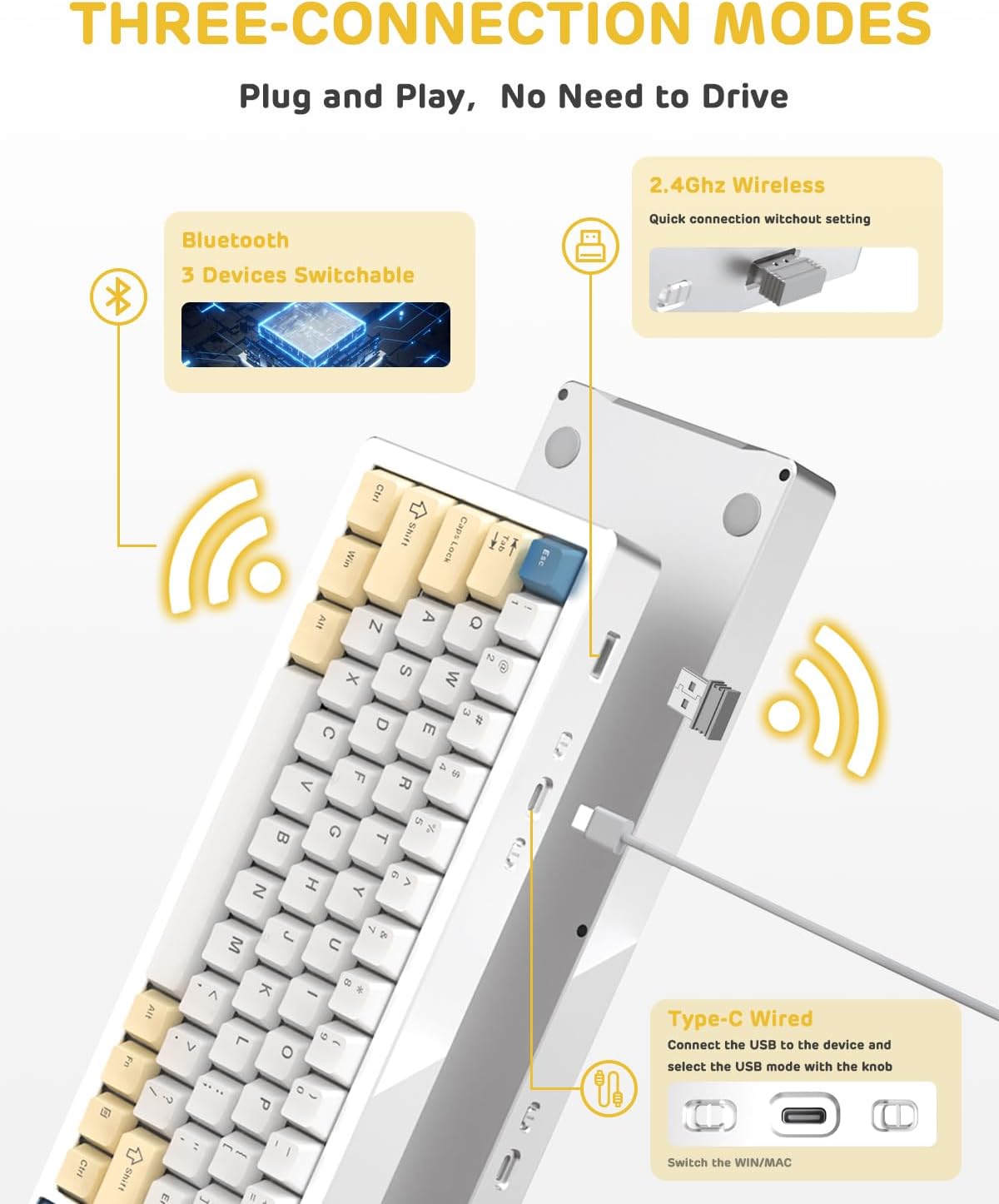
Figure 2.1: Triple Connection Modes
2.2. All Aluminum Alloy Body and Gasket Structure
Constructed from national standard 6063 aluminum alloy, the M71 keyboard boasts exceptional durability, corrosion resistance, and oxidation resistance. Its gasket-mounted design, combined with three layers of Poron Foam, anti-static IXPE under-axis pad, and PET sound-optimized pads, significantly reduces internal vibrations. This results in a stable, quieter, softer, and more cushioned typing experience.
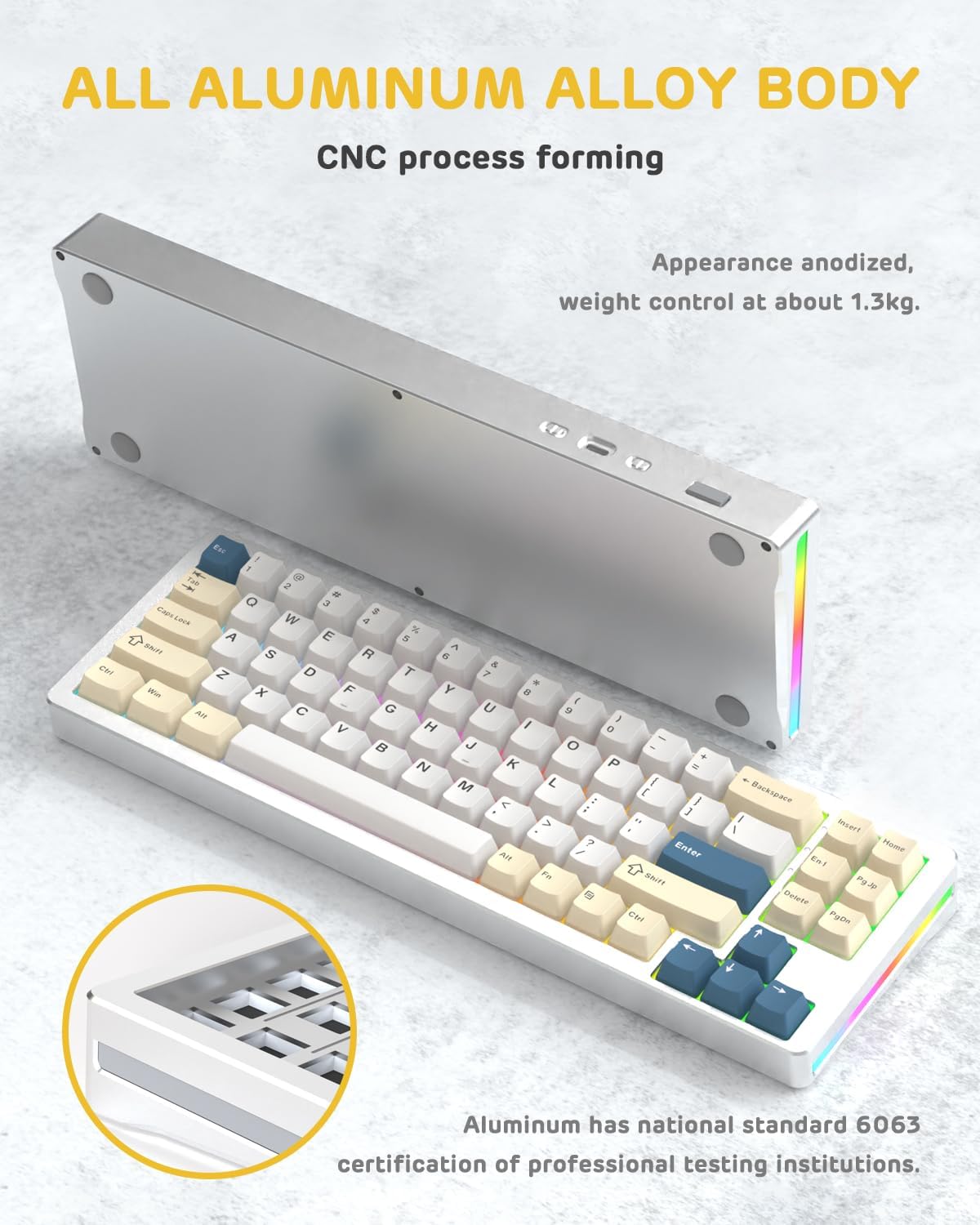
Figure 2.2: All Aluminum Alloy Body
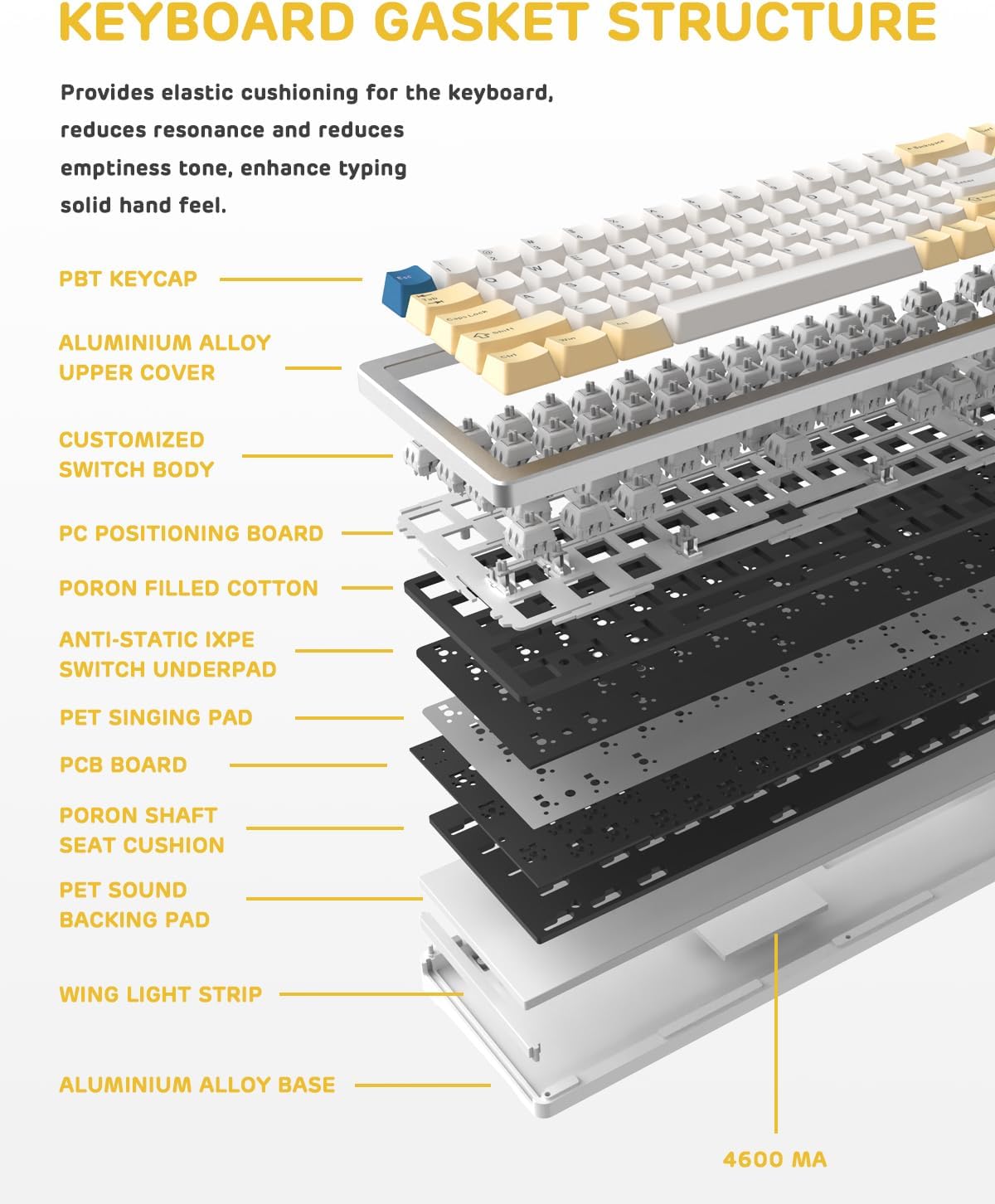
Figure 2.3: Keyboard Gasket Structure Layers
2.3. Hot-Swappable TTC Socket and PBT Keycaps
The hot-swappable PCB allows users to easily replace keyboard switches without soldering, supporting 99.9%+ of 3/5-pin switches on the market. The keyboard comes with customized linear white switches, designed for a lifespan of approximately 50 million keystrokes. High-quality PBT keycaps offer superior wear resistance, heat resistance, and fatigue resistance, ensuring clear, uniform backlighting and extended durability.

2.4-сүрөт: Ыкчам алмаштыруучу которгучтар
2.4. Dynamic Backlit RGB Keyboard
Featuring double-sided RGB lighting and 16.8 million customizable chroma backlight effects, the M71 keyboard allows for a personalized visual experience. Custom software is available for advanced customization, including per-key lighting and macro creation.

2.5-сүрөт: Динамикалык RGB арткы жарыктандыруу
2.5. 4600mAh Extra Large Battery
Equipped with a high-capacity 4600mAh battery, the M71 provides continuous power. In low-power wireless mode, the battery can last up to approximately 15 days, minimizing the need for frequent recharging.

Figure 2.6: 4600mAh Battery and Battery Level Indicator
3. Орнотуу колдонмосу
3.1. Баштапкы орнотуу
- Кутучадан клавиатураны жана бардык аксессуарларды ачыңыз.
- Ensure the keyboard is fully charged before first use for optimal battery life. Connect the included USB-C cable to the keyboard and a power source (e.g., computer USB port, USB wall adapter).
3.2. Баскычтопту туташтыруу
The M71 keyboard supports three connection modes:
- Зымдуу режим: Баскычтоптон USB-C кабелин компьютериңиздин USB портуна туташтырыңыз. Баскычтоп автоматтык түрдө зымдуу режимге өтөт.
- 2.4G зымсыз режими:
- Адатта клавиатурадагы бөлүмдө сакталган 2.4G USB ресиверди табыңыз.
- USB ресиверди компьютериңиздеги жеткиликтүү USB портуна сайыңыз.
- Баскычтоптун режим тандагычын 2.4Gге которуңуз. Баскычтоп автоматтык түрдө туташуу керек.
- Bluetooth режими:
- Баскычтоптун режим тандагычын Bluetooth'га которуңуз.
- Компьютериңизде же түзмөгүңүздө Bluetooth иштетип, жаңы түзмөктөрдү издеңиз.
- Select "MAGIC-REFINER M71" (or similar name) from the list of available devices to pair.
- The keyboard can store up to 3 Bluetooth connections. Refer to the keyboard's specific key combinations (often Fn + 1/2/3) to switch between paired Bluetooth devices.
4. Иштөө нускамалары
4.1. Негизги колдонуу
The M71 keyboard features a 71-key (75%) layout. Standard typing functions operate as expected. For specific functions or multimedia controls, refer to the keycap legends or the manufacturer's software.
4.2. RGB жарыкты башкаруу
The keyboard offers dynamic RGB backlighting. Use the dedicated function keys (often combined with the Fn key) to cycle through different lighting modes, adjust brightness, and change lighting speed. For advanced customization, including per-key lighting and macro programming, download and install the official custom software from the MAGIC-REFINER webсайт.
4.3. Батареянын деңгээлин текшерүү
In wireless mode, you can check the approximate battery level by pressing Fn + Alt(R). The keyboard's indicator lights or specific key backlights will show the current charge status (e.g., 25%, 50%, 75%, 100%).
4.4. Hot-Swapping Switches
Өчүргүчтү алмаштыруу үчүн:
- Gently pull the keycap off using the included keycap puller.
- Которгучту этияттык менен кармап, түз өйдө тартуу үчүн которгучту тартуучу каражатты колдонуңуз.
- Жаңы которгучтун төөнөгүчтөрүн ПХБдагы тешиктерге тууралаңыз.
- Жаңы которгучту чыкылдаган үн чыкканча бекем басыңыз. Төөнөгүчтөрдүн ийилип калбаганын текшериңиз.
- Баскычтоптун капкагын кайра бекитиңиз.
5. Техникалык тейлөө
- Тазалоо: Regularly clean the keyboard with a soft, dry cloth. For deeper cleaning, remove keycaps and use compressed air to clear debris. Avoid using harsh chemicals or abrasive materials.
- Батареяга кам көрүү: To prolong battery life, avoid fully discharging the keyboard frequently. Store the keyboard in a cool, dry place when not in use for extended periods.
- Keycap and Switch Handling: When removing or installing keycaps and switches, apply gentle, even pressure to prevent damage to the components or the PCB.
6. Кыйынчылыктарды
- Баскычтоп жооп бербей жатат:
- Баскычтоп кубатталганын текшериңиз.
- Check the connection mode (wired, 2.4G, Bluetooth) and ensure it matches your device's connection.
- 2.4G үчүн USB жабдыктын коопсуз сайылганын текшериңиз.
- Bluetooth үчүн, зарыл болсо, түзмөктү кайра жупташтырыңыз.
- Try connecting the keyboard to a different USB port or computer to rule out port/computer issues.
- Катталбаган ачкычтар же эки жолу терүү:
- This could indicate a faulty switch. Try hot-swapping the problematic switch with a known working one or a spare.
- Коммутатордун розеткага толугу менен орнотулганын текшериңиз.
- RGB жарыктандыруу иштебейт:
- Check if the lighting is turned off or set to minimum brightness using the keyboard's function keys.
- Баскычтоптун микропрограммасы жаңыртылганын текшериңиз.
- Батарея кубатталбай жатат:
- Try a different USB-C cable or charging port/adapter.
- Ensure the cable is securely connected to both the keyboard and the power source.
7. Техникалык шарттар
| Өзгөчөлүк | Description |
|---|---|
| Модел | M71 |
| Баскычтоптун жайгашуусу | 71 keys (75% mechanical keyboard) |
| Баскычтоп материалы | National standard 6063 aluminum alloy |
| Продукциянын өлчөмдөрү | 13.8 x 4.5 x 1.18 дюйм |
| Элемент Салмагы | 3.52 фунт |
| Байланыш технологиясы | Bluetooth, 2.4G зымсыз, зымдуу (USB-C) |
| Батарея сыйымдуулугу | 4600mAh |
| Баскыч капкактары | High-quality PBT |
| Которгучтар | Hot-swappable TTC Socket, Customized Linear White Switch |
| Арткы жарык | Dynamic RGB (16.8 million colors) |
| Шайкеш түзмөктөр | PC, Windows, Mac |
8. Кепилдик жана колдоо
For warranty information and technical support, please refer to the official MAGIC-REFINER webсайтка же түздөн-түз кардарларды тейлөөгө кайрылыңыз. Сатып алуу квитанциясын кепилдик дооматтары үчүн сатып алуунун далили катары сактаңыз.