
MAGIC-REFINER M71
MAGIC-REFINER M71 75% CNC Aluminum Alloy Custom Wireless Gaming Keyboard User Manual
Модел: M71
Introduction
Thank you for choosing the MAGIC-REFINER M71 75% CNC Aluminum Alloy Custom Wireless Gaming Keyboard. This manual provides detailed instructions for setting up, operating, and maintaining your new keyboard. Please read this manual thoroughly before use to ensure optimal performance and longevity of your device.

Image: The MAGIC-REFINER M71 keyboard in blue, showcasing its compact 75% layout and aluminum alloy construction.
Продукт өзгөчөлүктөрү
- 75% макет (71 баскыч): A compact design that saves desk space while retaining essential keys.
- CNC Aluminum Alloy Body: Constructed from national standard 6063 aluminum alloy for durability, corrosion resistance, and a premium feel. Weighs approximately 2.9 pounds.
- Triple Mode Wireless Connectivity: Supports Bluetooth 5.0, 2.4G wireless, and wired USB-C connections. Easily switch between up to 3 different wireless devices.
- Gasket Structure & Poron Foam: Features a gasket-mounted design with 3 layers of Poron foam, anti-static IXPE under-axis pad, and PET sound-optimized pads for a quieter, softer, and more cushioned typing experience.
- Hot-Swappable TTC Socket: Allows for easy replacement of 3-pin or 5-pin mechanical switches without soldering. Compatible with most major switch brands (Cherry MX, Kailh, Gateron, Akko, Glorious, etc.). Comes with customized linear white switches.
- Динамикалык RGB жарыктандыруу: 16.8 million customizable chroma backlight effects with double-sided RGB lighting. Custom software available for personalized lighting and macros.
- High-Quality PBT Keycaps: Durable, wear-resistant, and heat-resistant PBT keycaps provide clear, uniform backlighting and a comfortable typing surface.
- 4600 мАч чоң батарея: High-capacity rechargeable battery provides up to 15 days of continuous use in low-power wireless mode. Compatible with Windows and Mac systems.

Сүрөт: An overview of the M71 keyboard highlighting its key features such as all-aluminum alloy body, CNC machining, three modes connection, appearance anodizing, gasket structure, 4600mAh battery, RGB backlight, and satellite switch.
Пакеттин мазмуну
Сураныч, пакетте төмөнкү нерселерди текшериңиз:
- MAGIC-REFINER M71 Keyboard (Blue)
- USB-C Cable
- Баскыч капкагын тарткыч
- Switch Puller
- Additional Keycaps (as specified by manufacturer)
- Колдонуучунун Колдонмосу (бул документ)
Жайгашуу
Байланыш режимдери
The M71 keyboard supports three connection modes: Wired, 2.4G Wireless, and Bluetooth.

Image: Diagram illustrating the three connection modes: Bluetooth, 2.4GHz Wireless, and Type-C Wired, with connection points on the keyboard.
1. Зымдуу режим (USB-C)
- Connect the included USB-C cable to the keyboard's USB-C port.
- USB-C кабелинин экинчи учун компьютериңиздеги жеткиликтүү USB портуна туташтырыңыз.
- Баскычтоп автоматтык түрдө таанылып, колдонууга даяр болот.
2. 2.4G зымсыз режим
- Locate the 2.4G USB receiver, usually stored in a compartment on the keyboard.
- 2.4G USB ресиверди компьютериңиздеги жеткиликтүү USB портуна сайыңыз.
- Switch the keyboard's mode selector to 2.4G mode. The keyboard should connect automatically.
3. Bluetooth режими
- Баскычтоптун режим тандагычын Bluetooth режимине которуңуз.
- Компьютериңизде же түзмөгүңүздө Bluetooth жөндөөлөрүн ачып, жаңы түзмөктөрдү издеңиз.
- Select "MAGIC-REFINER M71" (or similar name) from the list of available devices to pair.
- Клавиатура 3 Bluetooth pro чейин сактай алатfiles, allowing quick switching between devices. Refer to the keyboard's function key combinations for switching between paired Bluetooth devices (e.g., Fn + 1/2/3).
Иштөө нускамалары
Функционалдык баскычтар жана жарлыктар
The M71 keyboard utilizes the Fn key for various shortcuts and multimedia controls. Specific combinations may vary slightly, but common functions include:
- Fn + F1-F12: Multimedia controls (Play/Pause, Volume Up/Down, Mute, etc.)
- Fn + 1/2/3: Switch between Bluetooth paired devices.
- Fn + Backlight Key: RGB жарык режимдерин өзгөртүү.
- Fn + Жебе баскычтары: Арткы жарыктын жарыктыгын жана ылдамдыгын тууралаңыз.
- Fn + Alt(R): Check battery level in wireless mode.
- Fn + Enter: (If numbers are not working, as per user review) This combination might reset or enable certain functions.
RGB жарыктандыруу
The keyboard features dynamic RGB backlighting with multiple effects. Use the designated function key combinations (e.g., Fn + specific key) to cycle through lighting modes, adjust brightness, and change animation speed. Custom software is available for more advanced customization, including per-key lighting and macro creation.
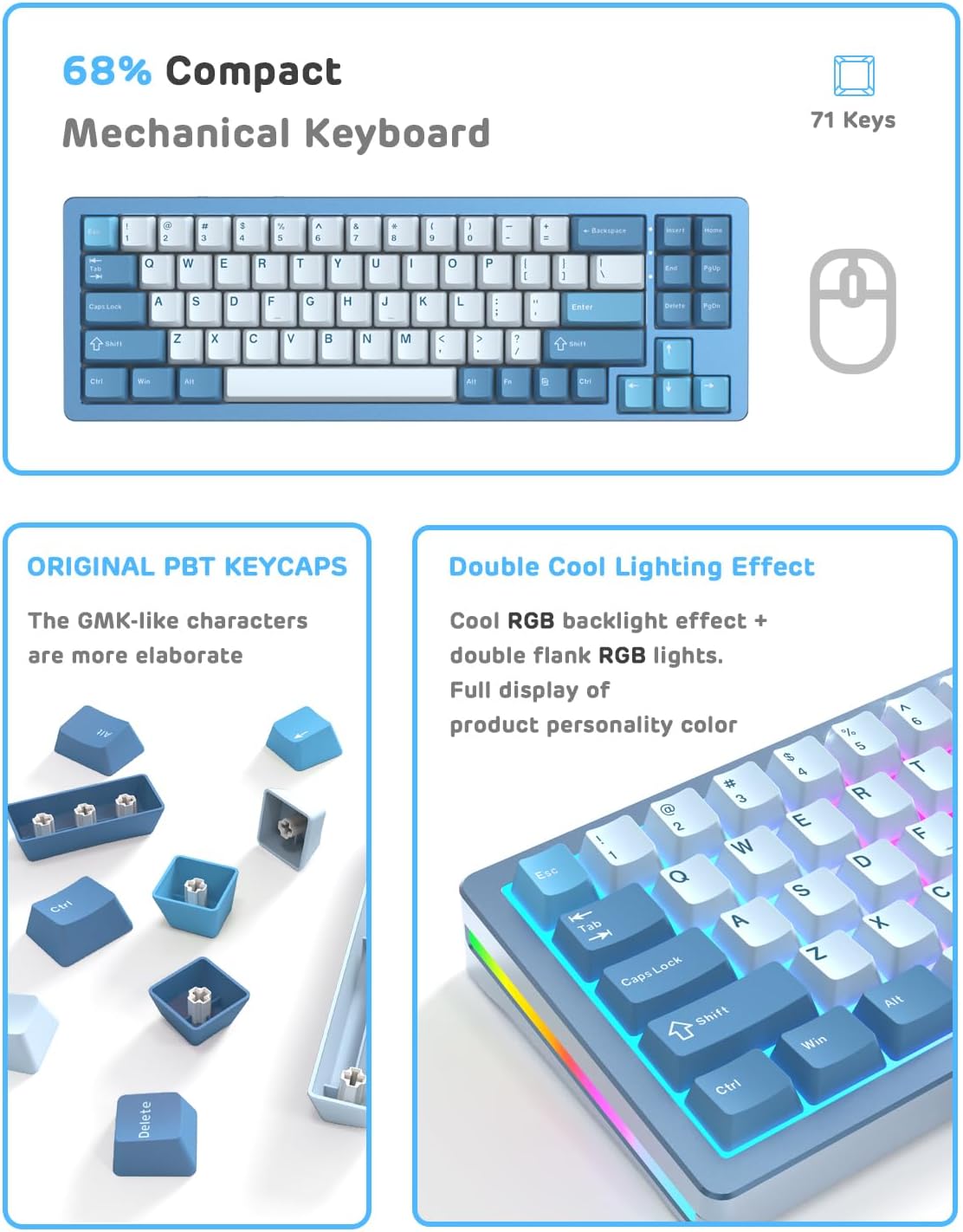
Image: The M71 keyboard showcasing its RGB lighting effects along the sides and under the keys, with a close-up of the PBT keycaps.
Батарея башкаруу
The M71 keyboard is equipped with a 4600mAh battery. To check the battery level in wireless mode, press Fn + Alt(R). The keyboard's indicator lights or specific key backlights will show the approximate charge level (e.g., 10%-100%).

Image: A visual guide demonstrating how to check the battery level by pressing Fn + Alt(R), with indicators showing battery percentag25%дан 100%ке чейин.
When the battery is low, the keyboard's indicators will signal the need for charging. Connect the USB-C cable to charge the keyboard. The keyboard can be used while charging.
Техникалык тейлөө
Баскычтопту тазалоо
- Тазалоодон мурун клавиатураны компьютерден ажыратыңыз.
- Бир аз жумшак, түксүз кездемени колдонуңуз dampачкыч капкактарын жана шассиди сүртүү үчүн суу же жумшак тазалоо эритмеси менен жабыңыз.
- Ачкычтардын ортосундагы чаң жана таштанды үчүн кысылган абаны колдонуңуз.
- Катуу химиялык заттарды, абразивдүү тазалагычтарды же ашыкча нымдуулукту колдонуудан алыс болуңуз.
Которгучтарды жана клавишаларды алмаштыруу
The M71 keyboard is hot-swappable, allowing you to change switches and keycaps easily.

Сүрөт: жакын план view of the M71 keyboard's hot-swappable sockets with switches removed, showing the White Jade linear switches and satellite switches.
- Клавиатураны алып салуу: Use the included keycap puller to gently pull keycaps straight up.
- Которуштурууну алып салуу: Use the included switch puller to grasp the switch firmly and pull it straight up. Ensure the switch is fully disengaged from the PCB.
- Которуу орнотуу: Align the pins of the new switch with the holes on the PCB. Gently push the switch down until it clicks into place. Do not force it to avoid bending pins.
- Баскычтарды орнотуу: Баскыч капкагын которгучтун сабы менен тегиздеп, ал отурганга чейин катуу басыңыз.
Проблемаларды чечүү
| Көйгөй | Мүмкүн чечим |
|---|---|
| Баскычтоп зымсыз режимде жооп бербейт. |
|
| RGB жарыгы иштебейт же тыгылып калды. |
|
| Айрым ачкычтар катталбай жатат. |
|
| Клавиатура тез-тез өчүп калат. |
|
Техникалык шарттар
| Өзгөчөлүк | Деталь |
|---|---|
| Модел | M71 |
| Баскычтоптун жайгашуусу | 75% (71 ачкыч) |
| Байланыш | Bluetooth 5.0, 2.4G зымсыз, USB-C зымдуу |
| Баскычтоп материалы | National standard 6063 Aluminum Alloy |
| Которуу түрү | Hot-swappable TTC Socket (compatible with 3/5-pin switches), Customized Linear White Switches included |
| Клавиатура материалы | PBT |
| Арткы жарыктандыруу | RGB (16.8 миллион түс, ыңгайлаштырылуучу эффекттер) |
| Батарея сыйымдуулугу | 4600mAh |
| Батареянын иштөө мөөнөтү (зымсыз) | Up to 15 days (low-power mode) |
| Продукциянын өлчөмдөрү | 13.8 x 4.5 x 1.18 дюйм (35.05 x 11.43 x 2.99 см) |
| Элемент Салмагы | 2.9 фунт (1.3 кг) |
| Шайкеш системалар | PC (Windows, Mac) |
Кепилдик жана колдоо
For warranty information and technical support, please refer to the official MAGIC-REFINER webсайтка же түздөн-түз кардарларды тейлөөгө кайрылыңыз. Кепилдик дооматтар үчүн сатып алуу дүмүрчөгүңүздү сактаңыз.
Өндүрүүчү: СЫЙКЫРДУУ ТАЗАЛООЧУ
ASIN: B0CDPMVZKQ
Биринчи жеткиликтүү болгон күнү: 4-август, 2023-жыл
Ask a question about this manual
Ask about setup, troubleshooting, compatibility, parts, safety, or missing instructions. Manuals+ will review the question and use this page’s manual context to help answer it.