
Cuifati Cuifatig8c3hmvd9n
FS01 Digital Camera User Manual
Brand: Cuifati | Model: Cuifatig8c3hmvd9n
Introduction
Сатып алганыңыз үчүн рахматasing the Cuifati FS01 Digital Camera. This camera is designed for photography enthusiasts, offering 4K video resolution and 64MP image resolution. It features dual LCD screens (2.8-inch rear and 2-inch front), 16x digital zoom, and anti-shake capabilities, making it suitable for various photography needs. This manual provides detailed instructions on how to set up, operate, and maintain your camera to ensure optimal performance and longevity.

Маанилүү эскертүү: Please read the product instructions carefully before use to ensure correct and safe operation.
Пакеттин мазмуну
Сураныч, пакеттин мазмунун текшерип, бардык буюмдар бар экенин текшериңиз:
- 1 x Cuifati FS01 Digital Camera
- 1 x USB кабели
- 1 x BL-5B Lithium Ion Battery (1200mAh, built-in)
- 1 x User Manual
- 1 x Portable аркан
Продукт бүттүview
Камеранын компоненттери жана башкаруу элементтери менен таанышыңыз.

Сүрөт: Алдыңкы жана арткы view of the Cuifati FS01 Digital Camera, showcasing the dual screens and main controls.

Сүрөт: Фронт view of the camera, highlighting the lens, flash, and front display.

Сүрөт: Арткы view of the camera, showing the main LCD screen and control buttons (T/W for zoom, WiFi, Flash, Mode, Delete, Menu, Display).
Негизги компоненттер:
- Объектив: Сүрөттөрдү жана видеолорду тартат.
- Front LCD Screen (2-inch): For convenient self-portraits and vlogging.
- Rear LCD Screen (2.8-inch): Main display for framing shots, reviewing media, and navigating menus.
- Кубат баскычы: Камераны күйгүзөт/өчүрөт.
- Жабык баскычы: Сүрөткө тартат же видео жазууну баштайт/токтот.
- Чоңойтуу баскычтары (Т/Б): Adjusts the 16x digital zoom.
- Меню баскычы: Камера жөндөөлөрүнө жана параметрлерине кирет.
- ДИСП баскычы: Toggles display information on the screen.
- Режим баскычы (M): Ар кандай тартуу режимдеринин ортосунда которулат.
- Flash баскычы: Controls flash settings.
- Жок кылуу баскычы: Тандалган сүрөттөрдү же видеолорду жок кылат.
- WiFi баскычы: Activates Wi-Fi for connectivity.
- Микрофон: Built-in for audio recording with videos.
- USB порт: Заряддоо жана маалыматтарды өткөрүү үчүн.
- Микро SD карта слоту: Тышкы эс тутум үчүн.
- Батарея бөлүмү: Houses the BL-5B battery.
Жайгашуу
1. Батареяны заряддоо
The camera comes with a built-in 1200mAh BL-5B Lithium Ion Battery. Before first use, ensure the battery is fully charged.
- Connect the camera to a power source (e.g., computer USB port or USB wall adapter) using the provided USB cable.
- Заряддоо индикаторунун жарыгы күйөт. Заряддоо аяктагандан кийин ал өчөт же түсүн өзгөртөт.
2. Inserting a Micro Memory Card
A micro memory card (not included) is required to store photos and videos. The camera supports up to 256GB Class 10 micro memory cards.
- Камерадагы micro SD карта уячасын табыңыз.
- Insert the micro SD card with the gold contacts facing down until it clicks into place.
- Чыгаруу үчүн картаны сыртка чыкканга чейин акырын түртүңүз.
3. Күйгүзүү / Өчүрүү
Press and hold the Power button (usually located on the top of the camera) for a few seconds to turn the camera on or off.
Иштөө нускамалары
1. Basic Photo and Video Capture
- Сүрөткө тартуу: Turn on the camera. Frame your shot using the LCD screen. Press the Shutter button fully down to take a photo.
- Видеолорду жаздыруу: Switch to video mode using the Mode button (M). Press the Shutter button to start recording. Press it again to stop recording.
- Чоңойтуу: Use the T (Telephoto) button to zoom in and the W (Wide) button to zoom out. The camera supports 16x digital zoom.
2. Using Dual Screens for Selfies and Vlogging
The camera features a 2.8-inch rear screen and a 2-inch front screen, ideal for self-portraits and vlogging.
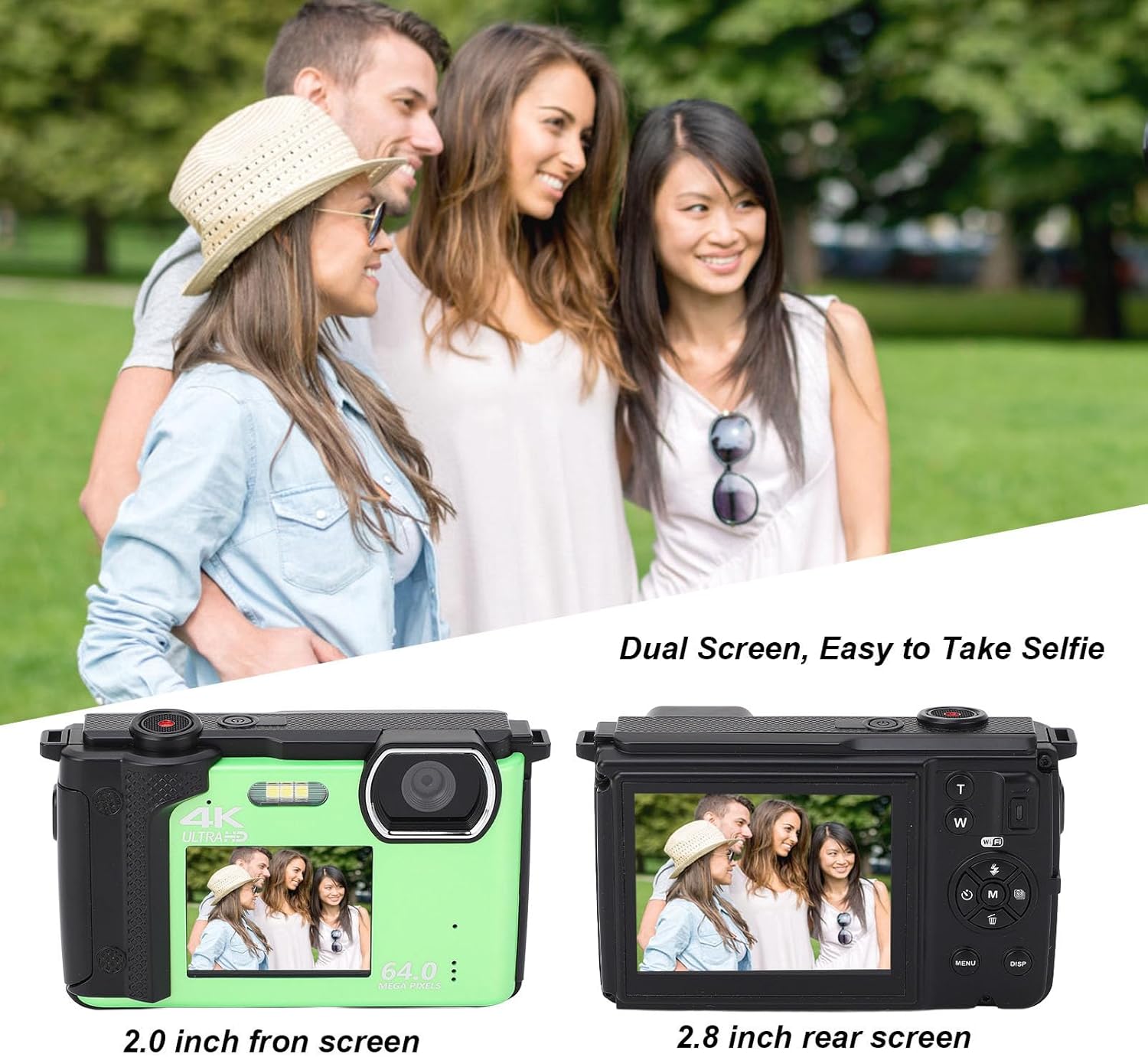
Сүрөт: Illustration of the dual screen functionality, showing how the front screen aids in taking selfies or group photos.
- To switch to the front screen, typically there is a dedicated button or a setting in the menu.
- Utilize the built-in 2s, 5s, and 10s selfie timer functions for timed shots.
- Continuous shooting mode allows you to capture a series of photos rapidly.
3. Wi-Fi байланышы жана тиркемени колдонуу
The camera can connect to smart devices for remote control and sharing.

Сүрөт: Demonstrates the camera's Wi-Fi wireless sharing capability, allowing connection to a smartphone for photo and video transfer.
- Колдонмону жүктөп алыңыз: Издөө 'IDC' on Google Play (for Android) or the iOS App Store (for iOS) to download the companion application.
- Камеранын Wi-Fi'ын иштетүү:
- Камераны күйгүзүңүз.
- басыңыз МЕНЮ менюга кирүү үчүн баскычты басыңыз.
- Use the left/right navigation keys to switch to Системалык орнотуулар.
- Use the up/down navigation keys to find the Hotspot субменю.
- басыңыз M key to open Wi-Fi. The Wi-Fi ID and password will be displayed on the camera screen.
- Connect from Smartphone:
- Open your smartphone's settings and navigate to WLAN or Wi-Fi.
- Select the network named 4K_xxxx (matching the camera's displayed ID).
- Enter the password displayed on the camera screen.
- Once connected, you can use your smartphone to control the camera for taking photos and recording videos.
4. Using as a Web Камера
The Cuifati FS01 can function as a web camera when connected to a computer.
- Камераны компьютериңизге берилген USB кабели аркылуу туташтырыңыз.
- Select the "PC Camera" or "Webcam" option on the camera's screen (if prompted).
- Сиздин компьютериңиз камераны а webcam, allowing you to use it for video calls or live streaming.
Техникалык шарттар
| Өзгөчөлүк | Description |
|---|---|
| Продукт материалы | Пластик |
| Салмагы | Болжол менен 380г / 13.4 унция |
| Сүрөттүн чечилиши | 64М, 56М, 48М, 30М, 24М, 20М, 12М, 8М, 5М |
| Video Resolution | 4K 60fps/30fps, 2.7K 30fps, 1080P 60fps/30fps, 720P 120fps/60fps/30fps |
| Кош экран | 2.8 Inch Rear Screen, 2 Inch Front Screen |
| Микрофон | Камтылган |
| File Формат | MP4, JPEG |
| Сактагыч | Supports Up To 256G Class10 Micro Memory Cards (Not Included) |
| Camera Battery Capacity | 1200mAh Lithium Ion Battery x 1, BL-5B (Built-In) |
| Digital Zoom | 16x |
| Үзгүлтүксүз атуу ылдамдыгы | 30 кадр/сек |
| Жаздыруу мүмкүнчүлүгү | 136 мүнөт (болжол менен) |
| Image Stabilization | Жок |
| Автофокус | Жок |
Проблемаларды чечүү
Эгерде сиз камераңыз менен көйгөйлөргө туш болсоңуз, төмөнкү жалпы көйгөйлөрдү чечүү кадамдарын караңыз:
- Камера күйбөй жатат:
- Батарея толугу менен заряддалганын текшериңиз.
- Батарея туура салынганын текшериңиз.
- Try connecting the camera to a power source via USB to see if it powers on.
- "Memory Card Error" or unable to save photos:
- Ensure a compatible micro SD card (Class 10, up to 256GB) is inserted correctly.
- Format the memory card through the camera's menu (this will erase all data on the card).
- Башка эстутум картасын колдонуп көрүңүз.
- Сүрөт/видео сапаты начар:
- Линзанын таза жана тактары жок экенине ынаныңыз.
- Check lighting conditions; use flash in low light if necessary.
- Verify that the selected image/video resolution settings are appropriate.
- Wi-Fi туташуу көйгөйлөрү:
- Ensure Wi-Fi is enabled on the camera and your smartphone.
- Double-check the Wi-Fi ID and password.
- Камераны да, смартфонуңузду да өчүрүп-күйгүзүңүз.
- Ensure the 'IDC' app is installed and up to date on your smartphone.
- Камера катып калат же жооп бербей калат:
- If possible, remove and reinsert the battery (if accessible, otherwise hold power button for 10 seconds).
- Perform a factory reset via the camera's menu (note: this will reset all settings).
Техникалык тейлөө
Туура кам көрүү жана тейлөө камераңыздын иштөө мөөнөтүн узартат.
- Камераны тазалоо:
- Камеранын корпусун тазалоо үчүн жумшак, түксүз чүпүрөктү колдонуңуз.
- Линзалар жана экрандар үчүн атайын линза тазалоочу чүпүрөктү жана эритмени колдонуңуз. Абразивдүү материалдардан алыс болуңуз.
- Күчтүү жуучу каражаттарды же эриткичтерди колдонбоңуз.
- Сактагыч:
- Store the camera in a cool, dry place away from direct sunlight, dust, and moisture.
- Узак мөөнөткө сактасаңыз, акып кетпеш үчүн батареяны алып салыңыз.
- Батареяга кам көрүү:
- Батареяны экстремалдуу температурага тийгизүүдөн сактаңыз.
- Батареяны ажыратпаңыз же тешип албаңыз.
- Батарейканын ден соолугун сактоо үчүн колдонулбаса да, аны үзгүлтүксүз заряддап туруңуз.
Кепилдик жана колдоо
For warranty information and technical support, please refer to the warranty card included with your product or visit the official Cuifati website. You can also visit the Cuifati store on Amazon for additional product information and support resources.
Cuifati Store Link: https://www.amazon.com/stores/Cuifati/page/092BE1D7-D029-428E-9855-7943182E7680
Ask a question about this manual
Ask about setup, troubleshooting, compatibility, parts, safety, or missing instructions. Manuals+ will review the question and use this page’s manual context to help answer it.