
1. Киришүү
The CALEX Smart Home Indoor Ambiance Aroma Diffuser 590100500 is designed to enhance your indoor environment by improving air quality, diffusing pleasant aromas, and providing ambient lighting. This smart device integrates seamlessly into your smart home ecosystem, offering control through the Calex app, voice commands, and programmable features.
Негизги өзгөчөлүктөр төмөнкүлөрдү камтыйт:
- Aroma diffusion with essential oils.
- Realistic flame effect for ambiance.
- Adjustable ambient lighting with 16 million color options.
- Smart control via Calex app (timers, programmable scenarios).
- Voice control compatibility with Google Assistant, Siri, and Amazon Alexa.
- 300ml water tank capacity with automatic shut-off.
2. Коопсуздук маалыматы
Жаракат алуунун же бузулуунун алдын алуу үчүн, түзмөктү колдонуудан мурун бардык коопсуздук көрсөтмөлөрүн окуп чыгыңыз.
- Always place the diffuser on a stable, flat surface away from direct sunlight, heat sources, and electronic devices.
- Do not exceed the maximum water fill line (300ml) to prevent overflow.
- Таза кран суусун же дистилденген сууну гана колдонуңуз. Ысык сууну колдонбоңуз.
- Only use 100% pure, water-soluble essential oils. Other oils or corrosive liquids may damage the device.
- Аппаратты балдар жана үй жаныбарлары жетпеген жерде сактаңыз.
- Do not cover the mist outlet during operation.
- Unplug the device from the power outlet before cleaning or refilling.
- The device features an automatic shut-off function when the water tank is empty, and sends a notification to your phone.
- A built-in safety configuration will cause the diffuser to flash if the remaining water in the tank needs to cool down after a maximum of 72 hours of continuous operation.
- Аппаратты өзүңүз оңдоого же өзгөртүүгө аракет кылбаңыз. Жардам алуу үчүн кардарларды колдоо бөлүмүнө кайрылыңыз.
3. Пакеттин мазмуну
Пакетте бардык буюмдар бар экенин текшериңиз:
- CALEX Smart Home Indoor Ambiance Aroma Diffuser (Model 5901000500)
- Кубаттуу адаптер
- User Manual
4. Продукт бүтүп калдыview
Familiarize yourself with the components of your aroma diffuser.
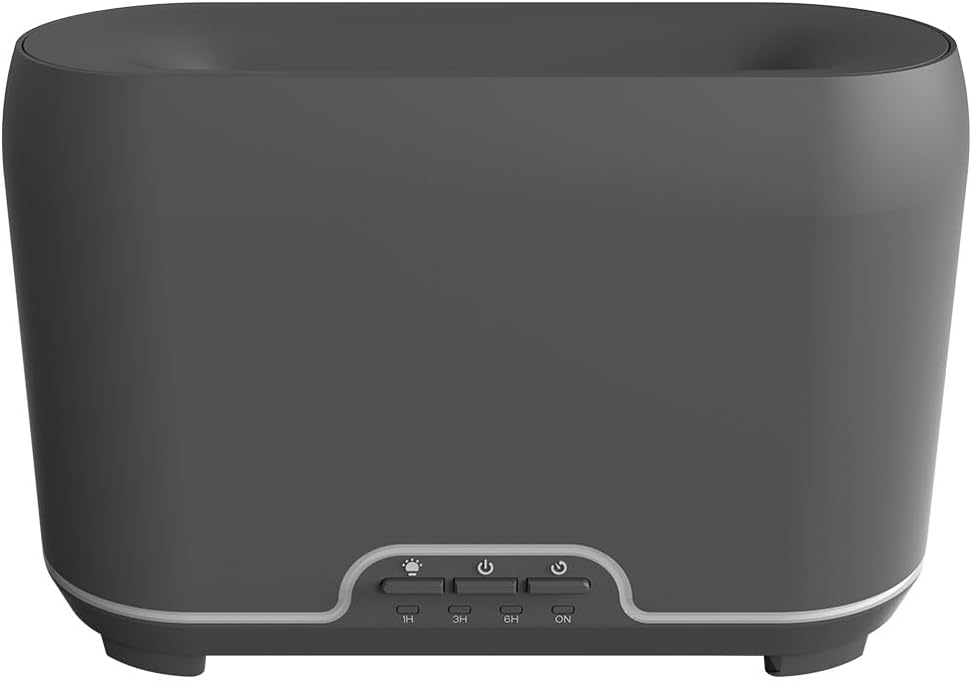
Сүрөт: алдыңкы view of the CALEX Smart Home Aroma Diffuser, showing the control panel with buttons for light, power, and timer settings (1H, 3H, 6H, ON).

Image: The CALEX Smart Home Aroma Diffuser operating on a wooden table, displaying its ambient flame effect and mist output.
The diffuser typically consists of a water tank, an ultrasonic plate, a mist outlet, and a control panel with buttons for power, light, and timer functions. The power input port is usually located at the back or bottom of the device.
5. Орнотуу
Баштапкы орнотуу үчүн бул кадамдарды аткарыңыз:
- Жайгашкан жери: Диффузорду түз, туруктуу бетке коюңуз.
- Ачык капкак: Gently remove the top cover of the diffuser.
- Сууну толтуруу: Fill the water tank with clean water up to the 300ml maximum fill line. Do not overfill.
- Эфир майын кошуу: Сүйүктүү эфир майыңыздын бир нече тамчысын түз эле суу куюлган идишке кошуңуз.
- Жабуу: Үстүнкү капкакты коопсуз ордуна коюңуз.
- Туташуу кубаты: Plug the power adapter into the diffuser's power input port, then plug the adapter into a wall outlet.
- Calex тиркемесин жүктөп алыңыз: Download the free Calex Smart app from your smartphone's app store (available for iOS and Android).
- WiFi'га туташуу: Follow the in-app instructions to connect your diffuser to your home WiFi network. Ensure your WiFi is 2.4GHz.
6. Иштөө нускамалары
The CALEX Smart Home Aroma Diffuser can be operated via the Calex app or its integrated control buttons.
6.1 Using the Calex Smart App
The Calex app provides full control over your diffuser's functions:
- Күйгүзүү/өчүрүү: Turn the diffuser on or off remotely.
- Туманды көзөмөлдөө: Adjust the mist output level.
- Жарыкты башкаруу: Change the ambient light color from over 16 million options, adjust brightness, and select lighting modes.
- Flame Effect: Activate or deactivate the flame effect.
- Таймерлер: Set schedules for the diffuser to turn on or off automatically.
- Программалануучу сценарийлер: Create custom scenarios based on time, weather, or other smart home triggers.
- Эскертмелер: Receive alerts when the water tank is empty.
6.2 Үн менен башкаруу
Integrate your diffuser with voice assistants for hands-free control:
- Google Жардамчысы: Link your Calex account in the Google Home app. Use commands like "Hey Google, turn on the diffuser."
- Сири: Create custom shortcuts in the Apple Home app or through the Calex app for Siri commands.
- Amazon Alexa: Enable the Calex skill in the Alexa app. Use commands like "Alexa, set diffuser light to blue."
6.3 Manual Control Buttons
The control panel on the diffuser allows for basic operation:
- Кубат баскычы: Press once to turn on/off the mist and flame effect.
- Жарык баскычы: Press to cycle through light colors or turn the light on/off.
- Timer Buttons (1H, 3H, 6H, ON): Select a desired operating duration. The diffuser will automatically shut off after the selected time. 'ON' typically means continuous operation until water runs out or manually turned off.
7. Техникалык тейлөө
Үзгүлтүксүз тазалоо оптималдуу иштешин камсыз кылат жана диффузоруңуздун иштөө мөөнөтүн узартат.
- Күнүмдүк тазалоо: Ар бир колдонгондон кийин, резервуардагы калган сууну төгүп салыңыз. Бактын ичин таза, жумшак чүпүрөк менен сүртүңүз.
- Жумалык тазалоо: For a more thorough clean, unplug the device. Add a small amount of white vinegar (about 10ml) to the water tank and let it sit for 10-15 minutes to dissolve mineral buildup. Gently wipe the ultrasonic plate with a cotton swab or soft brush. Rinse the tank thoroughly with clean water, avoiding the air outlet.
- Тышкы тазалоо: Диффузордун сыртын жумшак менен сүртүңүз, гamp кездеме. Абразивдүү тазалагычтарды же эриткичтерди колдонбоңуз.
- Ensure the device is completely dry before refilling or storing.
8. Кыйынчылыктарды
Эгер көйгөйлөргө туш болсоңуз, төмөнкү жалпы көйгөйлөрдү жана чечимдерди караңыз:
| Көйгөй | Мүмкүн себеп | Чечим |
|---|---|---|
| Туман же алсыз туман жок | Суунун деңгээли төмөн УЗИ плитасы кир Туман чыгуучу түтүк бөгөттөлдү | Refill water to the appropriate level. Clean the ultrasonic plate as per maintenance instructions. Ensure the mist outlet is clear. |
| Түзмөк күйбөйт | Күч жок Суу резервуары бош Аппараттын бузулушу | Электр туташуусун жана дубалдагы розетканы текшериңиз. Суу резервуарын кайра толтуруңуз. Эгер көйгөй чечилбесе, кардарларды колдоо кызматына кайрылыңыз. |
| Колдонмого туташуу маселелери | Туура эмес WiFi сырсөз Маршрутизатор өтө алыс 2.4GHz vs 5GHz WiFi | WiFi сырсөзүн ырастаңыз. Move diffuser closer to the router. Ensure your router is broadcasting a 2.4GHz network and connect to it. |
| Жалын эффекти иштебейт | Feature deactivated in app Аппараттын бузулушу | Check app settings to ensure flame effect is enabled. Кардарларды колдоо кызматына кайрылыңыз. |
9. Техникалык шарттар
| Өзгөчөлүк | Спецификация |
|---|---|
| Модель номери | 5901000500 |
| Бренд | КАЛЕКС |
| Кубаттуулугу | 300 миллилитр |
| Материал | Пластик |
| Автоматтык өчүрүү | Ооба |
| Байланыш | WiFi (2.4 ГГц) |
| Контролдоо ыкмалары | Calex Smart App, Voice Control (Google Assistant, Siri, Amazon Alexa), Manual Buttons |
| Жарык параметрлери | 16 млн Түстөр |
| Сунушталган колдонуу аймагы | Medium space |
| Эл аралык макала кодекси (EAN/UPC) | 08712879157090 |
10. Кепилдик жана колдоо
Кепилдик жөнүндө маалымат же техникалык колдоо алуу үчүн, сатып алууңуз менен кошо берилген документтерди караңыз же сатуучуга/өндүрүүчүгө түздөн-түз кайрылыңыз. Кепилдик боюнча дооматтар үчүн сатып алууну тастыктаган документти сактап коюңуз.